Cloudron makes it easy to run web apps like WordPress, Nextcloud, GitLab on your server. Find out more or install now.


Skip to content
  • Categories
  • Recent
  • Tags
  • Popular
  • Bookmarks
  • Search
Skins
  • Light
  • Brite
  • Cerulean
  • Cosmo
  • Flatly
  • Journal
  • Litera
  • Lumen
  • Lux
  • Materia
  • Minty
  • Morph
  • Pulse
  • Sandstone
  • Simplex
  • Sketchy
  • Spacelab
  • United
  • Yeti
  • Zephyr
  • Dark
  • Cyborg
  • Darkly
  • Quartz
  • Slate
  • Solar
  • Superhero
  • Vapor

  • Default (No Skin)
  • No Skin
Collapse
Brand Logo

Cloudron Forum

Apps - Status | Demo | Docs | Install
  1. Cloudron Forum
  2. App Wishlist
  3. IsoMan on Cloudron – ISO Image Management Made Simple

IsoMan on Cloudron – ISO Image Management Made Simple

Scheduled Pinned Locked Moved App Wishlist
14 Posts 6 Posters 779 Views 7 Watching
  • Oldest to Newest
  • Newest to Oldest
  • Most Votes
Reply
  • Reply as topic
Log in to reply
This topic has been deleted. Only users with topic management privileges can see it.
  • timconsidineT timconsidine

    I can add to the catalogue / create a 1 line install link.
    Quicker if @vitetj has a publicly available Cloudron docker image (hub.docker.com or similar)

    robiR Offline
    robiR Offline
    robi
    wrote on last edited by
    #4

    @timconsidine seems to be: https://hub.docker.com/u/vitetj

    Conscious tech

    vitetjV 1 Reply Last reply
    2
    • robiR robi

      @timconsidine seems to be: https://hub.docker.com/u/vitetj

      vitetjV Offline
      vitetjV Offline
      vitetj
      App Dev
      wrote on last edited by vitetj
      #5

      @robi @timconsidine Thanks for the feedback 👍

      The Docker image is publicly available here:
      https://hub.docker.com/r/vitetj/isoman

      If needed, you can also build directly from the Git repository and deploy the traditional
      https://github.com/vitetj/Cloudron-isoman
      Cloudron way:
      • Cloudron build
      • Cloudron install

      This works on our servers without issue.

      Let me know if CCAI-P requires a specific packaging format or deployment method.

      1 Reply Last reply
      2
      • jamesJ Online
        jamesJ Online
        james
        Staff
        wrote on last edited by
        #6

        Hello @vitetj
        With Cloudron 9.1 we have added community app support.
        Please see: https://docs.cloudron.io/packaging/publishing/

        vitetjV 1 Reply Last reply
        1
        • jamesJ james

          Hello @vitetj
          With Cloudron 9.1 we have added community app support.
          Please see: https://docs.cloudron.io/packaging/publishing/

          vitetjV Offline
          vitetjV Offline
          vitetj
          App Dev
          wrote on last edited by
          #7

          @james Hi,

          Thanks for the info! My server isn’t updated to 9.1 yet, but I’ll take a look at the documentation and update my Git repository accordingly once I’ve upgraded 🙂

          Appreciate the heads-up!

          1 Reply Last reply
          1
          • vitetjV Offline
            vitetjV Offline
            vitetj
            App Dev
            wrote on last edited by
            #8

            @robi @james @timconsidine

            Morning on my side 👋

            Here we go:
            https://raw.githubusercontent.com/vitetj/Cloudron-isoman/master/CloudronVersions.json

            It’s working for me 🙂

            1 Reply Last reply
            4
            • nebulonN Away
              nebulonN Away
              nebulon
              Staff
              wrote on last edited by
              #9

              Great, installs well, was able to add some ISOs but otherwise have no real use-case for this 🙂

              1 Reply Last reply
              0
              • J Online
                J Online
                joseph
                Staff
                wrote on last edited by
                #10

                If you can add the proxyAuth addon, then one can secure the instance .

                1 Reply Last reply
                0
                • vitetjV Offline
                  vitetjV Offline
                  vitetj
                  App Dev
                  wrote on last edited by
                  #11

                  @joseph I tried implementing the proxyAuth addon, but I wasn’t able to properly sync it with OIDC or LDAP.

                  The only way I managed to make it work was with a static login defined via environment variables stored in the app data. I’m not really comfortable with that approach, so I rolled it back for now 😅

                  I’m going to study the original project more deeply to see if I can implement a proper unique token mechanism for downloads instead. I’m not a big fan of keeping secrets in a file.

                  1 Reply Last reply
                  0
                  • jamesJ Online
                    jamesJ Online
                    james
                    Staff
                    wrote on last edited by james
                    #12

                    Hello @vitetj
                    With proxyauth in the manifest it should work out of the box.
                    No extra configuration needed.


                    EDIT:
                    Now I see that IsoMan has the option to enable LDAP auth but is not enabled or configured on app installation.
                    The best route would be to set up the LDAP auth from the IsoMan app itself for the Cloudron Community app.

                    Another thing I noticed.
                    Since the app does not build on the cloudron base image, many expected defaults are missing or simply broken.
                    The Web Terminal is not working at all.
                    There is no way to add environment variables in /app/data/ to further configure the app according to e.g.: ENV.md

                    vitetjV 1 Reply Last reply
                    1
                    • jamesJ james

                      Hello @vitetj
                      With proxyauth in the manifest it should work out of the box.
                      No extra configuration needed.


                      EDIT:
                      Now I see that IsoMan has the option to enable LDAP auth but is not enabled or configured on app installation.
                      The best route would be to set up the LDAP auth from the IsoMan app itself for the Cloudron Community app.

                      Another thing I noticed.
                      Since the app does not build on the cloudron base image, many expected defaults are missing or simply broken.
                      The Web Terminal is not working at all.
                      There is no way to add environment variables in /app/data/ to further configure the app according to e.g.: ENV.md

                      vitetjV Offline
                      vitetjV Offline
                      vitetj
                      App Dev
                      wrote on last edited by
                      #13

                      @james Thanks for the feedback!

                      I’m going to rebase the project on a proper Cloudron base image — that will definitely make things simpler and align with the expected defaults.

                      Indeed, the current version you’re seeing isn’t really suitable. It was more of a local development build from my PC 😅

                      I’ll work on a cleaner image based on the official deployment guide and adapt it for Cloudron:
                      https://github.com/aloks98/isoman/blob/master/docs/DEPLOYMENT.md

                      I’ll keep you posted once I have a proper build ready.

                      1 Reply Last reply
                      2
                      • vitetjV Offline
                        vitetjV Offline
                        vitetj
                        App Dev
                        wrote on last edited by vitetj
                        #14

                        @james Quick update — I just shipped a full Cloudron-native refresh of ISOMan (v0.3.8).

                        This version is now properly aligned with Cloudron expectations and based on a cleaner packaging approach.

                        Key updates:

                        • Cloudron packaging aligned for production: proxyAuth + LDAP addons, persistent /app/data, internal port 8080, and healthcheck at /api/health.
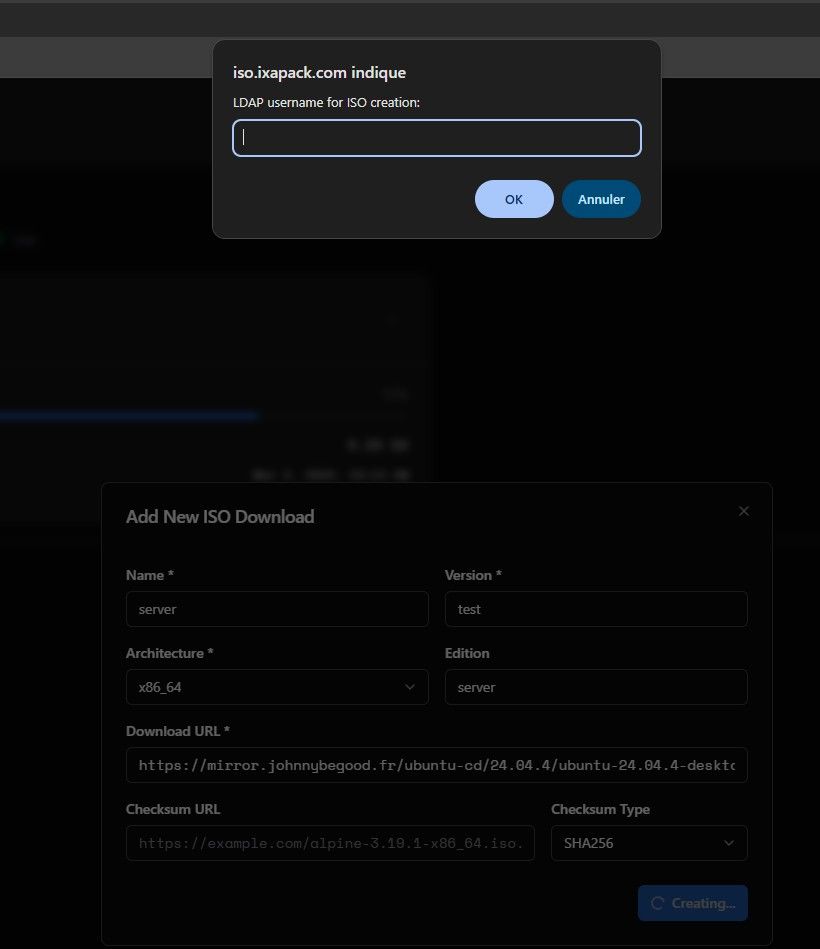
                        • Added optional create-only protection for POST /api/isos with LDAP-first authentication (Basic fallback still supported).
                        • Fixed frontend create-flow issues when auth challenges returned HTML/non-JSON responses.
                        • Added credential prompt handling for create-only auth and improved dialog accessibility.
                        • Updated app icon handling for Cloudron login compatibility (PNG).
                        • Deployment docs refreshed and fully translated to English.

                        Result:

                        Global access control remains managed by Cloudron proxyAuth, while ISO creation can now be protected independently without breaking the normal read/list UX.


                        0084e5c9-7ebf-440e-8746-d338bd190680-image.jpeg

                        1 Reply Last reply
                        4

                        Hello! It looks like you're interested in this conversation, but you don't have an account yet.

                        Getting fed up of having to scroll through the same posts each visit? When you register for an account, you'll always come back to exactly where you were before, and choose to be notified of new replies (either via email, or push notification). You'll also be able to save bookmarks and upvote posts to show your appreciation to other community members.

                        With your input, this post could be even better 💗

                        Register Login
                        Reply
                        • Reply as topic
                        Log in to reply
                        • Oldest to Newest
                        • Newest to Oldest
                        • Most Votes


                        • Login

                        • Don't have an account? Register

                        • Login or register to search.
                        • First post
                          Last post
                        0
                        • Categories
                        • Recent
                        • Tags
                        • Popular
                        • Bookmarks
                        • Search