
Server behind Dynamic Public IP - Cloudron Dashboard DNS record entry not updated
-
If you go to Domains -> Sync DNS and check the logs, do you see that it is updating the dashboard domain DNS?
How did you determine that my.domain.name DNS is not updated? Did you check it inside deSEC itself ? I am wondering if you have some local DNS cache causing problems here.
-
Hi @joseph - Thanks for this.
When I sync DNS via Cloudron dashboard, the logs indicate all updates are successful (no error).
How I know that the dashboard DNS record is not update:
- All other services are responding to DNS requests, only the dashboard is not
- I then check deSEC and note that all records have been updated but not the dashboard one.
There is no specific local DNS caching happening on site as far as I am aware.
Especially since it impacts only the "my." DNS record and not the others.However, looking more closely to the historical logs (apologies for not finding this / adding this to the initial post), I noticed the following:
May 04 03:40:01 taskworker: Starting task 195. Logs are at /home/yellowtent/platformdata/logs/tasks/195.log
May 04 03:40:01 taskworker: Running task of type syncDyndns
May 04 03:40:01 tasks: updating task 195 with: {"percent":5,"message":"Updating dashboard location my.domain.name"}
May 04 03:40:01 dns: upsertDnsRecords: subdomain:my domain:domain.name type:A values:["aaa.bbb.ccc.ddd"]
May 04 03:40:02 dyndns: BoxError: deSEC DNS error [502] <html>

<head><title>502 Bad Gateway</title></head>

<body>

<center><h1>502 Bad Gateway</h1></center>

<hr><center>nginx</center>

</body>

</html>


    at del (file:///home/yellowtent/box/src/dns/desec.js:76:40)
    at process.processTicksAndRejections (node:internal/process/task_queues:103:5)
    at async Object.upsert (file:///home/yellowtent/box/src/dns/desec.js:89:5)
    at async Object.upsertDnsRecords (file:///home/yellowtent/box/src/dns.js:146:5) {
  reason: 'External Error',
  details: {}
}
May 04 03:40:02 tasks: updating task 195 with: {"percent":15,"message":"Updating mail location my.domain.name"}
May 04 03:40:02 tasks: updating task 195 with: {"percent":36,"message":"Updating app sub1.domain.name"}
May 04 03:40:02 dns: upsertDnsRecords: subdomain:change domain:sub1.domain.name type:A values:["aaa.bbb.ccc.ddd"]
May 04 03:40:05 tasks: updating task 195 with: {"percent":57,"message":"Updating app sub2.domain.name"}
May 04 03:40:05 dns: upsertDnsRecords: subdomain:bookmarks domain:sub2.domain.name type:A values:["aaa.bbb.ccc.ddd"]
May 04 03:40:07 tasks: updating task 195 with: {"percent":78,"message":"Updating app sub3.domain.name"}
May 04 03:40:07 dns: upsertDnsRecords: subdomain:vpn domain:sub3.domain.name type:A values:["aaa.bbb.ccc.ddd"]
May 04 03:40:09 tasks: updating task 195 with: {"percent":99,"message":"Updating app sub4.domain.name"}
May 04 03:40:09 dns: upsertDnsRecords: subdomain:sync domain:sub4.domain.name type:A values:["aaa.bbb.ccc.ddd"]
May 04 03:40:11 tasks: updating task 195 with: {"percent":100,"message":"Done"}
May 04 03:40:11 tasks: setCompleted - 195: {"result":null,"error":null,"percent":100}
May 04 03:40:11 tasks: updating task 195 with: {"completed":true,"result":null,"error":null,"percent":100}
May 04 03:40:11 taskworker: Task took 10.021 seconds
May 04 03:40:11 Exiting with code 0
Where domain.name is my domain and aaa.bbb.ccc.ddd the new IP address.
No sure why this errors on the first record update but not the others.
-
@joseph Thanks for the pointers.
Upon further investigation on deSEC side, this might point to a temporary server overload with potential ways the help the issue.How does the Dynamic DNS update work on Cloudron's side? What does the cron table entry look like for this?
(Is there a place where I should be looking for this info somewhere / additional tech info on cloudron's side?)Also, do you think that some of these suggestions are implementable (if not already present)?
Many thanks again
-
 J james has marked this topic as solved on
-
@james - I am afraid this is not solved at all from my side.
The server overloading from deSEC side is just a theory at this stage and without more tech info there is not much I feel I can do.
I see couple of non exclusive ways forward:
- inquire about this directly with deSEC, but it'll need some more tech info which I do not have or have access to as far as I know.
- implement helping measures on Cloudron as suggested by this deSEC thread - which, as far as I know, is something that only Cloudron can do.
Please would you consider this before marking the topic as solved?
At the moment, the issue happens every night and the pattern is clear:
It is failing on this single DNS record (because it is the firs one in the list?).
I find it rather odd that within the same seconds all other DNS records are updated just fine.How often is the DynDNS check run?
What happen when an DNS update fails? is there a check and a alert/notification that can be triggered?
at what interval is this retried if at all?Many questions still as you can see.
Many thanks again
-
J james has marked this topic as unsolved on
-
I guess one option is to try to run a curl query to update the deSEC side using a crontab and log the results periodically? Not sure how we can debug an external service. All we get is the 502 unless you have better suggestions.
From the upstream forum,
you use cron(1) to trigger the checks, randomise the time. ~/5 * * * * would choose a random 5 minute interval for example. So it might run at …:07:00, …:12:00, … instead of …:05:00, …:10:00, etc. AFAIK, this is already the case with Cloudron's crontab. -
Thanks @joseph.
This is weird because whatever the timing of the Cloudron Dyn DNS update, the pattern is always the same and only the dashboard (my.) record is failing. The other (app) domain record updates are successful and just fine.is it because it is the first one in the list of the batch to be updated?
Is it because there is a en issue with the content of the record ("my")?I have no idea.
I am attempting to contact deSEC to see if I can get more info from their end and will revert back/if when I do.
-
Ok - Here is the reply I got from deSEC:
This is caused by the fact that hundreds of clients send updates at xx:xx:x0 00:00. We only accept about 60 simultaneously processed updates, so most of them get this error.
To prevent this, we recommend randomizing the update time, or at least set it to some non-special time manually.
Looking more closely at the cloudron logs and despite the somewhat random nature of the change of public IP when not having a fixed IP address, it looks like Cloudron triggers DNS checks/update almost exclusively on xx:xx:x0
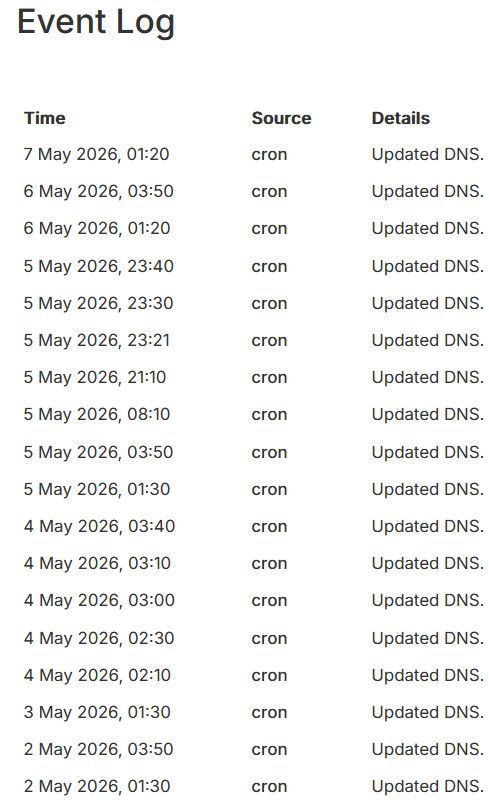
Could it be possible to randomize this further ?
-
J joseph has marked this topic as solved on

Hello! It looks like you're interested in this conversation, but you don't have an account yet.
Getting fed up of having to scroll through the same posts each visit? When you register for an account, you'll always come back to exactly where you were before, and choose to be notified of new replies (either via email, or push notification). You'll also be able to save bookmarks and upvote posts to show your appreciation to other community members.
With your input, this post could be even better 💗
Register Login