Cloudron makes it easy to run web apps like WordPress, Nextcloud, GitLab on your server. Find out more or install now.


Skip to content
  • Categories
  • Recent
  • Tags
  • Popular
  • Bookmarks
  • Search
Skins
  • Light
  • Brite
  • Cerulean
  • Cosmo
  • Flatly
  • Journal
  • Litera
  • Lumen
  • Lux
  • Materia
  • Minty
  • Morph
  • Pulse
  • Sandstone
  • Simplex
  • Sketchy
  • Spacelab
  • United
  • Yeti
  • Zephyr
  • Dark
  • Cyborg
  • Darkly
  • Quartz
  • Slate
  • Solar
  • Superhero
  • Vapor

  • Default (No Skin)
  • No Skin
Collapse
Brand Logo

Cloudron Forum

Apps - Status | Demo | Docs | Install
  1. Cloudron Forum
  2. Grav CMS
  3. Grav 2.0 - copying a page is slow

Grav 2.0 - copying a page is slow

Scheduled Pinned Locked Moved Grav CMS
24 Posts 5 Posters 524 Views 5 Watching
  • Oldest to Newest
  • Newest to Oldest
  • Most Votes
Reply
  • Reply as topic
Log in to reply
This topic has been deleted. Only users with topic management privileges can see it.
  • nebulonN nebulon

    If both those apps are installed and using the same disk, I can't quite see how filesystem operations would in any case impact how Grav is serving up files. On top of this, the Grav package is also using apache to serve up the files.

    S Offline
    S Offline
    superhua
    wrote last edited by
    #12

    @nebulon Thanks for the reply.

    Yes, both apps are installed and using the same disk.

    Good to know the Grav package is also using Apache.

    Quite a mystery why there is a difference in speed then! 🤷 🙂

    1 Reply Last reply
    0
    • S Offline
      S Offline
      superhua
      wrote last edited by
      #13

      Would the following making any difference?

      grav-system-info.yaml from the Dockerized install has opcache.revalidate_freq: "2s"

      while

      grav-system-info.yaml from LAMP install has opcache.revalidate_freq: "60s"

      ?

      robiR 1 Reply Last reply
      1
      • jamesJ Offline
        jamesJ Offline
        james
        Staff
        wrote last edited by
        #14

        Hello @superhua
        The official docker image of grav is also settings this to 2s.
        See: https://github.com/getgrav/docker-grav/blob/89920ea92715261adee817dc7d74f366621af5c9/config/php-grav.ini#L32

        1 Reply Last reply
        1
        • S superhua

          Would the following making any difference?

          grav-system-info.yaml from the Dockerized install has opcache.revalidate_freq: "2s"

          while

          grav-system-info.yaml from LAMP install has opcache.revalidate_freq: "60s"

          ?

          robiR Offline
          robiR Offline
          robi
          wrote last edited by robi
          #15

          @superhua change it and test?

          How's the CPU usage for both during the op?

          Conscious tech

          S 1 Reply Last reply
          0
          • robiR robi

            @superhua change it and test?

            How's the CPU usage for both during the op?

            S Offline
            S Offline
            superhua
            wrote last edited by superhua
            #16

            @robi Thanks for the reply! No, I haven't changed the opcache.revalidate_freq as I don't know how. If there is a way to do that in Cloudron, please let me know. 😄

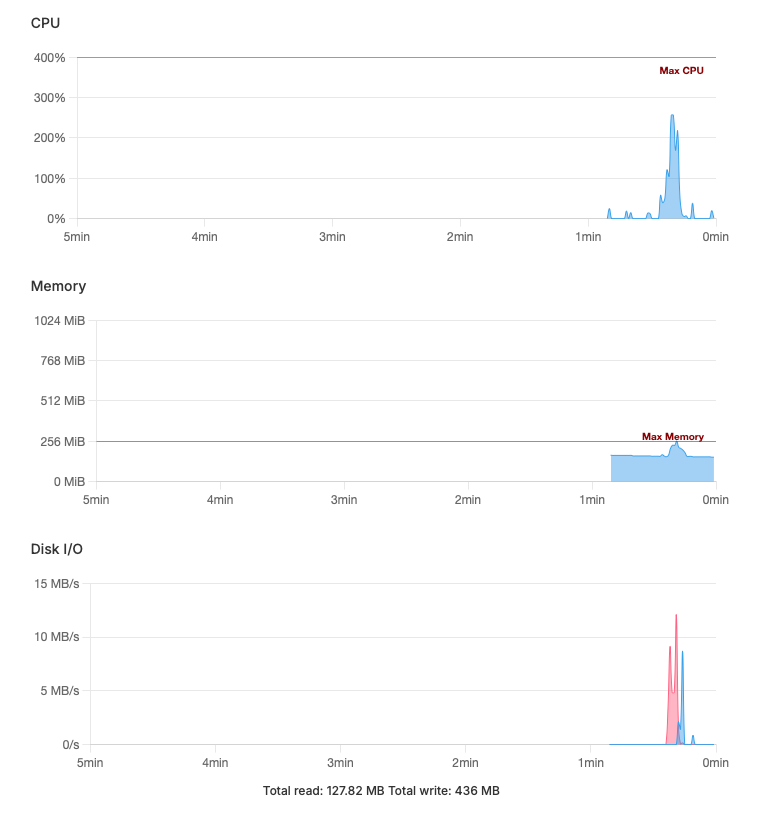
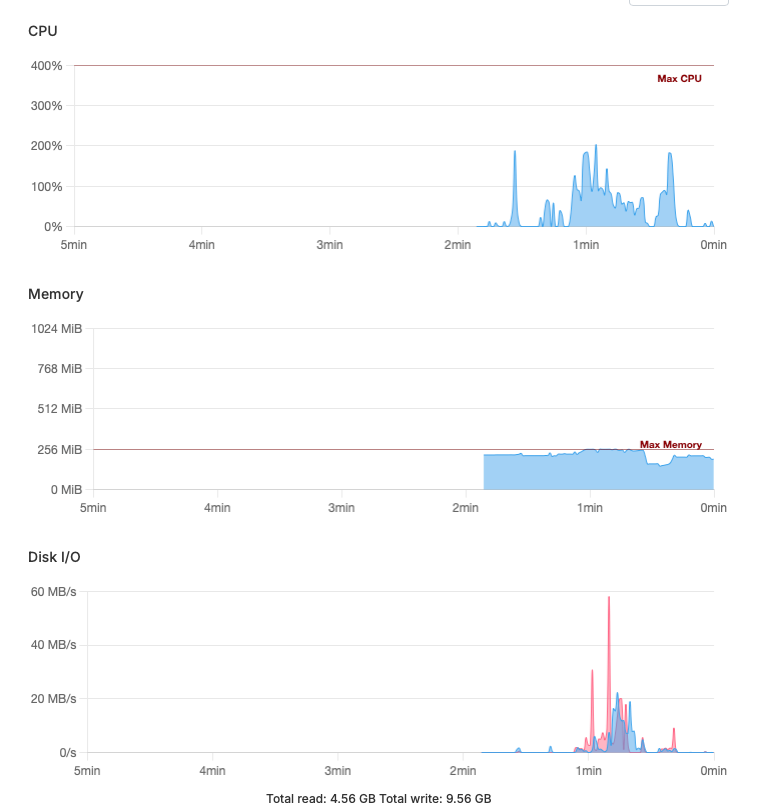
            CPU usage for both is okay -- but the Disk I/O is quite different: 4.6 GB / 9.6 GB for Docker and 128 MB / 436 MB for LAMP:

            Docker:
            docker - Screenshot 2026-07-15 at 06.42.37.png

            LAMP:
            lamp - Screenshot 2026-07-15 at 06.51.33.png

            S robiR 2 Replies Last reply
            0
            • S superhua

              @robi Thanks for the reply! No, I haven't changed the opcache.revalidate_freq as I don't know how. If there is a way to do that in Cloudron, please let me know. 😄

              CPU usage for both is okay -- but the Disk I/O is quite different: 4.6 GB / 9.6 GB for Docker and 128 MB / 436 MB for LAMP:

              Docker:
              docker - Screenshot 2026-07-15 at 06.42.37.png

              LAMP:
              lamp - Screenshot 2026-07-15 at 06.51.33.png

              S Offline
              S Offline
              superhua
              wrote last edited by
              #17

              Update: just re-tested on the Docker install, and the I/O amounts are now similar to the LAMP install.

              However, copying a page in the GUI is still slow.

              jdaviescoatesJ 1 Reply Last reply
              0
              • S superhua

                Update: just re-tested on the Docker install, and the I/O amounts are now similar to the LAMP install.

                However, copying a page in the GUI is still slow.

                jdaviescoatesJ Offline
                jdaviescoatesJ Offline
                jdaviescoates
                wrote last edited by
                #18

                @superhua have you tried another browser, incognito tabs, no plugins, cleared cache etc yet?

                I use Cloudron with Gandi & Hetzner

                S 1 Reply Last reply
                0
                • S superhua

                  @robi Thanks for the reply! No, I haven't changed the opcache.revalidate_freq as I don't know how. If there is a way to do that in Cloudron, please let me know. 😄

                  CPU usage for both is okay -- but the Disk I/O is quite different: 4.6 GB / 9.6 GB for Docker and 128 MB / 436 MB for LAMP:

                  Docker:
                  docker - Screenshot 2026-07-15 at 06.42.37.png

                  LAMP:
                  lamp - Screenshot 2026-07-15 at 06.51.33.png

                  robiR Offline
                  robiR Offline
                  robi
                  wrote last edited by
                  #19

                  @superhua You edit the .yaml file from the File Manager or CLI console.. then test your page copy.

                  It might help to fully describe exactly what you're doing to copy a page and how slow it is, so it can be tested on the demo server as well.

                  Conscious tech

                  S 1 Reply Last reply
                  0
                  • jdaviescoatesJ jdaviescoates

                    @superhua have you tried another browser, incognito tabs, no plugins, cleared cache etc yet?

                    S Offline
                    S Offline
                    superhua
                    wrote last edited by
                    #20

                    @jdaviescoates Yes, I tried …

                    • Chrome
                    • Private browsing
                    • Minimal plugins (e.g., Admin2, API, Login)
                    • Clearing cache

                    … but no difference.

                    Copying a page in Admin2 is still slow.

                    Thanks for your reply!

                    1 Reply Last reply
                    0
                    • robiR robi

                      @superhua You edit the .yaml file from the File Manager or CLI console.. then test your page copy.

                      It might help to fully describe exactly what you're doing to copy a page and how slow it is, so it can be tested on the demo server as well.

                      S Offline
                      S Offline
                      superhua
                      wrote last edited by
                      #21

                      @robi Forgive the basic question, but which .yaml file?

                      I'm using the copy page button in Admin2 to copy:

                      Screenshot 2026-07-15 at 13.10.45.png

                      It takes 12-16 seconds before I can edit the new copy on the Dockerized version.

                      In contrast, on the same server, the LAMP version takes ~7 seconds.

                      The demo server was faster, but yielded similar results (i.e., faster on on the LAMP install).

                      Thank you!

                      robiR 1 Reply Last reply
                      0
                      • S superhua

                        @robi Forgive the basic question, but which .yaml file?

                        I'm using the copy page button in Admin2 to copy:

                        Screenshot 2026-07-15 at 13.10.45.png

                        It takes 12-16 seconds before I can edit the new copy on the Dockerized version.

                        In contrast, on the same server, the LAMP version takes ~7 seconds.

                        The demo server was faster, but yielded similar results (i.e., faster on on the LAMP install).

                        Thank you!

                        robiR Offline
                        robiR Offline
                        robi
                        wrote last edited by
                        #22

                        @superhua you mentioned it in a previous post with the cache settings. Which other could it be?

                        Conscious tech

                        S 1 Reply Last reply
                        0
                        • robiR robi

                          @superhua you mentioned it in a previous post with the cache settings. Which other could it be?

                          S Offline
                          S Offline
                          superhua
                          wrote last edited by
                          #23

                          @robi Indeed, I did mention grav-system-info.yaml 😄

                          However, that file is a generated when you click Export YAML under Configuration > Info.

                          IOW, I don't think you can edit it and affect the system.

                          I diid add opcache.revalidate_freq: "60s" to php.ini found at /app/data/. But this didn't speed things up.

                          robiR 1 Reply Last reply
                          0
                          • S superhua

                            @robi Indeed, I did mention grav-system-info.yaml 😄

                            However, that file is a generated when you click Export YAML under Configuration > Info.

                            IOW, I don't think you can edit it and affect the system.

                            I diid add opcache.revalidate_freq: "60s" to php.ini found at /app/data/. But this didn't speed things up.

                            robiR Offline
                            robiR Offline
                            robi
                            wrote last edited by
                            #24

                            @superhua good to verify.

                            Find an issue upstream or file one?

                            Conscious tech

                            1 Reply Last reply
                            0

                            Hello! It looks like you're interested in this conversation, but you don't have an account yet.

                            Getting fed up of having to scroll through the same posts each visit? When you register for an account, you'll always come back to exactly where you were before, and choose to be notified of new replies (either via email, or push notification). You'll also be able to save bookmarks and upvote posts to show your appreciation to other community members.

                            With your input, this post could be even better 💗

                            Register Login
                            Reply
                            • Reply as topic
                            Log in to reply
                            • Oldest to Newest
                            • Newest to Oldest
                            • Most Votes


                            • Login

                            • Don't have an account? Register

                            • Login or register to search.
                            • First post
                              Last post
                            0
                            • Categories
                            • Recent
                            • Tags
                            • Popular
                            • Bookmarks
                            • Search