
placeholder link instead of button
-
When 2FA is enabled and mandatory, creating a new user and having the suer setup 2FA/passkey upon first login resolves in the following popup:
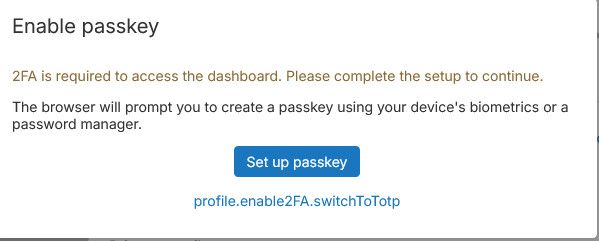
As can be seen, the "profile.enable2FA.switchToToptp" is missing its button appearance.
I hope this makes sense.
-
v9.2 currently.
I noticed that the picture in the docs looks different:
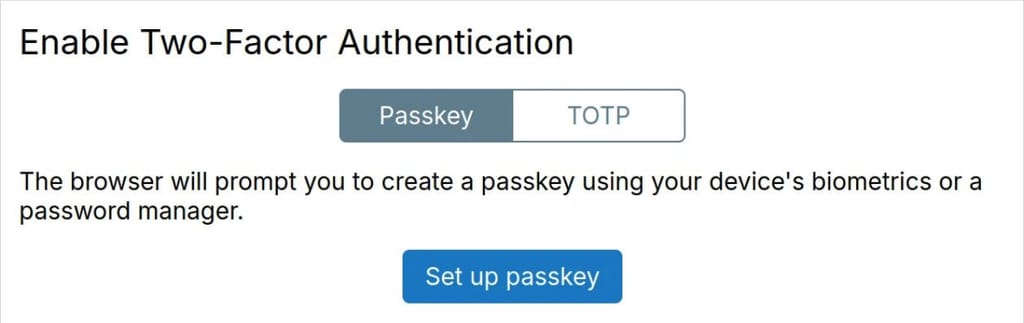
Is this from version 10?
Onboarding with Passkey is creating massive challenges for us at the moment and is simply not working.
Is there a way to turn passkey off, or better to make TOTP the default 2FA (when onboarding at least)? -
Hello @teiluj
Yes Cloudron 10 already fixed that issue: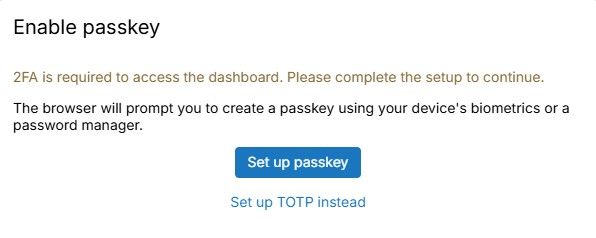
asskey is creating massive challenges for us at the moment and is simply not working.
Because of your other topic https://forum.cloudron.io/topic/15562/2fa-sync-via-cloudron-connector-not-working right?
Is there a way to turn passkey off, or better to make TOTP the default 2FA
No that is currently not possible.
But users can always chose TOTP. -
Hello @teiluj
Yes Cloudron 10 already fixed that issue:asskey is creating massive challenges for us at the moment and is simply not working.
Because of your other topic https://forum.cloudron.io/topic/15562/2fa-sync-via-cloudron-connector-not-working right?
Is there a way to turn passkey off, or better to make TOTP the default 2FA
No that is currently not possible.
But users can always chose TOTP.asskey is creating massive challenges for us at the moment and is simply not working.
Because of your other topic https://forum.cloudron.io/topic/15562/2fa-sync-via-cloudron-connector-not-working right?
No - the other issue comes on top of this and has to do with 2FA/passkey sync when using a cloudron server as IDP and 2FA is enabled
The challenge here comes from the unreliability of passkey setup in a mix environment with BYOD and users from all over the world.
One could argue that his is a user education issue - fair enough albeit far from the reality.
However, part of the situation arise from the fact that, AFAIK, nowhere in cloudron is it possible to reset passkey for a given user.So, if the user decide to attempt to setup passkey at onboarding and something goes wrong or it does not work on subsequent login attempts, for any reason (environment, network, device etc..), then there is no fall back method and the user is locked without being able to login.
In comparison, TOTP is reset-able by an admin and offers backup codes. Hence the preference for being the onboarding method by default.
Is there a way to turn passkey off, or better to make TOTP the default 2FA
No that is currently not possible.
But users can always chose TOTP.I am on the lookout for v10, but so far on my servers, no cigar....
Any way to try to push this to us and see if this might alleviate the issue somehow? can contact via email if relevant. -
We can put you on the early update list, but we have found some regressions already, mostly in UI but also with the mail indexer features introduced. So it is not without risk, depending on which features you use. If you want though write a mail to support@cloudron.io with the dashboard domain of that Cloudron.
-
asskey is creating massive challenges for us at the moment and is simply not working.
Because of your other topic https://forum.cloudron.io/topic/15562/2fa-sync-via-cloudron-connector-not-working right?
No - the other issue comes on top of this and has to do with 2FA/passkey sync when using a cloudron server as IDP and 2FA is enabled
The challenge here comes from the unreliability of passkey setup in a mix environment with BYOD and users from all over the world.
One could argue that his is a user education issue - fair enough albeit far from the reality.
However, part of the situation arise from the fact that, AFAIK, nowhere in cloudron is it possible to reset passkey for a given user.So, if the user decide to attempt to setup passkey at onboarding and something goes wrong or it does not work on subsequent login attempts, for any reason (environment, network, device etc..), then there is no fall back method and the user is locked without being able to login.
In comparison, TOTP is reset-able by an admin and offers backup codes. Hence the preference for being the onboarding method by default.
Is there a way to turn passkey off, or better to make TOTP the default 2FA
No that is currently not possible.
But users can always chose TOTP.I am on the lookout for v10, but so far on my servers, no cigar....
Any way to try to push this to us and see if this might alleviate the issue somehow? can contact via email if relevant.Hello @teiluj
nowhere in cloudron is it possible to reset passkey for a given user.
Indeed, that is the case. When pressing
reset 2FAfor a user only the TOTP gets reset/disabled.
If only a passkey is configured the dashboard gives no obvious option to reset the passkey.Although not intuitive and not documented there is a way to get access to such a user.
If userjameshas a passkey configured, an admin can use theImpersonate userfunction to set a temporary password.
You can use the username and that temporary password to get access to that user account without the need for TOTP or passkey.
Then you can disable the TOTP/passkey. -
Hello @teiluj
nowhere in cloudron is it possible to reset passkey for a given user.
Indeed, that is the case. When pressing
reset 2FAfor a user only the TOTP gets reset/disabled.
If only a passkey is configured the dashboard gives no obvious option to reset the passkey.Although not intuitive and not documented there is a way to get access to such a user.
If userjameshas a passkey configured, an admin can use theImpersonate userfunction to set a temporary password.
You can use the username and that temporary password to get access to that user account without the need for TOTP or passkey.
Then you can disable the TOTP/passkey.I do not know how but I did not receive any notifications about these replies and so I am only discovering them now - thanks for the replies!
Although not intuitive and not documented there is a way to get access to such a user.
If userjameshas a passkey configured, an admin can use theImpersonate userfunction to set a temporary password.
You can use the username and that temporary password to get access to that user account without the need for TOTP or passkey.
Then you can disable the TOTP/passkey.This is indeed the way we have been doing until now, but this is hardly scalable and does give the best impressions/feelings for a first time user having an issue at onboarding. It is a solution nonetheless
We can put you on the early update list, but we have found some regressions already, mostly in UI but also with the mail indexer features introduced. So it is not without risk, depending on which features you use. If you want though write a mail to support@cloudron.io with the dashboard domain of that Cloudron.
Thanks for the offer - I might get in touch in the next few hours. I suppose if mails/mailboxes are not used on the related server then regression related mails should not be an issue hopefully.
-
J joseph has marked this topic as solved


Hello! It looks like you're interested in this conversation, but you don't have an account yet.
Getting fed up of having to scroll through the same posts each visit? When you register for an account, you'll always come back to exactly where you were before, and choose to be notified of new replies (either via email, or push notification). You'll also be able to save bookmarks and upvote posts to show your appreciation to other community members.
With your input, this post could be even better 💗
Register Login