
Apps cannot send emails anymore since 10.0.3
-
Hello @mmolivier
I think this is a duplicate of https://forum.cloudron.io/topic/15886/cannot-send-email-with-alias-anymore
Might be resolved with the 10.0.4 update. -
@mmolivier so you have an app that is sending out email with arbitrary ids? can you give more info about the app or plugin ?
Cloudron 10 removed the domain level flag for security reasons. Instead, you have to either use relay tokens (under Email -> domain -> SMTP relay) or via the mailbox.
-
@joseph hi, the apps are based on a fork of the lamp app (I already updated the base image) so that shouldn't be too relevant, if you want I can give you access of course.
Behaviour before the update: App was capable of sending all emails, from different senders of different domains
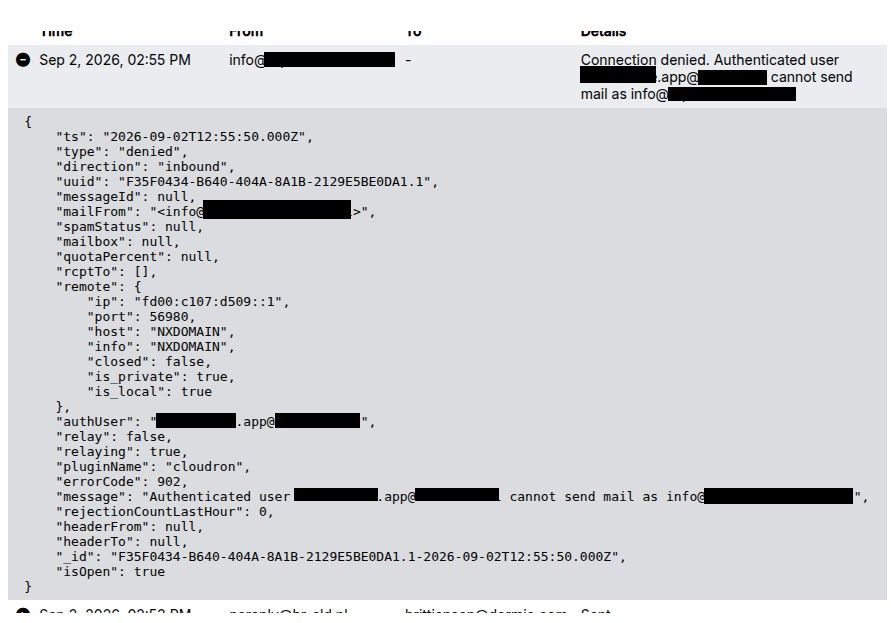
Behaviour after the update: App runs into the "Connection denied. Authenticated user [mail address configured on the email tab, which i ignore] cannot send mail as [from address specified from within the app]"
The quickest workaround is to align the mail address configured on the app email tab with the from addresses used, but some apps send mails from other addresses (even from other domains in some cases). The domains are all configured within Cloudron. Mails are never sent from an email unknown to Cloudron.
The domains are configured like this

As far as I understand, Cloudron is being too strict here. Mailjet and SendGrid handle everything just fine.
I'd like to be able to turn off this restriction or at least be able to configure accepted mailaddresses somewhere. I can't find neither of those two options.
-
@joseph hi, the apps are based on a fork of the lamp app (I already updated the base image) so that shouldn't be too relevant, if you want I can give you access of course.
Behaviour before the update: App was capable of sending all emails, from different senders of different domains
Behaviour after the update: App runs into the "Connection denied. Authenticated user [mail address configured on the email tab, which i ignore] cannot send mail as [from address specified from within the app]"
The quickest workaround is to align the mail address configured on the app email tab with the from addresses used, but some apps send mails from other addresses (even from other domains in some cases). The domains are all configured within Cloudron. Mails are never sent from an email unknown to Cloudron.
The domains are configured like this
As far as I understand, Cloudron is being too strict here. Mailjet and SendGrid handle everything just fine.
I'd like to be able to turn off this restriction or at least be able to configure accepted mailaddresses somewhere. I can't find neither of those two options.
@mmolivier I think the mail relay token does what you want. All you have to do is create a token and this give you permission to send email as whatever you want for that domain (just like mailjet/sendgrid tokens work). Fix your setup to use
relay@yourdomain.comas username and the token as the password. You can then send any email asanyone@yourdomain.com. -
@mmolivier I think the mail relay token does what you want. All you have to do is create a token and this give you permission to send email as whatever you want for that domain (just like mailjet/sendgrid tokens work). Fix your setup to use
relay@yourdomain.comas username and the token as the password. You can then send any email asanyone@yourdomain.com.@mmolivier I think the mail relay token does what you want. All you have to do is create a token and this give you permission to send email as whatever you want for that domain (just like mailjet/sendgrid tokens work). Fix your setup to use
relay@yourdomain.comas username and the token as the password. You can then send any email asanyone@yourdomain.com.Just to ensure that we're talking about the same problem and same fix.
Old behaviour:
- App sends mail from
noreply@domain.com, Email tab of the app is set tonoreply@domain.com> Email is accepted and sent based on config ofdomain.com(which is set toOutbound only, SendGrid) - App sends mail from
noreply2@domain.com, Email tab of the app is set tonoreply@domain.com> Email is accepted and sent based on config ofdomain.com(which is set toOutbound only, SendGrid) - App sends mail from
noreply@otherdomain.com, Email tab of the app is set tonoreply@domain.com> Email is accepted and sent based on config ofotherdomain.com(which is set toOutbound only, SendGrid)
Behaviour since last night:
- App sends mail from
noreply@domain.com, Email tab of the app is set tonoreply@domain.com> Email is accepted and sent based on config ofdomain.com(which is set toOutbound only, SendGrid) - App sends mail from
noreply2@domain.com, Email tab of the app is set tonoreply@domain.com> Email is denied because Cloudron allows mails fromnoreply@domain.comonly - App sends mail from
noreply@otherdomain.com, Email tab of the app is set tonoreply@domain.com> Email is denied because Cloudron allows mails fromnoreply@domain.comonly
Given this example, your suggested fix is:
- App sends mail from
noreply2@domain.com, Email tab of the app is set tonoreply@domain.com> Email is denied because Cloudron allows mails fromnoreply@domain.comonlyTo fix this, I should add a "SMTP Relay" token on
domain.com, make sure the app authenticates withrelay@domain.comand[token of domain.com] - App sends mail from
noreply@otherdomain.com, Email tab of the app is set tonoreply@domain.com> Email is denied because Cloudron allows mails fromnoreply@domain.comonlyTo fix this, I should add a "SMTP Relay" token on
otherdomain.com, make sure the app authenticates withrelay@otherdomain.comand[token of otherdomain.com]
Did I interpret it correctly?
- App sends mail from
-
@mmolivier yes, I think your interpretation is correct. One quick question, why not use the sendgrid/mailgun credentials directly in your app? You don't need to go via cloudron mail server in this case, no?
A setting that would help in your specific case is to allow apps to send without MAIL FROM validation . This would avoid the whole dance around creating relay tokens cc @girish
-
@joseph I like the idea of delegating mail to Cloudron entirely and being able to switch mail providers / mail configuration / rotate tokens easily from within the Cloudron UI, so I don't have to edit my own config files / manage SDKs etc.
Keeps my apps simple: Just send mail using the envvars and let Cloudron figure it out. The event log is nice too, for monitoring.
The setting you mentioned would definitely help a lot, but I have a workable solution now, thanks!


Hello! It looks like you're interested in this conversation, but you don't have an account yet.
Getting fed up of having to scroll through the same posts each visit? When you register for an account, you'll always come back to exactly where you were before, and choose to be notified of new replies (either via email, or push notification). You'll also be able to save bookmarks and upvote posts to show your appreciation to other community members.
With your input, this post could be even better 💗
Register Login