
Customize Dashboard
-
Can I customize ( edit HTML, CSS and JS ) to default cloudron dashboard? IF there is any way to do this without any errors then please let me know.
-
@lunarshade Can you give some idea on what you are trying to customize? If these are general UI/UX improvement, we are happy to incorporate them into the main product itself.
If you are a hosting provider, we are building out customization features in the hosting provider edition - https://cloudron.io/documentation/hosting-provider/ (write to us at support@cloudron.io for a trial license)
-
 D David 0 referenced this topic on
-
Let's dust off this feature request

A little CSS injector textarea would be so nice to have!
This private dashboard screenshot struck me - if only there were a possibility to make the dashboard look less like a spilled logo bucket (no front, not your fault) and more like "our workspace lobby"...
Already great that we can use different images for the tiles:
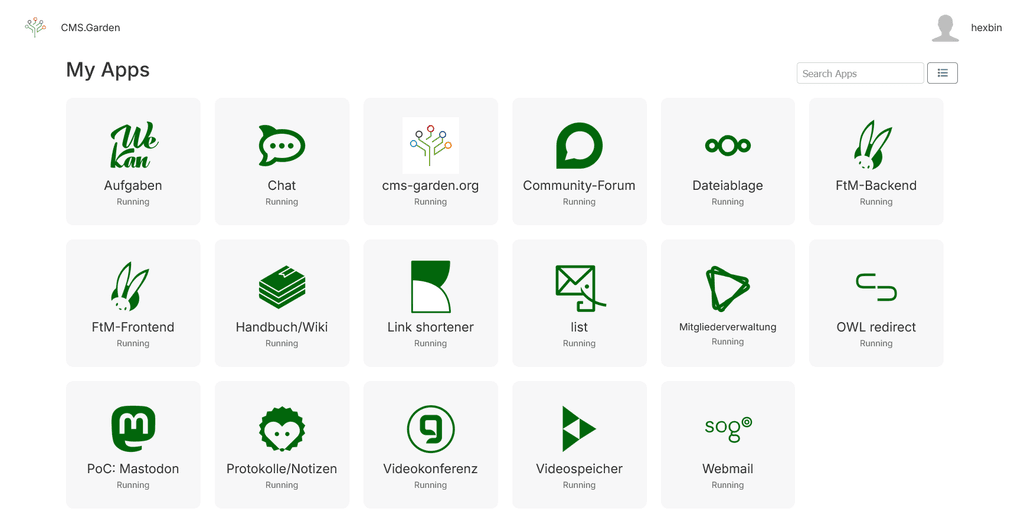
CSS as the magic wand for modifying some colors (accessible links styles!) or adding a characteristic border would be awesome.
-
We could certainly support injecting a custom.css file into the dashboard. The reason we haven't done that so far, is that this inevitably will break when we rework UI bits and especially class names in the dashboard. So maybe we can have a place on the server to place an optional .css file. Offering this via the UI will make it impossible for us to test if an update breaks the dashboard, as we can't know what admins inject and on which DOM structure the custom css relies on. Maybe this is overthinking it from our side though, not too sure tbh.
-
Obvious constraints, of course. IMHO a "use at your own risk" should do. The concept of custom CSS is known from other tools. Most folks in the target group should already have experienced a breaking CSS concept change or two, e.g. with Nextcloud.
For mitigation, document the class name changes, ideally in form of before/after.
I think the Cloudron dashboard could even benefit from users' experiments and hopefully enhancement suggestions.
How about a toggle to en/disable custom css and include the dis value in testing?
-
Obvious constraints, of course. IMHO a "use at your own risk" should do. The concept of custom CSS is known from other tools. Most folks in the target group should already have experienced a breaking CSS concept change or two, e.g. with Nextcloud.
For mitigation, document the class name changes, ideally in form of before/after.
I think the Cloudron dashboard could even benefit from users' experiments and hopefully enhancement suggestions.
How about a toggle to en/disable custom css and include the dis value in testing?
-
On second look, given that the dashboard has moved to vue with modern style isolation, the classnames are actually autogenerated with every rebuild to properly scope webcomponents. So this means that even if we don't change them actively the next update will break all of them. I guess this can only work if we would start to implement some proper theming system, which seem far out at this point

To be specific, the classnames are as such "stable" but the data attribute which is what matches the styles are not. For example we end up with
.grid-item[data-v-62c41ab8]. I guess that would mean a style override would have to put!importanton anything which adds further inconsistencies based on style load order if current styles also use!importantas they do in some places. -
True, there are limitations. I withdraw my class names suggestion

On third look, only very few inline styles are set (e.g. width for grid-item). As to class + data attribute selector, it'd be easy to use higher specificity, try:
.grid .grid-item { border-radius: 50%; }or.grid .grid-item img { object-fit: contain; }. And there are a bunch of possible declarations that need not even override anything (e.g. filter, border, box-shadow). -
We have added a way to place a custom css file which is sourced on the dashboard entry points as well as the OpenID views. This will be available with Cloudron 10 and it simply means one can put a
custom.cssin/home/yellowtent/boxdata/via SSH. We treat this as some escape hatch for the brave and I am not very keen on advertising that in the docs much for the reasons above, but also it is possible for the people who have enough knowledge of css to figure out the override rules for elements which may or may not change with each release.



Hello! It looks like you're interested in this conversation, but you don't have an account yet.
Getting fed up of having to scroll through the same posts each visit? When you register for an account, you'll always come back to exactly where you were before, and choose to be notified of new replies (either via email, or push notification). You'll also be able to save bookmarks and upvote posts to show your appreciation to other community members.
With your input, this post could be even better 💗
Register Login