
Certificate renewals and app updates fail -- D.O. API expired
-
This isn't so much a problem I need help with, but rather sharing something I didn't immediately find in a site search. I fixed my own problem, so now it's a suggestion.

I experienced a certificate error for the domain upon which my Cloudron control panel happily resides. No amount of irritable gesticulating could make it work -- I'd try to force certificate renewals only to see the control panel go offline and prove unable to connect. Logs weren't especially useful, either. I had to reboot the server from the shell to make things work again.
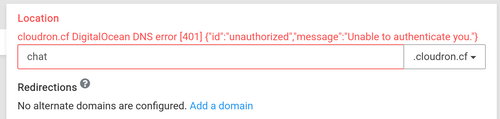
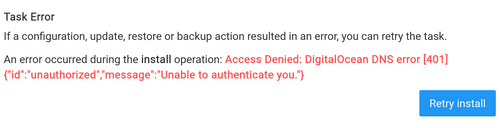
When I tried updating one specific app and it gave me a 500 error on the Digital Ocean side, it occurred to me that the API credentials must have expired. Which, as it happens, proved to be the case. I generated a new set, added it, and viola! life is good.
I wonder if we can have a better way of uncovering expired DNS API connections? Perhaps a check before a certificate upgrade that flags a plain-English error?
-
This isn't so much a problem I need help with, but rather sharing something I didn't immediately find in a site search. I fixed my own problem, so now it's a suggestion.
I experienced a certificate error for the domain upon which my Cloudron control panel happily resides. No amount of irritable gesticulating could make it work -- I'd try to force certificate renewals only to see the control panel go offline and prove unable to connect. Logs weren't especially useful, either. I had to reboot the server from the shell to make things work again.
When I tried updating one specific app and it gave me a 500 error on the Digital Ocean side, it occurred to me that the API credentials must have expired. Which, as it happens, proved to be the case. I generated a new set, added it, and viola! life is good.
I wonder if we can have a better way of uncovering expired DNS API connections? Perhaps a check before a certificate upgrade that flags a plain-English error?
@jegillikin said in Certificate renewals and app updates fail -- D.O. API expired:
When I tried updating one specific app and it gave me a 500 error on the Digital Ocean side,
Ah! The DO API returned 500.. I wonder if they had some issue with some bad token and this ended causing Cloudron code problems.
In any case, if you hit this again, let me know.
-
@jegillikin said in Certificate renewals and app updates fail -- D.O. API expired:
When I tried updating one specific app and it gave me a 500 error on the Digital Ocean side,
Ah! The DO API returned 500.. I wonder if they had some issue with some bad token and this ended causing Cloudron code problems.
In any case, if you hit this again, let me know.
@girish Will do. It's actually not the first time I've run into the problem and a re-fresh of the API credentials solved the problem, although this is the first time I specifically observed that it was a 500 error vs. a 401.


Hello! It looks like you're interested in this conversation, but you don't have an account yet.
Getting fed up of having to scroll through the same posts each visit? When you register for an account, you'll always come back to exactly where you were before, and choose to be notified of new replies (either via email, or push notification). You'll also be able to save bookmarks and upvote posts to show your appreciation to other community members.
With your input, this post could be even better 💗
Register Login