
Cloudron makes it easy to run web apps like WordPress, Nextcloud, GitLab on your server. Find out more or install now.


Skip to content
  • Categories
  • Recent
  • Tags
  • Popular
  • Bookmarks
  • Search
Skins
  • Light
  • Brite
  • Cerulean
  • Cosmo
  • Flatly
  • Journal
  • Litera
  • Lumen
  • Lux
  • Materia
  • Minty
  • Morph
  • Pulse
  • Sandstone
  • Simplex
  • Sketchy
  • Spacelab
  • United
  • Yeti
  • Zephyr
  • Dark
  • Cyborg
  • Darkly
  • Quartz
  • Slate
  • Solar
  • Superhero
  • Vapor

  • Default (No Skin)
  • No Skin
Collapse
Brand Logo

Cloudron Forum

Apps - Status | Demo | Docs | Install
  1. Cloudron Forum
  2. Support
  3. Installation problem during setup - AWS Cloudron AMI

Installation problem during setup - AWS Cloudron AMI

Scheduled Pinned Locked Moved Solved Support
awsamiinstallationregression
5 Posts 3 Posters 2.0k Views 3 Watching
  • Oldest to Newest
  • Newest to Oldest
  • Most Votes
Reply
  • Reply as topic
Log in to reply
This topic has been deleted. Only users with topic management privileges can see it.
  • M Offline
    M Offline
    markjames
    wrote on last edited by girish
    #1

    Hi,
    I'm trying to setup cloudron using the Cloudron AMI on AWS.
    The server spins up and I'm redirected to the setupdns page as expected. However when I add my details selecting DNS provider AWS Route53 and security credentials I get and error message when I click the 'Next' button. The error is -

    "providerToken must be a non empty string"

    Choosing alternative DNS Providers caused the same error message.

    I've tried on both Firefox and Safari. Chrome doesn't allow me to advance due to the self-signed cert.

    Does anyone have any suggestions?

    Thanks
    Mark

    1 Reply Last reply
    0
    • nebulonN Offline
      nebulonN Offline
      nebulon
      Staff
      wrote on last edited by
      #2

      Hi,

      the AMI on the AWS marketplace require some validation token, which is often the AWS instance id. Usually you should have received a link to the cloudron setup page which has that part added to the link query section. You can add that manually though in your browser url bar by adding https://<ip>/setupdns.html?instanceId=<yourec2instanceid>

      1 Reply Last reply
      0
      • girishG Do not disturb
        girishG Do not disturb
        girish
        Staff
        wrote on last edited by
        #3

        I wonder if I did something wrong with the AMI I published last week. Just spinning up an AMI now to verify but the setup screen should have a provider token field. It won't let you click next without it.

        1 Reply Last reply
        0
        • girishG Do not disturb
          girishG Do not disturb
          girish
          Staff
          wrote on last edited by girish
          #4

          @markjames Thanks for reporting, this is a regression from our previous release. You can fix this as follows:

          • Edit the file /home/yellowtent/box/src/provision.js
          • Make this change https://git.cloudron.io/cloudron/box/-/commit/1259d1117364715533cb82546abec04987a44f8a . It's just a one liner. All you have to do is to add the line provider: settings.provider() in line 233 in the function getStatus.
          • After that, sudo systemctl restart box (this restarts the code to apply the above change)
          • If you refresh the setup screen, you will now see the AMI owner verification field like this:
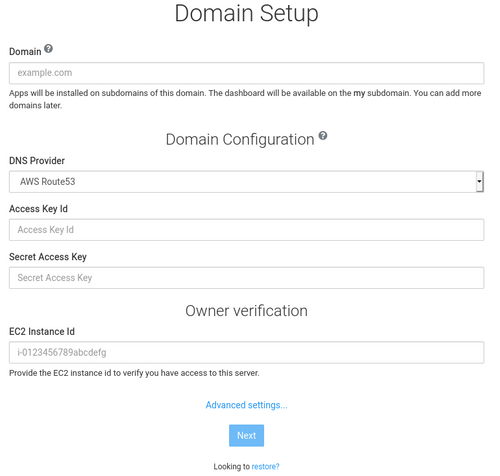
          320b6f0a-31e8-4f6d-9eea-651e699e6cdd-image.png

          Let us know if that works, thanks!

          1 Reply Last reply
          0
          • M Offline
            M Offline
            markjames
            wrote on last edited by
            #5

            Thanks, Girish,
            That patch worked. I've successfully setup things.
            cheers
            Mark

            1 Reply Last reply
            0

            Hello! It looks like you're interested in this conversation, but you don't have an account yet.

            Getting fed up of having to scroll through the same posts each visit? When you register for an account, you'll always come back to exactly where you were before, and choose to be notified of new replies (either via email, or push notification). You'll also be able to save bookmarks and upvote posts to show your appreciation to other community members.

            With your input, this post could be even better 💗

            Register Login
            Reply
            • Reply as topic
            Log in to reply
            • Oldest to Newest
            • Newest to Oldest
            • Most Votes


            • Login

            • Don't have an account? Register

            • Login or register to search.
            • First post
              Last post
            0
            • Categories
            • Recent
            • Tags
            • Popular
            • Bookmarks
            • Search

