Cloudron makes it easy to run web apps like WordPress, Nextcloud, GitLab on your server. Find out more or install now.


Skip to content
  • Categories
  • Recent
  • Tags
  • Popular
  • Bookmarks
  • Search
Skins
  • Light
  • Brite
  • Cerulean
  • Cosmo
  • Flatly
  • Journal
  • Litera
  • Lumen
  • Lux
  • Materia
  • Minty
  • Morph
  • Pulse
  • Sandstone
  • Simplex
  • Sketchy
  • Spacelab
  • United
  • Yeti
  • Zephyr
  • Dark
  • Cyborg
  • Darkly
  • Quartz
  • Slate
  • Solar
  • Superhero
  • Vapor

  • Default (No Skin)
  • No Skin
Collapse
Brand Logo

Cloudron Forum

Apps - Status | Demo | Docs | Install
  1. Cloudron Forum
  2. WordPress (Developer)
  3. wp-cli not working on 6.3.5?

wp-cli not working on 6.3.5?

Scheduled Pinned Locked Moved WordPress (Developer)
13 Posts 2 Posters 4.3k Views 2 Watching
  • Oldest to Newest
  • Newest to Oldest
  • Most Votes
Reply
  • Reply as topic
Log in to reply
This topic has been deleted. Only users with topic management privileges can see it.
  • martinkbsM Offline
    martinkbsM Offline
    martinkbs
    wrote on last edited by
    #1

    wp-cli not working on 6.3.5?

    Hi guys,

    After updating two Cloudrons I find the same problem in the WordPress (managed) installations.

    Connecting...
    If you resize the browser window, press Ctrl+D to start a new session with the current size.
    root@2d2d8096-2889-44f0-b36b-0aed411943c6:/app/code# wp plugin list
    bash: wp: command not found
    root@2d2d8096-2889-44f0-b36b-0aed411943c6:/app/code# 
    

    Anyone has encountered the same error?

    Thanks!

    girishG 1 Reply Last reply
    0
    • martinkbsM martinkbs

      wp-cli not working on 6.3.5?

      Hi guys,

      After updating two Cloudrons I find the same problem in the WordPress (managed) installations.

      Connecting...
      If you resize the browser window, press Ctrl+D to start a new session with the current size.
      root@2d2d8096-2889-44f0-b36b-0aed411943c6:/app/code# wp plugin list
      bash: wp: command not found
      root@2d2d8096-2889-44f0-b36b-0aed411943c6:/app/code# 
      

      Anyone has encountered the same error?

      Thanks!

      girishG Do not disturb
      girishG Do not disturb
      girish
      Staff
      wrote on last edited by
      #2

      @martinkbs I think same as https://forum.cloudron.io/topic/5382/wp-cli-disappeared . Can you try giving the full path?

      martinkbsM 1 Reply Last reply
      0
      • girishG girish

        @martinkbs I think same as https://forum.cloudron.io/topic/5382/wp-cli-disappeared . Can you try giving the full path?

        martinkbsM Offline
        martinkbsM Offline
        martinkbs
        wrote on last edited by
        #3

        @girish

        Reconnecting...
        If you resize the browser window, press Ctrl+D to start a new session with the current size.
        root@2d2d8096-2889-44f0-b36b-0aed411943c6:/app/code# cd /app/pkg/wp
        bash: cd: /app/pkg/wp: Not a directory
        root@2d2d8096-2889-44f0-b36b-0aed411943c6:/app/code# cd /app/pkg/  
        root@2d2d8096-2889-44f0-b36b-0aed411943c6:/app/pkg# ls         
        authLdap.zip  credentials.template  cron.sh  mpm_prefork.conf  smtp-mailer.zip  start.sh  wp  wp-convert-multisite  wp-redis-cache.zip
        root@2d2d8096-2889-44f0-b36b-0aed411943c6:/app/pkg# wp plugin list
        bash: wp: command not found
        root@2d2d8096-2889-44f0-b36b-0aed411943c6:/app/pkg# 
        
        girishG 2 Replies Last reply
        0
        • martinkbsM martinkbs

          @girish

          Reconnecting...
          If you resize the browser window, press Ctrl+D to start a new session with the current size.
          root@2d2d8096-2889-44f0-b36b-0aed411943c6:/app/code# cd /app/pkg/wp
          bash: cd: /app/pkg/wp: Not a directory
          root@2d2d8096-2889-44f0-b36b-0aed411943c6:/app/code# cd /app/pkg/  
          root@2d2d8096-2889-44f0-b36b-0aed411943c6:/app/pkg# ls         
          authLdap.zip  credentials.template  cron.sh  mpm_prefork.conf  smtp-mailer.zip  start.sh  wp  wp-convert-multisite  wp-redis-cache.zip
          root@2d2d8096-2889-44f0-b36b-0aed411943c6:/app/pkg# wp plugin list
          bash: wp: command not found
          root@2d2d8096-2889-44f0-b36b-0aed411943c6:/app/pkg# 
          
          girishG Do not disturb
          girishG Do not disturb
          girish
          Staff
          wrote on last edited by
          #4

          @martinkbs you have to either do /app/pkg/wp plugin list OR if you cd /app/pkg, then ./wp plugin list (the dot slash in the front is important).

          martinkbsM 1 Reply Last reply
          0
          • martinkbsM martinkbs

            @girish

            Reconnecting...
            If you resize the browser window, press Ctrl+D to start a new session with the current size.
            root@2d2d8096-2889-44f0-b36b-0aed411943c6:/app/code# cd /app/pkg/wp
            bash: cd: /app/pkg/wp: Not a directory
            root@2d2d8096-2889-44f0-b36b-0aed411943c6:/app/code# cd /app/pkg/  
            root@2d2d8096-2889-44f0-b36b-0aed411943c6:/app/pkg# ls         
            authLdap.zip  credentials.template  cron.sh  mpm_prefork.conf  smtp-mailer.zip  start.sh  wp  wp-convert-multisite  wp-redis-cache.zip
            root@2d2d8096-2889-44f0-b36b-0aed411943c6:/app/pkg# wp plugin list
            bash: wp: command not found
            root@2d2d8096-2889-44f0-b36b-0aed411943c6:/app/pkg# 
            
            girishG Do not disturb
            girishG Do not disturb
            girish
            Staff
            wrote on last edited by
            #5

            @martinkbs Is this managed wordpress or the developer wordpress ? The CLI command is slightly different depending on which one.

            1 Reply Last reply
            0
            • girishG girish

              @martinkbs you have to either do /app/pkg/wp plugin list OR if you cd /app/pkg, then ./wp plugin list (the dot slash in the front is important).

              martinkbsM Offline
              martinkbsM Offline
              martinkbs
              wrote on last edited by
              #6

              @girish

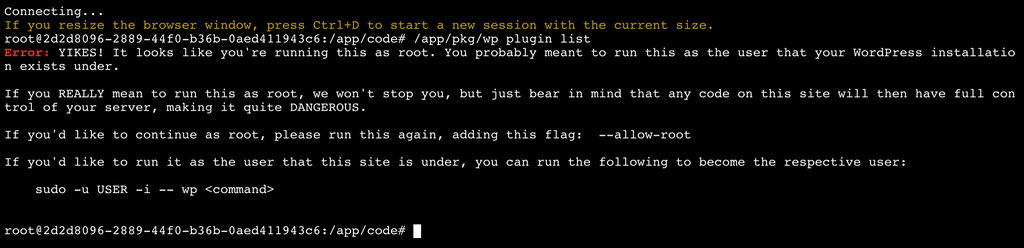
              With /app/pkg/wp plugin list

              Imagen PNG 5.png

              With cd /app/pkg, then ./wp plugin list
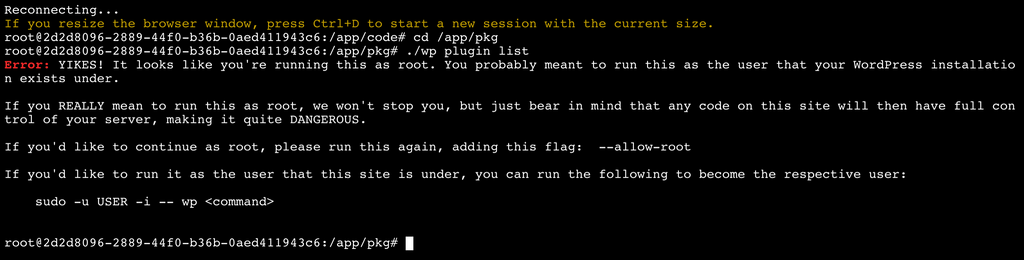
              Imagen PNG 6.png

              The installation is always WordPress (Developer)

              girishG 1 Reply Last reply
              0
              • martinkbsM martinkbs

                @girish

                With /app/pkg/wp plugin list

                Imagen PNG 5.png

                With cd /app/pkg, then ./wp plugin list

                Imagen PNG 6.png

                The installation is always WordPress (Developer)

                girishG Do not disturb
                girishG Do not disturb
                girish
                Staff
                wrote on last edited by
                #7

                @martinkbs you have to use the command like in https://docs.cloudron.io/apps/wordpress-developer/#wp-cli . So,

                sudo -E -u www-data php /app/pkg/wp --path=/app/data/public/ plugin list
                

                To explain the arguments:

                • sudo is for running the command as a different user. -u www-data means run it as www-data user (which is what apache is running as)
                • -E means to preserve environment variables. This way the container's env vars are passed on to the CLI command as well.
                • --path is required to specify the path to the installation of WP.
                martinkbsM 1 Reply Last reply
                0
                • girishG girish

                  @martinkbs you have to use the command like in https://docs.cloudron.io/apps/wordpress-developer/#wp-cli . So,

                  sudo -E -u www-data php /app/pkg/wp --path=/app/data/public/ plugin list
                  

                  To explain the arguments:

                  • sudo is for running the command as a different user. -u www-data means run it as www-data user (which is what apache is running as)
                  • -E means to preserve environment variables. This way the container's env vars are passed on to the CLI command as well.
                  • --path is required to specify the path to the installation of WP.
                  martinkbsM Offline
                  martinkbsM Offline
                  martinkbs
                  wrote on last edited by
                  #8

                  Hi @girish

                  WP-cli commands, up to version 6.3.X update have always worked the same way. In fact, I have several Cloudrons in version 6.2.8, in which the 'wp plugin list' command works as WP-cli has to.

                  According to your explanation, it means that from now on, in version 6.3.X you have to put the command as you mentioned?

                  sudo -E -u www-data php /app/pkg/wp --path=/app/data/public/ plugin list
                  

                  Or is it going to restore the original format that was used until now? As you will see, it is not a very productive way to work with the terminal.

                  girishG 1 Reply Last reply
                  0
                  • martinkbsM martinkbs

                    Hi @girish

                    WP-cli commands, up to version 6.3.X update have always worked the same way. In fact, I have several Cloudrons in version 6.2.8, in which the 'wp plugin list' command works as WP-cli has to.

                    According to your explanation, it means that from now on, in version 6.3.X you have to put the command as you mentioned?

                    sudo -E -u www-data php /app/pkg/wp --path=/app/data/public/ plugin list
                    

                    Or is it going to restore the original format that was used until now? As you will see, it is not a very productive way to work with the terminal.

                    girishG Do not disturb
                    girishG Do not disturb
                    girish
                    Staff
                    wrote on last edited by girish
                    #9

                    @martinkbs you are right, there should be a wp command alias. I see that it's in the package code as well. Let me see why it broke.

                    1 Reply Last reply
                    0
                    • girishG Do not disturb
                      girishG Do not disturb
                      girish
                      Staff
                      wrote on last edited by
                      #10

                      It seems /root/.bashrc is not sourced for some reason. If you do, source /root/.bashrc , then wp starts to work. Investigating further.

                      1 Reply Last reply
                      0
                      • girishG Do not disturb
                        girishG Do not disturb
                        girish
                        Staff
                        wrote on last edited by girish
                        #11

                        I had made a change that source any app specific rcfile for 6.3. I did this for https://forum.cloudron.io/topic/4992/seting-bash-aliases-for-cloudron-terminal. Unfortunately, this breaks sourcing of the personal rcfile. From the man page,

                               --rcfile file
                                      Execute commands from file instead of the system wide initialization file /etc/bash.bashrc and the standard personal initialization file ~/.bashrc if the shell is interac‐
                                      tive (see INVOCATION below).
                        

                        @martinkbs I will look into how to fix this now that I know what the issue is. Thanks for reporting! For the moment, the workaround is to type source /root/.bashrc after you open a web terminal and then the wp command should work.

                        martinkbsM 1 Reply Last reply
                        0
                        • girishG girish

                          I had made a change that source any app specific rcfile for 6.3. I did this for https://forum.cloudron.io/topic/4992/seting-bash-aliases-for-cloudron-terminal. Unfortunately, this breaks sourcing of the personal rcfile. From the man page,

                                 --rcfile file
                                        Execute commands from file instead of the system wide initialization file /etc/bash.bashrc and the standard personal initialization file ~/.bashrc if the shell is interac‐
                                        tive (see INVOCATION below).
                          

                          @martinkbs I will look into how to fix this now that I know what the issue is. Thanks for reporting! For the moment, the workaround is to type source /root/.bashrc after you open a web terminal and then the wp command should work.

                          martinkbsM Offline
                          martinkbsM Offline
                          martinkbs
                          wrote on last edited by
                          #12

                          Thanks @girish

                          Checked. After starting the terminal, inserting the commandsource /root/.bashrc, WP-cli works normally.

                          Connecting...
                          If you resize the browser window, press Ctrl+D to start a new session with the current size.
                          root@2d2d8096-2889-44f0-b36b-0aed411943c6:/app/code# source /root/.bashrc
                          root@2d2d8096-2889-44f0-b36b-0aed411943c6:/app/code# wp core version
                          5.8
                          root@2d2d8096-2889-44f0-b36b-0aed411943c6:/app/code# 
                          

                          At least, even temporarily, it solves the problem and lets you use the terminal.

                          If you need help, please let me know to make checks.

                          Thanks again!

                          1 Reply Last reply
                          0
                          • girishG Do not disturb
                            girishG Do not disturb
                            girish
                            Staff
                            wrote on last edited by
                            #13

                            I have fixed this for the next release.

                            1 Reply Last reply
                            1

                            Hello! It looks like you're interested in this conversation, but you don't have an account yet.

                            Getting fed up of having to scroll through the same posts each visit? When you register for an account, you'll always come back to exactly where you were before, and choose to be notified of new replies (either via email, or push notification). You'll also be able to save bookmarks and upvote posts to show your appreciation to other community members.

                            With your input, this post could be even better šŸ’—

                            Register Login
                            Reply
                            • Reply as topic
                            Log in to reply
                            • Oldest to Newest
                            • Newest to Oldest
                            • Most Votes


                            • Login

                            • Don't have an account? Register

                            • Login or register to search.
                            • First post
                              Last post
                            0
                            • Categories
                            • Recent
                            • Tags
                            • Popular
                            • Bookmarks
                            • Search