
HowTo install Cloudron CLI on Windows
-
More by curiosity than actually dwelling to use it, I figure I might be not the only fool who would try to run cloudron-cli on Windows (10).
basically
- you install nodejs (hint: you don't need the chocolatey)
- then you could
npm install -g cloudron - to exectute cloudron.ps1, you have to allow unsigned PowerShellScript; by applying this policy:
Set-ExecutionPolicy -ExecutionPolicy RemoteSigned -Scope LocalMachinethrough a Windows PowerShell as Administrator.
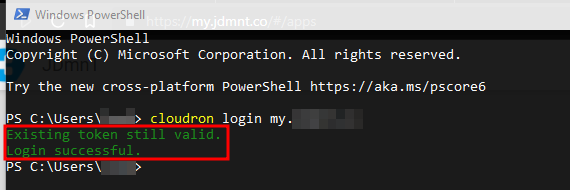
and voilà!
-
More by curiosity than actually dwelling to use it, I figure I might be not the only fool who would try to run cloudron-cli on Windows (10).
basically
- you install nodejs (hint: you don't need the chocolatey)
- then you could
npm install -g cloudron - to exectute cloudron.ps1, you have to allow unsigned PowerShellScript; by applying this policy:
Set-ExecutionPolicy -ExecutionPolicy RemoteSigned -Scope LocalMachinethrough a Windows PowerShell as Administrator.
and voilà!
-
More by curiosity than actually dwelling to use it, I figure I might be not the only fool who would try to run cloudron-cli on Windows (10).
basically
- you install nodejs (hint: you don't need the chocolatey)
- then you could
npm install -g cloudron - to exectute cloudron.ps1, you have to allow unsigned PowerShellScript; by applying this policy:
Set-ExecutionPolicy -ExecutionPolicy RemoteSigned -Scope LocalMachinethrough a Windows PowerShell as Administrator.
and voilà!
-
Thanks for sharing. I have no clue about powershell, but why is this required in the first place? Does one need to sign executables somehow on win10 for this to work without such settings?
-
Lets stay with this a little longer, as we might be on the brink of enabling a ton of M$FT users to get on board with Cloudron...
We have just seen how to install Cloudron on Windows. There are a few more steps that would need to be shown. (This would be a good use case for a video explainer.)
- Associating the Cloudron instance with a domain name
- Getting the Cloudron through the home's router to the wide world
- Some basic hardening of the deployment
Could somebody please outline these steps?
-
Lets stay with this a little longer, as we might be on the brink of enabling a ton of M$FT users to get on board with Cloudron...
We have just seen how to install Cloudron on Windows. There are a few more steps that would need to be shown. (This would be a good use case for a video explainer.)
- Associating the Cloudron instance with a domain name
- Getting the Cloudron through the home's router to the wide world
- Some basic hardening of the deployment
Could somebody please outline these steps?
@loudlemur As far as I know Cloudron installations are only for Ubuntu. This is just the CLI to interact with your Cloudron that you install on an Ubuntu machine, if you use a computer that runs Windows.
-
@loudlemur As far as I know Cloudron installations are only for Ubuntu. This is just the CLI to interact with your Cloudron that you install on an Ubuntu machine, if you use a computer that runs Windows.
-
@thpuffin OK, thanks. I think a lot of Windows users might be able to install GNU+Linux on a spare, perhaps old, home computer, for example, Ubuntu. Maybe we could have an explainer video on what to do "after you have installed Ubuntu".
@loudlemur one can always install a VM and/or WSL2
-
@loudlemur one can always install a VM and/or WSL2
-
More by curiosity than actually dwelling to use it, I figure I might be not the only fool who would try to run cloudron-cli on Windows (10).
basically
- you install nodejs (hint: you don't need the chocolatey)
- then you could
npm install -g cloudron - to exectute cloudron.ps1, you have to allow unsigned PowerShellScript; by applying this policy:
Set-ExecutionPolicy -ExecutionPolicy RemoteSigned -Scope LocalMachinethrough a Windows PowerShell as Administrator.
and voilà!





 LOL
LOL
Hello! It looks like you're interested in this conversation, but you don't have an account yet.
Getting fed up of having to scroll through the same posts each visit? When you register for an account, you'll always come back to exactly where you were before, and choose to be notified of new replies (either via email, or push notification). You'll also be able to save bookmarks and upvote posts to show your appreciation to other community members.
With your input, this post could be even better 💗
Register Login