
-
Unfortunately, I can't move a file (snapshot.yaml) from /tmp to my desired destination in the directus app:
mv: inter-device move failed: 'tmp/snapshot.yaml' to 'app/snapshot.yaml'; unable to remove target: Read-only file systemCan I disable read-only to move the file temporarly?
-
@nebulon I put the app in recovery/debug mode. It became writable but got another issue:
"DB_CLIENT" Environment Variable is missing.
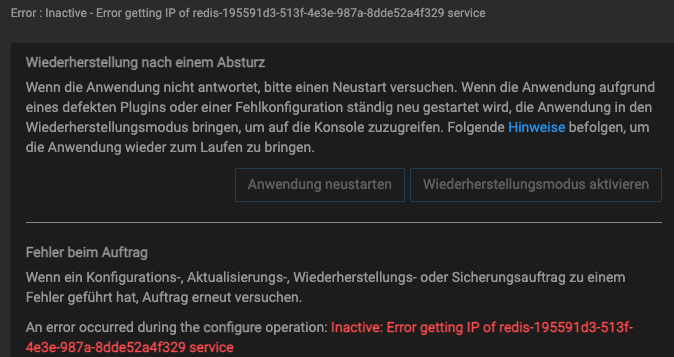
I've tried to add the changes in the env file in app/data. It didn't work. After that I tried to start it normally and got a new error with redis:

@devtron the
DB_CLIENTis set and configured in the/app/pkg/start.shwhich also sets up other required settings. So while having the app in debug mode, you either have to run relevant pre-setup commands required fornpx directus schema applyor put that line at the correct place in/app/pkg/start.shand run that whole script.For redis, you can check the services view in your dashboard and manually start it from there first.
-
I can't apply my scheme to directus:
root@...:/app/data# npx directus schema apply snapshot.yaml npm ERR! code EROFS npm ERR! syscall open npm ERR! path /root/.npm/_cacache/tmp/e889ceb7 npm ERR! errno EROFS npm ERR! rofs Invalid response body while trying to fetch https://registry.npmjs.org/directus: EROFS: read-only file system, open '/root/.npm/_cacache/tmp/e889ceb7' npm ERR! rofs Often virtualized file systems, or other file systems npm ERR! rofs that don't support symlinks, give this error. -
 G girish moved this topic from Support on
-
@devtron on Cloudron all apps run in a read-only filesystem, causing this issue. However for things which need to be writeable, we link them into to the read/write section.
What is the use-case, requiring you to move the snapshot.yaml ?@nebulon The use-case is to import my schema (snapshot.yaml) from my local development into the prod environment (cloudron app instance). And vice versa.
In fact, I need to import into the app only once, because I already created my schema locally. It would be tedious to define everything in the app again. -
@nebulon The use-case is to import my schema (snapshot.yaml) from my local development into the prod environment (cloudron app instance). And vice versa.
In fact, I need to import into the app only once, because I already created my schema locally. It would be tedious to define everything in the app again.@devtron
I think that was a feature in version 8 or lower but is really interesting if it's still supported, can post the link to the documentation. -
@devtron
I think that was a feature in version 8 or lower but is really interesting if it's still supported, can post the link to the documentation.@moocloud_matt
Here is the link for their newest version 9
https://docs.directus.io/reference/cli/#snapshot-the-data-modelI am also using Directus 9 and used it during their rc-phase
-
@moocloud_matt
Here is the link for their newest version 9
https://docs.directus.io/reference/cli/#snapshot-the-data-modelI am also using Directus 9 and used it during their rc-phase
@devtron
Nice, the old version has a dedicated page on it, and I didn't find it on the new documentation. -
@nebulon The use-case is to import my schema (snapshot.yaml) from my local development into the prod environment (cloudron app instance). And vice versa.
In fact, I need to import into the app only once, because I already created my schema locally. It would be tedious to define everything in the app again.@devtron said in Move file in directus app: read-only file system:
@nebulon The use-case is to import my schema (snapshot.yaml) from my local development into the prod environment (cloudron app instance). And vice versa.
In fact, I need to import into the app only once, because I already created my schema locally. It would be tedious to define everything in the app again.ah I see, if this is a one-time task, you could also put the app in debug mode, which makes the filesystems temporarily read/write (but not persistent across restarts)
-
@devtron said in Move file in directus app: read-only file system:
@nebulon The use-case is to import my schema (snapshot.yaml) from my local development into the prod environment (cloudron app instance). And vice versa.
In fact, I need to import into the app only once, because I already created my schema locally. It would be tedious to define everything in the app again.ah I see, if this is a one-time task, you could also put the app in debug mode, which makes the filesystems temporarily read/write (but not persistent across restarts)
@nebulon I put the app in recovery/debug mode. It became writable but got another issue:
"DB_CLIENT" Environment Variable is missing.I've tried to add the changes in the env file in app/data. It didn't work. After that I tried to start it normally and got a new error with redis:
-
@nebulon I put the app in recovery/debug mode. It became writable but got another issue:
"DB_CLIENT" Environment Variable is missing.I've tried to add the changes in the env file in app/data. It didn't work. After that I tried to start it normally and got a new error with redis:
@devtron the
DB_CLIENTis set and configured in the/app/pkg/start.shwhich also sets up other required settings. So while having the app in debug mode, you either have to run relevant pre-setup commands required fornpx directus schema applyor put that line at the correct place in/app/pkg/start.shand run that whole script.For redis, you can check the services view in your dashboard and manually start it from there first.
-
@devtron the
DB_CLIENTis set and configured in the/app/pkg/start.shwhich also sets up other required settings. So while having the app in debug mode, you either have to run relevant pre-setup commands required fornpx directus schema applyor put that line at the correct place in/app/pkg/start.shand run that whole script.For redis, you can check the services view in your dashboard and manually start it from there first.


Hello! It looks like you're interested in this conversation, but you don't have an account yet.
Getting fed up of having to scroll through the same posts each visit? When you register for an account, you'll always come back to exactly where you were before, and choose to be notified of new replies (either via email, or push notification). You'll also be able to save bookmarks and upvote posts to show your appreciation to other community members.
With your input, this post could be even better 💗
Register Login