
Restoring backups not working - stuck on Restoring
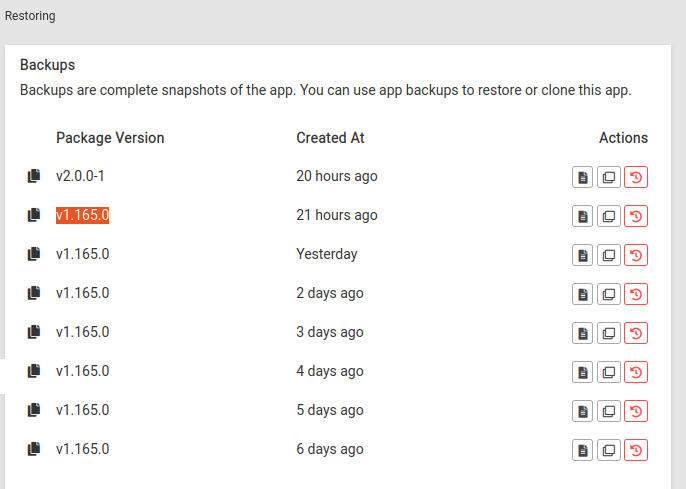
-
If I go to the url I get this:
You are seeing this page because the DNS record of wordpress-backups.ud.coop is set to this server's IP but Cloudron has no app configured for this domain.
I thought I'd try hitting save in Location and I get this error:
secondaryDomain API_SERVER_DOMAIN is not listed in manifestIt seems something about the new API server domain of the new version is messing up restoring the older version

Help!
-
Figured I'd try cloning from one of 1.165.0 backups, same error:
secondaryDomain API_SERVER_DOMAIN is not listed in manifestWell, yes, that's because in that version is is no API_SERVER_DOMAIN!
Help!
So, tried restoring the 2.0.0-1 backup instead, because at least that has the API_SERVER_DOMAIN
But that just results in Not Responding, I think because some of the stuff I put in .env.sh was confusing it. So deleted those lines and restarted... and I'm finally back in!
-
So, tried restoring the 2.0.0-1 backup instead, because at least that has the API_SERVER_DOMAIN
But that just results in Not Responding, I think because some of the stuff I put in .env.sh was confusing it. So deleted those lines and restarted... and I'm finally back in!
Now to see if I can get the BackWPUp plugin in WordPress to work again... seems to be. Phew.
But I'm still very confused about the Access and Secret Keys...
Thankfully it turns out I had them saved in Bit/ValutWarden, but they don't appear to be anywhere in Minio itself (there is nothing in the env.sh file), so where/ how is Minio actually storing them?!?
-
Now to see if I can get the BackWPUp plugin in WordPress to work again... seems to be. Phew.
But I'm still very confused about the Access and Secret Keys...
Thankfully it turns out I had them saved in Bit/ValutWarden, but they don't appear to be anywhere in Minio itself (there is nothing in the env.sh file), so where/ how is Minio actually storing them?!?
Anyways, @staff, I'm sorted for now, but I think I've found a bug in that it's currently impossible to restore older versions of Minio as it's expecting there to be an API_SERVER_DOMAIN in the manifest, when of course there isn't because no such thing existed in older versions.
-
Anyways, @staff, I'm sorted for now, but I think I've found a bug in that it's currently impossible to restore older versions of Minio as it's expecting there to be an API_SERVER_DOMAIN in the manifest, when of course there isn't because no such thing existed in older versions.
@jdaviescoates yes, indeed, this is a bug.
Probably not worth fixing since this was just a special case with this app. i pondered if I just push out the new minio as a totally different app but thought that people might have their existing data there and would be a hassle to migrate.
-
So, tried restoring the 2.0.0-1 backup instead, because at least that has the API_SERVER_DOMAIN
But that just results in Not Responding, I think because some of the stuff I put in .env.sh was confusing it. So deleted those lines and restarted... and I'm finally back in!
@jdaviescoates said in Restoring backups not working - stuck on Restoring:
I think because some of the stuff I put in .env.sh was confusing it.
Also, @staff I think perhaps something should be added to the docs about how the characters
$and#shouldn't be used in password/ keys as that seems to confuse Minio.I'm pretty sure that's what lead to these errors:
May 11 23:22:58 /app/data/env.sh: line 5: Uv: unbound variable May 11 23:22:58 /app/data/env.sh: line 5: $4: unbound variable May 11 23:22:58 /app/data/env.sh: line 5: NFrBzhA: unbound variable May 11 23:23:00 /app/data/env.sh: line 5: Uv: unbound variable May 11 23:23:00 /app/data/env.sh: line 5: $4: unbound variable May 11 23:23:00 /app/data/env.sh: line 5: NFrBzhA: unbound variable May 11 23:23:02 /app/data/env.sh: line 5: XJxQXBuvsqk4Cei^Y!d9u9iH2NR@WZuzLdix*743P: command not found May 11 23:23:02 /app/data/env.sh: line 5: NFrBzhA: unbound variable May 11 23:23:02 /app/data/env.sh: line 5: Uv: unbound variable May 11 23:23:03 /app/data/env.sh: line 5: Uv: unbound variable May 11 23:23:03 /app/data/env.sh: line 5: NFrBzhA: unbound variable May 11 23:23:03 /app/data/env.sh: line 5: $4: unbound variable May 11 23:23:03 /app/data/env.sh: line 5: XJxQXBuvsqk4Cei^Y!d9u9iH2NR@WZuzLdix*743P: command not found May 11 23:23:03 /app/data/env.sh: line 5: WLk2UWtapFJ2fCbzEBM: command not found May 11 23:23:05 /app/data/env.sh: line 5: Uv: unbound variable May 11 23:23:05 /app/data/env.sh: line 5: $4: unbound variable May 11 23:23:05 /app/data/env.sh: line 5: NFrBzhA: unbound variable May 11 23:23:05 /app/data/env.sh: line 5: XJxQXBuvsqk4Cei^Y!d9u9iH2NR@WZuzLdix*743P: command not found May 11 23:23:08 /app/data/env.sh: line 5: Uv: unbound variable May 11 23:23:08 /app/data/env.sh: line 5: $4: unbound variable May 11 23:23:08 /app/data/env.sh: line 5: XJxQXBuvsqk4Cei^Y!d9u9iH2NR@WZuzLdix*743P: command not found May 11 23:23:08 /app/data/env.sh: line 5: NFrBzhA: unbound variable May 11 23:23:12 /app/data/env.sh: line 5: Uv: unbound variable May 11 23:23:12 /app/data/env.sh: line 5: XJxQXBuvsqk4Cei^Y!d9u9iH2NR@WZuzLdix*743P: command not found May 11 23:23:12 /app/data/env.sh: line 5: NFrBzhA: unbound variable May 11 23:23:12 /app/data/env.sh: line 5: WLk2UWtapFJ2fCbzEBM: command not found May 11 23:23:12 /app/data/env.sh: line 5: $4: unbound variable May 11 23:23:19 /app/data/env.sh: line 5: Uv: unbound variable May 11 23:23:19 /app/data/env.sh: line 5: $4: unbound variable May 11 23:23:19 /app/data/env.sh: line 5: NFrBzhA: unbound variable May 11 23:23:19 /app/data/env.sh: line 5: XJxQXBuvsqk4Cei^Y!d9u9iH2NR@WZuzLdix*743P: command not found -
@jdaviescoates yes, indeed, this is a bug.
Probably not worth fixing since this was just a special case with this app. i pondered if I just push out the new minio as a totally different app but thought that people might have their existing data there and would be a hassle to migrate.
@girish well, if you're not going to fix the bug, perhaps at least add a warning somewhere that once you've upgraded it's impossible to restore older backups? Thanks goodness I also had a backup of the latest version otherwise I don't know what I would've done!
-
@girish well, if you're not going to fix the bug, perhaps at least add a warning somewhere that once you've upgraded it's impossible to restore older backups? Thanks goodness I also had a backup of the latest version otherwise I don't know what I would've done!
@jdaviescoates Agreed... Except that we actually made this update 5 months ago. I do wonder how many others have not updated to latest minio. Latest minio package is v2.5.0 (there's been around 15-20 releases since the v2 package).
I think a good lesson for us for next time we do something like this.
-
@jdaviescoates said in Restoring backups not working - stuck on Restoring:
I think because some of the stuff I put in .env.sh was confusing it.
Also, @staff I think perhaps something should be added to the docs about how the characters
$and#shouldn't be used in password/ keys as that seems to confuse Minio.I'm pretty sure that's what lead to these errors:
May 11 23:22:58 /app/data/env.sh: line 5: Uv: unbound variable May 11 23:22:58 /app/data/env.sh: line 5: $4: unbound variable May 11 23:22:58 /app/data/env.sh: line 5: NFrBzhA: unbound variable May 11 23:23:00 /app/data/env.sh: line 5: Uv: unbound variable May 11 23:23:00 /app/data/env.sh: line 5: $4: unbound variable May 11 23:23:00 /app/data/env.sh: line 5: NFrBzhA: unbound variable May 11 23:23:02 /app/data/env.sh: line 5: XJxQXBuvsqk4Cei^Y!d9u9iH2NR@WZuzLdix*743P: command not found May 11 23:23:02 /app/data/env.sh: line 5: NFrBzhA: unbound variable May 11 23:23:02 /app/data/env.sh: line 5: Uv: unbound variable May 11 23:23:03 /app/data/env.sh: line 5: Uv: unbound variable May 11 23:23:03 /app/data/env.sh: line 5: NFrBzhA: unbound variable May 11 23:23:03 /app/data/env.sh: line 5: $4: unbound variable May 11 23:23:03 /app/data/env.sh: line 5: XJxQXBuvsqk4Cei^Y!d9u9iH2NR@WZuzLdix*743P: command not found May 11 23:23:03 /app/data/env.sh: line 5: WLk2UWtapFJ2fCbzEBM: command not found May 11 23:23:05 /app/data/env.sh: line 5: Uv: unbound variable May 11 23:23:05 /app/data/env.sh: line 5: $4: unbound variable May 11 23:23:05 /app/data/env.sh: line 5: NFrBzhA: unbound variable May 11 23:23:05 /app/data/env.sh: line 5: XJxQXBuvsqk4Cei^Y!d9u9iH2NR@WZuzLdix*743P: command not found May 11 23:23:08 /app/data/env.sh: line 5: Uv: unbound variable May 11 23:23:08 /app/data/env.sh: line 5: $4: unbound variable May 11 23:23:08 /app/data/env.sh: line 5: XJxQXBuvsqk4Cei^Y!d9u9iH2NR@WZuzLdix*743P: command not found May 11 23:23:08 /app/data/env.sh: line 5: NFrBzhA: unbound variable May 11 23:23:12 /app/data/env.sh: line 5: Uv: unbound variable May 11 23:23:12 /app/data/env.sh: line 5: XJxQXBuvsqk4Cei^Y!d9u9iH2NR@WZuzLdix*743P: command not found May 11 23:23:12 /app/data/env.sh: line 5: NFrBzhA: unbound variable May 11 23:23:12 /app/data/env.sh: line 5: WLk2UWtapFJ2fCbzEBM: command not found May 11 23:23:12 /app/data/env.sh: line 5: $4: unbound variable May 11 23:23:19 /app/data/env.sh: line 5: Uv: unbound variable May 11 23:23:19 /app/data/env.sh: line 5: $4: unbound variable May 11 23:23:19 /app/data/env.sh: line 5: NFrBzhA: unbound variable May 11 23:23:19 /app/data/env.sh: line 5: XJxQXBuvsqk4Cei^Y!d9u9iH2NR@WZuzLdix*743P: command not found -
@jdaviescoates Agreed... Except that we actually made this update 5 months ago. I do wonder how many others have not updated to latest minio. Latest minio package is v2.5.0 (there's been around 15-20 releases since the v2 package).
I think a good lesson for us for next time we do something like this.
@girish said in Restoring backups not working - stuck on Restoring:
I do wonder how many others have not updated to latest minio
Given how pervasive the fear of breaking thing by updating is (I used to have to constantly tell people I made Wordpress sites for that the risk of getting hacked by not updating is higher than the risk of breaking something by updating), I'd guess quite a few.
-
@jdaviescoates Since it's shell script , maybe you have to single quote things properly. Like so:
export MINIO_ROOT_PASSWORD='minioa#dm$in'@girish said in Restoring backups not working - stuck on Restoring:
@jdaviescoates Since it's shell script , maybe you have to single quote things properly. Like so:
export MINIO_ROOT_PASSWORD='minioa#dm$in'I think the docs need updating to make that clear.
At present they just say:
To change admin credentials, use the File manager to edit the variables MINIO_ROOT_USER and MINIO_ROOT_PASSWORD in /app/data/env.sh
And
- My env.sh doesn't even have those variables
- I think you should include a full example like you did above
export MINIO_ROOT_PASSWORD='minioa#dm$in'Including highlighting that the single quotes are important
Probably also worth adding that this user/ pass combo are also the Access Key and Secret Key too (to avoid similar confusion to what happened with Own Cast)
Thanks!
-
I did a full run of update testing now.
-
After upgrade, I was able to login with my previous root credentials.
-
After upgrade, indeed, the env variables are not injected. I have put an example in docs now - https://docs.cloudron.io/apps/minio/#admin-credentials . New installs have these variables.
-
I was able to reproduce the clone issue. Was easy to fix. I guess this will be useful in case one wants to inspect older backups in the future.
-
The restore is a bit more complex - Made an issue https://git.cloudron.io/cloudron/box/-/issues/814
-


Hello! It looks like you're interested in this conversation, but you don't have an account yet.
Getting fed up of having to scroll through the same posts each visit? When you register for an account, you'll always come back to exactly where you were before, and choose to be notified of new replies (either via email, or push notification). You'll also be able to save bookmarks and upvote posts to show your appreciation to other community members.
With your input, this post could be even better 💗
Register Login