
Cloudron makes it easy to run web apps like WordPress, Nextcloud, GitLab on your server. Find out more or install now.


Skip to content
  • Categories
  • Recent
  • Tags
  • Popular
  • Bookmarks
  • Search
Skins
  • Light
  • Brite
  • Cerulean
  • Cosmo
  • Flatly
  • Journal
  • Litera
  • Lumen
  • Lux
  • Materia
  • Minty
  • Morph
  • Pulse
  • Sandstone
  • Simplex
  • Sketchy
  • Spacelab
  • United
  • Yeti
  • Zephyr
  • Dark
  • Cyborg
  • Darkly
  • Quartz
  • Slate
  • Solar
  • Superhero
  • Vapor

  • Default (No Skin)
  • No Skin
Collapse
Brand Logo

Cloudron Forum

Apps - Status | Demo | Docs | Install
  1. Cloudron Forum
  2. Support
  3. IP Address Blocklist Check acting weird

IP Address Blocklist Check acting weird

Scheduled Pinned Locked Moved Solved Support
mailstatus
5 Posts 3 Posters 1.8k Views 3 Watching
  • Oldest to Newest
  • Newest to Oldest
  • Most Votes
Reply
  • Reply as topic
Log in to reply
This topic has been deleted. Only users with topic management privileges can see it.
  • JOduMonTJ Offline
    JOduMonTJ Offline
    JOduMonT
    wrote on last edited by girish
    #1

    While IP address is red but the message say This server's IP is not on a blocklist
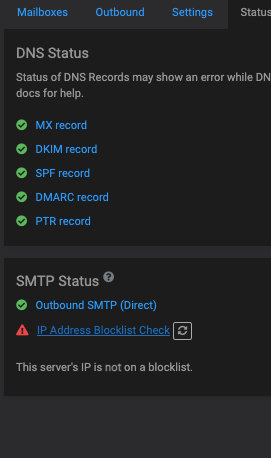
    Screen Shot 2022-09-22 at 15.14.45.png

    my IPv4 is on 2 blocklists; zen is just a concatenation of the others spamhaus list.
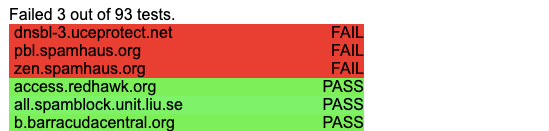
    Screen Shot 2022-09-22 at 15.21.09.png

    I wonder if the message: This server's IP is not on a blocklist doing an test on the IPv6 address ???

    1 Reply Last reply
    0
    • JOduMonTJ JOduMonT marked this topic as a question on
    • nebulonN Offline
      nebulonN Offline
      nebulon
      Staff
      wrote on last edited by
      #2

      This looks like a UI bug to me. In fact you should also see the ipv4 in that "This server's IP {{ ip }} is not on a blocklist" so something if off in your instance. If you want, you can enable remote SSH support for us and send a mail with your dashboard domain to support@cloudron.io so we can debug this right there, as I don't seem to be able to reproduce this on any of my Cloudrons.

      JOduMonTJ 1 Reply Last reply
      0
      • nebulonN nebulon

        This looks like a UI bug to me. In fact you should also see the ipv4 in that "This server's IP {{ ip }} is not on a blocklist" so something if off in your instance. If you want, you can enable remote SSH support for us and send a mail with your dashboard domain to support@cloudron.io so we can debug this right there, as I don't seem to be able to reproduce this on any of my Cloudrons.

        JOduMonTJ Offline
        JOduMonTJ Offline
        JOduMonT
        wrote on last edited by
        #3

        @nebulon said in IP Address Blocklist Check acting weird:

        so something if off in your instance

        I just restored a backup to migrate
        from Hetzner Ubuntu 20.04
        to OVH Ubuntu 22.04

        girishG 1 Reply Last reply
        0
        • JOduMonTJ JOduMonT

          @nebulon said in IP Address Blocklist Check acting weird:

          so something if off in your instance

          I just restored a backup to migrate
          from Hetzner Ubuntu 20.04
          to OVH Ubuntu 22.04

          girishG Do not disturb
          girishG Do not disturb
          girish
          Staff
          wrote on last edited by
          #4

          @JOduMonT Can you check if the IPv4 address is listed correctly in the Network view?

          JOduMonTJ 1 Reply Last reply
          0
          • girishG girish

            @JOduMonT Can you check if the IPv4 address is listed correctly in the Network view?

            JOduMonTJ Offline
            JOduMonTJ Offline
            JOduMonT
            wrote on last edited by
            #5

            @girish hey forgot to mention.
            My IP is not listed but the AS network is declared as spammy.

            While I contacted OVH for this and I respect their answers, they said they are not willing and paying for deblacklisting their network because it like an hostage situation.

            So I asked them to change the IP of my instance, let's see.

            1 Reply Last reply
            1
            • JOduMonTJ JOduMonT has marked this topic as solved on
            • JOduMonTJ JOduMonT marked this topic as a regular topic on
            • girishG girish marked this topic as a question on
            • girishG girish has marked this topic as solved on

            Hello! It looks like you're interested in this conversation, but you don't have an account yet.

            Getting fed up of having to scroll through the same posts each visit? When you register for an account, you'll always come back to exactly where you were before, and choose to be notified of new replies (either via email, or push notification). You'll also be able to save bookmarks and upvote posts to show your appreciation to other community members.

            With your input, this post could be even better 💗

            Register Login
            Reply
            • Reply as topic
            Log in to reply
            • Oldest to Newest
            • Newest to Oldest
            • Most Votes


            • Login

            • Don't have an account? Register

            • Login or register to search.
            • First post
              Last post
            0
            • Categories
            • Recent
            • Tags
            • Popular
            • Bookmarks
            • Search

