Cloudron makes it easy to run web apps like WordPress, Nextcloud, GitLab on your server. Find out more or install now.


Skip to content
  • Categories
  • Recent
  • Tags
  • Popular
  • Bookmarks
  • Search
Skins
  • Light
  • Brite
  • Cerulean
  • Cosmo
  • Flatly
  • Journal
  • Litera
  • Lumen
  • Lux
  • Materia
  • Minty
  • Morph
  • Pulse
  • Sandstone
  • Simplex
  • Sketchy
  • Spacelab
  • United
  • Yeti
  • Zephyr
  • Dark
  • Cyborg
  • Darkly
  • Quartz
  • Slate
  • Solar
  • Superhero
  • Vapor

  • Default (No Skin)
  • No Skin
Collapse
Brand Logo

Cloudron Forum

Apps - Status | Demo | Docs | Install
  1. Cloudron Forum
  2. LAMP
  3. How to run AI models in LAMP App

How to run AI models in LAMP App

Scheduled Pinned Locked Moved LAMP
13 Posts 2 Posters 4.7k Views 4 Watching
  • Oldest to Newest
  • Newest to Oldest
  • Most Votes
Reply
  • Reply as topic
Log in to reply
This topic has been deleted. Only users with topic management privileges can see it.
  • girishG Offline
    girishG Offline
    girish
    Staff
    wrote on last edited by
    #4

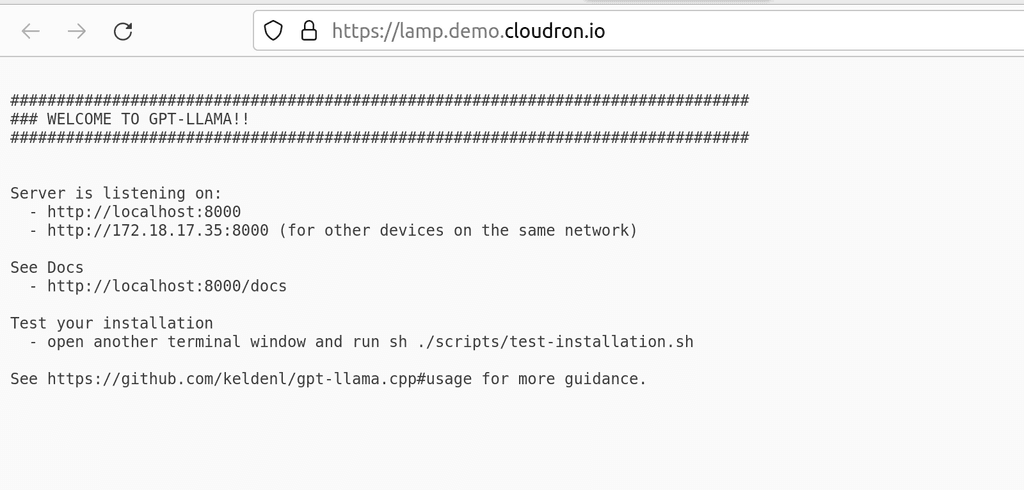
    Works now after enabling the module.

    image.png

    1 Reply Last reply
    0
    • girishG girish moved this topic from App Packaging & Development on
    • girishG Offline
      girishG Offline
      girish
      Staff
      wrote on last edited by
      #5

      I pushed a new package that enables the proxy module.

      robiR 2 Replies Last reply
      3
      • girishG girish

        I pushed a new package that enables the proxy module.

        robiR Offline
        robiR Offline
        robi
        wrote on last edited by
        #6

        @girish Thank you!

        Conscious tech

        1 Reply Last reply
        0
        • robiR Offline
          robiR Offline
          robi
          wrote on last edited by robi
          #7

          Hmm, @girish did you push a custom package?

          image.png

          After updating the LAMP app on my server, it still doesn't proxy properly via .htaccess file.

          My version:
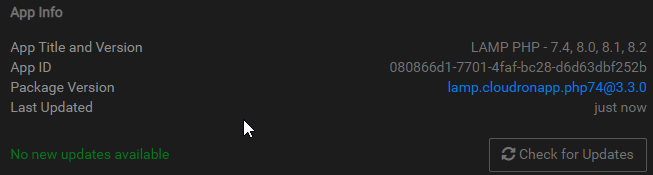
          afd98b67-4f7b-49cd-8eb2-10fc4e310517-image.png

          Conscious tech

          girishG 1 Reply Last reply
          0
          • girishG girish

            I pushed a new package that enables the proxy module.

            robiR Offline
            robiR Offline
            robi
            wrote on last edited by robi
            #8

            @girish the new lamp app does have the modules enabled, but still no go via .htaccess file.

            root@080866d1-7701-4faf-bc28-d6d63dbf252b:/app/data/apache# apache2ctl -M | grep proxy
             proxy_module (shared)
             proxy_http_module (shared)
            

            Oh I see; you added the proxypass block in the apache/app.conf instead.

                <Location "/">
                ProxyPass "http://localhost:8000"
                </Location>


            Not sure why .htaccess doesn't work as the rewrite_module is also loaded.

            Conscious tech

            girishG 1 Reply Last reply
            0
            • robiR robi

              Hmm, @girish did you push a custom package?

              image.png

              After updating the LAMP app on my server, it still doesn't proxy properly via .htaccess file.

              My version:
              afd98b67-4f7b-49cd-8eb2-10fc4e310517-image.png

              girishG Offline
              girishG Offline
              girish
              Staff
              wrote on last edited by girish
              #9

              @robi said in How to run AI models in LAMP App:

              Hmm, @girish did you push a custom package?

              yes, I updated the demo app instance for testing before I published the package. you can just reinstall I guess.

              1 Reply Last reply
              0
              • robiR robi

                @girish the new lamp app does have the modules enabled, but still no go via .htaccess file.

                root@080866d1-7701-4faf-bc28-d6d63dbf252b:/app/data/apache# apache2ctl -M | grep proxy
                 proxy_module (shared)
                 proxy_http_module (shared)
                

                Oh I see; you added the proxypass block in the apache/app.conf instead.

                    <Location "/">
                    ProxyPass "http://localhost:8000"
                    </Location>


                Not sure why .htaccess doesn't work as the rewrite_module is also loaded.

                girishG Offline
                girishG Offline
                girish
                Staff
                wrote on last edited by girish
                #10

                @robi said in How to run AI models in LAMP App:

                Not sure why .htaccess doesn't work as the rewrite_module is also loaded.

                There is something wrong with that rule but I don't know htaccess configuration well enough. In fact, I wasn't aware of P before this. If you put RewriteRule "(.*)$" "http://localhost:8000/$1" [P,L] it does something (i.e a not found page from the node app atleast).

                @robi said in How to run AI models in LAMP App:

                RewriteRule ^/(.*)?$ http:/localhost:8000/$1 [P,L]

                Also, there is a missing slash after http.

                robiR 1 Reply Last reply
                0
                • robiR Offline
                  robiR Offline
                  robi
                  wrote on last edited by
                  #11

                  Good catch, however I don't have the same typo in my file.

                  I'll try a few more things and report back.

                  Conscious tech

                  1 Reply Last reply
                  0
                  • girishG girish

                    @robi said in How to run AI models in LAMP App:

                    Not sure why .htaccess doesn't work as the rewrite_module is also loaded.

                    There is something wrong with that rule but I don't know htaccess configuration well enough. In fact, I wasn't aware of P before this. If you put RewriteRule "(.*)$" "http://localhost:8000/$1" [P,L] it does something (i.e a not found page from the node app atleast).

                    @robi said in How to run AI models in LAMP App:

                    RewriteRule ^/(.*)?$ http:/localhost:8000/$1 [P,L]

                    Also, there is a missing slash after http.

                    robiR Offline
                    robiR Offline
                    robi
                    wrote on last edited by
                    #12

                    @girish not sure why, but what did work for the bare domain was (.*)^

                    RewriteRule (.*)^ http://localhost:8000/$1 [P,L]
                    

                    There is also a /docs URL which then doesn't work, unless the ^ is missing.

                    RewriteRule (.*) http://localhost:8000/$1 [P,L]
                    

                    Conscious tech

                    1 Reply Last reply
                    1
                    • robiR robi referenced this topic on
                    • robiR Offline
                      robiR Offline
                      robi
                      wrote on last edited by robi
                      #13

                      If you don't care to use the proxy features in LAMP via Apache2, you can launch the App-Proxy app from the App Store and configure it on a new subdomain to proxy to any of the LAMP installed apps on local ports via the internal Cloudron IP, ie. http://172.18.xx.xxx:port (make sure to use HTTP and not HTTPS).

                      You can get the internal IP from the web terminal by typing hostname -i

                      Conscious tech

                      1 Reply Last reply
                      2
                      • robiR robi referenced this topic on
                      • robiR robi referenced this topic on
                      • robiR robi referenced this topic on
                      • robiR robi referenced this topic on

                      Hello! It looks like you're interested in this conversation, but you don't have an account yet.

                      Getting fed up of having to scroll through the same posts each visit? When you register for an account, you'll always come back to exactly where you were before, and choose to be notified of new replies (either via email, or push notification). You'll also be able to save bookmarks and upvote posts to show your appreciation to other community members.

                      With your input, this post could be even better 💗

                      Register Login
                      Reply
                      • Reply as topic
                      Log in to reply
                      • Oldest to Newest
                      • Newest to Oldest
                      • Most Votes


                      • Login

                      • Don't have an account? Register

                      • Login or register to search.
                      • First post
                        Last post
                      0
                      • Categories
                      • Recent
                      • Tags
                      • Popular
                      • Bookmarks
                      • Search