Cloudron makes it easy to run web apps like WordPress, Nextcloud, GitLab on your server. Find out more or install now.


Skip to content
  • Categories
  • Recent
  • Tags
  • Popular
  • Bookmarks
  • Search
Skins
  • Light
  • Brite
  • Cerulean
  • Cosmo
  • Flatly
  • Journal
  • Litera
  • Lumen
  • Lux
  • Materia
  • Minty
  • Morph
  • Pulse
  • Sandstone
  • Simplex
  • Sketchy
  • Spacelab
  • United
  • Yeti
  • Zephyr
  • Dark
  • Cyborg
  • Darkly
  • Quartz
  • Slate
  • Solar
  • Superhero
  • Vapor

  • Default (No Skin)
  • No Skin
Collapse
Brand Logo

Cloudron Forum

Offical apps | Community apps | Demo | Docs | Install
  1. Cloudron Forum
  2. Komga
  3. Komga on Cloudron: How to upload comics held locally to your remote Komga
Everything related to the PHP CVE and eMudhra Cert Please read our Security issue thread - PHP and eMudhra cert compromise.

Komga on Cloudron: How to upload comics held locally to your remote Komga

Scheduled Pinned Locked Moved Solved Komga
komgapopulatecomics
15 Posts 5 Posters 7.0k Views 5 Watching
  • Oldest to Newest
  • Newest to Oldest
  • Most Votes
Reply
  • Reply as topic
Log in to reply
This topic has been deleted. Only users with topic management privileges can see it.
  • L LoudLemur

    Could we please have a few notes on how to accomplish this?
    Most people, after they install Komga, would like to put some comics on it. What is the procedure? Do we use Cubby, for example, or some other procedure?

    jdaviescoatesJ
    jdaviescoatesJ
    jdaviescoates
    Super Fan
    wrote on last edited by jdaviescoates
    #2

    @LoudLemur said in Komga on Cloudron: How to upload comics held locally to your remote Komga:

    Do we use Cubby

    No. Why would you need to use another app?

    Just use the File Manager and put things in the books folder
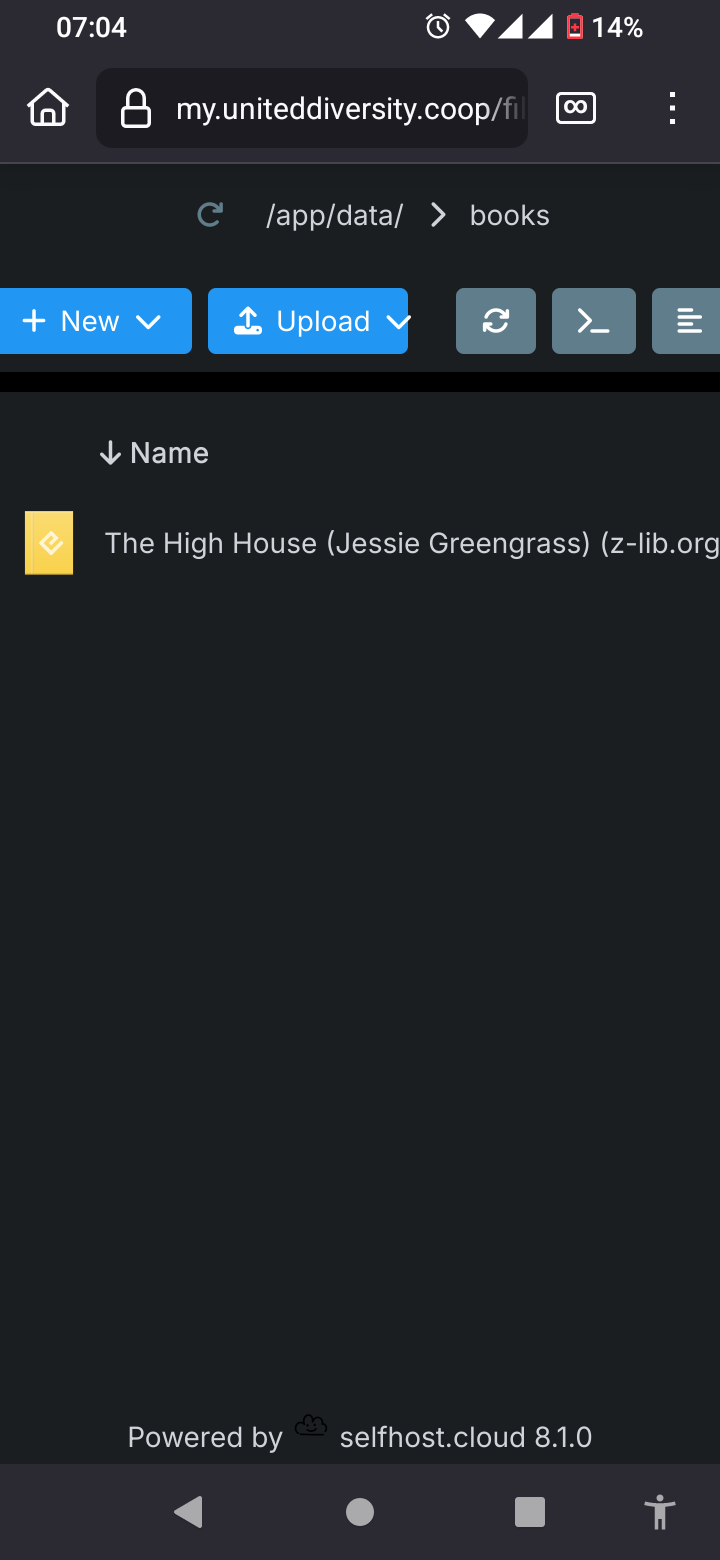
    Screenshot_20250106-070454_Firefox.png

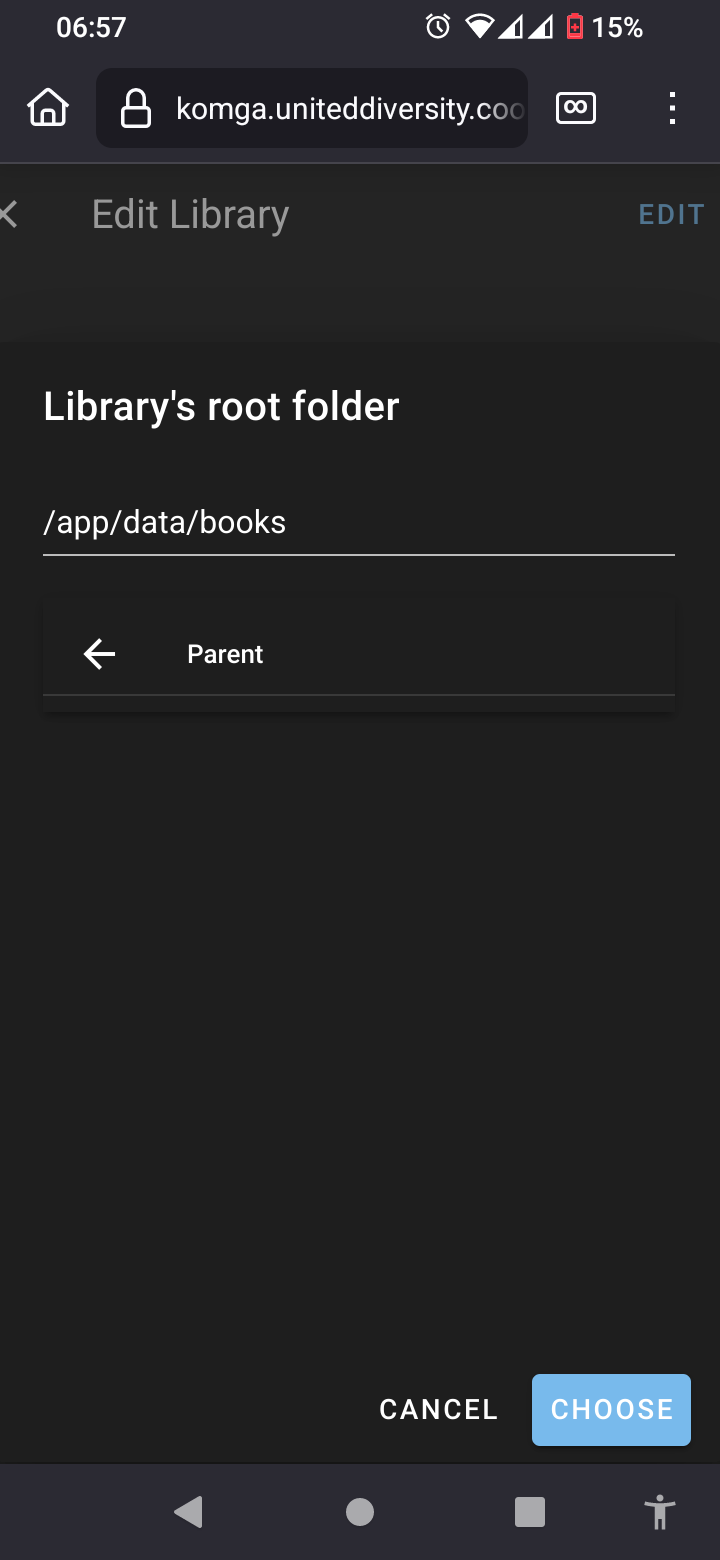
    Then create a library and choose /app/data/books as the root folder

    Screenshot_20250106-065708_Firefox.png

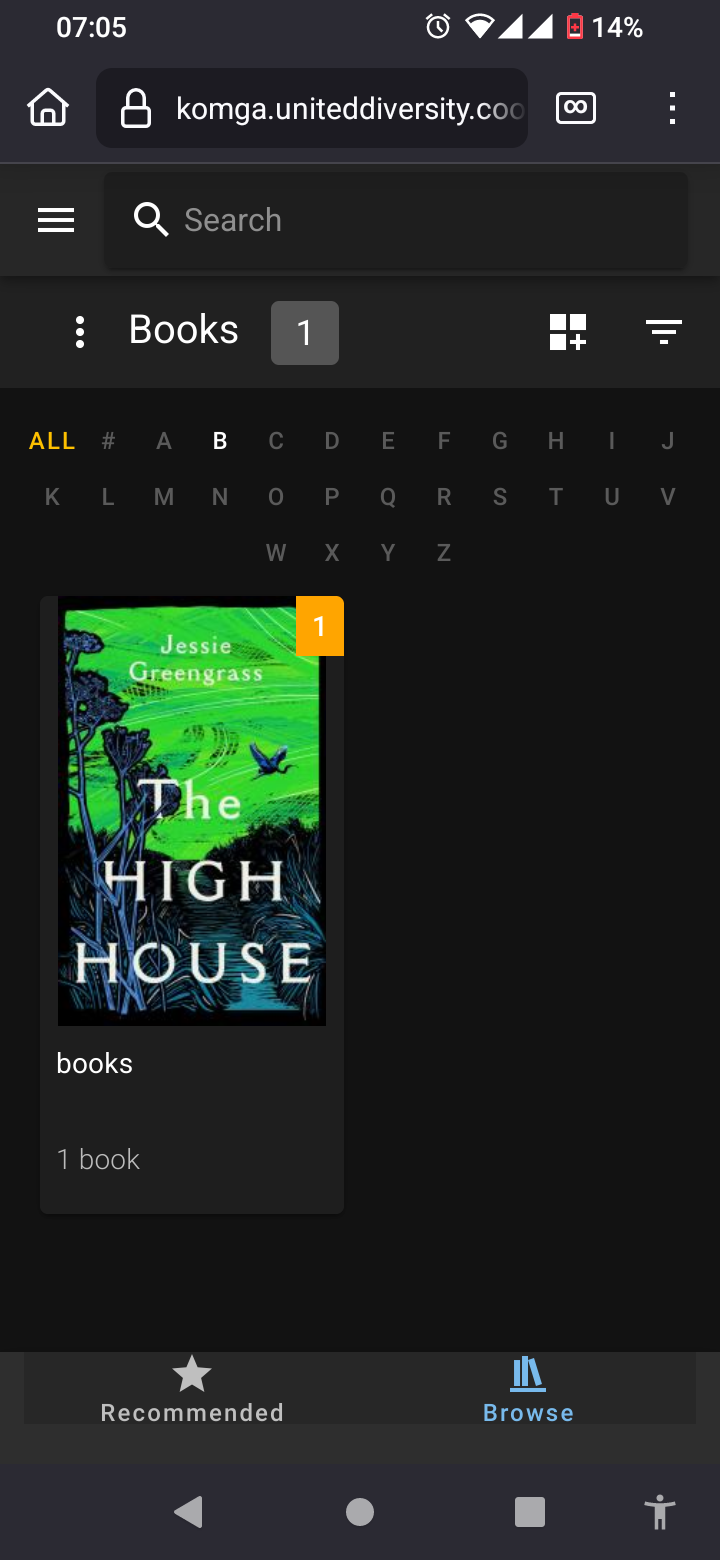
    Voila!

    Screenshot_20250106-070546_Firefox.png

    I use Cloudron with Gandi & Hetzner

    jdaviescoatesJ 1 Reply Last reply
    1
    • jdaviescoatesJ
      jdaviescoatesJ
      jdaviescoates
      Super Fan
      wrote on last edited by jdaviescoates
      #3

      But I agree, this should go in the docs.

      And perhaps even the app could be configured to automatically create that first books library at /app/data/books

      I use Cloudron with Gandi & Hetzner

      1 Reply Last reply
      1
      • J
        J
        joseph
        Staff
        wrote on last edited by
        #4

        You had to create directories in /app/data and add Libraries inside Komga to point to those directories. Looks like you have to use File manager to upload files. Can't find anything inside Komga itself to upload files.

        1 Reply Last reply
        1
        • girishG girish has marked this topic as solved on
        • timconsidineT
          timconsidineT
          timconsidine
          App Dev CA Maintainer Super Fan
          wrote on last edited by
          #5

          Konga could do with with an upload facility in its UI.
          Having to switch to File Manager is weird.

          Indie app dev, scratching my itches : communityapps.appx.uk, portfolio at myca.appx.uk

          1 Reply Last reply
          1
          • timconsidineT
            timconsidineT
            timconsidine
            App Dev CA Maintainer Super Fan
            wrote on last edited by
            #6

            And what is a Series ?
            Don’t see mention of it in the Konga docs.
            And no way to create one.
            But not possible to import books without assigning one.

            Had good hopes for Komga but doesn’t seem very mature as an app

            Indie app dev, scratching my itches : communityapps.appx.uk, portfolio at myca.appx.uk

            jdaviescoatesJ 1 Reply Last reply
            0
            • timconsidineT timconsidine

              And what is a Series ?
              Don’t see mention of it in the Konga docs.
              And no way to create one.
              But not possible to import books without assigning one.

              Had good hopes for Komga but doesn’t seem very mature as an app

              jdaviescoatesJ
              jdaviescoatesJ
              jdaviescoates
              Super Fan
              wrote on last edited by
              #7

              @timconsidine said in Komga on Cloudron: How to upload comics held locally to your remote Komga:

              And what is a Series ?
              Don’t see mention of it in the Konga docs.
              And no way to create one.
              But not possible to import books without assigning one.

              I didn't assign one, I think it's just an automatic thing based on folders:

              Komga will create a Series for each subfolder of any library, whatever the depth of this subfolder your directory structure

              https://komga.org/docs/guides/scan-analysis-refresh/

              Presumably it's to help with grouping comic book series, or books by the same author, together or something like that.

              I use Cloudron with Gandi & Hetzner

              1 Reply Last reply
              0
              • timconsidineT
                timconsidineT
                timconsidine
                App Dev CA Maintainer Super Fan
                wrote on last edited by
                #8

                Thank you @jdaviescoates

                I see the problem
                I have an empty library
                I try to import books to it.
                But I can’t because therte is no series.
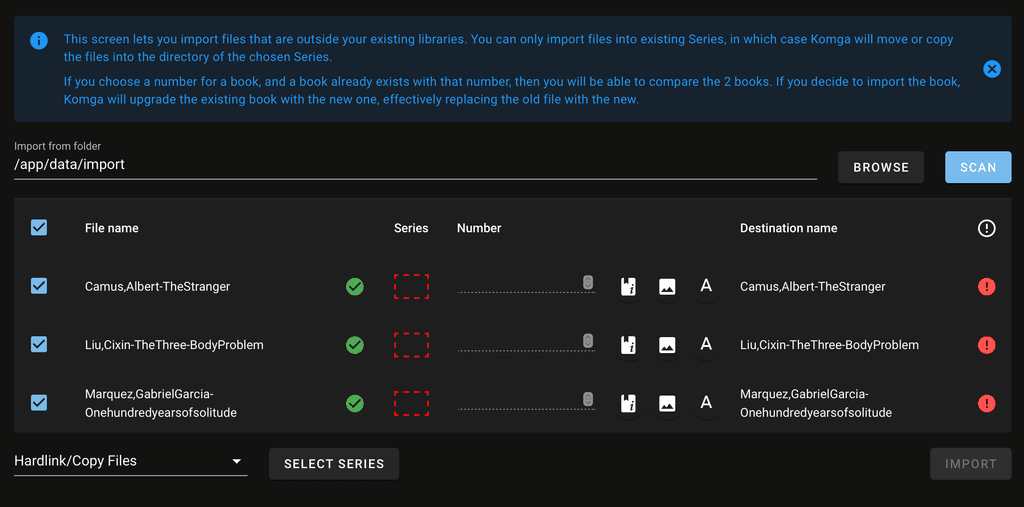
                Screenshot 2025-01-21 at 12.07.23.png

                My workflow is not what Komga expects.
                I thought : be organised - create an imports folder - import from it - but can’t do that.
                Seems I need to just import into the “destination” folder.

                My misunderstanding … but not very clear docs.

                Indie app dev, scratching my itches : communityapps.appx.uk, portfolio at myca.appx.uk

                1 Reply Last reply
                0
                • jdaviescoatesJ jdaviescoates

                  @LoudLemur said in Komga on Cloudron: How to upload comics held locally to your remote Komga:

                  Do we use Cubby

                  No. Why would you need to use another app?

                  Just use the File Manager and put things in the books folder

                  Screenshot_20250106-070454_Firefox.png

                  Then create a library and choose /app/data/books as the root folder

                  Screenshot_20250106-065708_Firefox.png

                  Voila!

                  Screenshot_20250106-070546_Firefox.png

                  jdaviescoatesJ
                  jdaviescoatesJ
                  jdaviescoates
                  Super Fan
                  wrote on last edited by
                  #9

                  @timconsidine said in Komga on Cloudron: How to upload comics held locally to your remote Komga:

                  Seems I need to just import into the “destination” folder.

                  I'm not following, but just import to the books folder in the File Manager 🤷:

                  @jdaviescoates said in Komga on Cloudron: How to upload comics held locally to your remote Komga:

                  Just use the File Manager and put things in the books folder

                  Screenshot_20250106-070454_Firefox.png

                  Then create a library and choose /app/data/books as the root folder

                  I use Cloudron with Gandi & Hetzner

                  L 1 Reply Last reply
                  2
                  • timconsidineT
                    timconsidineT
                    timconsidine
                    App Dev CA Maintainer Super Fan
                    wrote on last edited by timconsidine
                    #10

                    Yes, @jdaviescoates you’re right, seems I am making it more complicated through some misplaced thought I should organise the directories

                    Indie app dev, scratching my itches : communityapps.appx.uk, portfolio at myca.appx.uk

                    jdaviescoatesJ 1 Reply Last reply
                    0
                    • timconsidineT timconsidine

                      Yes, @jdaviescoates you’re right, seems I am making it more complicated through some misplaced thought I should organise the directories

                      jdaviescoatesJ
                      jdaviescoatesJ
                      jdaviescoates
                      Super Fan
                      wrote on last edited by
                      #11

                      @timconsidine I think organising is fine, just drop your nicely organised folders into the books folder in File Manager. I've not tried the import thing. Don't actually even have the app installed anymore.

                      I use Cloudron with Gandi & Hetzner

                      1 Reply Last reply
                      1
                      • timconsidineT
                        timconsidineT
                        timconsidine
                        App Dev CA Maintainer Super Fan
                        wrote on last edited by
                        #12

                        Yep.
                        Seems I don’t intuitively “get” the app but making progress.
                        Although I might be uninstalling it 😆
                        Having to go through the File Manager (or other connection to the server) is not what I expect to have to do in this kind of app.

                        Indie app dev, scratching my itches : communityapps.appx.uk, portfolio at myca.appx.uk

                        1 Reply Last reply
                        1
                        • L
                          L
                          LoudLemur
                          CA Maintainer
                          wrote on last edited by
                          #13

                          It takes a long time to upload a comic...

                          1 Reply Last reply
                          0
                          • jdaviescoatesJ jdaviescoates

                            @timconsidine said in Komga on Cloudron: How to upload comics held locally to your remote Komga:

                            Seems I need to just import into the “destination” folder.

                            I'm not following, but just import to the books folder in the File Manager 🤷:

                            @jdaviescoates said in Komga on Cloudron: How to upload comics held locally to your remote Komga:

                            Just use the File Manager and put things in the books folder

                            Screenshot_20250106-070454_Firefox.png

                            Then create a library and choose /app/data/books as the root folder

                            L
                            L
                            LoudLemur
                            CA Maintainer
                            wrote on last edited by
                            #14

                            @jdaviescoates said in Komga on Cloudron: How to upload comics held locally to your remote Komga:

                            /app/data/books

                            Thanks. This solved it for me.

                            1 Reply Last reply
                            1
                            • perelinP
                              perelinP
                              perelin
                              wrote on last edited by
                              #15

                              I guess Komga is not for the casual "upload a comic here and there" use case, but bigger, pre-existing libraries. I personally have my comics on a storage share, which I mounted through Cloudron and imported in Komga. Works well enough.

                              1 Reply Last reply
                              3

                              Hello! It looks like you're interested in this conversation, but you don't have an account yet.

                              Getting fed up of having to scroll through the same posts each visit? When you register for an account, you'll always come back to exactly where you were before, and choose to be notified of new replies (either via email, or push notification). You'll also be able to save bookmarks and upvote posts to show your appreciation to other community members.

                              With your input, this post could be even better 💗

                              Register Login
                              Reply
                              • Reply as topic
                              Log in to reply
                              • Oldest to Newest
                              • Newest to Oldest
                              • Most Votes


                              • Login

                              • Don't have an account? Register

                              • Login or register to search.
                              • First post
                                Last post
                              0
                              • Categories
                              • Recent
                              • Tags
                              • Popular
                              • Bookmarks
                              • Search