
CCAI : Cloudron Custom App Installer
-
@timconsidine Personally want to thank you for pushing CCAI and moving the development to the point where the Cloudron Team is taking this the next part of journey. In my mind, this makes Cloudron THE platform for hosting custom apps.
@crazybrad thank you.
Almost always I am scratching my own itches, but glad to be able to help others in process.I'm excited to see how Cloudron delivers the functionality, I'm sure it will be more slick than mine.
And I don't think they have ever been 'opposed' to it (it's been in cloudron CLI for yonks), it's just there's always been something more important / higher up on the list. A familiar dilemma.
Even though my project's lifetime will turn out to have short-lived usefulness, it's been a fun project.
Indie app dev, huge fan of Cloudron PaaS, scratching my itches : communityapps.appx.uk
-
@crazybrad thank you.
Almost always I am scratching my own itches, but glad to be able to help others in process.I'm excited to see how Cloudron delivers the functionality, I'm sure it will be more slick than mine.
And I don't think they have ever been 'opposed' to it (it's been in cloudron CLI for yonks), it's just there's always been something more important / higher up on the list. A familiar dilemma.
Even though my project's lifetime will turn out to have short-lived usefulness, it's been a fun project.
@timconsidine not sure why it needs to be retired so soon. It can still work as is for many moons.
Perhaps monitoring access would be a better metric for when it becomes obsolete and unused.
-
@timconsidine not sure why it needs to be retired so soon. It can still work as is for many moons.
Perhaps monitoring access would be a better metric for when it becomes obsolete and unused.
-
@timconsidine
Thank you for your work on this. It really leverages Cloudron's capabilities and helps make more applications deployable using Cloudron.Feedback:
-
@timconsidine
Thank you for your work on this. It really leverages Cloudron's capabilities and helps make more applications deployable using Cloudron.Feedback:
said in CCAI : Cloudron Custom App Installer:
@timconsidine
Thank you for your work on this. It really leverages Cloudron's capabilities and helps make more applications deployable using Cloudron.Feedback:
Edit /app/data/config.json with your Cloudron URL and a NEW Long-Lived Token.This part is a bit confusing for me. Let me show why:
- We create token 1 when we first install CCAI to access our Cloudron.
- We create token 2 when we install our first application, Application A.
- After our first application installation is completed, we are asked to update its token, so we create token 3
- Then we might need to install an additional app, Application B. So we launch the CCAI on our local machine and ... create token 4?
Also:
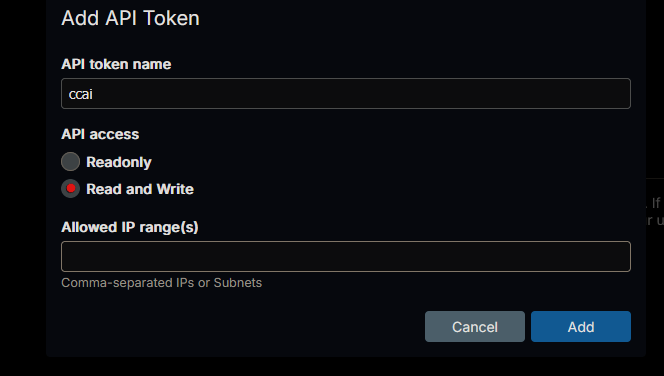
Should the tokens be read-only or read and write?
Also:
Could we please also include a pretty icon for that specific application so we have one readily available instead of the generic cloudron one in our panel? Perhaps that could be included inline with the apps list on CCAI. As that list grows, it might help people find the ones they want more quickly, too.
-
said in CCAI : Cloudron Custom App Installer:
@timconsidine
Thank you for your work on this. It really leverages Cloudron's capabilities and helps make more applications deployable using Cloudron.Feedback:
Edit /app/data/config.json with your Cloudron URL and a NEW Long-Lived Token.This part is a bit confusing for me. Let me show why:
- We create token 1 when we first install CCAI to access our Cloudron.
- We create token 2 when we install our first application, Application A.
- After our first application installation is completed, we are asked to update its token, so we create token 3
- Then we might need to install an additional app, Application B. So we launch the CCAI on our local machine and ... create token 4?
Also:
Should the tokens be read-only or read and write?
Also:
Could we please also include a pretty icon for that specific application so we have one readily available instead of the generic cloudron one in our panel? Perhaps that could be included inline with the apps list on CCAI. As that list grows, it might help people find the ones they want more quickly, too.
@LoudLemur thank you
- the tokens : this kinda reflects the "journey" that CCAI went on. Initially it was browser-only ... and not user's site. I acknowledge users' cautions about this. Hence recommending a short-lived token disposable for use in CCAI open browser
Then we had CCAI-P deployed on your own cloudron, and interacting with your own Cloudron. In this case a multi-use long-life token was OK and so recommended. I think the quote you included in your question is from CCAI-P.
Then CustomAppGateway got rid of browsers completely for initial install and you enter a token into the binary on your local device. So not needed to use single-use short-term token. But hey everyone's paranoid these days so no harm in doing so.
I don't recognise the need for a 3rd token, but it might an academic question, as Cloudron 9.1 will make all this redundant. A much smoother and less problematic security approach, because it's all "on platform"
-
RO vs RW : it needs to make changes to your Cloudron, so RW.
-
pretty icons : that all comes down to the app being deployed. CCAI-P uses a similar but deliberately different logo to Cloudron.
Let me know which apps are not rendering a nice icon, and I can look at it.
Cloudron :

CCAI / CCAI-P :

-
@LoudLemur thank you
- the tokens : this kinda reflects the "journey" that CCAI went on. Initially it was browser-only ... and not user's site. I acknowledge users' cautions about this. Hence recommending a short-lived token disposable for use in CCAI open browser
Then we had CCAI-P deployed on your own cloudron, and interacting with your own Cloudron. In this case a multi-use long-life token was OK and so recommended. I think the quote you included in your question is from CCAI-P.
Then CustomAppGateway got rid of browsers completely for initial install and you enter a token into the binary on your local device. So not needed to use single-use short-term token. But hey everyone's paranoid these days so no harm in doing so.
I don't recognise the need for a 3rd token, but it might an academic question, as Cloudron 9.1 will make all this redundant. A much smoother and less problematic security approach, because it's all "on platform"
-
RO vs RW : it needs to make changes to your Cloudron, so RW.
-
pretty icons : that all comes down to the app being deployed. CCAI-P uses a similar but deliberately different logo to Cloudron.
Let me know which apps are not rendering a nice icon, and I can look at it.
Cloudron :
CCAI / CCAI-P :
Hi @timconsidine, thank you for your efforts in making CCAI. However, is there any tutorial video on how to install it and update the application if we use CCAI? So, the newbie like me can understand the whole process.

-
The launcher guides you through it. Here's a screenshot of the Windows method.
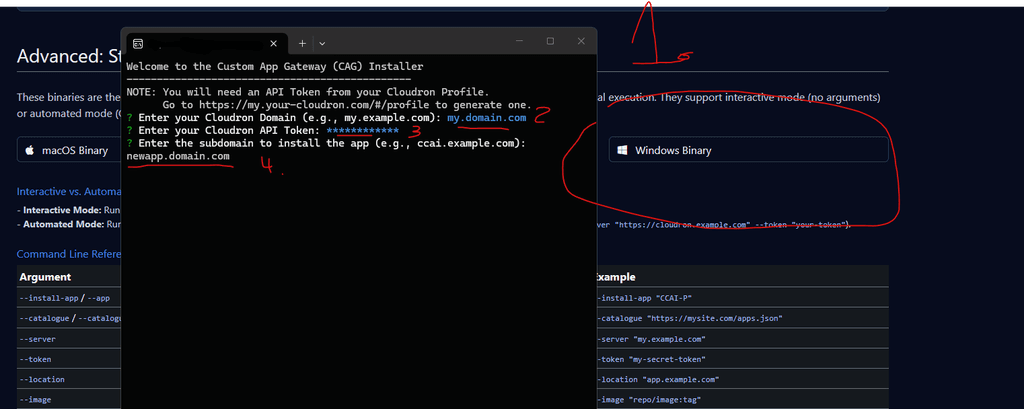
Explanation of the annotated steps:
- download the windows script thing from here: https://customappgateway.appx.uk/
- launch the windows script and enter your cloudron domain
- enter your api token (create one in your CR dash > profile > API Token > Add
- Enter a domain for the new CCAI-P app (e.g. ccai.domain.com)
Once CCAI-P is installed. Go to the app settings in your dashboard > File manager > /app/data/config.json
Edit the two lines to add your cloudron domain and API token. Example below.
{
  "apiEndpoint": "my.domain.com",
  "token": "sdgkj5437jk43g9u34ijhuvkn23kj5yk43kjokj435ykj"
}
Restart the app. Feel free to browse and install any app from the catalog.
-
Hi @timconsidine, thank you for your efforts in making CCAI. However, is there any tutorial video on how to install it and update the application if we use CCAI? So, the newbie like me can understand the whole process.
@IniBudi I didn’t make a video as the process is simple, and Cloudron 9.1 will take over soon.

As @humptydumpty (thank you for stepping in) said, the process is guided.
Some important points :
- CCAI original version is dead : site now directs you to CustomAppGateway which is the new start point
- CustomAppGateway gives you choice of installing individual apps from there, or installing CCAI-P which is maybe more useful if installing multiple custom apps
- for individual installations, CustomAppGateway shows a catalogue, pick an item, popup shows a description and a curl one line installation command. Copy that and paste into your desktop/laptop terminal. It will :
- prompt for your Cloudron, e.g. my.domain.tld
- prompt for a token (create this in your Cloudron dashboard | Profile | Tokens
- prompt for app location, eg myapp.mydomain.tld
- invoke the installation : note that it will likely complete quickly but your Cloudron needs another couple minutes to install the app
- for multiple custom apps, use CustomAppGateway to install CCAI-P : same process as above.
- you will then have an app in your Cloudron which can install further apps (displays the same catalog as CustomAppGateway but no more curl download links)
- store your creds in /app/data
- pick an app and watch installation proceed
- wait for completion notice.
Note : your auth creds are now always input in your control (your desktop or your own Cloudron environment), never in a 3rd party site.
Let me know if any other questions
Indie app dev, huge fan of Cloudron PaaS, scratching my itches : communityapps.appx.uk
-
@IniBudi I didn’t make a video as the process is simple, and Cloudron 9.1 will take over soon.
As @humptydumpty (thank you for stepping in) said, the process is guided.
Some important points :
- CCAI original version is dead : site now directs you to CustomAppGateway which is the new start point
- CustomAppGateway gives you choice of installing individual apps from there, or installing CCAI-P which is maybe more useful if installing multiple custom apps
- for individual installations, CustomAppGateway shows a catalogue, pick an item, popup shows a description and a curl one line installation command. Copy that and paste into your desktop/laptop terminal. It will :
- prompt for your Cloudron, e.g. my.domain.tld
- prompt for a token (create this in your Cloudron dashboard | Profile | Tokens
- prompt for app location, eg myapp.mydomain.tld
- invoke the installation : note that it will likely complete quickly but your Cloudron needs another couple minutes to install the app
- for multiple custom apps, use CustomAppGateway to install CCAI-P : same process as above.
- you will then have an app in your Cloudron which can install further apps (displays the same catalog as CustomAppGateway but no more curl download links)
- store your creds in /app/data
- pick an app and watch installation proceed
- wait for completion notice.
Note : your auth creds are now always input in your control (your desktop or your own Cloudron environment), never in a 3rd party site.
Let me know if any other questions
@timconsidine it's gone too soon, was needing to use CCAI today.. can you extend it for another month?
-
@timconsidine it's gone too soon, was needing to use CCAI today.. can you extend it for another month?
-
@timconsidine it's gone too soon, was needing to use CCAI today.. can you extend it for another month?
@robi sorry for confusion
"CCAI" as a whole is not gone
Just the original browser-centric version requiring users to put auth creds in my site (yuk!)CustomAppGateway lives on, to install CCAI-P and individual apps.
https://customgateway.appx.ukThis will live for a while, definitely for a month after 9.1 is released, maybe as long as 3-6 months after 9.1.
Indie app dev, huge fan of Cloudron PaaS, scratching my itches : communityapps.appx.uk
-
@robi sorry for confusion
"CCAI" as a whole is not gone
Just the original browser-centric version requiring users to put auth creds in my site (yuk!)CustomAppGateway lives on, to install CCAI-P and individual apps.
https://customgateway.appx.ukThis will live for a while, definitely for a month after 9.1 is released, maybe as long as 3-6 months after 9.1.
@timconsidine I quite enjoyed your 'yuk' site.
-
Congratz @timconsidine CCAI-P is an excellent software. I'm looking forward to Cloudron 9.1 and you expanding the Apps list.
I tested installing Moltbot (OpenClaw) and there are errors.
Used settings ---
Repository Location:
http://git.cloudron.io/timconsidine/cloudron-moltbot
+
Docker Image Location:
tcmbp132021/cloudron-moltbot:latest
+
Port Binding:
3000Basically, it says that the image can't be pulled.
Please see if you can spot something strange:
Error in CCAI-P:
[7:34:50 PM] [2026-02-13 18:34:49] App installation error: Installation failed: Unable to pull image tcmbp132021/cloudron-moltbot:latest. message: (HTTP code 404) unexpected - manifest for tcmbp132021/cloudron-moltbot:latest not found: manifest unknown: manifest unknown statusCode: 404
[7:34:50 PM] [2026-02-13 18:34:49] Installation failed with exit code 1
[7:34:50 PM] ERROR: Installation failed: Unknown errorError in Cloudron:
Error - Unable to pull image tcmbp132021/cloudron-moltbot:latest. message: (HTTP code 404) unexpected - manifest for tcmbp132021/cloudron-moltbot:latest not found: manifest unknown: manifest unknown statusCode: 404 -
Congratz @timconsidine CCAI-P is an excellent software. I'm looking forward to Cloudron 9.1 and you expanding the Apps list.
I tested installing Moltbot (OpenClaw) and there are errors.
Used settings ---
Repository Location:
http://git.cloudron.io/timconsidine/cloudron-moltbot
+
Docker Image Location:
tcmbp132021/cloudron-moltbot:latest
+
Port Binding:
3000Basically, it says that the image can't be pulled.
Please see if you can spot something strange:
Error in CCAI-P:
[7:34:50 PM] [2026-02-13 18:34:49] App installation error: Installation failed: Unable to pull image tcmbp132021/cloudron-moltbot:latest. message: (HTTP code 404) unexpected - manifest for tcmbp132021/cloudron-moltbot:latest not found: manifest unknown: manifest unknown statusCode: 404
[7:34:50 PM] [2026-02-13 18:34:49] Installation failed with exit code 1
[7:34:50 PM] ERROR: Installation failed: Unknown errorError in Cloudron:
Error - Unable to pull image tcmbp132021/cloudron-moltbot:latest. message: (HTTP code 404) unexpected - manifest for tcmbp132021/cloudron-moltbot:latest not found: manifest unknown: manifest unknown statusCode: 404@creative567145 thanks for reporting
I should have clarified moltbot is unfinished
And may never be finished as I am packaging openclawApologies if this caused you wasted time
-
@creative567145 thanks for reporting
I should have clarified moltbot is unfinished
And may never be finished as I am packaging openclawApologies if this caused you wasted time
@timconsidine Thank you for your fast response. No worries.
Your documentation is very useful:
https://git.cloudron.io/timconsidine/cloudron-moltbot/-/blob/main/POSTINSTALL.md?ref_type=heads
so perhaps it will help me make OpenClaw work on DokPloy.I'll test additionally if I can self-host an LLM via Ollama on a Cloudron VPS and connect it to OpenClaw




Hello! It looks like you're interested in this conversation, but you don't have an account yet.
Getting fed up of having to scroll through the same posts each visit? When you register for an account, you'll always come back to exactly where you were before, and choose to be notified of new replies (either via email, or push notification). You'll also be able to save bookmarks and upvote posts to show your appreciation to other community members.
With your input, this post could be even better 💗
Register Login