Cloudron makes it easy to run web apps like WordPress, Nextcloud, GitLab on your server. Find out more or install now.


Skip to content
  • Categories
  • Recent
  • Tags
  • Popular
  • Bookmarks
  • Search
Skins
  • Light
  • Brite
  • Cerulean
  • Cosmo
  • Flatly
  • Journal
  • Litera
  • Lumen
  • Lux
  • Materia
  • Minty
  • Morph
  • Pulse
  • Sandstone
  • Simplex
  • Sketchy
  • Spacelab
  • United
  • Yeti
  • Zephyr
  • Dark
  • Cyborg
  • Darkly
  • Quartz
  • Slate
  • Solar
  • Superhero
  • Vapor

  • Default (No Skin)
  • No Skin
Collapse
Brand Logo

Cloudron Forum

Apps - Status | Demo | Docs | Install
  1. Cloudron Forum
  2. MiroTalk
  3. MiroTalk Update regularly fails after update

MiroTalk Update regularly fails after update

Scheduled Pinned Locked Moved MiroTalk
port bindings
20 Posts 7 Posters 1.9k Views 7 Watching
  • Oldest to Newest
  • Newest to Oldest
  • Most Votes
Reply
  • Reply as topic
Log in to reply
This topic has been deleted. Only users with topic management privileges can see it.
  • jamesJ james

    Hello @mirotalk
    Does this have any other effects?

    MiroTalkM Offline
    MiroTalkM Offline
    MiroTalk
    App Maintainer
    wrote on last edited by
    #7

    @james said in MiroTalk Update regularly fails after update:

    Does this have any other effects?

    In theory, it shouldn’t have any other effects, as long as the user can switch between these two modes. I’m not entirely sure why Mediasoup doesn’t use a server SFU by default, but you could ask the Mediasoup support forum for clarification.

    1 Reply Last reply
    1
    • D Offline
      D Offline
      djxx
      wrote on last edited by
      #8

      Is there any update on this? I can't rely on this app for meeting links because about 75% of the time it's not running properly due to startup failure.

      1 Reply Last reply
      0
      • nebulonN Offline
        nebulonN Offline
        nebulon
        Staff
        wrote on last edited by
        #9

        So this always happens when the app gets updated?

        D 1 Reply Last reply
        0
        • nebulonN nebulon

          So this always happens when the app gets updated?

          D Offline
          D Offline
          djxx
          wrote on last edited by
          #10

          @nebulon It also happens after system updates or restarts. It seems it's a roll of the dice if the ports aren't already taken. Restarting the app doesn't fix it anymore, so now when it crashes I change the SFU TCP/UDP port range to something else and it works when the app restarts.

          MiroTalkM 1 Reply Last reply
          0
          • robiR Offline
            robiR Offline
            robi
            wrote on last edited by
            #11

            Sounds like a firewall cleanup issue or maybe something in between

            Conscious tech

            1 Reply Last reply
            0
            • nebulonN Offline
              nebulonN Offline
              nebulon
              Staff
              wrote on last edited by nebulon
              #12

              When this happens, can you check which container is occupying those ports?

              You can run

              docker ps --format "table {{.ID}}\t{{.Names}}\t{{.Ports}}" | grep <portnumber>
              

              which should reveal the container holding on to it.

              1 Reply Last reply
              1
              • D djxx

                @nebulon It also happens after system updates or restarts. It seems it's a roll of the dice if the ports aren't already taken. Restarting the app doesn't fix it anymore, so now when it crashes I change the SFU TCP/UDP port range to something else and it works when the app restarts.

                MiroTalkM Offline
                MiroTalkM Offline
                MiroTalk
                App Maintainer
                wrote on last edited by MiroTalk
                #13

                @djxx said:

                Restarting the app doesn't fix it anymore, so now when it crashes I change the SFU TCP/UDP port range to something else and it works when the app restarts.

                This issue can occur if another application is already using ports within the 40000–40100 range. To resolve it, you can either change the port range (for example, starting from 25000)
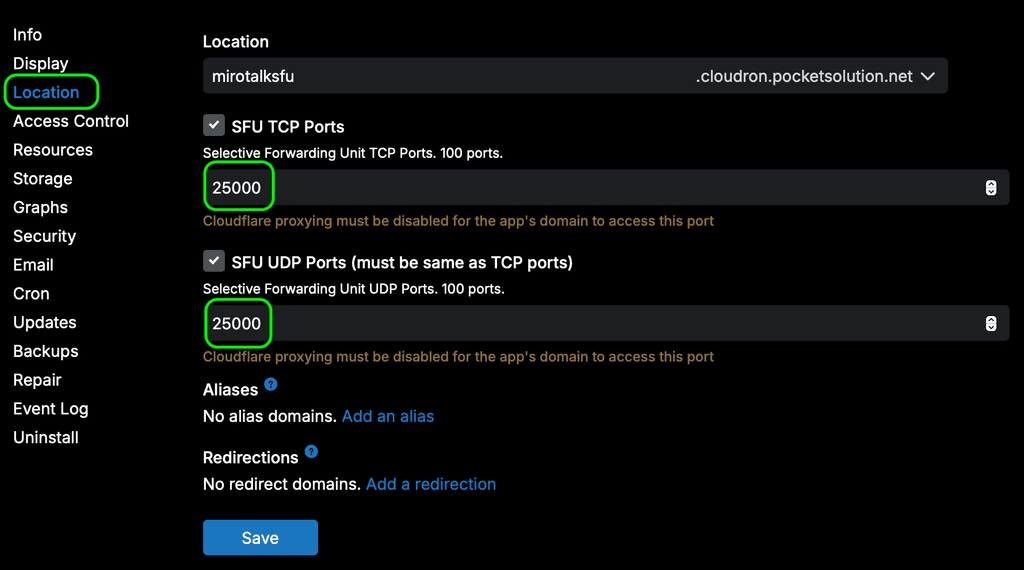
                port-conflicts.png

                or enable WebRTC server mode in the env (edit it via Cloudron file manager), which requires fewer ports, as described above.

                SFU_SERVER=true
                

                Then restart the instance.

                Edit: The second option requires implementation on the Cloudron side, as described here:
                https://forum.cloudron.io/post/117374

                1 Reply Last reply
                1
                • robiR Offline
                  robiR Offline
                  robi
                  wrote on last edited by
                  #14

                  Why don't we have the second option as the more reliable packaged default?

                  Conscious tech

                  1 Reply Last reply
                  0
                  • girishG Offline
                    girishG Offline
                    girish
                    Staff
                    wrote on last edited by
                    #15

                    @djxx I think https://git.cloudron.io/platform/box/-/commit/b08e3a5128cdf2e036523c6d585adb0674ba95bf will help.

                    1 Reply Last reply
                    0
                    • D Offline
                      D Offline
                      djxx
                      wrote on last edited by djxx
                      #16

                      It's happening again, and this time I don't see a container conflict but rather a health check failure that it cant find it's public IP:

                      Mar 30 09:06:14 [3/30/2026, 16:06:14:098] [Server] Failed to detect IP from http://api.ipify.org 'getaddrinfo EAI_AGAIN api.ipify.org'
                      Mar 30 09:06:14 [3/30/2026, 16:06:14:101] [Server] Failed to detect IP from http://ipinfo.io/ip 'getaddrinfo EAI_AGAIN ipinfo.io'
                      Mar 30 09:06:14 [3/30/2026, 16:06:14:102] [Server] Failed to detect IP from http://ifconfig.me/ip 'getaddrinfo EAI_AGAIN ifconfig.me'
                      Mar 30 09:06:14 [3/30/2026, 16:06:14:103] [Server] Public IP detection failed 'All public IP detection services failed! Please check your network connection'
                      Mar 30 09:06:14 ⠙
                      Mar 30 09:06:23 => Healthcheck error: Error: connect EHOSTUNREACH 172.18.16.130:3010
                      

                      When I check what is using port 3010, it's nodeJS running /home/yellowtent/box/box.js

                      MiroTalkM 1 Reply Last reply
                      0
                      • D djxx

                        It's happening again, and this time I don't see a container conflict but rather a health check failure that it cant find it's public IP:

                        Mar 30 09:06:14 [3/30/2026, 16:06:14:098] [Server] Failed to detect IP from http://api.ipify.org 'getaddrinfo EAI_AGAIN api.ipify.org'
                        Mar 30 09:06:14 [3/30/2026, 16:06:14:101] [Server] Failed to detect IP from http://ipinfo.io/ip 'getaddrinfo EAI_AGAIN ipinfo.io'
                        Mar 30 09:06:14 [3/30/2026, 16:06:14:102] [Server] Failed to detect IP from http://ifconfig.me/ip 'getaddrinfo EAI_AGAIN ifconfig.me'
                        Mar 30 09:06:14 [3/30/2026, 16:06:14:103] [Server] Public IP detection failed 'All public IP detection services failed! Please check your network connection'
                        Mar 30 09:06:14 ⠙
                        Mar 30 09:06:23 => Healthcheck error: Error: connect EHOSTUNREACH 172.18.16.130:3010
                        

                        When I check what is using port 3010, it's nodeJS running /home/yellowtent/box/box.js

                        MiroTalkM Offline
                        MiroTalkM Offline
                        MiroTalk
                        App Maintainer
                        wrote on last edited by MiroTalk
                        #17
                        Mar 30 09:06:14 [3/30/2026, 16:06:14:098] [Server] Failed to detect IP from http://api.ipify.org 'getaddrinfo EAI_AGAIN api.ipify.org'
                        Mar 30 09:06:14 [3/30/2026, 16:06:14:101] [Server] Failed to detect IP from http://ipinfo.io/ip 'getaddrinfo EAI_AGAIN ipinfo.io'
                        Mar 30 09:06:14 [3/30/2026, 16:06:14:102] [Server] Failed to detect IP from http://ifconfig.me/ip 'getaddrinfo EAI_AGAIN ifconfig.me'
                        Mar 30 09:06:14 [3/30/2026, 16:06:14:103] [Server] Public IP detection failed 'All public IP detection services failed! Please check your network connection'
                        

                        This looks like a network-related issue rather than something specific to MiroTalk.

                        If SFU_ANNOUNCED_IP is not configured, the system will automatically rely on three external services to determine the instance’s public IPv4 address.


                        Is there a firewall or network filter in between that might be blocking traffic?


                        NOTE: As I can see, on Cloudron this is handled by the command in:
                        https://git.cloudron.io/packages/mirotalksfu-app/-/blob/main/start.sh#L39

                        If it fails (mean not set SFU_ANNOUNCED_IP), MiroTalk SFU uses an internal fallback mechanism that queries three external services in sequence to determine a valid public IPv4 address for the instance.

                        D 1 Reply Last reply
                        0
                        • MiroTalkM MiroTalk
                          Mar 30 09:06:14 [3/30/2026, 16:06:14:098] [Server] Failed to detect IP from http://api.ipify.org 'getaddrinfo EAI_AGAIN api.ipify.org'
                          Mar 30 09:06:14 [3/30/2026, 16:06:14:101] [Server] Failed to detect IP from http://ipinfo.io/ip 'getaddrinfo EAI_AGAIN ipinfo.io'
                          Mar 30 09:06:14 [3/30/2026, 16:06:14:102] [Server] Failed to detect IP from http://ifconfig.me/ip 'getaddrinfo EAI_AGAIN ifconfig.me'
                          Mar 30 09:06:14 [3/30/2026, 16:06:14:103] [Server] Public IP detection failed 'All public IP detection services failed! Please check your network connection'
                          

                          This looks like a network-related issue rather than something specific to MiroTalk.

                          If SFU_ANNOUNCED_IP is not configured, the system will automatically rely on three external services to determine the instance’s public IPv4 address.


                          Is there a firewall or network filter in between that might be blocking traffic?


                          NOTE: As I can see, on Cloudron this is handled by the command in:
                          https://git.cloudron.io/packages/mirotalksfu-app/-/blob/main/start.sh#L39

                          If it fails (mean not set SFU_ANNOUNCED_IP), MiroTalk SFU uses an internal fallback mechanism that queries three external services in sequence to determine a valid public IPv4 address for the instance.

                          D Offline
                          D Offline
                          djxx
                          wrote on last edited by
                          #18

                          @MiroTalk I can't speak for what Cloudron is doing - but after changing the port ranges again and restarting the app, it starts working again. Perhaps there's a step (getting the public IP) that only happens on reconfiguration but the app expects it to happen on every start?


                          1 Reply Last reply
                          0
                          • girishG Offline
                            girishG Offline
                            girish
                            Staff
                            wrote on last edited by
                            #19

                            @djxx unfortunately, my fix (in 9.1.6) did not work. I am looking into a more involved fix.

                            1 Reply Last reply
                            0
                            • girishG Offline
                              girishG Offline
                              girish
                              Staff
                              wrote on last edited by
                              #20

                              I missed a retry in start container - https://git.cloudron.io/platform/box/-/commit/4ba9c63eb41d663e805f72257cc37774f401265b

                              1 Reply Last reply
                              1

                              Hello! It looks like you're interested in this conversation, but you don't have an account yet.

                              Getting fed up of having to scroll through the same posts each visit? When you register for an account, you'll always come back to exactly where you were before, and choose to be notified of new replies (either via email, or push notification). You'll also be able to save bookmarks and upvote posts to show your appreciation to other community members.

                              With your input, this post could be even better 💗

                              Register Login
                              Reply
                              • Reply as topic
                              Log in to reply
                              • Oldest to Newest
                              • Newest to Oldest
                              • Most Votes


                              • Login

                              • Don't have an account? Register

                              • Login or register to search.
                              • First post
                                Last post
                              0
                              • Categories
                              • Recent
                              • Tags
                              • Popular
                              • Bookmarks
                              • Search


