
Dify.ai, a self-hosted prompt-management tool
-
Installing App to diffy.example.org ...
Image: tcmbp132021/cloudron-dify:latest
✘ Installation failed: No such route[I assume
diffy.example.orgis just obfuscation for the forum. ]
]Compared to this :
Installing App to jumble.xapps.uk...
Image: tcmbp132021/cloudron-dify:latest Installation Started! (This may take a few minutes)
I think this suggests / confirms network issue.
Try again, maybe ?The first part of the sequence (the script) runs in seconds, so re-trying is do-able.
The second part (the cloudron install) takes few minutes because of image size.Are you running the install on your desktop/laptop ? Or on your Cloudron instance ?
Either way, I suspect temporary network failure connecting to hub.docker.com
Edit : I would do some standard network diagnostics.
% ping hub.docker.com
PING hub.docker.com.cdn.cloudflare.net (104.18.43.187): 56 data bytes
64 bytes from 104.18.43.187: icmp_seq=0 ttl=58 time=11.143 ms
64 bytes from 104.18.43.187: icmp_seq=1 ttl=58 time=11.543 ms
64 bytes from 104.18.43.187: icmp_seq=2 ttl=58 time=10.148 ms
^C
--- hub.docker.com.cdn.cloudflare.net ping statistics ---
3 packets transmitted, 3 packets received, 0.0% packet loss
round-trip min/avg/max/stddev = 10.148/10.945/11.543/0.587 ms
Hmmm, possibly a Cloudflare issue ?
@timconsidine can you check your chats?
-
% curl -fsSL https://customappgateway.appx.uk/install.sh | bash -s -- --install-app "Dify AI"
CustomAppGateway Universal Installer
----------------------------------------
Detected OS: Darwin (arm64)
Downloading installer from: https://customappgateway.appx.uk/cag-installer-macos
Running Installer...
----------------------------------------
Welcome to the Custom App Gateway (CAG) Installer
-----------------------------------------------
Fetching catalogue to find app: Dify AI...
✔ Found App: Dify AI (undefined)
NOTE: You will need an API Token from your Cloudron Profile.
      Go to https://my.your-cloudron.com/#/profile to generate one.
? Enter your Cloudron Domain (e.g., my.example.com): my.example.uk
? Enter your Cloudron API Token: ****************************************************************
? Enter the subdomain to install the app (e.g., ccai.example.com): jumble.xapps.uk

Validating connection...
✔ Connection successful

Fetching App Manifest...
Fetching manifest from: https://customappgateway.appx.uk/deploy/dify/CloudronManifest.json
✔ Manifest fetched successfully
Resolving manifest file references...

Installing App to jumble.xapps.uk...
Image: tcmbp132021/cloudron-dify:latest

✔ Installation Started! (This may take a few minutes)
App ID: 35125028-84f0-4fb7-a307-eb6adaa6d691
You can check the progress in your Cloudron Dashboard.
Please wait for the app to enter "Running" state before using it.

SECURITY REMINDER: Please DELETE the API Token you used for this installation now.

----------------------------------------
Cleaning up...
Done.
Takes a while to download image because it's a BIG image.
Then :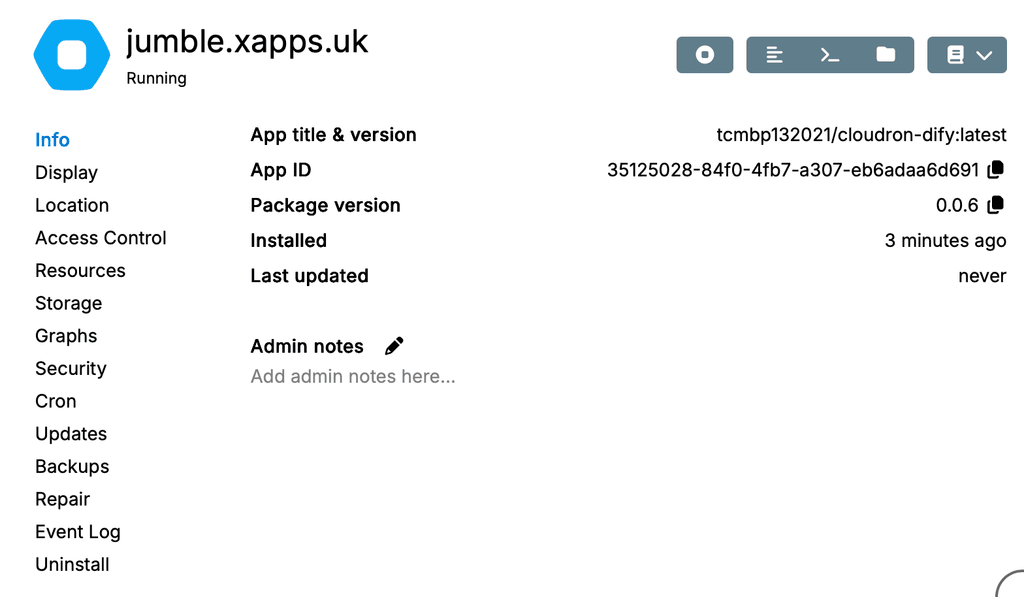
So ... I don't know for sure
 but I would suspect network issue somewhere.
@timconsidine same on the third network:
curl -fsSL https://customappgateway.appx.uk/install.sh | bash -s -- --install-app "Dify AI"
CustomAppGateway Universal Installer
----------------------------------------
Detected OS: Linux (x86_64)
Downloading installer from: https://customappgateway.appx.uk/cag-installer-linux
Running Installer...
----------------------------------------
Welcome to the Custom App Gateway (CAG) Installer
-----------------------------------------------
Fetching catalogue to find app: Dify AI...
✔ Found App: Dify AI (undefined)
NOTE: You will need an API Token from your Cloudron Profile.
      Go to https://my.your-cloudron.com/#/profile to generate one.
? Enter your Cloudron Domain (e.g., my.example.com): my.example.org
? Enter your Cloudron API Token: ****************************************************************
? Enter the subdomain to install the app (e.g., ccai.example.com): dify.example.org

Validating connection...
✔ Connection successful

Fetching App Manifest...
Fetching manifest from: https://customappgateway.appx.uk/deploy/dify/CloudronManifest.json
✔ Manifest fetched successfully
Resolving manifest file references...

Installing App to dify.example.org...
Image: tcmbp132021/cloudron-dify:latest
✘ Installation failed: No such route
Details: {
  "status": "Not Found",
  "message": "No such route"
}
ping hub.docker.com PING hub.docker.com (2606:4700:4409::ac40:9045) 56 Datenbytes 64 Bytes von 2606:4700:4409::ac40:9045: icmp_seq=1 ttl=56 Zeit=43.1 ms 64 Bytes von 2606:4700:4409::ac40:9045: icmp_seq=2 ttl=56 Zeit=48.4 ms 64 Bytes von 2606:4700:4409::ac40:9045: icmp_seq=3 ttl=56 Zeit=47.0 msI have no idea what the difference is between your network and mine.
Pronouns: he/him | Primary language: German
-
@timconsidine same on the third network:
curl -fsSL https://customappgateway.appx.uk/install.sh | bash -s -- --install-app "Dify AI"
CustomAppGateway Universal Installer
----------------------------------------
Detected OS: Linux (x86_64)
Downloading installer from: https://customappgateway.appx.uk/cag-installer-linux
Running Installer...
----------------------------------------
Welcome to the Custom App Gateway (CAG) Installer
-----------------------------------------------
Fetching catalogue to find app: Dify AI...
✔ Found App: Dify AI (undefined)
NOTE: You will need an API Token from your Cloudron Profile.
      Go to https://my.your-cloudron.com/#/profile to generate one.
? Enter your Cloudron Domain (e.g., my.example.com): my.example.org
? Enter your Cloudron API Token: ****************************************************************
? Enter the subdomain to install the app (e.g., ccai.example.com): dify.example.org

Validating connection...
✔ Connection successful

Fetching App Manifest...
Fetching manifest from: https://customappgateway.appx.uk/deploy/dify/CloudronManifest.json
✔ Manifest fetched successfully
Resolving manifest file references...

Installing App to dify.example.org...
Image: tcmbp132021/cloudron-dify:latest
✘ Installation failed: No such route
Details: {
  "status": "Not Found",
  "message": "No such route"
}
ping hub.docker.com PING hub.docker.com (2606:4700:4409::ac40:9045) 56 Datenbytes 64 Bytes von 2606:4700:4409::ac40:9045: icmp_seq=1 ttl=56 Zeit=43.1 ms 64 Bytes von 2606:4700:4409::ac40:9045: icmp_seq=2 ttl=56 Zeit=48.4 ms 64 Bytes von 2606:4700:4409::ac40:9045: icmp_seq=3 ttl=56 Zeit=47.0 msI have no idea what the difference is between your network and mine.
@luckow well seems to me it is docker hub access issue, not an app issue.
My ping was via cloudflare and IPV4
Yours seem ipv6 and direct.
No idea why either difference would be a blocker.I’ll try some diagnosis
-
Re-packaged as a community app :
Cloudron Versions:
https://communityapps.appx.uk/cloudron-dify/CloudronVersions.jsonWARNING : it's a big 3.6Gb image to pull down : be patient.
Community Apps Website:
https://communityapps.appx.uk[ @community-apps ]
@luckow does the community app solve your image download ?
@James, how do we communicate updates available ? Just push new details to CloudronVersions.json and Cloudron platform will pick them up and advise those who installed it ? (no update in this one - just a repackage)
Indie app dev, scratching my itches : communityapps.appx.uk, portfolio at myca.appx.uk
-
Re-packaged as a community app :
Cloudron Versions:
https://communityapps.appx.uk/cloudron-dify/CloudronVersions.jsonWARNING : it's a big 3.6Gb image to pull down : be patient.
Community Apps Website:
https://communityapps.appx.uk[ @community-apps ]
@luckow does the community app solve your image download ?
@James, how do we communicate updates available ? Just push new details to CloudronVersions.json and Cloudron platform will pick them up and advise those who installed it ? (no update in this one - just a repackage)
@timconsidine Yes. Great. The download and installation went smoothly.
Pronouns: he/him | Primary language: German
-
@timconsidine Yes. Great. The download and installation went smoothly.
@luckow phew !
-
Re-packaged as a community app :
Cloudron Versions:
https://communityapps.appx.uk/cloudron-dify/CloudronVersions.jsonWARNING : it's a big 3.6Gb image to pull down : be patient.
Community Apps Website:
https://communityapps.appx.uk[ @community-apps ]
@luckow does the community app solve your image download ?
@James, how do we communicate updates available ? Just push new details to CloudronVersions.json and Cloudron platform will pick them up and advise those who installed it ? (no update in this one - just a repackage)
Hello @timconsidine
When you update the
CloudronManifest.jsonfile at e.g.: https://communityapps.appx.uk/cloudron-dify/CloudronVersions.json installation that used this URL will pickup the update automatically. -
-
FWIW, Dify.ai is licensed under a modified version of the Apache License 2.0 with additional conditions:-
https://github.com/langgenius/dify/blob/main/LICENSE -
For all developers who work with large language models and prompts, there are graphical user interfaces that can make life easier.
Dify.ai is especially good and, that's the best part, it can be self-hosted.
Self-hosting documentation: https://docs.dify.ai/getting-started/install-self-hostedFeature overview:
- Building visual prompt workflows
- Supports multiple LLMs, incl. open-source ones
- Supports RAGs and vector databases
- It has an API that you can use to integrate into your own application
- You can log and evaluate your user's requests
I searched for a long time for a good open solution, and came to the conclusion that this is my favourite.
I would love to see this on cloudron and maybe other developers who work with LLMs might agree.
-
@LoudLemur also already packaged as community app
If you don’t check before posting, you risk becoming a bot posting slop -
@LoudLemur also already packaged as community app
If you don’t check before posting, you risk becoming a bot posting slop@timconsidine This is a good point. If I do try these in the future, I shall be sure of checking if they are packaged first. It is useful to check if the estimates prove accurate though.
Can you remember if this was actually hard?
-
@ekevu123 https://forum.cloudron.io/topic/12472/please-use-this-template-to-make-an-app-wishlist-request/13
Thank you for pointing out the template, but when I posted this, this didn't exist yet and I didn't want to go through my posts retroactively.
-
Updated my Dify community app to upstream 1.14.2 with sandbox enabled
https://communityapps.appx.uk/cloudron-dify/CloudronVersions.json
I'm not a Dify expert. Started it mostly for RAG, but I use my own simpler more-focussed custom RAG apps. Looking for use cases for Dify.
-
Bug report for the Cloudron Dify community package: plugins fail: "failed to find uv path"
Package:
io.timconsidine.dify(community), version 2.0.15, imageforgejo.tcjc.uk/cca/cloudron-dify:2.0.15
Cloudron: 9.xSymptom
Installing any model-provider plugin from the Marketplace (e.g. Text Embedding Inference /
langgenius/huggingface_tei) fails with:failed to launch plugin: failed to find uv path: failed to find uv path: exit status 1 failed to init environmentBecause in Dify 2.0 every model provider is a Python plugin, this blocks all providers — embeddings, LLMs, and rerank — so the app can't be wired to any model.
Root cause (verified in the running container)
The image does not contain the
uvbinary, but the plugin daemon shells out touvto build each plugin's Python venv.which uv,find / -name uv -type f,/app/code/api/.venv/bin/uv, andpython -c "import uv"all come up empty.start.shexpects uv: it creates/app/data/cache/uvand/app/data/uv/pythonand exportsUV_CACHE_DIR/UV_PYTHON_INSTALL_DIR, but the binary itself was never installed, and noUV_PATHis set.- The plugin daemon's
PATH(inherited fromstart.sh→ supervisord) is/app/code/api/.venv/bin:/usr/local/...:/usr/bin:...— all read-only, none containinguv.
It is not fixable at runtime by the operator: the rootfs is read-only, and
start.shregenerates/app/data/api-envon every boot, so there is no persistent hook to adduvorUV_PATH.Suggested fix (image-side)
Install
uvinto the image and make it discoverable to the plugin daemon. Any one of:- In the Dockerfile, install uv into the API venv:
pip install uv(putsuvin/app/code/api/.venv/bin, already on the daemon's PATH), or copy the static binary:COPY --from=ghcr.io/astral-sh/uv:latest /uv /usr/local/bin/uv. - Optionally also export an explicit
UV_PATH=/usr/local/bin/uv(or the venv path) instart.shso the daemon doesn't rely on PATH lookup.
After that, confirm a Marketplace plugin (e.g.
langgenius/huggingface_tei) installs and a Rerank model can be added.Note
Pin/ship a known uv version for reproducibility. This is the same class as langgenius/dify#19522, but here
uvis genuinely absent from the image rather than mis-detected. -
Bug report for the Cloudron Dify community package: plugins fail: "failed to find uv path"
Package:
io.timconsidine.dify(community), version 2.0.15, imageforgejo.tcjc.uk/cca/cloudron-dify:2.0.15
Cloudron: 9.xSymptom
Installing any model-provider plugin from the Marketplace (e.g. Text Embedding Inference /
langgenius/huggingface_tei) fails with:failed to launch plugin: failed to find uv path: failed to find uv path: exit status 1 failed to init environmentBecause in Dify 2.0 every model provider is a Python plugin, this blocks all providers — embeddings, LLMs, and rerank — so the app can't be wired to any model.
Root cause (verified in the running container)
The image does not contain the
uvbinary, but the plugin daemon shells out touvto build each plugin's Python venv.which uv,find / -name uv -type f,/app/code/api/.venv/bin/uv, andpython -c "import uv"all come up empty.start.shexpects uv: it creates/app/data/cache/uvand/app/data/uv/pythonand exportsUV_CACHE_DIR/UV_PYTHON_INSTALL_DIR, but the binary itself was never installed, and noUV_PATHis set.- The plugin daemon's
PATH(inherited fromstart.sh→ supervisord) is/app/code/api/.venv/bin:/usr/local/...:/usr/bin:...— all read-only, none containinguv.
It is not fixable at runtime by the operator: the rootfs is read-only, and
start.shregenerates/app/data/api-envon every boot, so there is no persistent hook to adduvorUV_PATH.Suggested fix (image-side)
Install
uvinto the image and make it discoverable to the plugin daemon. Any one of:- In the Dockerfile, install uv into the API venv:
pip install uv(putsuvin/app/code/api/.venv/bin, already on the daemon's PATH), or copy the static binary:COPY --from=ghcr.io/astral-sh/uv:latest /uv /usr/local/bin/uv. - Optionally also export an explicit
UV_PATH=/usr/local/bin/uv(or the venv path) instart.shso the daemon doesn't rely on PATH lookup.
After that, confirm a Marketplace plugin (e.g.
langgenius/huggingface_tei) installs and a Rerank model can be added.Note
Pin/ship a known uv version for reproducibility. This is the same class as langgenius/dify#19522, but here
uvis genuinely absent from the image rather than mis-detected.@LoudLemur away currently but will look into it in my return





 ), you can open a separate package updates thread for a package.
Hello! It looks like you're interested in this conversation, but you don't have an account yet.
Getting fed up of having to scroll through the same posts each visit? When you register for an account, you'll always come back to exactly where you were before, and choose to be notified of new replies (either via email, or push notification). You'll also be able to save bookmarks and upvote posts to show your appreciation to other community members.
With your input, this post could be even better 💗
Register Login