
Disk often full, cannot be extended, what remediations exist?
-
I will send you a DM.
-
There is a difference between Cloudron Volumes and Hetzner Volumes.
In the guide is written:Do not use a Cloudron Volume as storage location for the directories below. Set up fstab or systemd mount manually.
@SansGuidon said in Disk often full, cannot be extended, what remediations exist?:
The guide advises to not use symlinks
It states:
While symlinking various directories will work, this is not supported.
It works, but is not officially supported.
Meaning, yes you can do that, but when you have an issue, you will get less or no support.@SansGuidon said in Disk often full, cannot be extended, what remediations exist?:
As far as I understand it, the guide seems to cover the case for a full migration of docker images or apps data but it is unclear to me how to tackle this only for specific apps, and if that's a supported scenario.
That what Cloudron Volumes are for.
You can add a Hetzner Volume and mount it to e.g/mnt/hetzner-volume/and then in the Cloudron Dashboard at volumes do the following:
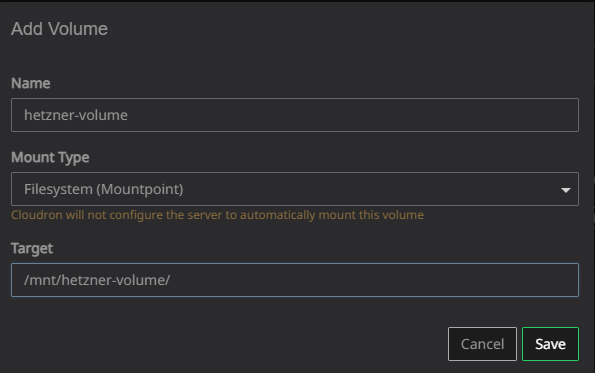
Then, for each app you can move the data directory.
Like it is described in the doc https://docs.cloudron.io/apps/#data-directory and https://docs.cloudron.io/volumes
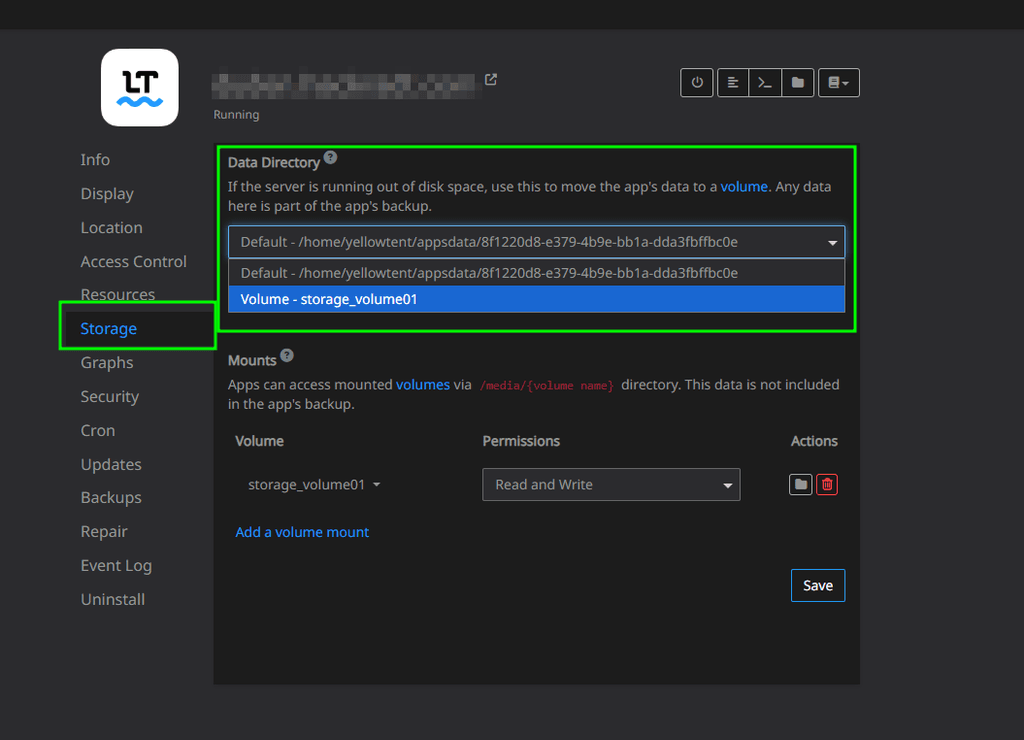
@SansGuidon said in Disk often full, cannot be extended, what remediations exist?:
I also read several times it was advised not to touch the Cloudron server configuration except via the UI, to ensure future Cloudron upgrades, backups, restore etc would work.
I guess this is a specific case that requires anyway to touch the terminal, but is it well supported by Cloudron (future upgrades etc)?Let me quote the doc again:
While symlinking various directories will work, this is not supported.
Officially, this is not supported to reduce support.
But it does work.
And yes, you should not touch the underlaying Server. But it is still your server. If you know what you do and can handle certain issues yourself you can do tasks on the root level.
I am doing this for almost all my servers and can tell you, I rarely had issues.
The only issues that ever appeared was when Hetzner Cloud Volumes had some outages (which rarely happens).@BrutalBirdie said in Disk often full, cannot be extended, what remediations exist?:
I really had issues.
s/really/rarely

-
@BrutalBirdie said in Disk often full, cannot be extended, what remediations exist?:
I really had issues.
s/really/rarely
@jdaviescoates Good Catch

-
I solved the problem, not sure what had the most impact:
Change permissions on my mount points/symlinks:
chown yellowtent:yellowtent /mnt/appsdata
chown yellowtent:yellowtent /mnt/appsdata/appsdata
Reboot: not mentioned in the guides but after changing permissions and rebooting, the problem was solved compared to several attempts before this, without reboot and with improper permissions changes.
The permissions and reboot parts are not mentioned in the guide for doing those operations if I'm right, so I'm not sure this was really needed, anyway I prefer to share
Thanks to @BrutalBirdie for all the feedback above and the proposed support (in DM), this community is awesome!
-
 J james has marked this topic as solved on
-
To add to the story, I've noticed that Cloudron system will often fill the disk with /var/log/syslog, this is patched for Cloudron 9 but for Cloudron 8.x however users are forced to patch manually
 , see https://forum.cloudron.io/topic/13361/after-ubuntu-22-24-upgrade-syslog-getting-spammed-and-grows-way-to-much-clogging-up-the-diskspace/6?_=1756455716990
I'm a bit confused that such a problem remains to patch manually for half a year anyway I've applied it.
systemctl stop rsyslog syslog.socket truncate -s 0 /var/log/syslog.* rsystemctl restart cloudron-syslog.service systemctl start rsyslog syslog.socket -
I was in a similar situation as you. However, rather than bashing my head (figuratively) against the same wall, i just moved to a vps with more space. Granted, this was before using external volumes was as easy as it is now. But reading that your two main apps are Immich and Sync thing... there's two walls.
Listen, there are amazing workarounds and solutions offered by Cloudron and from others on this forum. But, I've never viewed any of this as "recommended and official"; it's more, "enough people refuse to/can't do the obvious, so how can we help them?" The obvious being - get a server or vps or whatever that has all the space you need. It's one reason I moved to ssdnodes (but just enough users have not had a good experience with them so this isn't an ad, I've just had excellent results with them and the 1.2tb server they offer.)
A life lived in fear is a life half-lived
-
I was in a similar situation as you. However, rather than bashing my head (figuratively) against the same wall, i just moved to a vps with more space. Granted, this was before using external volumes was as easy as it is now. But reading that your two main apps are Immich and Sync thing... there's two walls.
Listen, there are amazing workarounds and solutions offered by Cloudron and from others on this forum. But, I've never viewed any of this as "recommended and official"; it's more, "enough people refuse to/can't do the obvious, so how can we help them?" The obvious being - get a server or vps or whatever that has all the space you need. It's one reason I moved to ssdnodes (but just enough users have not had a good experience with them so this isn't an ad, I've just had excellent results with them and the 1.2tb server they offer.)
@scooke Thanks for the suggestion,
while I admit this is a way to move forward, moving to a bigger vps/storage with my provider (Hetzner) would cost me money. I do not want to waste any money to create room for wasted storage. But I understand the advice which is pragmatic. However I find also satisfaction in understanding the root cause of a problem, and sharing the findings with the community rather than throwing dust under the carpet. For now I've been able to mitigate the issue and develop some scripts to monitor logs usage per container. Syncthing is indeed an issue but the main problem seems that there are too many logs generated/kept by application in Cloudron and it seems it's an issue with log management in Cloudron on Ubuntu. I could fix this with some extra logrotate configs on the server to prevent the log files to grow up to many GB in size.
Of course some apps might generate lot of activity, but I do not believe this is the main problem, and for now I do not want to waste TB of storage for logs when I could use this for data. So I've tuned the config to reduce proliferation of logs. I've learned some things in the process, about Cloudron & its logs management, about why there were so many issues reported in this forum about disk being full, and I'm happy to see it's partially solved in Cloudron 9.
The obvious thing for me is always to understand things and try to find the root cause. however I understand also why for lot of people, the most obvious thing is to throw more Resources (CPU/GPU/Storage) at a problem to not waste time on optimization/maintenance. But for my own education I like to dig deeper when my gut feeling tells me there is a shitty story behind a bug
-
From a deeper investigation, it seems that is has to do with backups and not with Syncthing or Photos app.
4 times a day, Uptime Kuma is backed up, and each time the heartbeat table is dumped into syslog, growing the syslog by 1-2GBs each time. More details in https://forum.cloudron.io/post/112261 -
@brutalbirdie is your documentation no longer available? I can't access it.
-
@brutalbirdie is your documentation no longer available? I can't access it.




Hello! It looks like you're interested in this conversation, but you don't have an account yet.
Getting fed up of having to scroll through the same posts each visit? When you register for an account, you'll always come back to exactly where you were before, and choose to be notified of new replies (either via email, or push notification). You'll also be able to save bookmarks and upvote posts to show your appreciation to other community members.
With your input, this post could be even better 💗
Register Login