
Rsync backup integrity fails for one Nextcloud and Jellyfin.
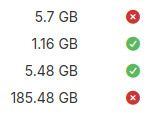
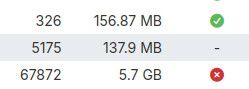
-
Hello @jdaviescoates
Theooctool is called this way https://docs.cloudron.io/packages/nextcloud#running-occ-toolsudo -u www-data php -f /app/code/occ $COMMAND -
Hello @jdaviescoates
Theooctool is called this way https://docs.cloudron.io/packages/nextcloud#running-occ-toolsudo -u www-data php -f /app/code/occ $COMMANDHello @jdaviescoates
Theooctool is called this way https://docs.cloudron.io/packages/nextcloud#running-occ-toolsudo -u www-data php -f /app/code/occ $COMMANDThanks, that worked.
-
 G girish has marked this topic as solved on
-
@staff I've now got to the bottom of this with the help of Claude (who also wrote most of this post).
It looks like potentially a genuine post-Cloudron-migration rsync backup bug rather than anything to do with files changing during the backup.
Summary
My rsync backups of Nextcloud and Jellyfin fail the integrity check every single night. Tarball backups of the same apps always pass. On 9.2 the error is:
Failed to verify 2026-09-22-000001-401/app_office.domain.coop_v5.8.8: Cannot read properties of undefined (reading 'size')The backup task itself reports no errors.
What I found
I compared a full file listing of each app's live data with the corresponding folder in the rsync backup on my Hetzner Storage Box (mounted via SSHFS).
Jellyfin: the backup holds 2,983 files that no longer exist on the server. These are old People and artist metadata images plus an old plugin folder (
plugins/SSO Authentication_4.0.0.4). Deleted files are never removed from the backup. Going the other way, 18 files that have existed on the server since 15 March have never been uploaded.Nextcloud: the backup holds 416 files that no longer exist on the server, mostly JS and CSS from old versions of Nextcloud apps. More seriously, real user files are missing. 21 of the 28 files in one of my folders are not in the backup, along with 5 files in another folder. They have been on the server for months.
So the rsync backup is both keeping deleted files and missing files that exist. My tarballs contain everything, so nothing is lost, but the rsync backups could not be relied on for a restore.
The likely cause
I did a full Cloudron migration onto a new server freshly built on 13 March (Cloudron installed that evening). The files that never uploaded, in both apps, have modification times in the early hours of 15 March, many at exactly 02:11. After the migration, the new server carried on backing up to the same rsync folder the old server had used.
My guess is that the new server's record of what it had already uploaded never matched what was actually on the Storage Box. Files it thinks are uploaded are skipped every night, and files left over from the old server are never deleted because it doesn't know about them. That would explain why it fails every time, only in rsync format, and only for these apps.
In April, on 9.1.5, the same problem showed up as a file count mismatch (284,709 found vs 285,450 expected). On 9.2 the checker seems to hit the mismatch and crash instead.
Questions
- How does the rsync format track what has already been uploaded, and is there a safe way to force a full resync for specific apps?
- Should a migration onto an existing rsync target reset or rebuild that state?
- Could the integrity checker list the missing or unexpected files instead of throwing? It would have made this much quicker to diagnose.
In the meantime I'm planning to add a fresh rsync target in an empty folder, check it passes, and then remove the old one.
-
 J jdaviescoates marked this topic as a regular topic
-
J jdaviescoates marked this topic as a question
-
Hello @jdaviescoates
Interesting finding.
I did not try to reproduce this yet, but this already reads like it could be hard to reproduce.Maybe you could do a test if possible.
If you add a new storage site, that is also rsync and a hetzner storage box and create a fresh backup maybe this issue does not exist on the new backup site then.Since you have already indentified single files that are not deleted and not uploaded it might be good to share this information with us so we can have a look on your system to see what is actually happening.
If that is possible, please write a mail to support@cloudron.io with the details and enable remote support on your Cloudron server. -
Hello @jdaviescoates
Interesting finding.
I did not try to reproduce this yet, but this already reads like it could be hard to reproduce.Maybe you could do a test if possible.
If you add a new storage site, that is also rsync and a hetzner storage box and create a fresh backup maybe this issue does not exist on the new backup site then.Since you have already indentified single files that are not deleted and not uploaded it might be good to share this information with us so we can have a look on your system to see what is actually happening.
If that is possible, please write a mail to support@cloudron.io with the details and enable remote support on your Cloudron server.Maybe you could do a test if possible.
If you add a new storage site, that is also rsync and a hetzner storage box and create a fresh backup maybe this issue does not exist on the new backup site then.That's what I'm doing at present... will report back once it finishes and I've done the integrity check...
-
Maybe you could do a test if possible.
If you add a new storage site, that is also rsync and a hetzner storage box and create a fresh backup maybe this issue does not exist on the new backup site then.That's what I'm doing at present... will report back once it finishes and I've done the integrity check...
jdaviescoates said:
That's what I'm doing at present... will report back once it finishes and I've done the integrity check...
Well, it failed again. But it wasn't the persistently failing instances of Nextcloud and Jellyfin this time, but the mail server instead. So, progress!
-
It's possible that rsync backups from the past (before we introduced integrity checks) are not backed up properly or are missing integrity information. If you can do a full backup from scratch (like you did for nc,jellyfin) and if it's reproducible, then that would be a sure bug.
-
It's possible that rsync backups from the past (before we introduced integrity checks) are not backed up properly or are missing integrity information. If you can do a full backup from scratch (like you did for nc,jellyfin) and if it's reproducible, then that would be a sure bug.
@girish I think it was just the mismatch caused by migrating the server that led to NC and JF persistently failing. My guess is mail will be ok next time too... and that that may well have been caused just by how long it took to do this new full rsync backup and integrity check
-
@girish I think it was just the mismatch caused by migrating the server that led to NC and JF persistently failing. My guess is mail will be ok next time too... and that that may well have been caused just by how long it took to do this new full rsync backup and integrity check
jdaviescoates said:
My guess is mail will be ok next time too
Yep, the most recent rsync back-up into the new folder (rather than the same folder as the rsync backups were going into before the server migration) worked fine too and now I have rsync backups that pass the integrity check - finally!

So it seems clear the issue was some file changes that happening during the full Cloudron server migration got rsync confused.
-
jdaviescoates said:
My guess is mail will be ok next time too
Yep, the most recent rsync back-up into the new folder (rather than the same folder as the rsync backups were going into before the server migration) worked fine too and now I have rsync backups that pass the integrity check - finally!
So it seems clear the issue was some file changes that happening during the full Cloudron server migration got rsync confused.
jdaviescoates said:
Yep, the most recent rsync back-up into the new folder (rather than the same folder as the rsync backups were going into before the server migration) worked fine too and now I have rsync backups that pass the integrity check - finally!
So it seems clear the issue was some file changes that happening during the full Cloudron server migration got rsync confused.
Think I may have spoken too soon. Every rsync back since the one that passed the integrity check has failed it again

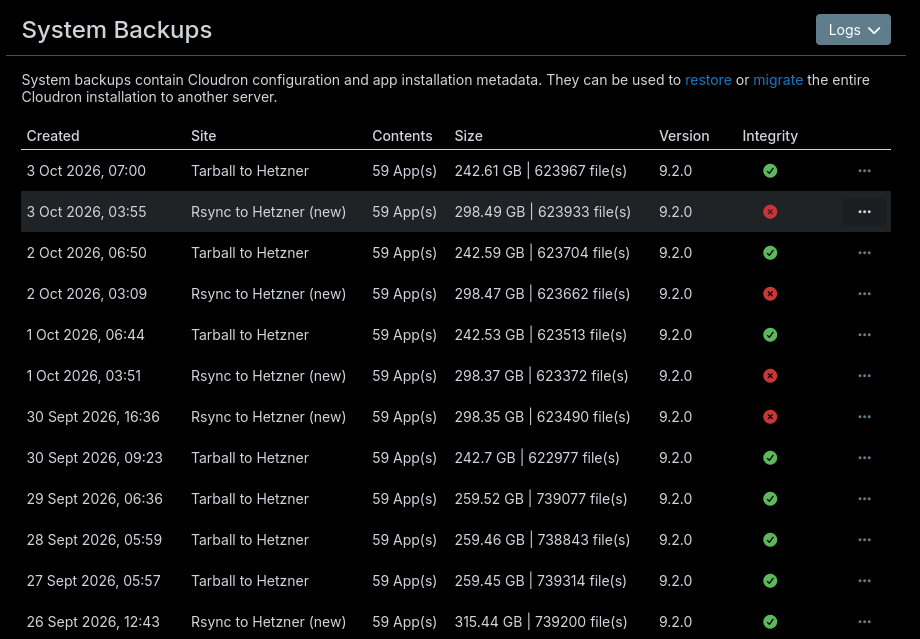
It's always the Jellyfin app that fails. Plus once also the Mail server again.
-
Update: Now on Cloudron 10.1.5.
The fresh rsync target fixed Nextcloud, but Jellyfin kept failing the integrity check with the same error. I've now tracked that down too, and it isn't just a migration problem.
The new target was created on 24 September, well after the migration. Comparing a full file listing of Jellyfin's live data with its latest rsync backup:
- 1,017 files exist only in the backup (about 18% of the 5,698 files in it)
- 0 files exist only on the server
So nothing is missing, but the backup is full of stale leftovers. All of them are
folder.jpgimages fromdata/jellyfin/data/metadata/People/<name>/folders that no longer exist on the server. Those will mostly be from me correcting metadata Jellyfin had matched wrongly and removing the bad entries, i.e. ordinary use of the app. Before that, there was also a staleplugins/LDAP Authentication/folder, last modified in the snapshot on 5 October, which no longer exists on the server (onlyLDAP Authentication_23.0.0.0and_24.0.0.0do).Oddly, it isn't every deletion. Yesterday I deleted Jellyfin's whole
metadata/artistsfolder (about 42,000 files) and removed the Music library in Jellyfin, which deleted most ofmetadata/library. Those deletions were correctly reflected in the backup. But these People folders and the LDAP folder were never removed from the snapshot. They get carried into every new backup via the hardlink copy, and since they aren't in the backup's manifest, the integrity checker crashes on them. The backup task itself reports no errors.This matches what I saw on the old target, where an old plugin folder (
plugins/SSO Authentication_4.0.0.4) and thousands of old People and artist images were also left behind. So the migration explained Nextcloud, but this looks like a separate, ongoing bug.Confirmed: after deleting the stale LDAP folder and the 1,017 stale files from the snapshot, the next Jellyfin backup passed the integrity check for the first time.
So two separate issues:
- Folders deleted from an app's data are sometimes never removed from the rsync snapshot, so they linger in every backup.
- The integrity checker crashes on files that aren't in the manifest ("Cannot read properties of undefined (reading 'size')") rather than listing them, which made this much harder to diagnose.

Hello! It looks like you're interested in this conversation, but you don't have an account yet.
Getting fed up of having to scroll through the same posts each visit? When you register for an account, you'll always come back to exactly where you were before, and choose to be notified of new replies (either via email, or push notification). You'll also be able to save bookmarks and upvote posts to show your appreciation to other community members.
With your input, this post could be even better 💗
Register Login