
Cloudron makes it easy to run web apps like WordPress, Nextcloud, GitLab on your server. Find out more or install now.


Skip to content
  • Categories
  • Recent
  • Tags
  • Popular
  • Bookmarks
  • Search
Skins
  • Light
  • Brite
  • Cerulean
  • Cosmo
  • Flatly
  • Journal
  • Litera
  • Lumen
  • Lux
  • Materia
  • Minty
  • Morph
  • Pulse
  • Sandstone
  • Simplex
  • Sketchy
  • Spacelab
  • United
  • Yeti
  • Zephyr
  • Dark
  • Cyborg
  • Darkly
  • Quartz
  • Slate
  • Solar
  • Superhero
  • Vapor

  • Default (No Skin)
  • No Skin
Collapse
Brand Logo

Cloudron Forum

Offical apps | Community apps | Demo | Docs | Install
  1. Cloudron Forum
  2. Support
  3. NFS mount not working.

NFS mount not working.
Scheduled Pinned Locked Moved Solved Support
26 Posts 4 Posters 10.8k Views 5 Watching
  • Oldest to Newest
  • Newest to Oldest
  • Most Votes
Reply
  • Reply as topic
Log in to reply
This topic has been deleted. Only users with topic management privileges can see it.
  • M Mastadamus

    @girish I did as you stated except I started completely over and created a new mount point named bu_nfs and then added the fstab entry. in proc/mounts i get the following now.

    (myIP):/mnt/array1/share /bu_nfs nfs4 rw,relatime,vers=4.0,rsize=8192,wsi

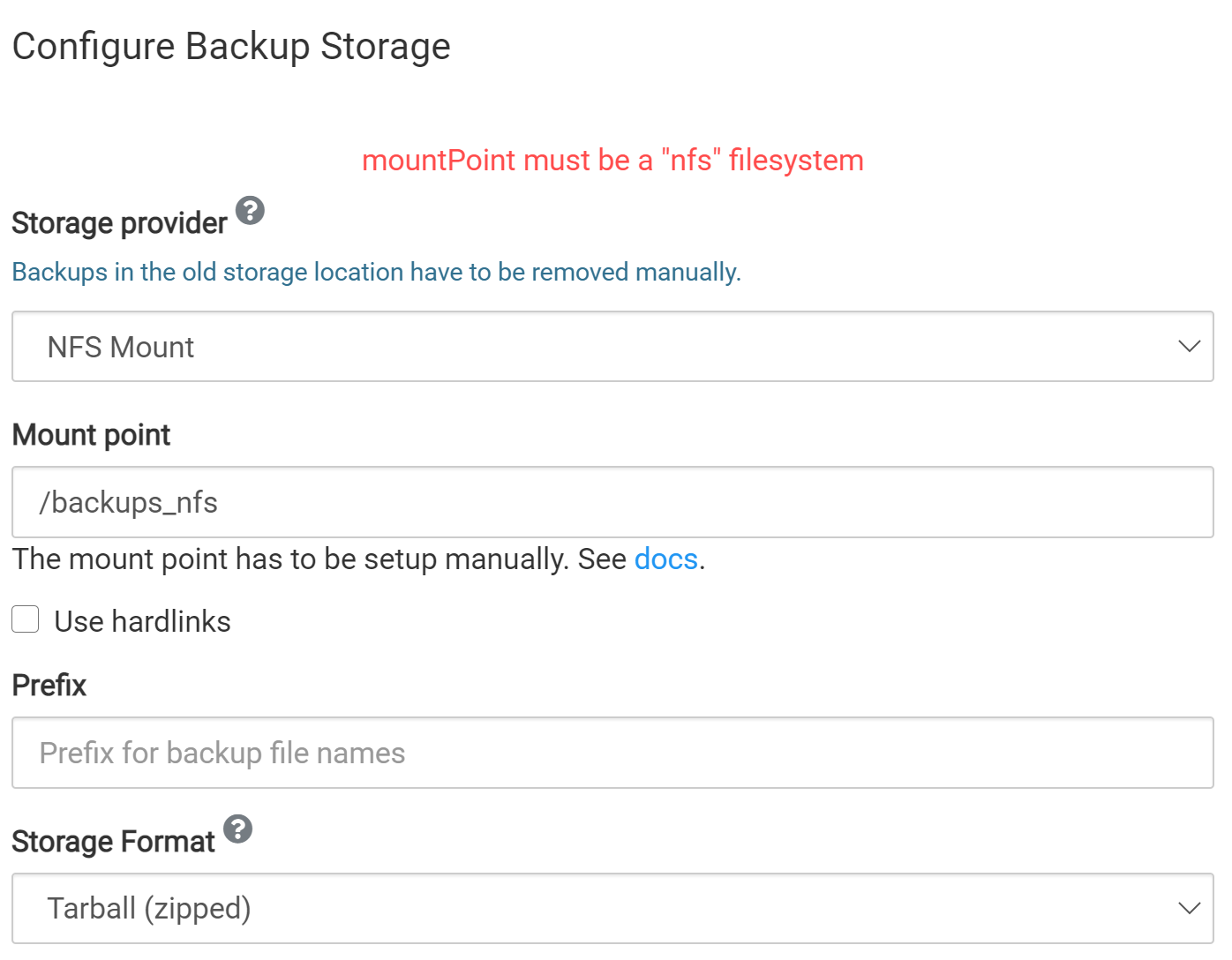
    yet when I put in /bu_nfs or /mnt/array1/share/bu_nfs inside cloudron gui, I get the same error message that it must be an NFS file system. Yet i can mount it as a local file system fine. It is showing nfs4 in proc/mounts though

    girishG
    girishG
    girish
    Staff
    wrote on last edited by
    #12

    @mastadamus said in NFS mount not working.:

    (myIP):/mnt/array1/share /bu_nfs nfs4 rw,relatime,vers=4.0,rsize=8192,wsi

    Maybe because of the nfs4 above. Can you make it nfs?

    M 1 Reply Last reply
    0
    • girishG girish

      @mastadamus said in NFS mount not working.:

      (myIP):/mnt/array1/share /bu_nfs nfs4 rw,relatime,vers=4.0,rsize=8192,wsi

      Maybe because of the nfs4 above. Can you make it nfs?

      M
      M
      Mastadamus
      wrote on last edited by
      #13

      @girish What is the command to force it nsf instead of nfs4?

      something like this?

      myIP:/mnt/array1/share /bu_nfs nfs nfsvers=3 rw,hard,tcp,rsize=8192,wsize=8192,timeo=14 0 0

      i think i need to specify which version..

      girishG 1 Reply Last reply
      0
      • M Mastadamus

        @girish What is the command to force it nsf instead of nfs4?

        something like this?

        myIP:/mnt/array1/share /bu_nfs nfs nfsvers=3 rw,hard,tcp,rsize=8192,wsize=8192,timeo=14 0 0

        i think i need to specify which version..

        girishG
        girishG
        girish
        Staff
        wrote on last edited by
        #14

        @mastadamus I meant like this (note that vers=4.0 i guess already means nfs4)

        (myIP):/mnt/array1/share /bu_nfs nfs rw,relatime,vers=4.0,rsize=8192,wsi
        
        M 2 Replies Last reply
        0
        • girishG girish

          @mastadamus I meant like this (note that vers=4.0 i guess already means nfs4)

          (myIP):/mnt/array1/share /bu_nfs nfs rw,relatime,vers=4.0,rsize=8192,wsi
          
          M
          M
          Mastadamus
          wrote on last edited by Mastadamus
          #15

          @girish Yes that line was the output of my proc/mounts. my fstab command was exactly as you wrote. Its automatically selecting nfs4. I think to force it to select an older version of NFS like ver 3 or 2 i have to manually input a nfsvers= command or vers= command

          1 Reply Last reply
          0
          • girishG girish

            @mastadamus I meant like this (note that vers=4.0 i guess already means nfs4)

            (myIP):/mnt/array1/share /bu_nfs nfs rw,relatime,vers=4.0,rsize=8192,wsi
            
            M
            M
            Mastadamus
            wrote on last edited by
            #16

            @girish What version should I try to mount it as? Im guessing try 3?

            girishG 1 Reply Last reply
            0
            • M Mastadamus

              @girish What version should I try to mount it as? Im guessing try 3?

              girishG
              girishG
              girish
              Staff
              wrote on last edited by
              #17

              @mastadamus I think we want nfs4. Note that all we are trying to do here is to get the output of cat /proc/mounts to show nfs instead of autofs and nfs4.

              M 1 Reply Last reply
              0
              • girishG girish

                @mastadamus I think we want nfs4. Note that all we are trying to do here is to get the output of cat /proc/mounts to show nfs instead of autofs and nfs4.

                M
                M
                Mastadamus
                wrote on last edited by
                #18

                @girish ah im following you now. I have absolutely no idea how to make proc/mounts do that lol.

                girishG 1 Reply Last reply
                0
                • M Mastadamus

                  @girish ah im following you now. I have absolutely no idea how to make proc/mounts do that lol.

                  girishG
                  girishG
                  girish
                  Staff
                  wrote on last edited by
                  #19

                  @mastadamus what is the /proc/mounts output as it stands right now?

                  M 1 Reply Last reply
                  0
                  • girishG girish

                    @mastadamus what is the /proc/mounts output as it stands right now?

                    M
                    M
                    Mastadamus
                    wrote on last edited by
                    #20

                    @girish

                    This is the output of the proc/mounts

                    192.x.x.x:/mnt/array1/share /bu_nfs nfs4 rw,relatime,vers=4.0,rsize=8192,wsi ze=8192,namlen=255,hard,proto=tcp,timeo=14,retrans=2,sec=sys,clientaddr=192.x. x.x,local_lock=none,addr=192.x.x.x 0 0 (note i replaced my IP's with 192.x.x.x. not that it really matters lol)

                    M 1 Reply Last reply
                    0
                    • M Mastadamus

                      @girish

                      This is the output of the proc/mounts

                      192.x.x.x:/mnt/array1/share /bu_nfs nfs4 rw,relatime,vers=4.0,rsize=8192,wsi ze=8192,namlen=255,hard,proto=tcp,timeo=14,retrans=2,sec=sys,clientaddr=192.x. x.x,local_lock=none,addr=192.x.x.x 0 0 (note i replaced my IP's with 192.x.x.x. not that it really matters lol)

                      M
                      M
                      Mastadamus
                      wrote on last edited by
                      #21

                      @mastadamus this is ubuntu 20.04lts

                      nebulonN 1 Reply Last reply
                      0
                      • M Mastadamus

                        @mastadamus this is ubuntu 20.04lts

                        nebulonN
                        nebulonN
                        nebulon
                        Staff
                        wrote on last edited by
                        #22

                        @mastadamus we have to check if this nfs4 tag is the default now on ubuntu 20.04 and if not, would be interesting to see why your system behaves differently.

                        M 1 Reply Last reply
                        0
                        • nebulonN nebulon

                          @mastadamus we have to check if this nfs4 tag is the default now on ubuntu 20.04 and if not, would be interesting to see why your system behaves differently.

                          M
                          M
                          Mastadamus
                          wrote on last edited by
                          #23

                          @nebulon Cool just let me know. its not a big deal as of now, I have it mounted "local" in the cloudron gui and its still writing to the NFS mount it just can't delete for some reason.

                          1 Reply Last reply
                          0
                          • girishG
                            girishG
                            girish
                            Staff
                            wrote on last edited by
                            #24

                            I have added nfs4 check for the next release. Searching around, I do see nfs4 in the output.

                            M 1 Reply Last reply
                            1
                            • girishG girish

                              I have added nfs4 check for the next release. Searching around, I do see nfs4 in the output.

                              M
                              M
                              Mastadamus
                              wrote on last edited by
                              #25

                              @girish thank you, you may want to add autofs as well to the input the input check or alter the command listed in the documentation to reflect the guidance given in this thread to delete the system.automount portion


                              girishG 1 Reply Last reply
                              0
                              • M Mastadamus

                                @girish thank you, you may want to add autofs as well to the input the input check or alter the command listed in the documentation to reflect the guidance given in this thread to delete the system.automount portion

                                girishG
                                girishG
                                girish
                                Staff
                                wrote on last edited by
                                #26

                                @mastadamus yes 🙂 https://git.cloudron.io/cloudron/box/-/commit/f3d9b8194264469152bc38d24d7080c611784b33

                                1 Reply Last reply
                                0

                                Hello! It looks like you're interested in this conversation, but you don't have an account yet.

                                Getting fed up of having to scroll through the same posts each visit? When you register for an account, you'll always come back to exactly where you were before, and choose to be notified of new replies (either via email, or push notification). You'll also be able to save bookmarks and upvote posts to show your appreciation to other community members.

                                With your input, this post could be even better 💗

                                Register Login
                                Reply
                                • Reply as topic
                                Log in to reply
                                • Oldest to Newest
                                • Newest to Oldest
                                • Most Votes


                                • Login

                                • Don't have an account? Register

                                • Login or register to search.
                                • First post
                                  Last post
                                0
                                • Categories
                                • Recent
                                • Tags
                                • Popular
                                • Bookmarks
                                • Search