
panic mode: Update failed
-
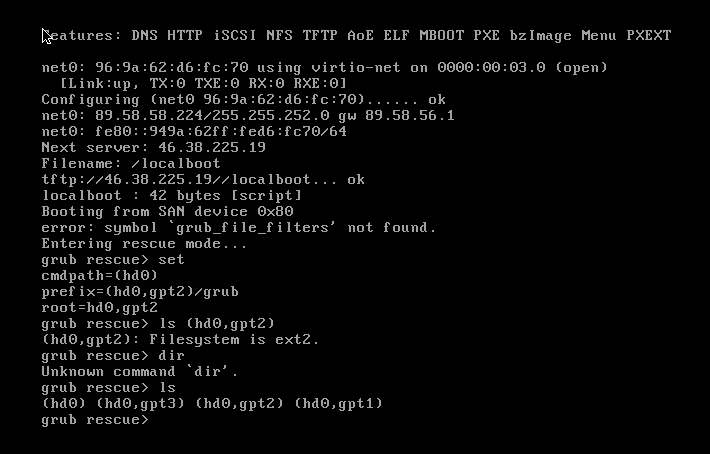
First of all, i'm a linux N00b - so i tried updating Ubunty from 18.something to 20.something and followed the instuctions in the docs by the book, but now, the server rebootet and i am stuck in something called grub and it tells me all my filesystems are toast!
I'm pretty sure (hopefully) this can be fixed quite easily, but as i mentioned i am a n00b and have absolute NO CLUE how to do this!
Can someone help me out here please?
-
-
Is this a physical server? Grub is the bootloader so if you end up there on reboot, then it means the linux/ubuntu system doesn't even start. Most likely it can't find the kernel to boot. Can you give as much context and errors you are seeing?
-
 G girish referenced this topic on
-
during the update it asked me where i want to boot from and i've chose the hdd labled BOOT if that helps
-
-
VPS at NetCup
-
-
netcup is not willing to help - so i have to kill everything?
-
-
great, well my plan is to install directly ubuntu 22 than and install the latest cloudron version on that
 yeah, luckily i have all my cloudron backups on my HDD
 -
@RazielKanos Oh, that's unfortunate (I mean isn't it their servers?) Anyway, do you have external backups i.e not on the server itself ? It's quite easy to restore from backups.
@girish Yeah, well they say they are just responsible for the hardware to run, but if ifuck something up i am on my own

-
-
@girish I just have this one unfortunately, still in my "trying phase"

Oh btw, NetCup seemingly doesn't offer any preinstalled Cloudron any longer. I installed Ubunty 18 with Cloudron already preinstalled in November last year, but that option now is gone, they just have naked Ubuntu 20 and 22
-
In some ways that's good, their cloudron image was very outdated , last I checked. Best to install it with the install script at https://cloudron.io/get.html .
BTW, in your case, you have to install with
./cloudron-setup --version 7.4.2(otherwise, you will get 7.5.0). Your backups are based on 7.4.2 -
Thanks for the advice, Installation is running
-
All went well, apps are restored and all is running as intended
-
 N nebulon marked this topic as a question on
-
N nebulon has marked this topic as solved on

Hello! It looks like you're interested in this conversation, but you don't have an account yet.
Getting fed up of having to scroll through the same posts each visit? When you register for an account, you'll always come back to exactly where you were before, and choose to be notified of new replies (either via email, or push notification). You'll also be able to save bookmarks and upvote posts to show your appreciation to other community members.
With your input, this post could be even better 💗
Register Login