
What's coming in 8.2
-
@umnz said in What's coming in 8.2:
@Joseph I'm using Safari. Which browser are you using?
iOS / iPadOS? macOS? There are settings to control the "new tab" behavior in both.
-
Updated to 8.2, smooth sailing.
Little issues:
- The app view (in blocks or as a list) still requires horizontal scrolling on an iPad.
- it’s at least not immediately clear how to use the new „archive app“ feature. I would have assumed it in the uninstall oder backup section but couldn’t find it.
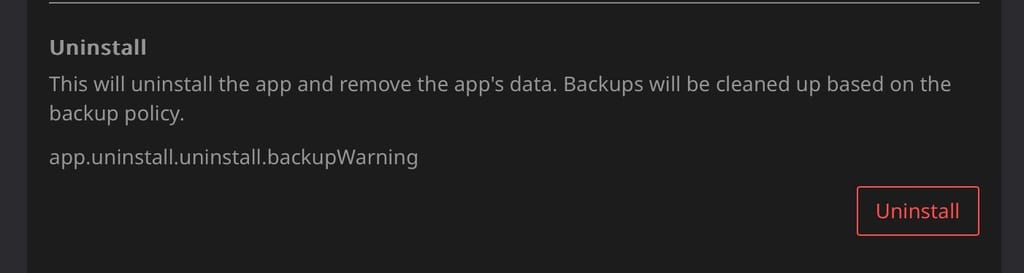
- some text missing in the „uninstall“ section:
-
I know it's not Christmas yet, but can I open my gift (8.2)?

Will install the update tonight. Thank you for your hard work @staff!

@humptydumpty brilliant graphic

-
Updated to 8.2, smooth sailing.
Little issues:
- The app view (in blocks or as a list) still requires horizontal scrolling on an iPad.
- it’s at least not immediately clear how to use the new „archive app“ feature. I would have assumed it in the uninstall oder backup section but couldn’t find it.
- some text missing in the „uninstall“ section:
@necrevistonnezr
This is most likely a UI caching issue. Can you Ctrl+Shift+R on your browser? We hit this on a couple of our servers as well.I can reproduce the broken UI for stopped apps. I guess it's looking fine for normal apps?Er, it's a caching issue after all. Can you please refresh and report back?
-
@necrevistonnezr
This is most likely a UI caching issue. Can you Ctrl+Shift+R on your browser? We hit this on a couple of our servers as well.I can reproduce the broken UI for stopped apps. I guess it's looking fine for normal apps?Er, it's a caching issue after all. Can you please refresh and report back?
@girish Indeed! Did a "hard" refresh (I can recommend https://chromewebstore.google.com/detail/hard-refresh/ichmdelihgokllcnibkcpciljnggojkj for Chrome-ish browsers), and both the correct text as well as the "Archive" button magically appeared!

-
@girish Indeed! Did a "hard" refresh (I can recommend https://chromewebstore.google.com/detail/hard-refresh/ichmdelihgokllcnibkcpciljnggojkj for Chrome-ish browsers), and both the correct text as well as the "Archive" button magically appeared!
-
There is a bug in the Archiving feature. You have to test a backup after you updated to 8.2 and then archive it. I have made a fix to disable archive button in the coming patch release. Nothing catostrophic happens when you archive pre-8.2 backups, but you have to download the backup config and import it to make it work (the archive restore UI does not work).
-
Selfhosted upgrade to 8.2 went smoothly without any hickup
-
I'm on 8.2.1 now but not understanding how the archive feature works. I don't see any way to archive an app even with recent backups made after upgrading to 8.2.1. Am I missing something?Sorry, I figured it out. I didn't realize it was on the Uninstall page, I thought it was part of the backups section. My bad.

-
Hello @girish, on v8.2.3 (Ubuntu 22.04.5 LTS) in Backups there is missing backups.archives.title caption/text.







Hello! It looks like you're interested in this conversation, but you don't have an account yet.
Getting fed up of having to scroll through the same posts each visit? When you register for an account, you'll always come back to exactly where you were before, and choose to be notified of new replies (either via email, or push notification). You'll also be able to save bookmarks and upvote posts to show your appreciation to other community members.
With your input, this post could be even better 💗
Register Login