Cloudron makes it easy to run web apps like WordPress, Nextcloud, GitLab on your server. Find out more or install now.


Skip to content
  • Categories
  • Recent
  • Tags
  • Popular
  • Bookmarks
  • Search
Skins
  • Light
  • Brite
  • Cerulean
  • Cosmo
  • Flatly
  • Journal
  • Litera
  • Lumen
  • Lux
  • Materia
  • Minty
  • Morph
  • Pulse
  • Sandstone
  • Simplex
  • Sketchy
  • Spacelab
  • United
  • Yeti
  • Zephyr
  • Dark
  • Cyborg
  • Darkly
  • Quartz
  • Slate
  • Solar
  • Superhero
  • Vapor

  • Default (No Skin)
  • No Skin
Collapse
Brand Logo

Cloudron Forum

Apps - Status | Demo | Docs | Install
  1. Cloudron Forum
  2. App Wishlist
  3. HumHub - social network software

HumHub - social network software

Scheduled Pinned Locked Moved Solved App Wishlist
126 Posts 17 Posters 101.9k Views 16 Watching
  • Oldest to Newest
  • Newest to Oldest
  • Most Votes
Reply
  • Reply as topic
Log in to reply
This topic has been deleted. Only users with topic management privileges can see it.
  • girishG girish

    @atrilahiji thanks! let me know if you hit any bumps and I can take a look as well.

    ? Offline
    ? Offline
    A Former User
    wrote on last edited by
    #48

    @girish Sure, thanks! I'll shuffle some things around in the package and see what I can do. My hope is I can just symlink everything that is needed in a migration to /app/data, which will also make updates a lot easier.

    1 Reply Last reply
    1
    • girishG girish

      @atrilahiji thanks! let me know if you hit any bumps and I can take a look as well.

      ? Offline
      ? Offline
      A Former User
      wrote on last edited by A Former User
      #49

      @girish Actually, I just thought of something. If the modules folder is symlinked and the app is expecting to write to the modules folder in /app/code, it will error right? I imagine it wouldn't just look at the actual folder in /app/data. The trouble here is there is a "module store" of sorts built right into the app.

      girishG 1 Reply Last reply
      0
      • ? A Former User

        @girish Actually, I just thought of something. If the modules folder is symlinked and the app is expecting to write to the modules folder in /app/code, it will error right? I imagine it wouldn't just look at the actual folder in /app/data. The trouble here is there is a "module store" of sorts built right into the app.

        girishG Offline
        girishG Offline
        girish
        Staff
        wrote on last edited by
        #50

        @atrilahiji maybe you can symlink /app/code/modules to /app/data/modules and that way it will become writable.

        To give a high level idea, let's say humhub app comes with some default modules. Then, in Dockerfile, you would move them to some other location like:

        RUN mv /app/code/modules /app/code/modules_orig && ln -s /app/data/modules /app/code/modules

        Then in start.sh:

        mkdir -p /app/code/modules
        cp -r /app/code/modules_orig/* /app/data/modules
        

        In many apps, instead of the blind copy above, we try to symlink each "module". So, there will be a symlink from /app/data/modules/x to /app/code/modules_orig/x . This sometimes works or not depending on the app. But hopefully you get the idea!

        ? 2 Replies Last reply
        2
        • girishG girish

          @atrilahiji maybe you can symlink /app/code/modules to /app/data/modules and that way it will become writable.

          To give a high level idea, let's say humhub app comes with some default modules. Then, in Dockerfile, you would move them to some other location like:

          RUN mv /app/code/modules /app/code/modules_orig && ln -s /app/data/modules /app/code/modules

          Then in start.sh:

          mkdir -p /app/code/modules
          cp -r /app/code/modules_orig/* /app/data/modules
          

          In many apps, instead of the blind copy above, we try to symlink each "module". So, there will be a symlink from /app/data/modules/x to /app/code/modules_orig/x . This sometimes works or not depending on the app. But hopefully you get the idea!

          ? Offline
          ? Offline
          A Former User
          wrote on last edited by
          #51

          @girish my confusion here is if the app still tries to write to /app/code/modules it would hit permissions issues no?

          fbartelsF 1 Reply Last reply
          0
          • girishG girish

            @atrilahiji maybe you can symlink /app/code/modules to /app/data/modules and that way it will become writable.

            To give a high level idea, let's say humhub app comes with some default modules. Then, in Dockerfile, you would move them to some other location like:

            RUN mv /app/code/modules /app/code/modules_orig && ln -s /app/data/modules /app/code/modules

            Then in start.sh:

            mkdir -p /app/code/modules
            cp -r /app/code/modules_orig/* /app/data/modules
            

            In many apps, instead of the blind copy above, we try to symlink each "module". So, there will be a symlink from /app/data/modules/x to /app/code/modules_orig/x . This sometimes works or not depending on the app. But hopefully you get the idea!

            ? Offline
            ? Offline
            A Former User
            wrote on last edited by A Former User
            #52

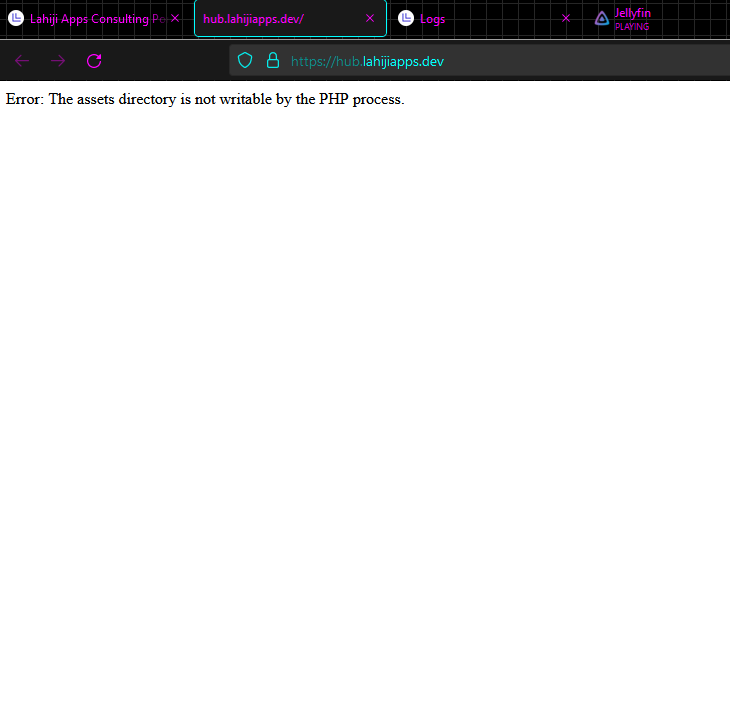
            @girish Running into issues here: https://docs.humhub.org/docs/admin/installation/#file-permissions

            There appears to be no way to configure where Hubhub looks for those files, so it will just keep trying to write to the symlink in /app/code and fail. In fact, you cant even get the site to load after installation without having the assets directory writable. This is something it has to do on startup. I can still make an update script for this, but I think it will have to sit in /app/data just based on how this was written. Unless I'm missing something?

            1 Reply Last reply
            0
            • ? A Former User

              @girish my confusion here is if the app still tries to write to /app/code/modules it would hit permissions issues no?

              fbartelsF Offline
              fbartelsF Offline
              fbartels
              App Dev
              wrote on last edited by
              #53

              @atrilahiji said in HumHub - social network software:

              if the app still tries to write to /app/code/modules it would hit permissions issues no?

              no, that should not be the case (at least when the symlinked dir has proper permissions for this).

              ? 1 Reply Last reply
              0
              • fbartelsF fbartels

                @atrilahiji said in HumHub - social network software:

                if the app still tries to write to /app/code/modules it would hit permissions issues no?

                no, that should not be the case (at least when the symlinked dir has proper permissions for this).

                ? Offline
                ? Offline
                A Former User
                wrote on last edited by
                #54

                @fbartels Weird... it seemed to think it didn't have permission to write...

                ? 1 Reply Last reply
                0
                • ? A Former User

                  @fbartels Weird... it seemed to think it didn't have permission to write...

                  ? Offline
                  ? Offline
                  A Former User
                  wrote on last edited by
                  #55

                  319b926a-e20f-46d8-973d-27592726f97b-image.png

                  scookeS fbartelsF 2 Replies Last reply
                  1
                  • ? A Former User

                    319b926a-e20f-46d8-973d-27592726f97b-image.png

                    scookeS Offline
                    scookeS Offline
                    scooke
                    wrote on last edited by
                    #56

                    @atrilahiji Never stop never stopping! You're doing great!

                    A life lived in fear is a life half-lived

                    1 Reply Last reply
                    1
                    • ? A Former User

                      319b926a-e20f-46d8-973d-27592726f97b-image.png

                      fbartelsF Offline
                      fbartelsF Offline
                      fbartels
                      App Dev
                      wrote on last edited by
                      #57

                      @atrilahiji can you push your current wip? I'd like to give the code a look.

                      ? 1 Reply Last reply
                      1
                      • fbartelsF fbartels

                        @atrilahiji can you push your current wip? I'd like to give the code a look.

                        ? Offline
                        ? Offline
                        A Former User
                        wrote on last edited by A Former User
                        #58

                        @fbartels Sure thing: https://git.atridad.dev/alt-ron/cloudron-humhub-app/-/tree/harden-app-code

                        Thanks! I'm convinced this is 1) impossible or 2) something so simple yet I have not noticed it somehow

                        fbartelsF 1 Reply Last reply
                        1
                        • ? A Former User

                          @fbartels Sure thing: https://git.atridad.dev/alt-ron/cloudron-humhub-app/-/tree/harden-app-code

                          Thanks! I'm convinced this is 1) impossible or 2) something so simple yet I have not noticed it somehow

                          fbartelsF Offline
                          fbartelsF Offline
                          fbartels
                          App Dev
                          wrote on last edited by
                          #59

                          @atrilahiji for me this works with

                          ➜  cloudron-humhub-app git:(harden-app-code) git rev-parse --short HEAD
                          0b5df1c
                          

                          Steps I tried:

                          • Install app (in debug mode, but only so that i could override and start the start.sh manually)
                          • finished Humhub installation
                          • went into admin and selected modules
                          • installed a module
                          • activated a module
                          • no php error can be seen
                          ? 1 Reply Last reply
                          1
                          • fbartelsF fbartels

                            @atrilahiji for me this works with

                            ➜  cloudron-humhub-app git:(harden-app-code) git rev-parse --short HEAD
                            0b5df1c
                            

                            Steps I tried:

                            • Install app (in debug mode, but only so that i could override and start the start.sh manually)
                            • finished Humhub installation
                            • went into admin and selected modules
                            • installed a module
                            • activated a module
                            • no php error can be seen
                            ? Offline
                            ? Offline
                            A Former User
                            wrote on last edited by
                            #60

                            @fbartels Huh so you manually started start.sh from the terminal in recovery mode? I get the exact same error doing that. Did you do something else to modify the permissions?

                            fbartelsF 1 Reply Last reply
                            0
                            • ? A Former User

                              @fbartels Huh so you manually started start.sh from the terminal in recovery mode? I get the exact same error doing that. Did you do something else to modify the permissions?

                              fbartelsF Offline
                              fbartelsF Offline
                              fbartels
                              App Dev
                              wrote on last edited by
                              #61

                              @atrilahiji no, no changes at all. maybe some leftovers from a previous installation of yours?

                              Yes, you can run cloudron install --debug where then the init script is not run. you then need to exec into the app and run it manually.

                              ? 2 Replies Last reply
                              1
                              • fbartelsF fbartels

                                @atrilahiji no, no changes at all. maybe some leftovers from a previous installation of yours?

                                Yes, you can run cloudron install --debug where then the init script is not run. you then need to exec into the app and run it manually.

                                ? Offline
                                ? Offline
                                A Former User
                                wrote on last edited by
                                #62

                                @fbartels ahhh I see what you mean. I'll try that.

                                1 Reply Last reply
                                0
                                • fbartelsF fbartels

                                  @atrilahiji no, no changes at all. maybe some leftovers from a previous installation of yours?

                                  Yes, you can run cloudron install --debug where then the init script is not run. you then need to exec into the app and run it manually.

                                  ? Offline
                                  ? Offline
                                  A Former User
                                  wrote on last edited by A Former User
                                  #63

                                  @fbartels Oh weird yeah that works... no clue why it wouldn't work if the start.sh is run normally during an install...

                                  IDK if you saw the same error but if I don't start in debug mode and switch to Recovery Mode, running start.sh results in a permission error for PHP again.

                                  EDIT: Nvm I think I figured it out...

                                  fbartelsF 2 Replies Last reply
                                  0
                                  • ? A Former User

                                    @fbartels Oh weird yeah that works... no clue why it wouldn't work if the start.sh is run normally during an install...

                                    IDK if you saw the same error but if I don't start in debug mode and switch to Recovery Mode, running start.sh results in a permission error for PHP again.

                                    EDIT: Nvm I think I figured it out...

                                    fbartelsF Offline
                                    fbartelsF Offline
                                    fbartels
                                    App Dev
                                    wrote on last edited by
                                    #64

                                    @atrilahiji ah nevermind, i forgot that part of debug is that the container is not read-only. Looking at the code now a bit closer.

                                    1 Reply Last reply
                                    1
                                    • ? A Former User

                                      @fbartels Oh weird yeah that works... no clue why it wouldn't work if the start.sh is run normally during an install...

                                      IDK if you saw the same error but if I don't start in debug mode and switch to Recovery Mode, running start.sh results in a permission error for PHP again.

                                      EDIT: Nvm I think I figured it out...

                                      fbartelsF Offline
                                      fbartelsF Offline
                                      fbartels
                                      App Dev
                                      wrote on last edited by
                                      #65

                                      @atrilahiji the modules directory does not exist at all in /app/code and then it fails at creating it in the first place. You have to prepare this in a similar way to https://git.atridad.dev/alt-ron/cloudron-humhub-app/-/blob/harden-app-code/Dockerfile#L78-80 where the folder symlink needs to already be created during docker build and then in start.sh you need to make sure that the folder and its default contents exist.

                                      ? 1 Reply Last reply
                                      1
                                      • fbartelsF fbartels

                                        @atrilahiji the modules directory does not exist at all in /app/code and then it fails at creating it in the first place. You have to prepare this in a similar way to https://git.atridad.dev/alt-ron/cloudron-humhub-app/-/blob/harden-app-code/Dockerfile#L78-80 where the folder symlink needs to already be created during docker build and then in start.sh you need to make sure that the folder and its default contents exist.

                                        ? Offline
                                        ? Offline
                                        A Former User
                                        wrote on last edited by
                                        #66

                                        @fbartels I think I got it working finally. I'll test it one more time and then push the code up.

                                        1 Reply Last reply
                                        1
                                        • ? Offline
                                          ? Offline
                                          A Former User
                                          wrote on last edited by A Former User
                                          #67

                                          This should work now: https://git.atridad.dev/alt-ron/cloudron-humhub-app/-/releases/0.8.0

                                          Now to tackle updates. With everything we need in /app/data now it should be a piece of cake. Thanks for the help @fbartels !

                                          fbartelsF 1 Reply Last reply
                                          1

                                          Hello! It looks like you're interested in this conversation, but you don't have an account yet.

                                          Getting fed up of having to scroll through the same posts each visit? When you register for an account, you'll always come back to exactly where you were before, and choose to be notified of new replies (either via email, or push notification). You'll also be able to save bookmarks and upvote posts to show your appreciation to other community members.

                                          With your input, this post could be even better 💗

                                          Register Login
                                          Reply
                                          • Reply as topic
                                          Log in to reply
                                          • Oldest to Newest
                                          • Newest to Oldest
                                          • Most Votes


                                          • Login

                                          • Don't have an account? Register

                                          • Login or register to search.
                                          • First post
                                            Last post
                                          0
                                          • Categories
                                          • Recent
                                          • Tags
                                          • Popular
                                          • Bookmarks
                                          • Search