
Since update to v8.2.1 backups fail with "Too many empty directories"
-
Hi,
this morning I noticed that since the 31st (and the update to 8.2.1 from 8.1.0) my backups keep failing with the same error message:
Too many empty directories. Run "find /home/yellowtent/boxdata/mail -type d -empty" to investigate
In the log this can be found for such a task:
2025-01-03T07:15:34.868Z box:shell backupformat/rsync: find /home/yellowtent/boxdata/mail -type d -empty
2025-01-03T07:15:41.125Z box:shell backupformat/rsync: find /home/yellowtent/boxdata/mail -type d -empty errored BoxError: find exited with code null signal SIGKILL
    at ChildProcess.<anonymous> (/home/yellowtent/box/src/shell.js:72:23)
    at ChildProcess.emit (node:events:519:28)
    at maybeClose (node:internal/child_process:1105:16)
    at Socket.<anonymous> (node:internal/child_process:457:11)
    at Socket.emit (node:events:519:28)
    at Pipe.<anonymous> (node:net:339:12) {
  reason: 'Shell Error',
  details: {},
  stdout: '/home/yellowtent/boxdata/mail/solr\n' +
[..]
    '/home/yellowtent/boxdata'... 2599152 more characters,
  stdoutLineCount: 20073,
  stderr: '',
  stderrLineCount: 0,
  code: null,
  signal: 'SIGKILL'
}
2025-01-03T07:15:41.205Z box:backupupload upload completed. error: BoxError: Too many empty directories. Run "find /home/yellowtent/boxdata/mail -type d -empty" to investigate at saveFsMetadata (/home/yellowtent/box/src/backupformat/rsync.js:131:82) at async Object.upload (/home/yellowtent/box/src/backupformat/rsync.js:270:5) at async Object.upload (/home/yellowtent/box/src/backuptask.js:92:5) { reason: 'FileSystem Error', details: {} }
2025-01-03T07:15:41.373Z box:backuptask runBackupUpload: result - {"result":"Too many empty directories. Run \"find /home/yellowtent/boxdata/mail -type d -empty\" to investigate"}
2025-01-03T07:15:41.533Z box:shell backuptask: /usr/bin/sudo -S -E --close-from=4 /home/yellowtent/box/src/scripts/backupupload.js snapshot/mail rsync {"localRoot":"/home/yellowtent/boxdata/mail","layout":[]} errored BoxError: backuptask exited with code 50 signal null
    at ChildProcess.<anonymous> (/home/yellowtent/box/src/shell.js:137:19)
    at ChildProcess.emit (node:events:519:28)
    at ChildProcess._handle.onexit (node:internal/child_process:294:12) {
  reason: 'Shell Error',
  details: {},
  code: 50,
  signal: null
}
2025-01-03T07:15:41.612Z box:taskworker Task took 415.137 seconds
2025-01-03T07:15:41.614Z box:tasks setCompleted - 19010: {"result":null,"error":{"stack":"BoxError: Too many empty directories. Run \"find /home/yellowtent/boxdata/mail -type d -empty\" to investigate\n    at runBackupUpload (/home/yellowtent/box/src/backuptask.js:172:15)\n    at process.processTicksAndRejections (node:internal/process/task_queues:95:5)\n    at async uploadMailSnapshot (/home/yellowtent/box/src/backuptask.js:413:5)\n    at async backupMailWithTag (/home/yellowtent/box/src/backuptask.js:462:5)\n    at async fullBackup (/home/yellowtent/box/src/backuptask.js:523:26)","name":"BoxError","reason":"External Error","details":{},"message":"Too many empty directories. Run \"find /home/yellowtent/boxdata/mail -type d -empty\" to investigate"}}
2025-01-03T07:15:41.615Z box:tasks update 19010: {"percent":100,"result":null,"error":{"stack":"BoxError: Too many empty directories. Run \"find /home/yellowtent/boxdata/mail -type d -empty\" to investigate\n    at runBackupUpload (/home/yellowtent/box/src/backuptask.js:172:15)\n    at process.processTicksAndRejections (node:internal/process/task_queues:95:5)\n    at async uploadMailSnapshot (/home/yellowtent/box/src/backuptask.js:413:5)\n    at async backupMailWithTag (/home/yellowtent/box/src/backuptask.js:462:5)\n    at async fullBackup (/home/yellowtent/box/src/backuptask.js:523:26)","name":"BoxError","reason":"External Error","details":{},"message":"Too many empty directories. Run \"find /home/yellowtent/boxdata/mail -type d -empty\" to investigate"}}
BoxError: Too many empty directories. Run "find /home/yellowtent/boxdata/mail -type d -empty" to investigate
    at runBackupUpload (/home/yellowtent/box/src/backuptask.js:172:15)
    at process.processTicksAndRejections (node:internal/process/task_queues:95:5)
    at async uploadMailSnapshot (/home/yellowtent/box/src/backuptask.js:413:5)
    at async backupMailWithTag (/home/yellowtent/box/src/backuptask.js:462:5)
    at async fullBackup (/home/yellowtent/box/src/backuptask.js:523:26)
What I am wondering about is the
find exited with code null signal SIGKILLpart.nullseems a weird exit code and also running the find command manually finishes with exit code 0. As far as I can see the server should not be running out of resources during this and no related error seems to be in dmesg. -
Hi,
this morning I noticed that since the 31st (and the update to 8.2.1 from 8.1.0) my backups keep failing with the same error message:
Too many empty directories. Run "find /home/yellowtent/boxdata/mail -type d -empty" to investigate
In the log this can be found for such a task:
2025-01-03T07:15:34.868Z box:shell backupformat/rsync: find /home/yellowtent/boxdata/mail -type d -empty
2025-01-03T07:15:41.125Z box:shell backupformat/rsync: find /home/yellowtent/boxdata/mail -type d -empty errored BoxError: find exited with code null signal SIGKILL
    at ChildProcess.<anonymous> (/home/yellowtent/box/src/shell.js:72:23)
    at ChildProcess.emit (node:events:519:28)
    at maybeClose (node:internal/child_process:1105:16)
    at Socket.<anonymous> (node:internal/child_process:457:11)
    at Socket.emit (node:events:519:28)
    at Pipe.<anonymous> (node:net:339:12) {
  reason: 'Shell Error',
  details: {},
  stdout: '/home/yellowtent/boxdata/mail/solr\n' +
[..]
    '/home/yellowtent/boxdata'... 2599152 more characters,
  stdoutLineCount: 20073,
  stderr: '',
  stderrLineCount: 0,
  code: null,
  signal: 'SIGKILL'
}
2025-01-03T07:15:41.205Z box:backupupload upload completed. error: BoxError: Too many empty directories. Run "find /home/yellowtent/boxdata/mail -type d -empty" to investigate at saveFsMetadata (/home/yellowtent/box/src/backupformat/rsync.js:131:82) at async Object.upload (/home/yellowtent/box/src/backupformat/rsync.js:270:5) at async Object.upload (/home/yellowtent/box/src/backuptask.js:92:5) { reason: 'FileSystem Error', details: {} }
2025-01-03T07:15:41.373Z box:backuptask runBackupUpload: result - {"result":"Too many empty directories. Run \"find /home/yellowtent/boxdata/mail -type d -empty\" to investigate"}
2025-01-03T07:15:41.533Z box:shell backuptask: /usr/bin/sudo -S -E --close-from=4 /home/yellowtent/box/src/scripts/backupupload.js snapshot/mail rsync {"localRoot":"/home/yellowtent/boxdata/mail","layout":[]} errored BoxError: backuptask exited with code 50 signal null
    at ChildProcess.<anonymous> (/home/yellowtent/box/src/shell.js:137:19)
    at ChildProcess.emit (node:events:519:28)
    at ChildProcess._handle.onexit (node:internal/child_process:294:12) {
  reason: 'Shell Error',
  details: {},
  code: 50,
  signal: null
}
2025-01-03T07:15:41.612Z box:taskworker Task took 415.137 seconds
2025-01-03T07:15:41.614Z box:tasks setCompleted - 19010: {"result":null,"error":{"stack":"BoxError: Too many empty directories. Run \"find /home/yellowtent/boxdata/mail -type d -empty\" to investigate\n    at runBackupUpload (/home/yellowtent/box/src/backuptask.js:172:15)\n    at process.processTicksAndRejections (node:internal/process/task_queues:95:5)\n    at async uploadMailSnapshot (/home/yellowtent/box/src/backuptask.js:413:5)\n    at async backupMailWithTag (/home/yellowtent/box/src/backuptask.js:462:5)\n    at async fullBackup (/home/yellowtent/box/src/backuptask.js:523:26)","name":"BoxError","reason":"External Error","details":{},"message":"Too many empty directories. Run \"find /home/yellowtent/boxdata/mail -type d -empty\" to investigate"}}
2025-01-03T07:15:41.615Z box:tasks update 19010: {"percent":100,"result":null,"error":{"stack":"BoxError: Too many empty directories. Run \"find /home/yellowtent/boxdata/mail -type d -empty\" to investigate\n    at runBackupUpload (/home/yellowtent/box/src/backuptask.js:172:15)\n    at process.processTicksAndRejections (node:internal/process/task_queues:95:5)\n    at async uploadMailSnapshot (/home/yellowtent/box/src/backuptask.js:413:5)\n    at async backupMailWithTag (/home/yellowtent/box/src/backuptask.js:462:5)\n    at async fullBackup (/home/yellowtent/box/src/backuptask.js:523:26)","name":"BoxError","reason":"External Error","details":{},"message":"Too many empty directories. Run \"find /home/yellowtent/boxdata/mail -type d -empty\" to investigate"}}
BoxError: Too many empty directories. Run "find /home/yellowtent/boxdata/mail -type d -empty" to investigate
    at runBackupUpload (/home/yellowtent/box/src/backuptask.js:172:15)
    at process.processTicksAndRejections (node:internal/process/task_queues:95:5)
    at async uploadMailSnapshot (/home/yellowtent/box/src/backuptask.js:413:5)
    at async backupMailWithTag (/home/yellowtent/box/src/backuptask.js:462:5)
    at async fullBackup (/home/yellowtent/box/src/backuptask.js:523:26)
What I am wondering about is the
find exited with code null signal SIGKILLpart.nullseems a weird exit code and also running the find command manually finishes with exit code 0. As far as I can see the server should not be running out of resources during this and no related error seems to be in dmesg.@fbartels this comes from https://git.cloudron.io/platform/box/-/blob/master/src/backupformat/rsync.js?ref_type=heads#L130 . The command it runs is
find /home/yellowtent/boxdata/mail -type d -emptyand somehow this exceeds 20000 lines (in stdout or stderr). Can you check why by running it manually? -
I have a testing mailbox called "many-folders", which on its own already exceeds this limit:
find /home/yellowtent/boxdata/mail -type d -empty | grep many-folders | wc -l
23811
The total line count when not grepping for my test mailbox is
31099.Depending on the amount of users and if these users are folder hoarders 20.000 may be a bit too low in my opinion. Every folder in the mailbox is represented with three folders in the maildir (
cur,newandtmp) and most of the timenewandtmpwill be empty. -
I have a testing mailbox called "many-folders", which on its own already exceeds this limit:
find /home/yellowtent/boxdata/mail -type d -empty | grep many-folders | wc -l
23811
The total line count when not grepping for my test mailbox is
31099.Depending on the amount of users and if these users are folder hoarders 20.000 may be a bit too low in my opinion. Every folder in the mailbox is represented with three folders in the maildir (
cur,newandtmp) and most of the timenewandtmpwill be empty. -
 G girish marked this topic as a question on
-
G girish has marked this topic as solved on
-
I am getting this error too, as well as this new error in another of my cloudron:
QUote:
Backup failed: Too many executable files. Run "find /home/yellowtent/appsdata/8679c3b3-59b6-4d7e-a84a-d11dab4d5a19 -type f -executable" to investigate.
How can I solve both the empty directories as well as this error please? Thank you!
-
I am getting this error too, as well as this new error in another of my cloudron:
QUote:
Backup failed: Too many executable files. Run "find /home/yellowtent/appsdata/8679c3b3-59b6-4d7e-a84a-d11dab4d5a19 -type f -executable" to investigate.
How can I solve both the empty directories as well as this error please? Thank you!
@jagan can you check why you have so many executable files? If you run
find /home/yellowtent/appsdata/8679c3b3-59b6-4d7e-a84a-d11dab4d5a19 -type f -executableit will give you a list of executable files. Usually, app data should not contain so many executables. -
@jagan can you check why you have so many executable files? If you run
find /home/yellowtent/appsdata/8679c3b3-59b6-4d7e-a84a-d11dab4d5a19 -type f -executableit will give you a list of executable files. Usually, app data should not contain so many executables. -
@girish sorry for the dumb question, but where do I run the 'find' command? I tried running it in the terminal of the nextcloud/wordpress app, but I got the 'no such file or directory' error.
@jagan looks like it's directly on your server (connecting ssh) and not on Cloudron interface
-
@girish
Hi. I've come across the same error,BoxError: Too many empty directories. Run "find /mnt/immich/i -type d -empty" to investigate, when i was investigating why my Immich app stopped updating at all.
It seems, that the backup process keeps failing and hence the app hasn't updated for the past month.
Btw:
root@apps:~# find /mnt/immich/i -type d -empty | wc -l 56108 -
@girish
Hi. I've come across the same error,BoxError: Too many empty directories. Run "find /mnt/immich/i -type d -empty" to investigate, when i was investigating why my Immich app stopped updating at all.
It seems, that the backup process keeps failing and hence the app hasn't updated for the past month.
Btw:
root@apps:~# find /mnt/immich/i -type d -empty | wc -l 56108 -
@shrey do you know why immich has 56k empty directories? Can you inspect those directories quickly? Something seems very wrong to have so many empty directories.
-
@shrey you can disable immich backups and then the system backup will succeed. System backup === a backup that you can use to restore on another system . If one or more apps fail, it won't finish, this is just be design.
Did you find out what those empty folders are? Which paths inside immich are they in?
-
@jagan can you check why you have so many executable files? If you run
find /home/yellowtent/appsdata/8679c3b3-59b6-4d7e-a84a-d11dab4d5a19 -type f -executableit will give you a list of executable files. Usually, app data should not contain so many executables. -
@shrey you can disable immich backups and then the system backup will succeed. System backup === a backup that you can use to restore on another system . If one or more apps fail, it won't finish, this is just be design.
Did you find out what those empty folders are? Which paths inside immich are they in?
@girish said in Since update to v8.2.1 backups fail with "Too many empty directories":
you can disable immich backups and then the system backup will succeed.
Yeah, that's the workaround i ended up with for now.
But i would really like to get my Immich start updating again (without compromising on the backup process). It's already 3 versions behind.
@girish said in Since update to v8.2.1 backups fail with "Too many empty directories":
Which paths inside immich are they in?
find /mnt/immich/i -type d -empty /mnt/immich/i/upload/upload/b4fe288d-66ef-42ac-b74a-14ec12220a71/82/c7 /mnt/immich/i/upload/upload/b4fe288d-66ef-42ac-b74a-14ec12220a71/82/96 /mnt/immich/i/upload/upload/b4fe288d-66ef-42ac-b74a-14ec12220a71/82/01 /mnt/immich/i/upload/upload/b4fe288d-66ef-42ac-b74a-14ec12220a71/82/09 /mnt/immich/i/upload/upload/b4fe288d-66ef-42ac-b74a-14ec12220a71/82/36 /mnt/immich/i/upload/upload/b4fe288d-66ef-42ac-b74a-14ec12220a71/82/2c /mnt/immich/i/upload/upload/b4fe288d-66ef-42ac-b74a-14ec12220a71/82/52 /mnt/immich/i/upload/upload/b4fe288d-66ef-42ac-b74a-14ec12220a71/82/70 /mnt/immich/i/upload/upload/b4fe288d-66ef-42ac-b74a-14ec12220a71/82/a3 /mnt/immich/i/upload/upload/b4fe288d-66ef-42ac-b74a-14ec12220a71/82/93 /mnt/immich/i/upload/upload/b4fe288d-66ef-42ac-b74a-14ec12220a71/82/33 /mnt/immich/i/upload/upload/b4fe288d-66ef-42ac-b74a-14ec12220a71/82/0b /mnt/immich/i/upload/upload/b4fe288d-66ef-42ac-b74a-14ec12220a71/82/b7 /mnt/immich/i/upload/upload/b4fe288d-66ef-42ac-b74a-14ec12220a71/82/9c /mnt/immich/i/upload/upload/b4fe288d-66ef-42ac-b74a-14ec12220a71/82/7d /mnt/immich/i/upload/upload/b4fe288d-66ef-42ac-b74a-14ec12220a71/82/3e /mnt/immich/i/upload/upload/b4fe288d-66ef-42ac-b74a-14ec12220a71/82/7c /mnt/immich/i/upload/upload/b4fe288d-66ef-42ac-b74a-14ec12220a71/82/d9 /mnt/immich/i/upload/upload/b4fe288d-66ef-42ac-b74a-14ec12220a71/82/82 ... -
@girish I did run that, and got a very long list of files - php, png, svg on a wordpress site along with all the plugins.
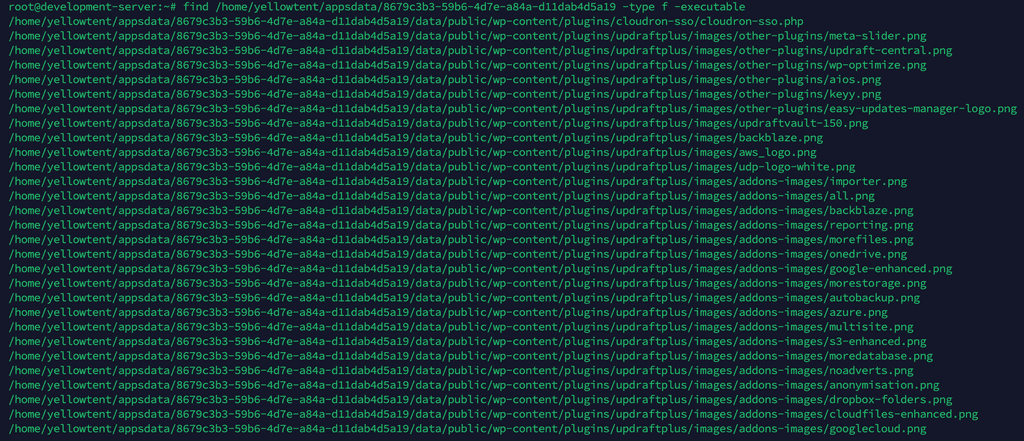
Absolutely no idea how to proceed.
But for now, I will disable the apps shown the list and try, thank you!
@jagan said in Since update to v8.2.1 backups fail with "Too many empty directories":
Absolutely no idea how to proceed.
Those files are images (png). They should not be executable. You can go to the Web Terminal and run something like this:
find /app/data/public/wp-content/plugins/updraftplus -type f -exec chmod a-x {} +Do this for other places which have 'x' bit on files as well. Generally, /app/data should not have any executable files (unless you have some scripts there).
-
S simon referenced this topic on
-
@shrey can you run the Migration job in the end of the jobs section within Immich? https://immich.app/docs/administration/jobs-workers#jobs
At least on my instance it purged most of the empty dirs. This seems to be a one-time housekeeping job. Not quite sure though why this is not run by default in Immich and needs to be manually triggered.
-
@shrey can you run the Migration job in the end of the jobs section within Immich? https://immich.app/docs/administration/jobs-workers#jobs
At least on my instance it purged most of the empty dirs. This seems to be a one-time housekeeping job. Not quite sure though why this is not run by default in Immich and needs to be manually triggered.
@nebulon said in Since update to v8.2.1 backups fail with "Too many empty directories":
@shrey can you run the Migration job in the end of the jobs section within Immich? https://immich.app/docs/administration/jobs-workers#jobs
Tried that.
But on my Immich instance (v1.123.0), it seems to have no effect on the concerned empty directories
root@apps:~# find /mnt/immich/i -type d -empty | wc -l
56587



Hello! It looks like you're interested in this conversation, but you don't have an account yet.
Getting fed up of having to scroll through the same posts each visit? When you register for an account, you'll always come back to exactly where you were before, and choose to be notified of new replies (either via email, or push notification). You'll also be able to save bookmarks and upvote posts to show your appreciation to other community members.
With your input, this post could be even better 💗
Register Login