
Cloudron 9.0 (beta) bug reports
-
We just upgraded to v9 and everything looks good, except for one detail: Somehow, the OIDC functionality stopped working. We configured Cloudflare access to protect access to another website with Cloudron as OIDC provider, and that worked perfectly with v8. After the upgrade to v9 I'm getting the following error:
Failed to verify oidc token with fresh keys
undefinedThis is with the previously configured OIDC app as well as with one freshly set up.
Did something change in the OIDC v9 config that requires adapting the apps?
-
@tronical can you make any sense of https://github.com/goauthentik/authentik/issues/12228 ? not sure if they are talking about "encryption key" in cloudflare or goauthentik. Also some notes here https://github.com/sebadob/rauthy/issues/1229 and https://www.authelia.com/integration/openid-connect/clients/cloudflare-zerotrust/#known-bugs . Cloudron uses https://github.com/panva/node-oidc-provider/ , the latest one.
-
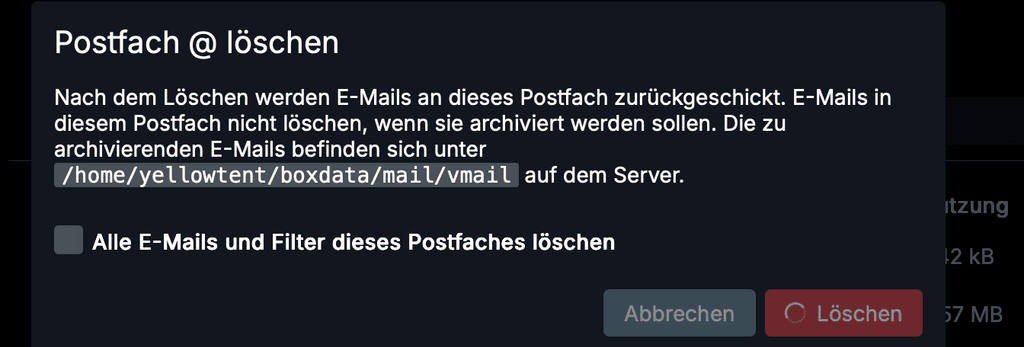
Cloudron 9.0.12, when deleting a mail account, the address is not showing when the confirmation modal appears.
-
I'm happily running 9.0.12 by now.
One thing keeps my annoyed: If you're in the app store and have opened a detail pane from one of the apps: on closing the infoe pane, the app store scrolls to the very top of the app list.
-
Is there a reason to set the 2FA button in the user profile to “display:none”? Cloudron v. 9.0.13

Pronouns: he/him | Primary language: German
-
Is there a reason to set the 2FA button in the user profile to “display:none”? Cloudron v. 9.0.13
-
looking at the code there, so that button is hidden if the user is a non-local (ldap) user or if the cloudron has set 2fa as mandatory, in which case all users must have 2fa setup already. Though maybe there is a bug where the user is not prompted to setup 2fa as the first thing
-
Tapping the notifications button with lots of notifications there is no "clear all" button visible.
One has to scroll all the way to the bottom to see it. Doesn't work well on mobile especially.
@robi I agree this isn't Ideal, especially when you have lots of notifications.
-
Two UI things:
- If a server requires a reboot, would be nice to be able to do that directly from the notification popup (in 8 you had the dedicated notifications page where you you push the button)
- After deleting a mailbox, I got back to the
/#/mailboxesview but all accounts just show "Loading..." and nothing happens. Would be cool if it remembered the mailbox size or at least start collecting the data again.
-
Two UI things:
- If a server requires a reboot, would be nice to be able to do that directly from the notification popup (in 8 you had the dedicated notifications page where you you push the button)
- After deleting a mailbox, I got back to the
/#/mailboxesview but all accounts just show "Loading..." and nothing happens. Would be cool if it remembered the mailbox size or at least start collecting the data again.
@msbt said in Cloudron 9.0 (beta) bug reports:
- If a server requires a reboot, would be nice to be able to do that directly from the notification popup (in 8 you had the dedicated notifications page where you you push the button)
In passing, I have also looked for a notification page anywhere, but could not find this - this means that once the notifications are acknowledged, there is not traces of them anywhere, anymore. I sometimes used the notifications page in v8.x.x to go back and see for example, for how long a notification had been going on, to inform of a situation (e.g. problem with backup etc..). I found it useful.
-
Another UI thing:
- on the users page (https://my.demo.cloudron.io/#/users), if any user belongs to a lot of groups, then you need to scroll horizontally to access the "
..." edit menu for any user:
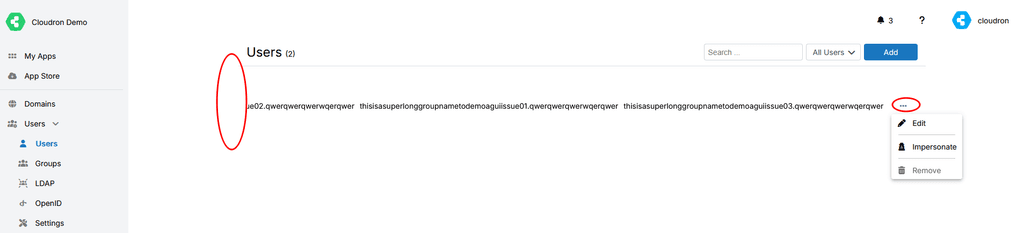
However, in doing so, you loose sight of the user/username and thus it becomes challenging to edit the right user.
Additionally, the horizontal scroll bar indication, only appears at the bottom of the user list, not the bottom of the page.
Hence, if you have a good number of users:- you first need to realize that the edit menu is hidden because of horizontal scrolling.
- Then you need to get to the bottom of the list to access the horizontal scroll bar
- Scroll horizontally
- Then you need to scroll back up to the user that you wish to edit, but then can but sure anymore since the username is hidden.
Currently, your best best in this situation is to search for the specific user hopping that you have enough information to do so.
Potentially, the "
..." edit menu should "float" at the end of the line and be accessible at all time, without horizontal scrolling necessary.Hopefully this makes sense.
- on the users page (https://my.demo.cloudron.io/#/users), if any user belongs to a lot of groups, then you need to scroll horizontally to access the "
-
For me I miss 2 things on the UX part:
- the history of notifications
- a way to reload the main view on mobile. By default I end up on https://my.domain.tld/#/apps and I guess because of the URL pattern (
#/appsis not an URL but a client side routing pattern) the only way to refresh the UI is to manually edit the URL to remove the client side routing part. - There are other small glitches I encounter on mobile, like the Cron part is more difficult to reach by default as the button to configure apps it not visible by defaults in the main view also we need to do extra clicks to see where the "Cron" config is.
Other than this, it works great!
-
Another UI thing:
- on the users page (https://my.demo.cloudron.io/#/users), if any user belongs to a lot of groups, then you need to scroll horizontally to access the "
..." edit menu for any user:
However, in doing so, you loose sight of the user/username and thus it becomes challenging to edit the right user.
Additionally, the horizontal scroll bar indication, only appears at the bottom of the user list, not the bottom of the page.
Hence, if you have a good number of users:- you first need to realize that the edit menu is hidden because of horizontal scrolling.
- Then you need to get to the bottom of the list to access the horizontal scroll bar
- Scroll horizontally
- Then you need to scroll back up to the user that you wish to edit, but then can but sure anymore since the username is hidden.
Currently, your best best in this situation is to search for the specific user hopping that you have enough information to do so.
Potentially, the "
..." edit menu should "float" at the end of the line and be accessible at all time, without horizontal scrolling necessary.Hopefully this makes sense.
@Teiluj thanks for reporting the group overflowing in the users view. We have changed that now to only display the group count for a start until we find some better solution to deal with the vastly varying size that column would require.
- on the users page (https://my.demo.cloudron.io/#/users), if any user belongs to a lot of groups, then you need to scroll horizontally to access the "
-
Is there a reason to set the 2FA button in the user profile to “display:none”? Cloudron v. 9.0.13
-
Two UI things:
- If a server requires a reboot, would be nice to be able to do that directly from the notification popup (in 8 you had the dedicated notifications page where you you push the button)
- After deleting a mailbox, I got back to the
/#/mailboxesview but all accounts just show "Loading..." and nothing happens. Would be cool if it remembered the mailbox size or at least start collecting the data again.
@msbt said in Cloudron 9.0 (beta) bug reports:
After deleting a mailbox, I got back to the /#/mailboxes view but all accounts just show "Loading..." and nothing happens. Would be cool if it remembered the mailbox size or at least start collecting the data again.
this is fixed in https://git.cloudron.io/platform/box/-/commit/3a760282f15259f461e0db4181883ac9d82aac06











Hello! It looks like you're interested in this conversation, but you don't have an account yet.
Getting fed up of having to scroll through the same posts each visit? When you register for an account, you'll always come back to exactly where you were before, and choose to be notified of new replies (either via email, or push notification). You'll also be able to save bookmarks and upvote posts to show your appreciation to other community members.
With your input, this post could be even better 💗
Register Login