
Apps for file management/sharing/syncing
-
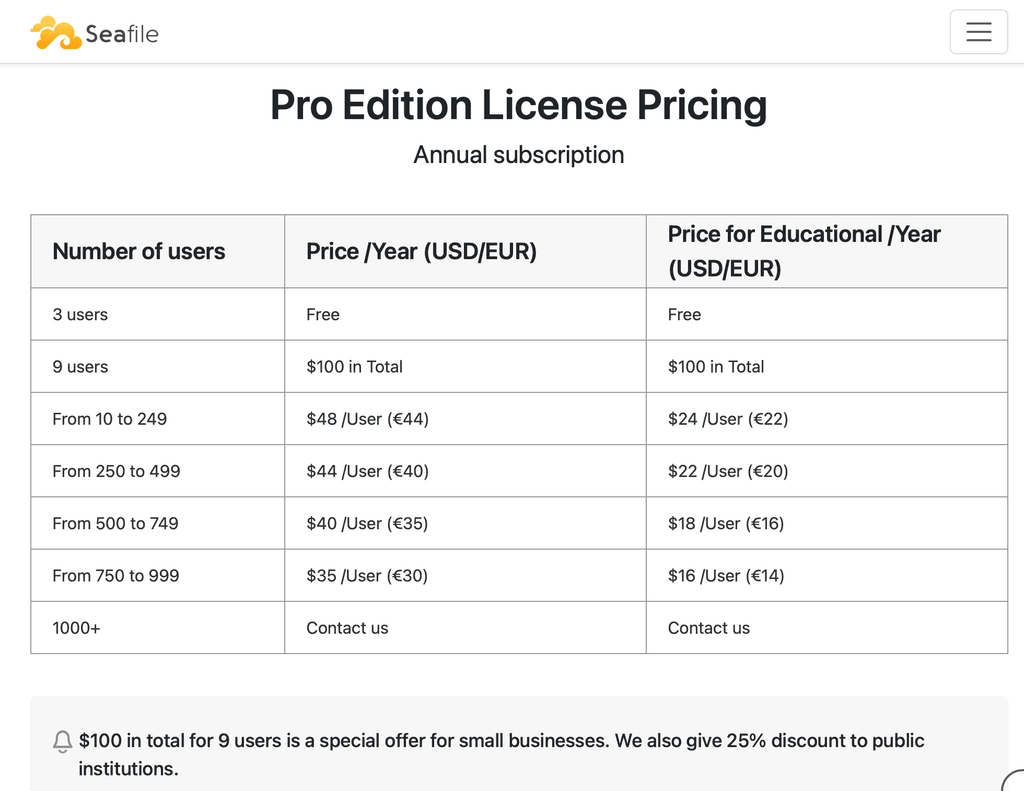
@timconsidine I remember reading about a PRO license for small business (up to 9 seats) for $100 per year (self-hosted). So not free technically, but essentially free given the value provided.
@crazybrad yes, I checked, they are still offering PRO for small deployments - still needs a licence but zero-cost for up to 3
-
@timconsidine You are impressive my friend. Can't believe you were able to package this so quickly. Just curious: where do you think the AI estimates are inflated? Perhaps Tim is 4x faster than others:)
And you are 100% correct about the <= 3 scenario. I missed that.
-
@timconsidine You are impressive my friend. Can't believe you were able to package this so quickly. Just curious: where do you think the AI estimates are inflated? Perhaps Tim is 4x faster than others:)
And you are 100% correct about the <= 3 scenario. I missed that.
@crazybrad don't jump to conclusions - it's not finished yet !
May turn out to be in line with estimates, who knows.
Will plough on - core build done but a fair few wrinkles need resolving, and of course lots of testing. -
@timconsidine Understood. But as I recall, AI was projecting a 40+ hour effort. Perhaps the last few tasks will take a lot of time. Been there!
-
Seafile is now packaged as a custom app.
https://forum.cloudron.io/post/118275@crazybrad : it definitely took longer than your assistant estimated, but I didn't track how long.
-
@timconsidine Gut feel, how much more (as a percent)? Just trying to calibrate AI as an estimating tool.
@crazybrad I don't think more than 80.
Maybe 60?
So maybe 150% ??With hindsight (or better foresight) it's always easier to do a better job, but some apps are well documented as to their install and configure process, others not so much.
Seafile is generally good documentation but like many apps, their attitude is "use our Docker image", rather than here's how to build.
So 60 hours estimate involved a lot of blundering about.
But done now, and I'm really happy to have Seafile available as an option (used it for 3+ years off-Cloudron).About to write a companion app which will pull Seafile libraries into backup storage as native files on external storage.
Can never have enough backups ! -
SeaClone now published as a custom app : https://forum.cloudron.io/post/118327
-
@timconsidine AI "guessed" 41-57 hours. So reality was just above the upper estimate. Also, not sure if AI "guessed" a PRO version instead of Community versions (which is what was possible).
On the topic of automated backup, if you store your SeaFile objects on Amazon S3, it is possible with bucket policies to replicate objects to a cheaper storage tier. No need to extend the application. And then you can have "deep storage" files delete automatically after a certain period of time. I don't know if some of the S3-compatible services like iDrive E2 and BackBlaze offer this capability but there are some interesting possibilities.
Finally, read an article that gave me pause about backups. A small company lost millions in revenue because their cloud provider (who shall be anonymous) went down and their backups were in the same availability region (which was part of the outage). This is making me think that perhaps duplicate backups (whether S3 objects or VPS snapshots might be worth replicating in another availability zone.
-
@timconsidine AI "guessed" 41-57 hours. So reality was just above the upper estimate. Also, not sure if AI "guessed" a PRO version instead of Community versions (which is what was possible).
On the topic of automated backup, if you store your SeaFile objects on Amazon S3, it is possible with bucket policies to replicate objects to a cheaper storage tier. No need to extend the application. And then you can have "deep storage" files delete automatically after a certain period of time. I don't know if some of the S3-compatible services like iDrive E2 and BackBlaze offer this capability but there are some interesting possibilities.
Finally, read an article that gave me pause about backups. A small company lost millions in revenue because their cloud provider (who shall be anonymous) went down and their backups were in the same availability region (which was part of the outage). This is making me think that perhaps duplicate backups (whether S3 objects or VPS snapshots might be worth replicating in another availability zone.
@crazybrad interesting comments
The packaging work for PRO might not actually be much higher, the blocker is that Seafile require the end-user to register for access to it, if I or Cloudron register, then share that file/link out, it's a breach of Seafile licence. So we have to rely on packaging CE and documenting how to upgrade. Still working on that because I used to have PRO but reverted to CE for simplicity and didn't suffer much loss.
About S3, I like it but I prefer a layered approach, local working, remote #1 in format #1, remote #2 in format #2, even a periodic sync to a 2Tb external drive.
One thing I like about Seafile is that native files are usually synced locally, so if Seafile server or VPS goes down, it's not that difficult (just time) to repopulate a new one. The only issue is Seafile libraries which are "cold", not synced by anyone. But my new SeaClone app gets around that by downloading all libraries as native files.
I am looking into making SeaClone back up Seafile libraries into a S3 destination also, which can then handle the live vs cold vs glacier issue. And maybe different zones. But I want to get the other functions proven out first, including transferring 300Gb of non-cloudron-seafile docs into the cloudron Seafile app.
With SeaClone, a full text search based on Meilisearch and extending SeaClone to handle S3, I am not sure Seafile PRO will be necessary. But will also get around to documenting how a user can upgrade their cloudron Seafile CE to cloudron Seafile PRO.
-
For me 2026 is a year to sort out the total mess which is my digital filing.
Almost everyone, individuals, solopreneur, small business, corporate, enterprise, needs good apps for file management/sharing/syncing.
Cloudron has had Nextcloud for a long time, but some just don't like it, and others (
 ) think it is too fat and bloated.
Cloudron has also had Syncthing for a long time, and it works well but is more of a personal tool. Personally I think it should only be used with the partner app, Syncthing Discovery Server, but that is now done as a custom app.
Cubby is also long standing, but doesn't have desktop apps.
Nothing is perfect for everyone, which underlines the need for choices.
I know (@)staff are perpetually busy, but I would like to suggest some attention to extending the available options for Cloudron users.
Fat Nextcloud vs. "personal" Syncthing vs web-only Cubby is not a good choice for this critical near-universal need for functionality.
I am a long-time user of Seafile, but (a) I think it is impossible to package for Cloudron, and (b) I worry about extracting / backing up files from its "cloaked" environment. Owncloud and OpenCloud don't seem the direction to go. MinIO is now effectively not an option.
Seeking a solution for own needs, I have packaged :
- Sync-in : young but possibly my favourite, intuitive, good desktop sync
- Pydio Cells : very established, needs a little configuration for max power, Mac desktop sync app cludgy but works
- Garage S3 (also packaged by @jadudm) as a back-end for other front-end S3 clients
I'd really like the AppStore to adopt these, one at least.
I'm sure my packages can be improved, and I'm not precious about that, but they are a starting point.Are there other solutions on this field which should be considered ?
Personally I might be sorted now with my custom apps, but that's not a good answer for others, and I feel a stronger offering in this field would enhance Cloudron as a platform.
Thank you for patiently reading and considering.
@timconsidine said in Apps for file management/sharing/syncing:
Cubby is also long standing, but doesn't have desktop apps.
I started on an android app - https://git.cloudron.io/cubby/cubby-android/ . It will take some time to get it polished but it will get there.
By desktop app, do you mean a desktop syncer? I connect via webdav on linux and while not a "syncer" , it gives similar functionality. But I am happy to hear opinions on how important a desktop syncer is these days.
-
I was just reading https://old.reddit.com/r/selfhosted/comments/1q3n2rl/i_failed_selfhosting/ and discovered something called Copyparty - https://github.com/9001/copyparty .
@joseph I just set this up as a Cloudron app, but good lord the UI is bad. I'm going to fork it.
Here's the Cloudron app repo for the regular version:
https://github.com/stalecontext/copyparty-cloudron-app -
@joseph I just set this up as a Cloudron app, but good lord the UI is bad. I'm going to fork it.
Here's the Cloudron app repo for the regular version:
https://github.com/stalecontext/copyparty-cloudron-app@stalecontext said in Apps for file management/sharing/syncing:
@joseph I just set this up as a Cloudron app, but good lord the UI is bad. I'm going to fork it.
Here's the Cloudron app repo for the regular version:
https://github.com/stalecontext/copyparty-cloudron-appThat's a 404 for me.
-
@stalecontext said in Apps for file management/sharing/syncing:
@joseph I just set this up as a Cloudron app, but good lord the UI is bad. I'm going to fork it.
Here's the Cloudron app repo for the regular version:
https://github.com/stalecontext/copyparty-cloudron-appThat's a 404 for me.
@jdaviescoates yeah likely a private repo
-
@stalecontext said in Apps for file management/sharing/syncing:
@joseph I just set this up as a Cloudron app, but good lord the UI is bad. I'm going to fork it.
Here's the Cloudron app repo for the regular version:
https://github.com/stalecontext/copyparty-cloudron-appThat's a 404 for me.
@jdaviescoates Had some issues with Github, will post on my gitea sometime tomorrow
-
Here you guys go @robi @jdaviescoates
https://git.cathedral.gg/Ben/copyparty-cloudron-appIf you want to wait for my frontend fork, here's what it's looking like
-
@stalecontext i've build an image on docker Hub: https://hub.docker.com/repository/docker/wazolab/copyparty
Also i've opened 2 issues on your repo:






Hello! It looks like you're interested in this conversation, but you don't have an account yet.
Getting fed up of having to scroll through the same posts each visit? When you register for an account, you'll always come back to exactly where you were before, and choose to be notified of new replies (either via email, or push notification). You'll also be able to save bookmarks and upvote posts to show your appreciation to other community members.
With your input, this post could be even better 💗
Register Login