
Speed up Cloudron Apps startup? especially wordpress sites
-
It takes a long time for the multiple wordpress sites, and apps in general to get started when cloudron is restarted. The sites are inaccessible for a long time yet server load is low.
Is there any way to speed up the inital startup time?
Why does it take so long?
What factors impact speed the most? -
Hello @supaiku
Are you using the @wordpress-managed or @wordpress-developer app? -
Hello @supaiku
Are you using the @wordpress-managed or @wordpress-developer app? -
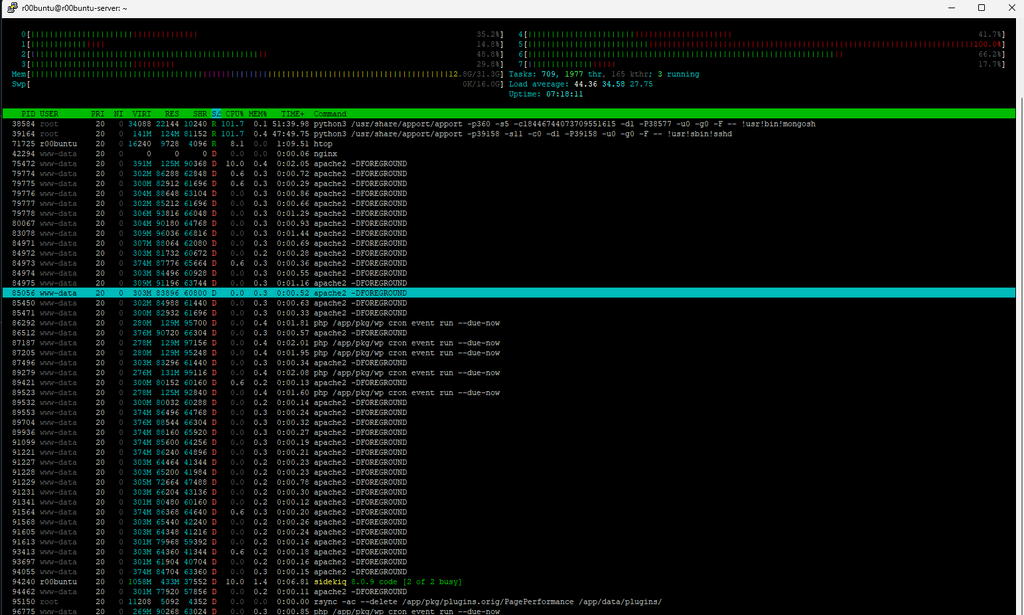
There's always all these processes in the D mode - is this perhaps a slow hard drive issue?
This screenshot is even from after they are going, but ususally there are these and then some more explicitly wordpress related processes to match the apache ones.
-
-
There's always all these processes in the D mode - is this perhaps a slow hard drive issue?
This screenshot is even from after they are going, but ususally there are these and then some more explicitly wordpress related processes to match the apache ones.
-
I killed the apport proceses and that helped the server load and since restarted the server as well, but it seems likely that a failing SSD that I let go way too long is likely the culprit (sdb1 was were most of the apps were stored)...
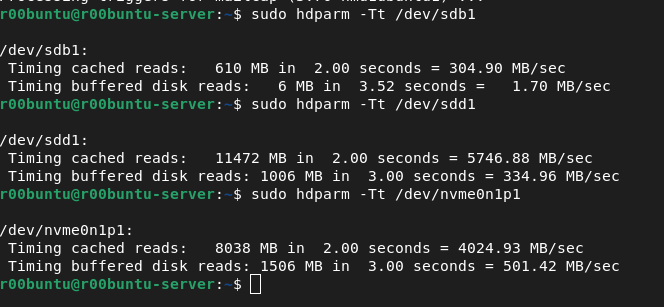
We'll see once everything is migrated and I try restarting... it's that initial boot up that seems to consistently take forever for the WP sites.
-
J joseph has marked this topic as solved on




Hello! It looks like you're interested in this conversation, but you don't have an account yet.
Getting fed up of having to scroll through the same posts each visit? When you register for an account, you'll always come back to exactly where you were before, and choose to be notified of new replies (either via email, or push notification). You'll also be able to save bookmarks and upvote posts to show your appreciation to other community members.
With your input, this post could be even better 💗
Register Login