
What's coming in Cloudron 10
-
Since we are getting swarmed by bots and crawlers (including our gitlab/forum/crm), we decided to include some features that will help in protecting apps. The first one is VPN protection. With this feature, people can access apps only via the VPN.
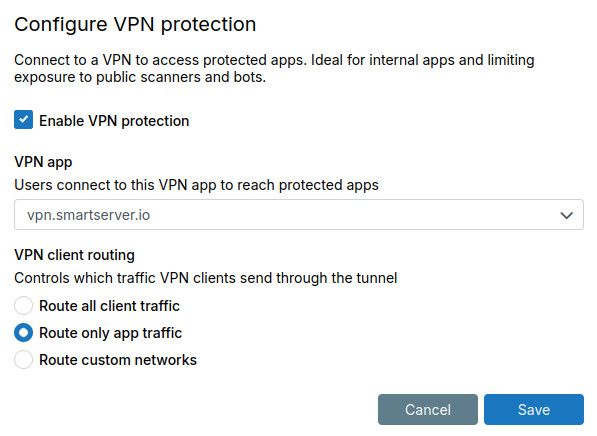
In the network UI, there is a setting called "VPN protection". First enable the feature and select how to route the client traffic.
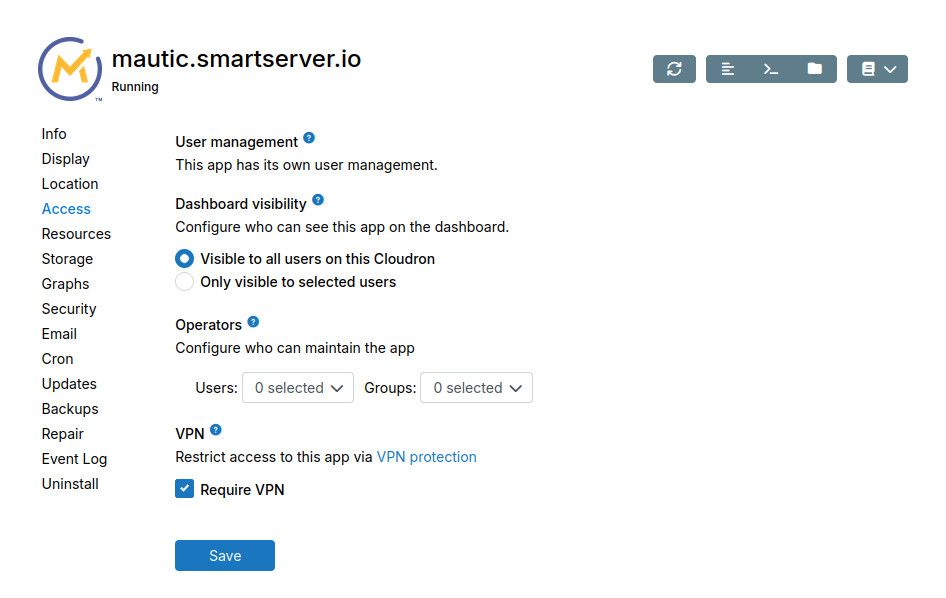
There is a per-app checkbox to VPN protect the app:
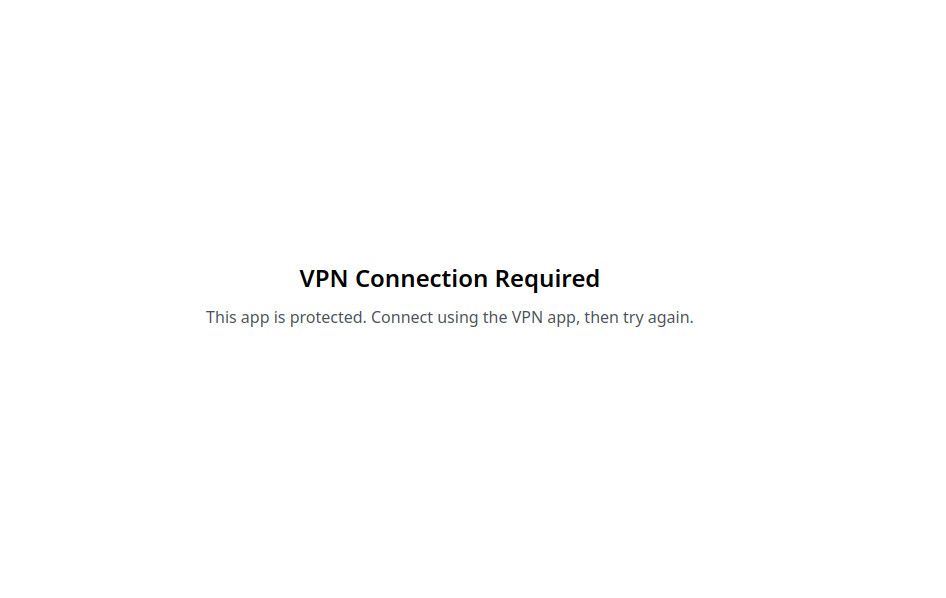
If you try to access mautic now without a VPN connection, you will see (placeholder):
With OpenVPN/Wireguard connection, you will see mautic .
Of course, this feature is mostly useful for internal apps. For public facing apps (like ghost, gitlab, nodebb), we are working on a different solution.
@girish I'd like to ask regarding this feature.
- Could we enable the VPN to protect my.cloudron.app?
- Is it possible to make custom rules? I mean if I want to protect WP-login.php and WP-admin, but I need to exclude this file /wp-admin/admin-ajax.php.
Thank you for making awesome feature!
-
@girish I'd like to ask regarding this feature.
- Could we enable the VPN to protect my.cloudron.app?
- Is it possible to make custom rules? I mean if I want to protect WP-login.php and WP-admin, but I need to exclude this file /wp-admin/admin-ajax.php.
Thank you for making awesome feature!
-
girish said:
Ubuntu 26.04 support
We will have Ubuntu 26.04 LTS Resolute Raccoon support next release. I have managed to test this across most of the providers we support. We will have a guide during release time to upgrade manually from Ubuntu 24.04.
Before someone asks, I don't know the ETA for Cloudron 10 yet, I think we will need 2-3 weeks more at least.
-
Since networking/vpn/security is currently being worked on is there any opportunity here to provide native Tailscale support as an option? Specifically we offload heavy compute to external boxes (think AI compute hosted elsewhere) and I'd like to add Cloudron to my Tailnet so that Open WebUI running on Cloudron for example, can have access to some private compute and resources without having to worry about persisting through updates/backups/breaking Cloudron DNS etc.
-
-
Since we are getting swarmed by bots and crawlers (including our gitlab/forum/crm), we decided to include some features that will help in protecting apps. The first one is VPN protection. With this feature, people can access apps only via the VPN.
In the network UI, there is a setting called "VPN protection". First enable the feature and select how to route the client traffic.
There is a per-app checkbox to VPN protect the app:
If you try to access mautic now without a VPN connection, you will see (placeholder):
With OpenVPN/Wireguard connection, you will see mautic .
Of course, this feature is mostly useful for internal apps. For public facing apps (like ghost, gitlab, nodebb), we are working on a different solution.
@girish you selected mautic for this example in the screenshot. Is it possible to differentiate already between different paths? As link redirects, assets etc. would still need to be served publicly - but the admin interface not.
Thanks for clarification!
(Ask me about B2B marketing automation & low code business solutions, if thats interesting for you.)
-
@girish you selected mautic for this example in the screenshot. Is it possible to differentiate already between different paths? As link redirects, assets etc. would still need to be served publicly - but the admin interface not.
Thanks for clarification!
@dsp76 Good point about the matuc example. But I think URL based protection is more complicated because we will need help from the apps. For example, it will require all of mautic admin and it's assets to be designed to be served from under a specific subpath. I haven't really investigated how friendly apps are in this regard but most likely we will have to handle this package by package (in a future release).
-
-
-
We will be working on the following for Cloudron 10. mail server needs a bunch of housekeeping and fixes and will be the focus for this release.
Mail related:
- mail: allow cloudron email to be used as a mail relay. this will allow one cloudron to relay emails via another cloudron without having to disable mail from validation.
- mail: fix mail forwarding. there's been lots of bug reports on this feature. have to investigate the root cause
- mail: admin notes field for mailboxes and lists
- mail: housekeeping task. we want to move away from usage of ldap for auth entirely. many of the node ldap modules have become unmaintained
- mail: housekeeping task. the mail database is partly in box code and partly in mail server. have to move everything into mail server. this will help us implement backup/restore of mail nicely as well.
- mail: expose mailbox indexing and spam learning status in the UI
Non-mail related:
- Ubuntu 26.04 support
- Improved progress reporting - show percentage complete and elapsed/estimated time for backups and app installations
- Convert backup site creation dialog to a view
- Policy change: self updating ubuntu packages will be permitted i.e apt update and apt upgrade is allowed.
- Personal access tokens will be renamed to API tokens.
- VPN protection of apps
girish said:
mail: fix mail forwarding. there's been lots of bug reports on this feature. have to investigate the root cause
The mailing list feature has got a revamp. For a start, it's completely removed and all the lists will be migrated to a mailbox with the Cloudron superadmin as the owner.
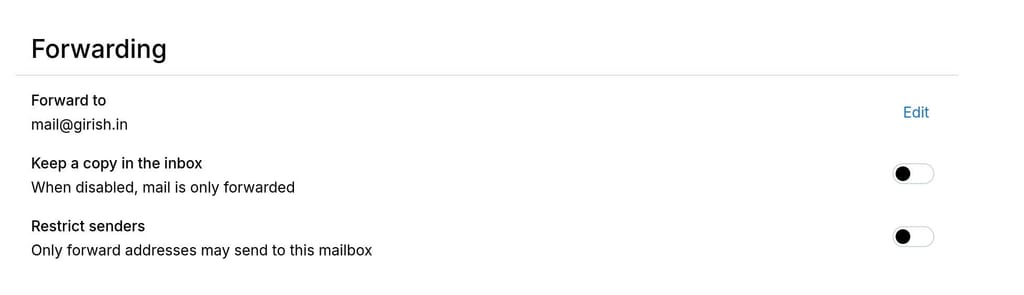
Each mailbox now has a capability to set up forwarding (same options as mailing list):
For the delivery aspect:
- SRS is still the way to go to overcome SPF.
- We follow best practices from gmail - https://support.google.com/mail/answer/175365?hl=en . Body/message headers are not changed. We also add Forwarding headers. Spam filtering is done before forwarding.
- We now attach ARC headers when forwarding. However, ARC is a system of trust and mostly the big mail providers won't trust ARC headers originating from Cloudron. So, this is mostly a theoretical exercise.
Unfortunately, there is nothing much we can do here about the delivery aspect. If it works, it works.
-
girish said:
mail: fix mail forwarding. there's been lots of bug reports on this feature. have to investigate the root cause
The mailing list feature has got a revamp. For a start, it's completely removed and all the lists will be migrated to a mailbox with the Cloudron superadmin as the owner.
Each mailbox now has a capability to set up forwarding (same options as mailing list):
For the delivery aspect:
- SRS is still the way to go to overcome SPF.
- We follow best practices from gmail - https://support.google.com/mail/answer/175365?hl=en . Body/message headers are not changed. We also add Forwarding headers. Spam filtering is done before forwarding.
- We now attach ARC headers when forwarding. However, ARC is a system of trust and mostly the big mail providers won't trust ARC headers originating from Cloudron. So, this is mostly a theoretical exercise.
Unfortunately, there is nothing much we can do here about the delivery aspect. If it works, it works.
@girish said:
Each mailbox now has a capability to set up forwarding (same options as mailing list):Looking forward to try out this new feature. Now that each mailbox has some settings, would it be possible to configure a different delivery for a given mailbox? Like some apps want mail delivered via pipe to a command, lmtp, or simply another internal smtp port in an app.
-
@fbartels not yet, but we can possibly add routing options as we go. Do we have concrete use cases? Maybe we should collect them and decide what is the best approach. I know "always bcc" is something people have wanted but the real use case here is to have an archive of email for regulatory purposes.
-
 J james forked this topic on
-
@fbartels not yet, but we can possibly add routing options as we go. Do we have concrete use cases? Maybe we should collect them and decide what is the best approach. I know "always bcc" is something people have wanted but the real use case here is to have an archive of email for regulatory purposes.
Do we have concrete use cases? Maybe we should collect them and decide what is the best approach
It certainly always depends on the application one wants to use. I do remember some people requesting mailman as an app, but that was not possible because mailman wants mails directly delivered to it instead of to a mailbox.
One application that i currently use and could benefit from this would be ntfy, where you can also submit messages via smtp.
Another application that could benefit from this would be alternative mailservers like stalwart or the product from my employer if you need exchange like sync.
-
Also given you're looking at emails, I wonder if you might have time to look at a couple more email related ideas (but I understand new features aren't and shouldn't be the priority over what you've listed):
-
Introducing manual / basic moderation for external mailing list through setting one email address / mailing list member who receives emails from external people and can decide whether or not to manually forward them to the list, like described here
-
Creating mailing lists based on a Cloudron group, so that mailing list recipient / email addresses get automatically updated when users enter / leave the group
-
Currently when I send an email to a mailing list I'm part of I also receive that email. Would it be possible to have an option (per mailing list) so that it is not the case, i.e. that senders don't receive their own email if they are part of the list?
avatar1024 said:
Also given you're looking at emails, I wonder if you might have time to look at a couple more email related ideas (but I understand new features aren't and shouldn't be the priority over what you've listed):
-
Creating mailing lists based on a Cloudron group, so that mailing list recipients / email addresses get automatically updated when users enter / leave the group
-
Currently when I send an email to a mailing list I'm part of I also receive that email. Would it be possible to have an option (per mailing list) so that it is not the case, i.e. that senders don't receive their own email if they are part of the list?
@girish have any of the two features been looked at as part of the revamp (got kind of a workaround for 1. in my original post which in fact should work even work better with your new approach)?
No worries if not of course, it's just to know what to expect. 2. especially would be super useful as I can't find a clean workaround for doing that with current features.
-
-
While I appreciate the upcoming mail related features and fixes, there is still one crucial feature left out that was talked about for years: Auto/Custom BCC for incoming/outgoing mail
We need to make them archivable to comply with german GoBD law. Setting this at client level would not pass as the law requires seamless documentation without user influence. This is not limited to german law but is generally useful for any company that needs to document business processes comprehensively. I know a lot of companys and freelancers lacking DMS systems, mostly because its complicated and can be very expensive.
Best case would be the ability to set global BCC per mailbox within Cloudron.
While I appreciate the upcoming mail related features and fixes, there is still one crucial feature left out that was talked about for years: Auto/Custom BCC for incoming/outgoing mail
We need to make them archivable to comply with german GoBD law. Setting this at client level would not pass as the law requires seamless documentation without user influence. This is not limited to german law but is generally useful for any company that needs to document business processes comprehensively. I know a lot of companys and freelancers lacking DMS systems, mostly because its complicated and can be very expensive.
Best case would be the ability to set global BCC per mailbox within Cloudron.
Is there any update on when this feature will become available?
A global/custom BCC setting per mailbox would be absolutely essential for us and is urgently needed, especially for reliable and seamless email archiving without depending on individual client-side settings.
-
There are unfortunately no concrete plans to add this right now, but we do investigate this. For German GoBD law some "always BCC" is actually not a compliant way as I understand it, neither is using https://mail-archiver.org/ for example. The reason is that one has to archive in- and outbound emails on the transport and not storage (like mail archiver does) side of things. Which in our case means in haraka.
We will continue to discuss this internally where an how this can be best and ideally most compliant implemented with Cloudron, but we are not there just yet.
-
Thank you very much for your reply.
In our case, our current requirement with Cloudron is simply to be able to archive outgoing emails from specialized applications on the server side, as unfortunately these applications do not support this functionality themselves (no CC / BCC).
For our use case, it would therefore be completely sufficient to have an “Auto-BCC” function that can be configured for individual mailboxes, entirely without any legal context.
Even a command-line workaround would be perfectly sufficient for us.
Thank you very much!
-
girish said:
Ubuntu 26.04 support
We will have Ubuntu 26.04 LTS Resolute Raccoon support next release. I have managed to test this across most of the providers we support. We will have a guide during release time to upgrade manually from Ubuntu 24.04.
Before someone asks, I don't know the ETA for Cloudron 10 yet, I think we will need 2-3 weeks more at least.
girish said:
Ubuntu 26.04 support
We will have Ubuntu 26.04 LTS Resolute Raccoon support next release. I have managed to test this across most of the providers we support. We will have a guide during release time to upgrade manually from Ubuntu 24.04.
As 10 is out - can you share your experience with upgrading to Ubuntu 26.04.?
-
Since we are getting swarmed by bots and crawlers (including our gitlab/forum/crm), we decided to include some features that will help in protecting apps. The first one is VPN protection. With this feature, people can access apps only via the VPN.
In the network UI, there is a setting called "VPN protection". First enable the feature and select how to route the client traffic.
There is a per-app checkbox to VPN protect the app:
If you try to access mautic now without a VPN connection, you will see (placeholder):
With OpenVPN/Wireguard connection, you will see mautic .
Of course, this feature is mostly useful for internal apps. For public facing apps (like ghost, gitlab, nodebb), we are working on a different solution.
In the network UI, there is a setting called "VPN protection". First enable the feature and select how to route the client traffic.
I love that feature! Thanks!
The setting offers three options, but I can't find them explained in the docs. What is the difference between "Route only app traffic" and "Route all client traffic"?
Where will the traffic be routed through for the "non-app traffic", if the option "only app traffic" is selected? Will the non app traffic be blocked then?Thanks!
-
In the network UI, there is a setting called "VPN protection". First enable the feature and select how to route the client traffic.
I love that feature! Thanks!
The setting offers three options, but I can't find them explained in the docs. What is the difference between "Route only app traffic" and "Route all client traffic"?
Where will the traffic be routed through for the "non-app traffic", if the option "only app traffic" is selected? Will the non app traffic be blocked then?Thanks!
In the network UI, there is a setting called "VPN protection". First enable the feature and select how to route the client traffic.
This is a great feature. I hope it can be documented more thoroughly, to better understand how to benefit from it in all use cases and scenarios.









Hello! It looks like you're interested in this conversation, but you don't have an account yet.
Getting fed up of having to scroll through the same posts each visit? When you register for an account, you'll always come back to exactly where you were before, and choose to be notified of new replies (either via email, or push notification). You'll also be able to save bookmarks and upvote posts to show your appreciation to other community members.
With your input, this post could be even better 💗
Register Login