Cloudron makes it easy to run web apps like WordPress, Nextcloud, GitLab on your server. Find out more or install now.


Skip to content
  • Categories
  • Recent
  • Tags
  • Popular
  • Bookmarks
  • Search
Skins
  • Light
  • Brite
  • Cerulean
  • Cosmo
  • Flatly
  • Journal
  • Litera
  • Lumen
  • Lux
  • Materia
  • Minty
  • Morph
  • Pulse
  • Sandstone
  • Simplex
  • Sketchy
  • Spacelab
  • United
  • Yeti
  • Zephyr
  • Dark
  • Cyborg
  • Darkly
  • Quartz
  • Slate
  • Solar
  • Superhero
  • Vapor

  • Default (No Skin)
  • No Skin
Collapse
Brand Logo

Cloudron Forum

Apps - Status | Demo | Docs | Install
  1. Cloudron Forum
  2. Feature Requests
  3. email: autoconfig for autoconfiguration (example: via thunderbird)

email: autoconfig for autoconfiguration (example: via thunderbird)

Scheduled Pinned Locked Moved Solved Feature Requests
emailthunderbird
28 Posts 9 Posters 14.2k Views 12 Watching
  • Oldest to Newest
  • Newest to Oldest
  • Most Votes
Reply
  • Reply as topic
Log in to reply
This topic has been deleted. Only users with topic management privileges can see it.
  • girishG girish

    @hakunamatata Can you try this curl -v https://domain.com/.well-known/autoconfig/mail/config-v1.1.xml. If that returns a 404, can you go the bare domain app's Location view and click save (no need to make any changes) and then run the curl again?

    H Online
    H Online
    hakunamatata
    wrote on last edited by
    #21

    @girish said in email: autoconfig for autoconfiguration (example: via thunderbird):

    curl -v https://domain.com/.well-known/autoconfig/mail/config-v1.1.xml

    That seems to have done the trick. Thanks!

    girishG 1 Reply Last reply
    1
    • H hakunamatata

      @girish said in email: autoconfig for autoconfiguration (example: via thunderbird):

      curl -v https://domain.com/.well-known/autoconfig/mail/config-v1.1.xml

      That seems to have done the trick. Thanks!

      girishG Offline
      girishG Offline
      girish
      Staff
      wrote on last edited by
      #22

      @hakunamatata Ah, I had put that "note" in https://docs.cloudron.io/domains/#matrix-server-location but forgot to put the same note for email configuration. Will do so, thanks.

      1 Reply Last reply
      2
      • A Offline
        A Offline
        AartJansen
        wrote on last edited by AartJansen
        #23

        I realize this is an old thread, but is the autodiscover meant to "just work" for thunderbird ? I just tried it and it "failed to find the settings for your email account"
        This was over the LAN. I just tried it over the internet, withthe same result.
        I also ran the curl command on both clients, and it reported "not found" no such route.
        I clicked the sync DNS, and waited for a while and tried again with the same result.

        1 Reply Last reply
        0
        • nebulonN Away
          nebulonN Away
          nebulon
          Staff
          wrote on last edited by girish
          #24

          Is the main domain (for example domain.com, when your Cloudron runs on my.domain.com) pointing to your Cloudron also and is served up correctly?

          See https://docs.cloudron.io/email/#autodiscover

          1 Reply Last reply
          1
          • girishG Offline
            girishG Offline
            girish
            Staff
            wrote on last edited by
            #25

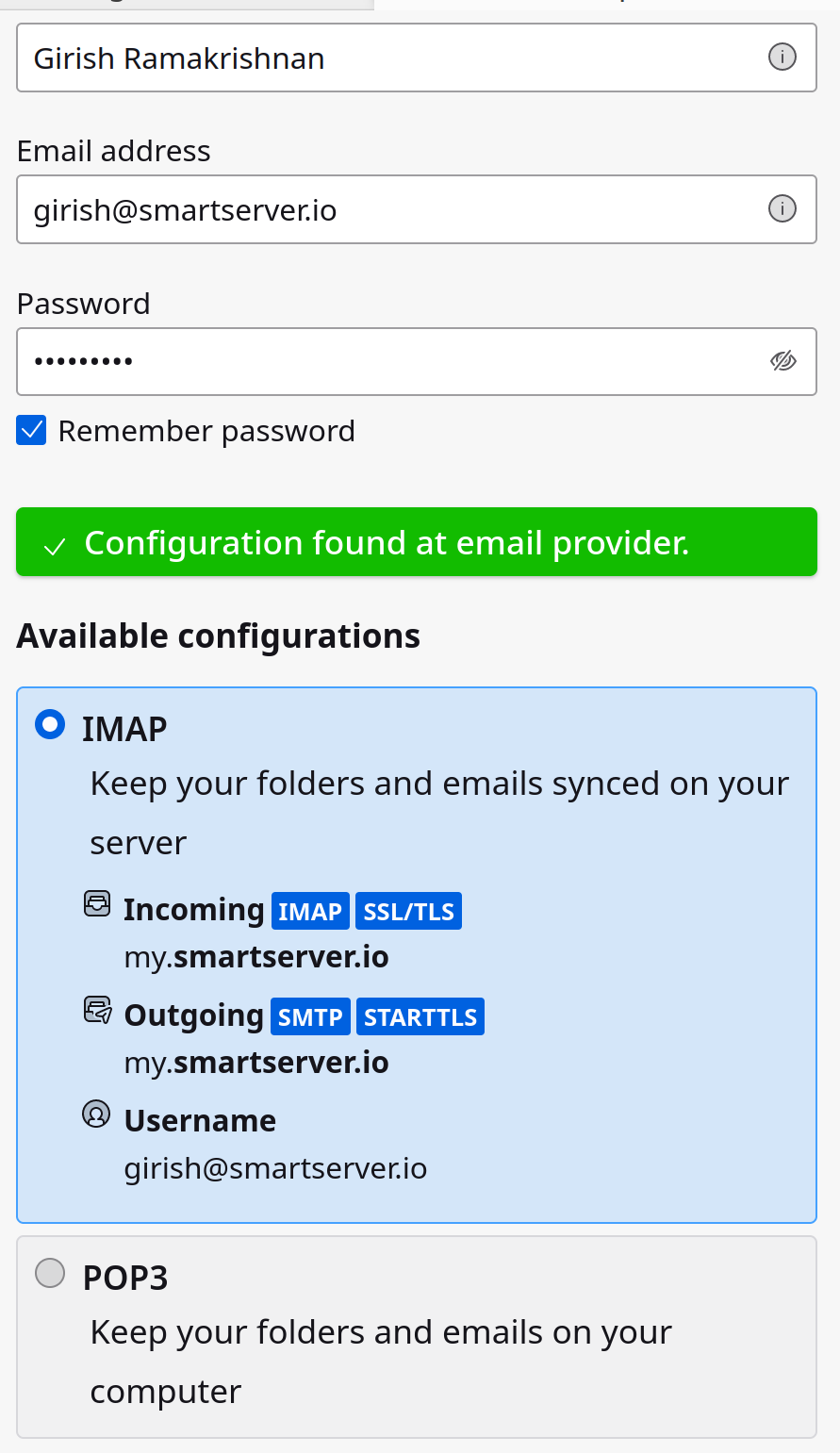
            I quickly re-tested this in my thunderbird. As @nebulon said, you must have an app in the email domain for this to work.

            image.png

            1 Reply Last reply
            2
            • A Offline
              A Offline
              AartJansen
              wrote on last edited by AartJansen
              #26

              oh that might be my problem, none of my apps are in the bare domain. I'll add one and retest

              EDIT: Tests fine now, thanks!

              1 Reply Last reply
              2
              • 32463 Offline
                32463 Offline
                3246
                wrote on last edited by 3246
                #27
                This post is deleted!
                1 Reply Last reply
                0
                • nebulonN Away
                  nebulonN Away
                  nebulon
                  Staff
                  wrote on last edited by
                  #28

                  As far as I understood this, thunderbird maintains an ISP database mainly. So once a domain was manually configured in any thunderbird, subsequent account setups will have the server addresses auto "discovered" from that database.

                  1 Reply Last reply
                  0

                  Hello! It looks like you're interested in this conversation, but you don't have an account yet.

                  Getting fed up of having to scroll through the same posts each visit? When you register for an account, you'll always come back to exactly where you were before, and choose to be notified of new replies (either via email, or push notification). You'll also be able to save bookmarks and upvote posts to show your appreciation to other community members.

                  With your input, this post could be even better 💗

                  Register Login
                  Reply
                  • Reply as topic
                  Log in to reply
                  • Oldest to Newest
                  • Newest to Oldest
                  • Most Votes


                  • Login

                  • Don't have an account? Register

                  • Login or register to search.
                  • First post
                    Last post
                  0
                  • Categories
                  • Recent
                  • Tags
                  • Popular
                  • Bookmarks
                  • Search