
PeerTube CLI
-
peertube as many other apps should ideally run with the
cloudronuser, so maybe try that user instead of root. -
Ah sudo apparently does not carry over the env bits for this. So instead use
gosu cloudron:cloudron npm ...that should do.@nebulon said in PeerTube CLI:
gosu cloudron:cloudron
getting one step closer but still an error:
gosu cloudron:cloudron NODE_CONFIG_DIR=/var/www/peertube/config NODE_ENV=production npm run create-transcoding-job -- -v db21c654-6ca3-470e-b6a0-0f31bbcb3c37 error: exec: "NODE_CONFIG_DIR=/var/www/peertube/config": stat NODE_CONFIG_DIR=/var/www/peertube/config: no such file or directory -
NODE_CONFIG_DIRis already properly set in the environment pointing to/app/code/server/configso remove that from your commandline.@nebulon again one step closer, but...
/app/code/server# gosu cloudron:cloudron NODE_ENV=production npm run create-transcoding-job -- -v db21c654-6ca3-470e-b6a0-0f31bbcb3c37 error: exec: "NODE_ENV=production": executable file not found in $PATHwith the current size. -
it seems to work here :

and transcoding works too :
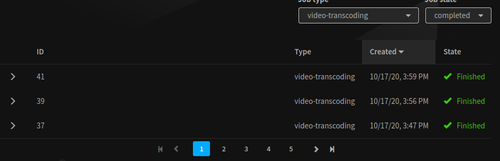
the "solution" is to disable HLS
Requires ffmpeg >= 4.1
Generate HLS playlists and fragmented MP4 files resulting in a better playback than with the current default player:
Resolution change is smoother
Faster playback in particular with long videos
More stable playback (less bugs/infinite loading)
If you also enabled WebTorrent support, it will multiply videos storage by 2
-
it seems to work here :
and transcoding works too :
the "solution" is to disable HLS
Requires ffmpeg >= 4.1
Generate HLS playlists and fragmented MP4 files resulting in a better playback than with the current default player:
Resolution change is smoother
Faster playback in particular with long videos
More stable playback (less bugs/infinite loading)
If you also enabled WebTorrent support, it will multiply videos storage by 2
-
@rmdes HLS seems to be messy.
is ffmpeg not >=4.1 by default?
does HLS being enabled mean the fragmented MP4 and original are in place? That already means 2x the original.
What is it about WebTorrent that 2x that even more?
-
Fresh update with the latest version on a fresh cloudron :
when I follow the doc here : https://docs.cloudron.io/apps/peertube/ to import a video from cli
I getpeertube import --url https://domain.com --username user --password bloodypass --target-url https://www.youtube.com/watch?v=xxxx --tmpdir /tmp
the shell returns this :
--username field is required
--password field is requiredAnything changed perhaps for the cli & latest peertube version ?
-
Fresh update with the latest version on a fresh cloudron :
when I follow the doc here : https://docs.cloudron.io/apps/peertube/ to import a video from cli
I getpeertube import --url https://domain.com --username user --password bloodypass --target-url https://www.youtube.com/watch?v=xxxx --tmpdir /tmp
the shell returns this :
--username field is required
--password field is requiredAnything changed perhaps for the cli & latest peertube version ?
So the peertube cli has now a neat feature to remember instances it is being used to upload from the cli :
peertube auth :
add [options] remember your accounts on remote instances for easier use
del <url> unregisters a remote instance
list lists registered remote instances
set-default <url> set an existing entry as default
help [command] display help for commandExamples:
$ peertube auth add -u https://peertube.cpy.re -U "PEERTUBE_USER" --password "PEERTUBE_PASSWORD"
$ peertube auth add -u https://peertube.cpy.re -U root
$ peertube auth list
$ peertube auth del https://peertube.cpy.re
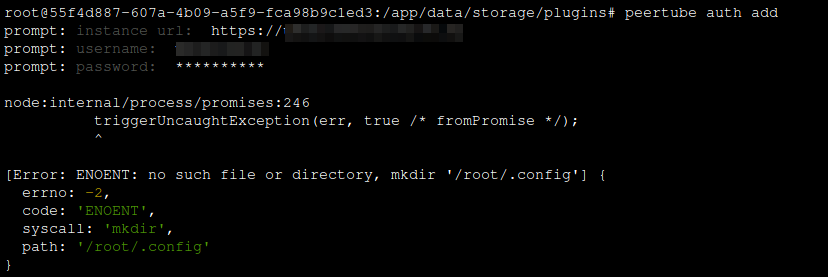
When I try to use it, I get this :
node:internal/process/promises:246
          triggerUncaughtException(err, true /* fromPromise */);
          ^

[Error: ENOENT: no such file or directory, mkdir '/root/.config'] {
  errno: -2,
  code: 'ENOENT',
  syscall: 'mkdir',
  path: '/root/.config'
}
-
So the peertube cli has now a neat feature to remember instances it is being used to upload from the cli :
peertube auth :
add [options] remember your accounts on remote instances for easier use
del <url> unregisters a remote instance
list lists registered remote instances
set-default <url> set an existing entry as default
help [command] display help for commandExamples:
$ peertube auth add -u https://peertube.cpy.re -U "PEERTUBE_USER" --password "PEERTUBE_PASSWORD"
$ peertube auth add -u https://peertube.cpy.re -U root
$ peertube auth list
$ peertube auth del https://peertube.cpy.re
When I try to use it, I get this :
node:internal/process/promises:246 triggerUncaughtException(err, true /* fromPromise */); ^ [Error: ENOENT: no such file or directory, mkdir '/root/.config'] { errno: -2, code: 'ENOENT', syscall: 'mkdir', path: '/root/.config' } -
@rmdes looks like it now requires a config file. Obviously on Cloudron that path is not writeable. Have you checked if the config file may be specified via environment variable or commandline argument?
-
@rmdes looks like it now requires a config file. Obviously on Cloudron that path is not writeable. Have you checked if the config file may be specified via environment variable or commandline argument?
@nebulon from what I can see here : https://docs.joinpeertube.org/maintain-tools?id=remote-tools
or better here : https://docs.joinpeertube.org/maintain-tools?id=server-toolsThere is nothing that indicate how to specify this on the command line.
-
@nebulon from what I can see here : https://docs.joinpeertube.org/maintain-tools?id=remote-tools
or better here : https://docs.joinpeertube.org/maintain-tools?id=server-toolsThere is nothing that indicate how to specify this on the command line.
-
Fresh update with the latest version on a fresh cloudron :
when I follow the doc here : https://docs.cloudron.io/apps/peertube/ to import a video from cli
I getpeertube import --url https://domain.com --username user --password bloodypass --target-url https://www.youtube.com/watch?v=xxxx --tmpdir /tmp
the shell returns this :
--username field is required
--password field is requiredAnything changed perhaps for the cli & latest peertube version ?



 it's just


Hello! It looks like you're interested in this conversation, but you don't have an account yet.
Getting fed up of having to scroll through the same posts each visit? When you register for an account, you'll always come back to exactly where you were before, and choose to be notified of new replies (either via email, or push notification). You'll also be able to save bookmarks and upvote posts to show your appreciation to other community members.
With your input, this post could be even better 💗
Register Login