
Error Playing Video on Jellyfin

-
Hi,
I keep getting this error when trying to play video on jellyfin.
Hosted on Hetzner VPS.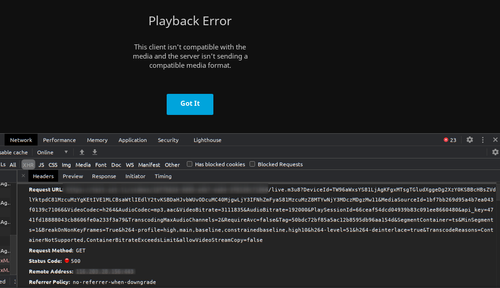
Same video play fine through Emby though.
Log file has a lot of "file name has not been provided"
Nov 29 23:42:02 System.InvalidOperationException: Cannot start process because a file name has not been provided.
Nov 29 23:42:02 at System.Diagnostics.Process.Start()
Nov 29 23:42:02 at MediaBrowser.Api.Playback.BaseStreamingService.StartFfMpeg(StreamState state, String outputPath, CancellationTokenSource cancellationTokenSource, String workingDirectory)
Nov 29 23:42:02 at MediaBrowser.Api.Playback.Hls.BaseHlsService.ProcessRequestAsync(StreamRequest request, Boolean isLive)
Nov 29 23:42:02 at Emby.Server.Implementations.Services.ServiceExecGeneral.GetTaskResult(Task task)
Nov 29 23:42:02 at Emby.Server.Implementations.Services.ServiceHandler.ProcessRequestAsync(HttpListenerHost httpHost, IRequest httpReq, HttpResponse httpRes, ILogger logger, CancellationToken cancellationToken)
Nov 29 23:42:02 at Emby.Server.Implementations.HttpServer.HttpListenerHost.RequestHandler(IHttpRequest httpReq, String urlString, String host, String localPath, CancellationToken cancellationToken)
Nov 29 23:42:05 [18:12:05] [INF] [5] Emby.Server.Implementations.Session.SessionManager: Playback stopped reported by app Jellyfin Web 10.6.4 playing Amélie. Stopped at 0 ms
Nov 29 23:42:21 [18:12:21] [ERR] [4] MediaBrowser.Providers.Movies.MovieMetadataService: Error in ffprobe
Nov 29 23:42:21 System.InvalidOperationException: Cannot start process because a file name has not been provided.
Nov 29 23:42:21 at System.Diagnostics.Process.Start()
Nov 29 23:42:21 at MediaBrowser.MediaEncoding.Encoder.MediaEncoder.StartProcess(ProcessWrapper process)
Nov 29 23:42:21 at MediaBrowser.MediaEncoding.Encoder.MediaEncoder.GetMediaInfoInternal(String inputPath, String primaryPath, MediaProtocol protocol, Boolean extractChapters, String probeSizeArgument, Boolean isAudio, Nullable`1 videoType, Boolean forceEnableLogging, CancellationToken cancellationToken)
Nov 29 23:42:21 at MediaBrowser.Providers.MediaInfo.FFProbeVideoInfo.ProbeVideo[T](T item, MetadataRefreshOptions options, CancellationToken cancellationToken)
Nov 29 23:42:21 at MediaBrowser.Providers.Manager.MetadataService`2.RunCustomProvider(ICustomMetadataProvider`1 provider, TItemType item, String logName, MetadataRefreshOptions options, RefreshResult refreshResult, CancellationToken cancellationToken)
Nov 29 23:42:21 [18:12:21] [ERR] [18] MediaBrowser.Providers.Movies.MovieMetadataService: Error in ffprobe
Nov 29 23:42:21 System.InvalidOperationException: Cannot start process because a file name has not been provided.
Anyone know how to fix it?
-
Hi,
I keep getting this error when trying to play video on jellyfin.
Hosted on Hetzner VPS.Same video play fine through Emby though.
Log file has a lot of "file name has not been provided"
Nov 29 23:42:02 System.InvalidOperationException: Cannot start process because a file name has not been provided.
Nov 29 23:42:02 at System.Diagnostics.Process.Start()
Nov 29 23:42:02 at MediaBrowser.Api.Playback.BaseStreamingService.StartFfMpeg(StreamState state, String outputPath, CancellationTokenSource cancellationTokenSource, String workingDirectory)
Nov 29 23:42:02 at MediaBrowser.Api.Playback.Hls.BaseHlsService.ProcessRequestAsync(StreamRequest request, Boolean isLive)
Nov 29 23:42:02 at Emby.Server.Implementations.Services.ServiceExecGeneral.GetTaskResult(Task task)
Nov 29 23:42:02 at Emby.Server.Implementations.Services.ServiceHandler.ProcessRequestAsync(HttpListenerHost httpHost, IRequest httpReq, HttpResponse httpRes, ILogger logger, CancellationToken cancellationToken)
Nov 29 23:42:02 at Emby.Server.Implementations.HttpServer.HttpListenerHost.RequestHandler(IHttpRequest httpReq, String urlString, String host, String localPath, CancellationToken cancellationToken)
Nov 29 23:42:05 [18:12:05] [INF] [5] Emby.Server.Implementations.Session.SessionManager: Playback stopped reported by app Jellyfin Web 10.6.4 playing Amélie. Stopped at 0 ms
Nov 29 23:42:21 [18:12:21] [ERR] [4] MediaBrowser.Providers.Movies.MovieMetadataService: Error in ffprobe
Nov 29 23:42:21 System.InvalidOperationException: Cannot start process because a file name has not been provided.
Nov 29 23:42:21 at System.Diagnostics.Process.Start()
Nov 29 23:42:21 at MediaBrowser.MediaEncoding.Encoder.MediaEncoder.StartProcess(ProcessWrapper process)
Nov 29 23:42:21 at MediaBrowser.MediaEncoding.Encoder.MediaEncoder.GetMediaInfoInternal(String inputPath, String primaryPath, MediaProtocol protocol, Boolean extractChapters, String probeSizeArgument, Boolean isAudio, Nullable`1 videoType, Boolean forceEnableLogging, CancellationToken cancellationToken)
Nov 29 23:42:21 at MediaBrowser.Providers.MediaInfo.FFProbeVideoInfo.ProbeVideo[T](T item, MetadataRefreshOptions options, CancellationToken cancellationToken)
Nov 29 23:42:21 at MediaBrowser.Providers.Manager.MetadataService`2.RunCustomProvider(ICustomMetadataProvider`1 provider, TItemType item, String logName, MetadataRefreshOptions options, RefreshResult refreshResult, CancellationToken cancellationToken)
Nov 29 23:42:21 [18:12:21] [ERR] [18] MediaBrowser.Providers.Movies.MovieMetadataService: Error in ffprobe
Nov 29 23:42:21 System.InvalidOperationException: Cannot start process because a file name has not been provided.
Anyone know how to fix it?
-
@pratik Do you know the format of this file ? Does it happen only for one specific file, or for all of them ?
-
https://github.com/jellyfin/jellyfin/issues/4184 and https://github.com/jellyfin/jellyfin/issues/3911 has similar errors and they both suggest that ffmpeg path is not set. I thought this was automatically set in the recent package (@mehdi / @nebulon ?)
-
https://github.com/jellyfin/jellyfin/issues/4184 and https://github.com/jellyfin/jellyfin/issues/3911 has similar errors and they both suggest that ffmpeg path is not set. I thought this was automatically set in the recent package (@mehdi / @nebulon ?)
@girish I think nothing ffmpeg-related has been changed in a while. Looking at the dockerfile, it seems it does install the jellyfin-specific build of ffmpeg, so at first glance I don't see a reason for it to not work. I'll give it a try later today
-
There is indeed a problem, looks like the new version of the jellyfin package does not know by default the path of ffmpeg installed by the jellyfin-ffmpeg package.
@pratik to work-around for now, you can go to the admin dashboard, the Playback tab, and in the "FFmpeg path" input, paste
/usr/share/jellyfin-ffmpeg/@girish I'm looking for a way to automate this. I think there's a CLI switch. I'll let you know
-
https://github.com/jellyfin/jellyfin/issues/4184 and https://github.com/jellyfin/jellyfin/issues/3911 has similar errors and they both suggest that ffmpeg path is not set. I thought this was automatically set in the recent package (@mehdi / @nebulon ?)
-
I've released a new package version with the added commandline argument. As far as I can tell I was able to play various video file formats.




Hello! It looks like you're interested in this conversation, but you don't have an account yet.
Getting fed up of having to scroll through the same posts each visit? When you register for an account, you'll always come back to exactly where you were before, and choose to be notified of new replies (either via email, or push notification). You'll also be able to save bookmarks and upvote posts to show your appreciation to other community members.
With your input, this post could be even better 💗
Register Login