
IP loggings/views in Moodle are local docker IP's
-
Is it possible to show everywhere where it's currently shown in Moodle the real IP of a user?
That way it is also possible to ban IP's if they are misusing the platform.
-
@jdaviescoates no, that is most likely the change from the release before https://forum.cloudron.io/topic/4299/jirafeau-package-updates/5?_=1612305182571
-
@jdaviescoates it was the
HTTP_X_FORWARDED_FORthing, not the apache port ^^Take a look at: https://moodle.org/mod/forum/discuss.php?d=385061#p1552240
Beside the suggestion/question from Howard, what is setting for:
Site Admin -> Server -> http
which says:
Logged IP address source
getremoteaddrconf
Default: HTTP_CLIENT_IP, HTTP_X_FORWARDED_FOR, REMOTE_ADDRIf your server is behind a reverse proxy, you can use this setting to specify which HTTP headers can be trusted to >contain the remote IP address. The headers are read in order, using the first one that is available.
'spirit of sharing', Ken
HTTP_X_FORWARDED_FORshould work if the the Docker gateway IP is added as trusted/ignored proxy for Moodle. I only found reverseproxy = true as an configuration option which (AFAIK) does not help. However you should be able to adjust the settings in the UI instead
Go to Site Admin -> Server -> http and do as follow:
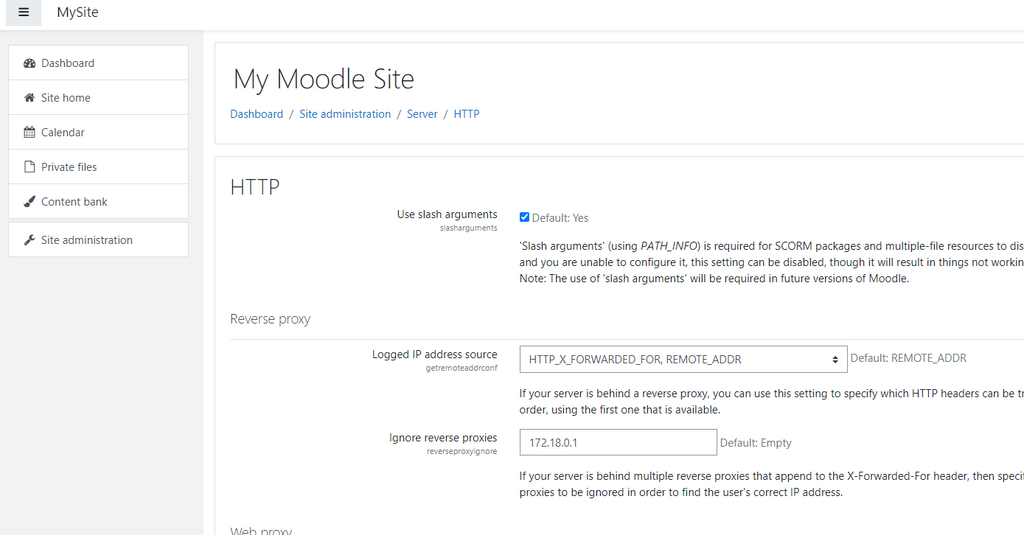
Since @girish should already know whats up, maybe he can help to make this change permanent for all instances.
EDIT PS: I DID NOT TEST THIS I'M JUST GUESSING

 PLEASE CONFIRM WORKING FIRST
EDIT2: Confirmed working

3 February 2021, 12:44 AM Admin User - System System Config log created The user with id '2' changed the config setting 'reverseproxyignore' for component 'core' from '' to '172.18.0.1'. web 176.XX.XXX.XXX (my IP) -
@jdaviescoates it was the
HTTP_X_FORWARDED_FORthing, not the apache port ^^Take a look at: https://moodle.org/mod/forum/discuss.php?d=385061#p1552240
Beside the suggestion/question from Howard, what is setting for:
Site Admin -> Server -> http
which says:
Logged IP address source
getremoteaddrconf
Default: HTTP_CLIENT_IP, HTTP_X_FORWARDED_FOR, REMOTE_ADDRIf your server is behind a reverse proxy, you can use this setting to specify which HTTP headers can be trusted to >contain the remote IP address. The headers are read in order, using the first one that is available.
'spirit of sharing', Ken
HTTP_X_FORWARDED_FORshould work if the the Docker gateway IP is added as trusted/ignored proxy for Moodle. I only found reverseproxy = true as an configuration option which (AFAIK) does not help. However you should be able to adjust the settings in the UI insteadGo to Site Admin -> Server -> http and do as follow:
Since @girish should already know whats up, maybe he can help to make this change permanent for all instances.
EDIT PS: I DID NOT TEST THIS I'M JUST GUESSING
PLEASE CONFIRM WORKING FIRSTEDIT2: Confirmed working
3 February 2021, 12:44 AM Admin User - System System Config log created The user with id '2' changed the config setting 'reverseproxyignore' for component 'core' from '' to '172.18.0.1'. web 176.XX.XXX.XXX (my IP) -





Hello! It looks like you're interested in this conversation, but you don't have an account yet.
Getting fed up of having to scroll through the same posts each visit? When you register for an account, you'll always come back to exactly where you were before, and choose to be notified of new replies (either via email, or push notification). You'll also be able to save bookmarks and upvote posts to show your appreciation to other community members.
With your input, this post could be even better 💗
Register Login