
Cloudron makes it easy to run web apps like WordPress, Nextcloud, GitLab on your server. Find out more or install now.


Skip to content
  • Categories
  • Recent
  • Tags
  • Popular
  • Bookmarks
  • Search
Skins
  • Light
  • Brite
  • Cerulean
  • Cosmo
  • Flatly
  • Journal
  • Litera
  • Lumen
  • Lux
  • Materia
  • Minty
  • Morph
  • Pulse
  • Sandstone
  • Simplex
  • Sketchy
  • Spacelab
  • United
  • Yeti
  • Zephyr
  • Dark
  • Cyborg
  • Darkly
  • Quartz
  • Slate
  • Solar
  • Superhero
  • Vapor

  • Default (No Skin)
  • No Skin
Collapse
Brand Logo

Cloudron Forum

Apps - Status | Demo | Docs | Install
  1. Cloudron Forum
  2. Support
  3. Failed to get release information

Failed to get release information

Scheduled Pinned Locked Moved Solved Support
installation
21 Posts 5 Posters 7.0k Views 5 Watching
  • Oldest to Newest
  • Newest to Oldest
  • Most Votes
Reply
  • Reply as topic
Log in to reply
This topic has been deleted. Only users with topic management privileges can see it.
  • G ghaisasadvait

    @girish I am not hosting it on a VPS, i'm hosting it at my home. Outgoing firewall rules allow the traffic.

    girishG Offline
    girishG Offline
    girish
    Staff
    wrote on last edited by
    #9

    @ghaisasadvait Is this Ubuntu 16/18/20 ?

    G 1 Reply Last reply
    0
    • girishG girish

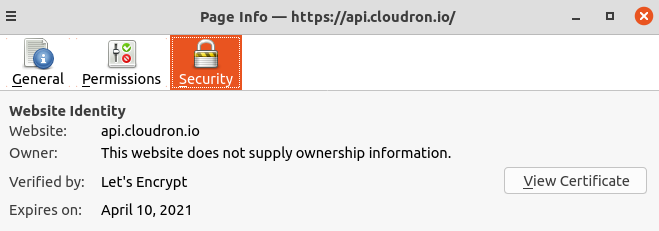
      @ghaisasadvait Thanks, there is something wrong with the certificate store or does your setup require some http proxy or something? The certs are valid:
      abdb3ef3-84a2-48ec-9fb0-5c44f5896224-image.png

      Not sure how to debug this but do other things work fine? Say curl https://cloudron.io and curl https://my.cloudron.io ? I can confirm that the IP address it tries to connect is also correct.

      G Offline
      G Offline
      ghaisasadvait
      wrote on last edited by
      #10

      @girish said in Failed to get release information:

      curl https://my.cloudron.io

      all curl commands related to cloudron.io give certificate error like above

      1 Reply Last reply
      0
      • girishG girish

        @ghaisasadvait Is this Ubuntu 16/18/20 ?

        G Offline
        G Offline
        ghaisasadvait
        wrote on last edited by
        #11

        @girish its ubuntu server 18.

        girishG 1 Reply Last reply
        0
        • G ghaisasadvait

          @girish its ubuntu server 18.

          girishG Offline
          girishG Offline
          girish
          Staff
          wrote on last edited by
          #12

          @ghaisasadvait How did you manage to download the cloudron-setup script in the first place? Maybe you can try sudo update-ca-certificates to see if that helps. Also, can you confirm that you can access cloudron.io and api.cloudron.io from other devices of your house? (so we can localize this to a VM issue).

          G 1 Reply Last reply
          1
          • girishG girish

            @ghaisasadvait How did you manage to download the cloudron-setup script in the first place? Maybe you can try sudo update-ca-certificates to see if that helps. Also, can you confirm that you can access cloudron.io and api.cloudron.io from other devices of your house? (so we can localize this to a VM issue).

            G Offline
            G Offline
            ghaisasadvait
            wrote on last edited by ghaisasadvait
            #13

            @girish said in Failed to get release information:

            sudo update-ca-certificates

            sudo update-ca-certificates

            This worked!..pretty odd since i updated and upgraded all the packages beforehand

            1 Reply Last reply
            2
            • luckymL Offline
              luckymL Offline
              luckym
              wrote on last edited by luckym
              #14

              I am getting the same error message on a fresh Hetzner VPS Ubuntu 22.04.3 install.

              => Updating apt and installing script dependencies
              => Validating setup token
              => Checking version
              Failed to get release information
              

              When I look at the logs I get the following output:

              root@ubuntu-2gb-nbg1-1:~# cat /var/log/cloudron-setup.log
              Running cloudron-setup with args : --
              Hit:1 https://mirror.hetzner.com/ubuntu/packages jammy InRelease
              Hit:2 https://mirror.hetzner.com/ubuntu/packages jammy-updates InRelease
              Hit:3 https://mirror.hetzner.com/ubuntu/packages jammy-backports InRelease
              Hit:4 https://mirror.hetzner.com/ubuntu/security jammy-security InRelease
              Reading package lists...
              Reading package lists...
              Building dependency tree...
              Reading state information...
              curl is already the newest version (7.81.0-1ubuntu1.15).
              python3 is already the newest version (3.10.6-1~22.04).
              software-properties-common is already the newest version (0.99.22.9).
              ubuntu-standard is already the newest version (1.481.1).
              0 upgraded, 0 newly installed, 0 to remove and 36 not upgraded.
              

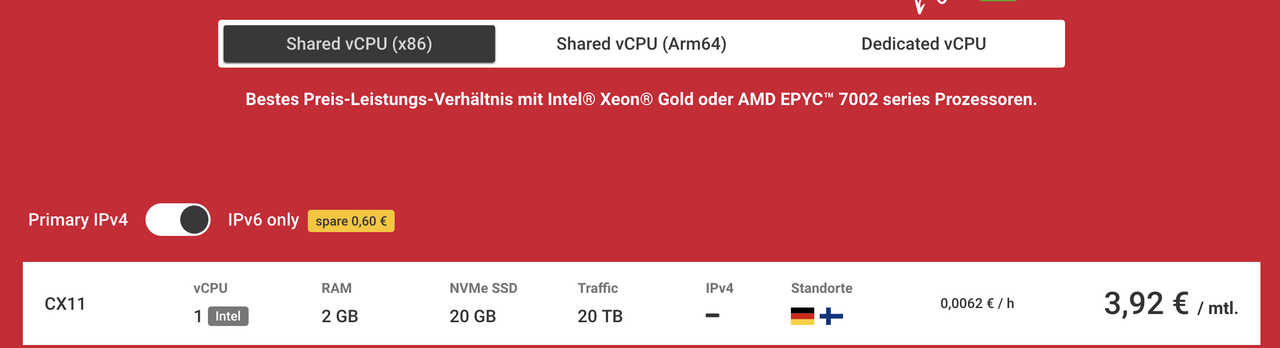
              Anybody has any ideas what the problem might be? Not sure if it makes a difference but the server only has an IPv6 address.

              girishG 1 Reply Last reply
              0
              • luckymL luckym

                I am getting the same error message on a fresh Hetzner VPS Ubuntu 22.04.3 install.

                => Updating apt and installing script dependencies
                => Validating setup token
                => Checking version
                Failed to get release information
                

                When I look at the logs I get the following output:

                root@ubuntu-2gb-nbg1-1:~# cat /var/log/cloudron-setup.log
                Running cloudron-setup with args : --
                Hit:1 https://mirror.hetzner.com/ubuntu/packages jammy InRelease
                Hit:2 https://mirror.hetzner.com/ubuntu/packages jammy-updates InRelease
                Hit:3 https://mirror.hetzner.com/ubuntu/packages jammy-backports InRelease
                Hit:4 https://mirror.hetzner.com/ubuntu/security jammy-security InRelease
                Reading package lists...
                Reading package lists...
                Building dependency tree...
                Reading state information...
                curl is already the newest version (7.81.0-1ubuntu1.15).
                python3 is already the newest version (3.10.6-1~22.04).
                software-properties-common is already the newest version (0.99.22.9).
                ubuntu-standard is already the newest version (1.481.1).
                0 upgraded, 0 newly installed, 0 to remove and 36 not upgraded.
                

                Anybody has any ideas what the problem might be? Not sure if it makes a difference but the server only has an IPv6 address.

                girishG Offline
                girishG Offline
                girish
                Staff
                wrote on last edited by
                #15

                @luckym can you check curl https://api.cloudron.io/api/v1/releases on the server ? If that doesn't work, does host api.cloudron.io work ?

                Can you also tell us a bit about your server/network setup?

                1 Reply Last reply
                0
                • luckymL Offline
                  luckymL Offline
                  luckym
                  wrote on last edited by
                  #16

                  @girish

                  The setup is basically this, the cheapest Hetzner VPS with a fresh Ubuntu 22.04.3 install. Didn't do anything special, just ssh'd in and ran the three install commands from Cloudrons homepage.
                  alt text

                  I tried running both of the commands, the first one fails, the second one works:

                  root@ubuntu-2gb-nbg1-1:~# curl https://api.cloudron.io/api/v1/releases
                  curl: (7) Couldn't connect to server
                  root@ubuntu-2gb-nbg1-1:~# host api.cloudron.io
                  api.cloudron.io has address 165.227.67.76
                  
                  girishG 1 Reply Last reply
                  0
                  • luckymL luckym

                    @girish

                    The setup is basically this, the cheapest Hetzner VPS with a fresh Ubuntu 22.04.3 install. Didn't do anything special, just ssh'd in and ran the three install commands from Cloudrons homepage.

                    alt text

                    I tried running both of the commands, the first one fails, the second one works:

                    root@ubuntu-2gb-nbg1-1:~# curl https://api.cloudron.io/api/v1/releases
                    curl: (7) Couldn't connect to server
                    root@ubuntu-2gb-nbg1-1:~# host api.cloudron.io
                    api.cloudron.io has address 165.227.67.76
                    
                    girishG Offline
                    girishG Offline
                    girish
                    Staff
                    wrote on last edited by
                    #17

                    @luckym thanks. the DNS resolution is correct. It seems it is not able to make outbound request for some reason. I just checked from multiple servers and api.cloudron.io seems fine. Are you able to curl other sites? Say curl https://www.cloudron.io ?

                    Another idea: start afresh with ubuntu 22.04. then, run the curl command first. then, run cloudron-setup script. This will give us a better idea if it is some installation issue or some VM issue.

                    1 Reply Last reply
                    0
                    • luckymL Offline
                      luckymL Offline
                      luckym
                      wrote on last edited by
                      #18

                      Thanks girish. I tried to curl other sites and that worked fine as well. Also from my local computer curling api.cloudron.io works fine. I then deleted the server and set up a fresh server and tried the curl command first as you suggested. Same issue.

                      After that I deleted the server again and set up a new server that also has a IPv4 address instead of IPv6 only. This time the curl command to api.cloudron.io worked and the setup script is currently running just fine ¯_(ツ)_/¯ .

                      jdaviescoatesJ 1 Reply Last reply
                      0
                      • luckymL luckym

                        Thanks girish. I tried to curl other sites and that worked fine as well. Also from my local computer curling api.cloudron.io works fine. I then deleted the server and set up a fresh server and tried the curl command first as you suggested. Same issue.

                        After that I deleted the server again and set up a new server that also has a IPv4 address instead of IPv6 only. This time the curl command to api.cloudron.io worked and the setup script is currently running just fine ¯_(ツ)_/¯ .

                        jdaviescoatesJ Online
                        jdaviescoatesJ Online
                        jdaviescoates
                        wrote on last edited by
                        #19

                        @luckym said in Failed to get release information:

                        IPv6 only

                        sounds like that was the issue then

                        I use Cloudron with Gandi & Hetzner

                        1 Reply Last reply
                        0
                        • girishG Offline
                          girishG Offline
                          girish
                          Staff
                          wrote on last edited by
                          #20

                          Ah right. Cloudron currently does not support IPv6 only servers. It needs an IPv4. But this is great to know that Hetzner has IPv6 only servers. I will see how far away we are from supporting this.

                          1 Reply Last reply
                          2
                          • girishG girish marked this topic as a question on
                          • girishG girish has marked this topic as solved on

                          • E Offline
                            E Offline
                            eddowding
                            wrote on last edited by eddowding
                            #21

                            Ah .. ssdnodes can also be ip6 only. ip4 adds a fair chunk of money these days.

                            1 Reply Last reply
                            0

                            Hello! It looks like you're interested in this conversation, but you don't have an account yet.

                            Getting fed up of having to scroll through the same posts each visit? When you register for an account, you'll always come back to exactly where you were before, and choose to be notified of new replies (either via email, or push notification). You'll also be able to save bookmarks and upvote posts to show your appreciation to other community members.

                            With your input, this post could be even better 💗

                            Register Login
                            Reply
                            • Reply as topic
                            Log in to reply
                            • Oldest to Newest
                            • Newest to Oldest
                            • Most Votes


                            • Login

                            • Don't have an account? Register

                            • Login or register to search.
                            • First post
                              Last post
                            0
                            • Categories
                            • Recent
                            • Tags
                            • Popular
                            • Bookmarks
                            • Search
