
Failed to get release information
-
@ghaisasadvait Is this Ubuntu 16/18/20 ?
-
@girish its ubuntu server 18.
@ghaisasadvait How did you manage to download the
cloudron-setupscript in the first place? Maybe you can trysudo update-ca-certificatesto see if that helps. Also, can you confirm that you can access cloudron.io and api.cloudron.io from other devices of your house? (so we can localize this to a VM issue). -
@ghaisasadvait How did you manage to download the
cloudron-setupscript in the first place? Maybe you can trysudo update-ca-certificatesto see if that helps. Also, can you confirm that you can access cloudron.io and api.cloudron.io from other devices of your house? (so we can localize this to a VM issue).@girish said in Failed to get release information:
sudo update-ca-certificates
sudo update-ca-certificates
This worked!..pretty odd since i updated and upgraded all the packages beforehand
-
I am getting the same error message on a fresh Hetzner VPS Ubuntu 22.04.3 install.
=> Updating apt and installing script dependencies
=> Validating setup token
=> Checking version
Failed to get release information
When I look at the logs I get the following output:
root@ubuntu-2gb-nbg1-1:~# cat /var/log/cloudron-setup.log
Running cloudron-setup with args : --
Hit:1 https://mirror.hetzner.com/ubuntu/packages jammy InRelease
Hit:2 https://mirror.hetzner.com/ubuntu/packages jammy-updates InRelease
Hit:3 https://mirror.hetzner.com/ubuntu/packages jammy-backports InRelease
Hit:4 https://mirror.hetzner.com/ubuntu/security jammy-security InRelease
Reading package lists...
Reading package lists...
Building dependency tree...
Reading state information...
curl is already the newest version (7.81.0-1ubuntu1.15).
python3 is already the newest version (3.10.6-1~22.04).
software-properties-common is already the newest version (0.99.22.9).
ubuntu-standard is already the newest version (1.481.1).
0 upgraded, 0 newly installed, 0 to remove and 36 not upgraded.
Anybody has any ideas what the problem might be? Not sure if it makes a difference but the server only has an IPv6 address.
-
I am getting the same error message on a fresh Hetzner VPS Ubuntu 22.04.3 install.
=> Updating apt and installing script dependencies
=> Validating setup token
=> Checking version
Failed to get release information
When I look at the logs I get the following output:
root@ubuntu-2gb-nbg1-1:~# cat /var/log/cloudron-setup.log
Running cloudron-setup with args : --
Hit:1 https://mirror.hetzner.com/ubuntu/packages jammy InRelease
Hit:2 https://mirror.hetzner.com/ubuntu/packages jammy-updates InRelease
Hit:3 https://mirror.hetzner.com/ubuntu/packages jammy-backports InRelease
Hit:4 https://mirror.hetzner.com/ubuntu/security jammy-security InRelease
Reading package lists...
Reading package lists...
Building dependency tree...
Reading state information...
curl is already the newest version (7.81.0-1ubuntu1.15).
python3 is already the newest version (3.10.6-1~22.04).
software-properties-common is already the newest version (0.99.22.9).
ubuntu-standard is already the newest version (1.481.1).
0 upgraded, 0 newly installed, 0 to remove and 36 not upgraded.
Anybody has any ideas what the problem might be? Not sure if it makes a difference but the server only has an IPv6 address.
-
The setup is basically this, the cheapest Hetzner VPS with a fresh Ubuntu 22.04.3 install. Didn't do anything special, just ssh'd in and ran the three install commands from Cloudrons homepage.
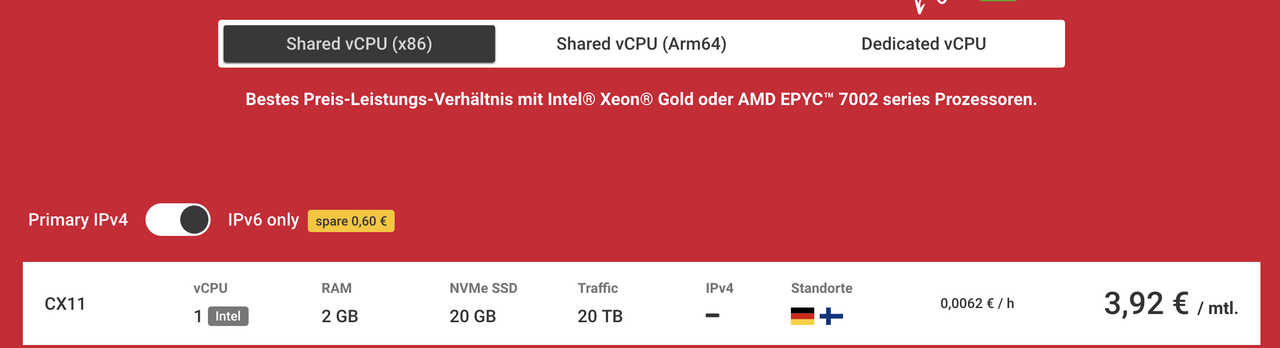
I tried running both of the commands, the first one fails, the second one works:
root@ubuntu-2gb-nbg1-1:~# curl https://api.cloudron.io/api/v1/releases curl: (7) Couldn't connect to server root@ubuntu-2gb-nbg1-1:~# host api.cloudron.io api.cloudron.io has address 165.227.67.76 -
The setup is basically this, the cheapest Hetzner VPS with a fresh Ubuntu 22.04.3 install. Didn't do anything special, just ssh'd in and ran the three install commands from Cloudrons homepage.
I tried running both of the commands, the first one fails, the second one works:
root@ubuntu-2gb-nbg1-1:~# curl https://api.cloudron.io/api/v1/releases curl: (7) Couldn't connect to server root@ubuntu-2gb-nbg1-1:~# host api.cloudron.io api.cloudron.io has address 165.227.67.76@luckym thanks. the DNS resolution is correct. It seems it is not able to make outbound request for some reason. I just checked from multiple servers and
api.cloudron.ioseems fine. Are you able to curl other sites? Saycurl https://www.cloudron.io?Another idea: start afresh with ubuntu 22.04. then, run the curl command first. then, run cloudron-setup script. This will give us a better idea if it is some installation issue or some VM issue.
-
Thanks girish. I tried to curl other sites and that worked fine as well. Also from my local computer curling
api.cloudron.ioworks fine. I then deleted the server and set up a fresh server and tried the curl command first as you suggested. Same issue.After that I deleted the server again and set up a new server that also has a IPv4 address instead of IPv6 only. This time the curl command to
api.cloudron.ioworked and the setup script is currently running just fine ¯_(ツ)_/¯ . -
Thanks girish. I tried to curl other sites and that worked fine as well. Also from my local computer curling
api.cloudron.ioworks fine. I then deleted the server and set up a fresh server and tried the curl command first as you suggested. Same issue.After that I deleted the server again and set up a new server that also has a IPv4 address instead of IPv6 only. This time the curl command to
api.cloudron.ioworked and the setup script is currently running just fine ¯_(ツ)_/¯ . -
 G girish marked this topic as a question on
-
G girish has marked this topic as solved on


Hello! It looks like you're interested in this conversation, but you don't have an account yet.
Getting fed up of having to scroll through the same posts each visit? When you register for an account, you'll always come back to exactly where you were before, and choose to be notified of new replies (either via email, or push notification). You'll also be able to save bookmarks and upvote posts to show your appreciation to other community members.
With your input, this post could be even better 💗
Register Login