
Backups not getting cleaned up from ext4 block storage
-
Can anyone help me understand what is going on in here ?
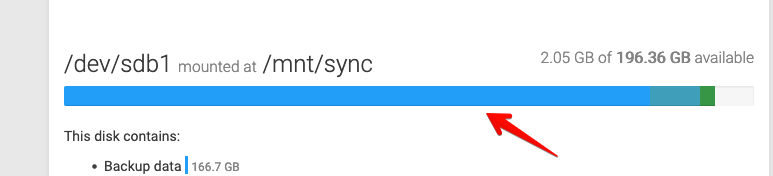
I just increased the storage size from 100GB to 200GB yesterday and it's all filled withing one backup cycle (last night).
It seems that the "cleanup backups" decides to keep absolutely all backups (in the logs).
Backup policy is every day at 11PM (tarball) and i have 2 apps that contain lots of pictures and are as large as 9GB. But still, i think the size of the backup is way too big.
Is there a possibility to manually delete all backups and do an immediate backup to see the size of it ?
-
Can anyone help me understand what is going on in here ?
I just increased the storage size from 100GB to 200GB yesterday and it's all filled withing one backup cycle (last night).
It seems that the "cleanup backups" decides to keep absolutely all backups (in the logs).
Backup policy is every day at 11PM (tarball) and i have 2 apps that contain lots of pictures and are as large as 9GB. But still, i think the size of the backup is way too big.
Is there a possibility to manually delete all backups and do an immediate backup to see the size of it ?
@bigdot indeed there is something apparently wrong if you have 2 apps with around 9Gb of data, this should not fillup so quickly or at all. Can you maybe look into the mounted disk via SSH what is actually stored there and how much is used? Just to verify that this is not just a display bug in the UI.
-
@bigdot indeed there is something apparently wrong if you have 2 apps with around 9Gb of data, this should not fillup so quickly or at all. Can you maybe look into the mounted disk via SSH what is actually stored there and how much is used? Just to verify that this is not just a display bug in the UI.
-
waaaait ... @nebulon
Is cloudron trying to backup apps that have external storage ? Cause i thought it shouldn't. I have a stopped syncthing instance that synced about 15GB on that external mount. There's also a nextcloud with the same config. This might be the culprit, rignt ?

But still. Even if i disable backups for this app, i still need to delete the existing backups. How do i do that ? Is manually deleting backup forlders an option ? Or will this mess up cloudron's twinkles ?
-
So. I deleted some apps and feed some space (including the syncthing). But still, i need a way to delete existing backups.
So @nebulon @girish please help with that.
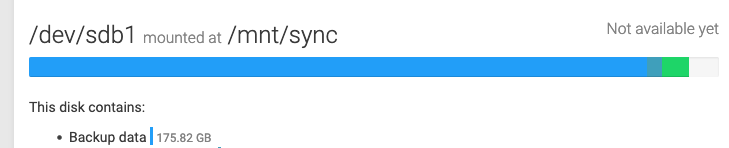
It looks to me like when a backup fails due to insufficient disk space, it does not rollback and backups that were created are never removed/cleaned.
-
So. I deleted some apps and feed some space (including the syncthing). But still, i need a way to delete existing backups.
So @nebulon @girish please help with that.
It looks to me like when a backup fails due to insufficient disk space, it does not rollback and backups that were created are never removed/cleaned.
@bigdot It is safe to manually delete the backups. You can delete the "timestamped" directories without any issues. There is a folder called "snapshot", do not delete this since it has the state of the backup as well and changing this would corrupt future backups. Once you delete the entries manually, you can go to Backups -> Cleanup backups and those entries will get removed from the UI as well.
-
@bigdot It is safe to manually delete the backups. You can delete the "timestamped" directories without any issues. There is a folder called "snapshot", do not delete this since it has the state of the backup as well and changing this would corrupt future backups. Once you delete the entries manually, you can go to Backups -> Cleanup backups and those entries will get removed from the UI as well.


Hello! It looks like you're interested in this conversation, but you don't have an account yet.
Getting fed up of having to scroll through the same posts each visit? When you register for an account, you'll always come back to exactly where you were before, and choose to be notified of new replies (either via email, or push notification). You'll also be able to save bookmarks and upvote posts to show your appreciation to other community members.
With your input, this post could be even better 💗
Register Login