
Argo Tunnels
-
Hi There,
Im thinking about moving to cloudron, however, the new solution I choose needs to be cloudflare argo enabled. Can cloudron be configured with argo?
-
I gave this a shot but I couldn't get it work. I could not figure how cloudflared can work with nginx/reverse proxy locally. There is an open thread at https://community.cloudflare.com/t/argo-tunnel-origin-ssl/73225 with no response.
So, I guess at this point, it's not compatible easily.
-
FWIW, here is what I did:
On Cloudron:
- Add cloudflare domain -
cloudron.site - Installed app -
blog.cloudron.site
Then, on the server:
- Install
cloudflaredon the server cloudflared login- authorized the domain via browser.- Created tunnel
# ./cloudflared tunnel create my-website Tunnel credentials written to /root/.cloudflared/84a99546-30a4-4466-bd85-67e6a869f381.json. cloudflared chose this file based on where your origin certificate was found. Keep this file secret. To revoke these credentials, delete the tunnel. Created tunnel my-website with id 84a99546-30a4-4466-bd85-67e6a869f381- Then, created DNS entry:
# ./cloudflared tunnel route dns -f my-website blog.cloudron.site 2021-09-27T19:15:11Z INF Added CNAME blog.cloudron.site which will route to this tunnel tunnelID=84a99546-30a4-4466-bd85-67e6a869f381 tunnel: my-website credentials-file: /root/.cloudflared/84a99546-30a4-4466-bd85-67e6a869f381.json- Create a
config.ymllocally:
tunnel: my-website credentials-file: /root/.cloudflared/84a99546-30a4-4466-bd85-67e6a869f381.json ingress: - hostname: blog.cloudron.site service: https://localhost - service: http_status:404- Ran
cloudflared
# ./cloudflared tunnel --config config.yml run my-website
2021-09-27T19:16:39Z INF Starting tunnel tunnelID=84a99546-30a4-4466-bd85-67e6a869f381
2021-09-27T19:16:39Z INF Version 2021.9.1
2021-09-27T19:16:39Z INF GOOS: linux, GOVersion: devel +a84af465cb Mon Aug 9 10:31:00 2021 -0700, GoArch: amd64
2021-09-27T19:16:39Z INF Settings: map[config:config.yml cred-file:/root/.cloudflared/84a99546-30a4-4466-bd85-67e6a869f381.json credentials-file:/root/.cloudflared/84a99546-30a4-4466-bd85-67e6a869f381.json]
2021-09-27T19:16:39Z INF Generated Connector ID: bcc71e80-cefa-4bdb-9bd9-b7cbaa453e95
2021-09-27T19:16:39Z INF cloudflared will not automatically update when run from the shell. To enable auto-updates, run cloudflared as a service: https://developers.cloudflare.com/argo-tunnel/reference/service/
2021-09-27T19:16:39Z INF Initial protocol http2
2021-09-27T19:16:39Z INF Starting metrics server on 127.0.0.1:32803/metrics
2021-09-27T19:16:39Z INF Connection b5fd0d6a-be89-420b-9a52-929984abb14d registered connIndex=0 location=SJC
2021-09-27T19:16:39Z INF Connection 3294a047-32c2-48ad-b504-dadd1830cd0b registered connIndex=1 location=LAX
2021-09-27T19:16:40Z INF Connection b7e78790-c6a2-4289-be63-ca558b43cf9f registered connIndex=2 location=SJC
2021-09-27T19:16:41Z INF Connection 2eee1567-8bf4-4d86-b8cf-98ef34ed76bb registered connIndex=3 location=LAX
That's as far as I got. It doesn't seem to want to proxy to https services locally.
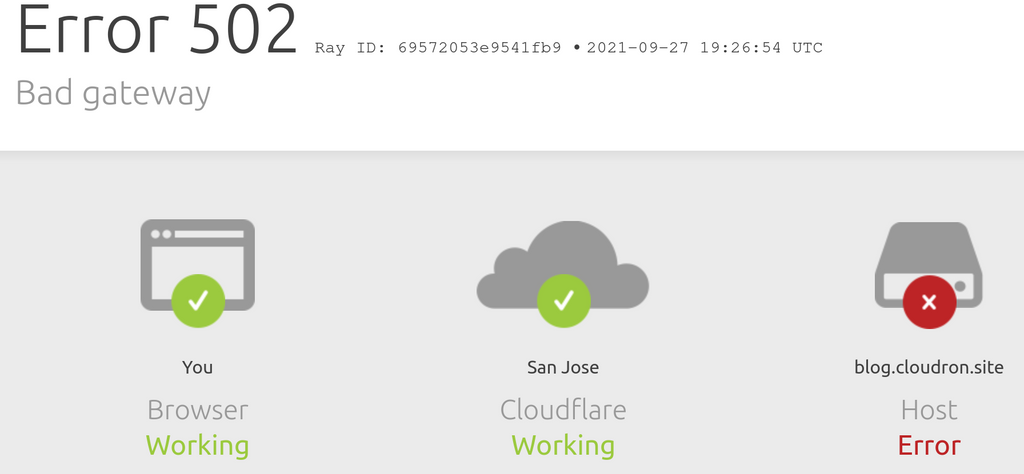
If you can figure out how to make it proxy to https, it will work. FWIW,
curl -kH 'Host: blog.cloudron.site' https://localhostworks just fine. I see the below incloudflaredlogs:2021-09-27T19:26:52Z ERR error="Unable to reach the origin service. The service may be down or it may not be responding to traffic from cloudflared: x509: certificate is not valid for any names, but wanted to match localhost" cfRay=6957204cbdeb1fb9-SJC ingressRule=0 originService=https://localhost - Add cloudflare domain -
-
FWIW, here is what I did:
On Cloudron:
- Add cloudflare domain -
cloudron.site - Installed app -
blog.cloudron.site
Then, on the server:
- Install
cloudflaredon the server cloudflared login- authorized the domain via browser.- Created tunnel
# ./cloudflared tunnel create my-website Tunnel credentials written to /root/.cloudflared/84a99546-30a4-4466-bd85-67e6a869f381.json. cloudflared chose this file based on where your origin certificate was found. Keep this file secret. To revoke these credentials, delete the tunnel. Created tunnel my-website with id 84a99546-30a4-4466-bd85-67e6a869f381- Then, created DNS entry:
# ./cloudflared tunnel route dns -f my-website blog.cloudron.site 2021-09-27T19:15:11Z INF Added CNAME blog.cloudron.site which will route to this tunnel tunnelID=84a99546-30a4-4466-bd85-67e6a869f381 tunnel: my-website credentials-file: /root/.cloudflared/84a99546-30a4-4466-bd85-67e6a869f381.json- Create a
config.ymllocally:
tunnel: my-website credentials-file: /root/.cloudflared/84a99546-30a4-4466-bd85-67e6a869f381.json ingress: - hostname: blog.cloudron.site service: https://localhost - service: http_status:404- Ran
cloudflared
# ./cloudflared tunnel --config config.yml run my-website
2021-09-27T19:16:39Z INF Starting tunnel tunnelID=84a99546-30a4-4466-bd85-67e6a869f381
2021-09-27T19:16:39Z INF Version 2021.9.1
2021-09-27T19:16:39Z INF GOOS: linux, GOVersion: devel +a84af465cb Mon Aug 9 10:31:00 2021 -0700, GoArch: amd64
2021-09-27T19:16:39Z INF Settings: map[config:config.yml cred-file:/root/.cloudflared/84a99546-30a4-4466-bd85-67e6a869f381.json credentials-file:/root/.cloudflared/84a99546-30a4-4466-bd85-67e6a869f381.json]
2021-09-27T19:16:39Z INF Generated Connector ID: bcc71e80-cefa-4bdb-9bd9-b7cbaa453e95
2021-09-27T19:16:39Z INF cloudflared will not automatically update when run from the shell. To enable auto-updates, run cloudflared as a service: https://developers.cloudflare.com/argo-tunnel/reference/service/
2021-09-27T19:16:39Z INF Initial protocol http2
2021-09-27T19:16:39Z INF Starting metrics server on 127.0.0.1:32803/metrics
2021-09-27T19:16:39Z INF Connection b5fd0d6a-be89-420b-9a52-929984abb14d registered connIndex=0 location=SJC
2021-09-27T19:16:39Z INF Connection 3294a047-32c2-48ad-b504-dadd1830cd0b registered connIndex=1 location=LAX
2021-09-27T19:16:40Z INF Connection b7e78790-c6a2-4289-be63-ca558b43cf9f registered connIndex=2 location=SJC
2021-09-27T19:16:41Z INF Connection 2eee1567-8bf4-4d86-b8cf-98ef34ed76bb registered connIndex=3 location=LAX
That's as far as I got. It doesn't seem to want to proxy to https services locally.
If you can figure out how to make it proxy to https, it will work. FWIW,
curl -kH 'Host: blog.cloudron.site' https://localhostworks just fine. I see the below incloudflaredlogs:2021-09-27T19:26:52Z ERR error="Unable to reach the origin service. The service may be down or it may not be responding to traffic from cloudflared: x509: certificate is not valid for any names, but wanted to match localhost" cfRay=6957204cbdeb1fb9-SJC ingressRule=0 originService=https://localhost - Add cloudflare domain -
-
@girish Wow that's really cool! I wonder if there's an interface or something you need to bind to?
-
@doodlemania2 possibly. I couldn't find anything about https proxying in their docs. I thought that would be fairly common.
@girish
I'm just posting here as this came up while googling.
For posterity, I had to do something like this in my config.yml file:- hostname: demo.site.com service: https://localhost:8000 originRequest: noTLSVerify: trueIt was not clear from the documentation that you needed the originRequest portion.
-
@girish
I'm just posting here as this came up while googling.
For posterity, I had to do something like this in my config.yml file:- hostname: demo.site.com service: https://localhost:8000 originRequest: noTLSVerify: trueIt was not clear from the documentation that you needed the originRequest portion.
@random_eric Does that mean you were able to get it up and going?
-
@random_eric Does that mean you were able to get it up and going?
@doodlemania2
I don't use cloudron and I only commented as when I was looking for the specific cloudflare error:The service may be down or it may not be responding to traffic from cloudflared: x509: certificate is not valid for any names, but wanted to match localhost" cfRay=6957204cbdeb1fb9-SJC ingressRule=0 originService=https://localhostI landed here from Google and I know that in the future, I will probably have this issue again and forget the solution.
So I'm posting this more for future me.However, this would solve that specific issue that @girish was having,
I got my services up and going that used a self signed ssl cert and was able to proxy it with cloudflare.
It would be cool to try cloudron as it sounds like a really great product, but I personally don't have the budget for it at the moment.
-
 G girish referenced this topic on
-
unfortunately, i also had an issue with it.
basically what i did, i put my testing page https://wp-test.blindsoft.net through it, using a docker container, sense i like using docker.
then i put the hostname as wp-test.
unfortunately, it only shows a 502 gateway error.



Hello! It looks like you're interested in this conversation, but you don't have an account yet.
Getting fed up of having to scroll through the same posts each visit? When you register for an account, you'll always come back to exactly where you were before, and choose to be notified of new replies (either via email, or push notification). You'll also be able to save bookmarks and upvote posts to show your appreciation to other community members.
With your input, this post could be even better 💗
Register Login