
Server down after system reboot - can you help?
-
There's a button on one of the system report screens which says reboot. I had deleted a bunch of redundant backup files from within an app and the free space wasn't recalculating, so I clicked the restart button.
And killed my server.
I can still ssh in so ran these, but now I'm totally stuck.
Any tips?
 setup/start.sh

2022-09-18T14:01:06 ==> start: Cloudron Start
media:x:500:
2022-09-18T14:01:06 ==> start: Configuring docker
Synchronizing state of apparmor.service with SysV service script with /lib/systemd/systemd-sysv-install.
Executing: /lib/systemd/systemd-sysv-install enable apparmor
2022-09-18T14:01:08 ==> start: Ensuring directories
2022-09-18T14:01:08 ==> start: Configuring journald
2022-09-18T14:01:08 ==> start: Setting up unbound
2022-09-18T14:01:09 ==> start: Adding systemd services
Synchronizing state of unbound.service with SysV service script with /lib/systemd/systemd-sysv-install.
Executing: /lib/systemd/systemd-sysv-install enable unbound
Synchronizing state of cron.service with SysV service script with /lib/systemd/systemd-sysv-install.
Executing: /lib/systemd/systemd-sysv-install enable cron
2022-09-18T14:01:13 ==> start: Configuring sudoers
2022-09-18T14:01:13 ==> start: Configuring collectd
2022-09-18T14:01:13 ==> start: Configuring sysctl
2022-09-18T14:01:13 ==> start: Configuring logrotate
2022-09-18T14:01:13 ==> start: Adding motd message for admins
2022-09-18T14:01:13 ==> start: Configuring nginx
Job for nginx.service failed because the control process exited with error code.
See "systemctl status nginx.service" and "journalctl -xe" for details.
root@vmi933755:/home/yellowtent/box#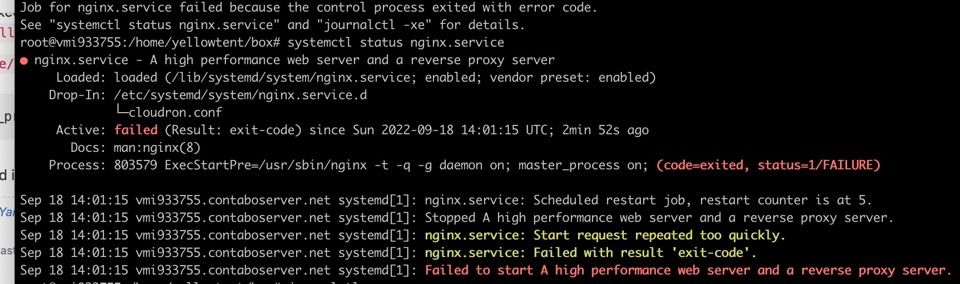
-
Take a look at https://forum.cloudron.io/post/43487
-
Take a look at https://forum.cloudron.io/post/43487
@robi I'm afraid I'm still not clear on which to delete where.
in /home/yellowtent/platformdata/nginx/ there is one .conf file. In /home/yellowtent/platformdata/nginx/applications there are many, but only some have a human readable name as part of their filename.
One user suggests deleting all of them, but does not say if they had to recreate a lot of configs manually later.
Can you clarify?
-
@robi I'm afraid I'm still not clear on which to delete where.
in /home/yellowtent/platformdata/nginx/ there is one .conf file. In /home/yellowtent/platformdata/nginx/applications there are many, but only some have a human readable name as part of their filename.
One user suggests deleting all of them, but does not say if they had to recreate a lot of configs manually later.
Can you clarify?
-
I deleted everything in
/home/yellowtent/platformdata/nginx/applications/and cloudron & nginx restart, so that's progress; but the site is still "refusing to connect" -
Ah well it took a while and a server reboot, but it's back.
Now I am re-saving the locations for each app so it knows where they're found.
Thank you for your help!
-
 G girish marked this topic as a question on
-
G girish has marked this topic as solved on

Hello! It looks like you're interested in this conversation, but you don't have an account yet.
Getting fed up of having to scroll through the same posts each visit? When you register for an account, you'll always come back to exactly where you were before, and choose to be notified of new replies (either via email, or push notification). You'll also be able to save bookmarks and upvote posts to show your appreciation to other community members.
With your input, this post could be even better 💗
Register Login