
Can one cloudron run two Jitsi's on different domains ?
-
-
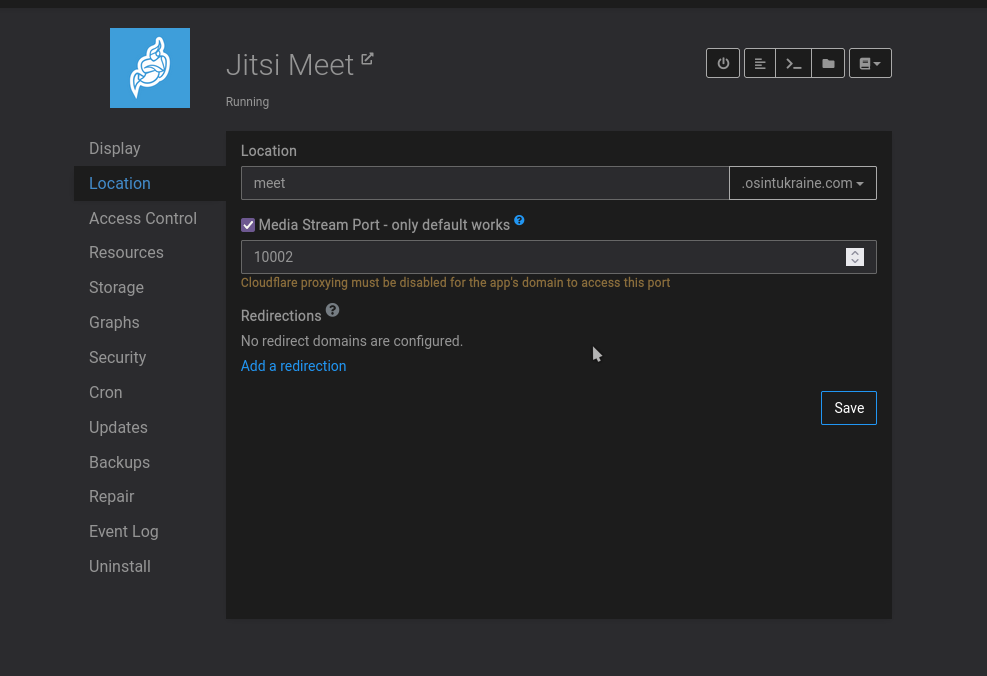
Does the fact Jitsi can only run on default port makes it that only one Jitsi instance can be installed on a given cloudron or is there any workaround ?
@benborges
I just installed two instanced on default port10000and10001and no problem here so far.Like my work? Consider donating a drink. Cheers!
-
@benborges
I just installed two instanced on default port10000and10001and no problem here so far.@BrutalBirdie so that "only default works" (as shown in screenshot above) message isn't true?
-
@benborges
I just installed two instanced on default port10000and10001and no problem here so far.@BrutalBirdie said in Can one cloudron run two Jitsi's on different domains ?:
@benborges
I just installed two instanced on default port10000and10001and no problem here so far.Ohh I forget that Jitsi does p2p on duo sessions, that why it might have worked on both.
-
@benborges
I just installed two instanced on default port10000and10001and no problem here so far. -
@BrutalBirdie Installing is not an issue, but getting it to work properly is the problem.
try your jitsi instance that is not running on default port, it will not work.@benborges said in Can one cloudron run two Jitsi's on different domains ?:
it will not work.
...for meetings with more than 2 people, I guess
-
@benborges I found that we can change the port number by changing a config variable - https://community.jitsi.org/t/changing-default-udp-port-10000-to-something-else/31205 . Will incorporate this in the package.
-
@benborges I found that we can change the port number by changing a config variable - https://community.jitsi.org/t/changing-default-udp-port-10000-to-something-else/31205 . Will incorporate this in the package.
-
@girish Oh that's really great !
I use different jitsi for different domains, for very small team but it's really neat if I could host two in the same server ! -
@benborges unfortunately to lower the enthusiasm, at least in my testing, while one can change the ports, I did not manage to make a call via the mobile app then.
-
@nebulon same here, I can change the ports but the UI is confusing, "only default works", why allow us to change the ports if only the defaults ports will work?





Hello! It looks like you're interested in this conversation, but you don't have an account yet.
Getting fed up of having to scroll through the same posts each visit? When you register for an account, you'll always come back to exactly where you were before, and choose to be notified of new replies (either via email, or push notification). You'll also be able to save bookmarks and upvote posts to show your appreciation to other community members.
With your input, this post could be even better 💗
Register Login