
Cannot Connect to Anthing locally
-
I have Cloudron running on Ubunutu 22.04.1 LTS. I have the Guacamole app installed. I have followed the process in the video linked below. I cannot ssh into any of my local machines. I get the screen stating that it cannot connect. When I check the history there is not history of the connect.
-
I have Cloudron running on Ubunutu 22.04.1 LTS. I have the Guacamole app installed. I have followed the process in the video linked below. I cannot ssh into any of my local machines. I get the screen stating that it cannot connect. When I check the history there is not history of the connect.
@kragontsal Are you able to ssh from the Cloudron server into other machines (i.e without using guacamole) ? What are the other machines - ubuntu/mac/windows ?
There were a few issues related to the ssh key type - https://forum.cloudron.io/topic/7805/ssh-help and https://forum.cloudron.io/topic/6557/ssh-connection-with-private-key-fails .
-
I have Cloudron running on Ubunutu 22.04.1 LTS. I have the Guacamole app installed. I have followed the process in the video linked below. I cannot ssh into any of my local machines. I get the screen stating that it cannot connect. When I check the history there is not history of the connect.
@kragontsal said in Cannot Connect to Anthing locally:
I cannot ssh into any of my local machines
Do something really simple: Go into your Cloudron and open the app settings for Guacamole. Open a terminal by clicking the button. Try to establish a ssh connection from within the terminal -->
ssh your.ip.or.domain
If your target is in reach (of Guacamole) and SSH is running there, you will get a fingerprint back. In my example I tried to connect to a local LAN address from my Cloudron hosted at Netcup and this obviously don't work. On the second command I try to SSH into on of my servers somewhere on the internet and I get a response back. This is just to test if your Guacamole is on the same network as your destination or if your destination is reachable at all.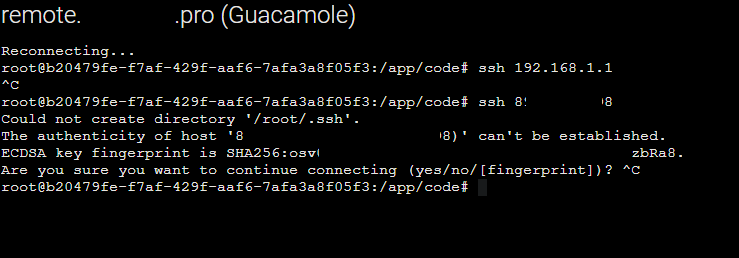
-
@kragontsal Are you able to ssh from the Cloudron server into other machines (i.e without using guacamole) ? What are the other machines - ubuntu/mac/windows ?
There were a few issues related to the ssh key type - https://forum.cloudron.io/topic/7805/ssh-help and https://forum.cloudron.io/topic/6557/ssh-connection-with-private-key-fails .
-
@girish
I have currently two Ubuntu Servers that I know are an issue with the SSH. I have a CentOS 7 server that I cannot SSH into either. I can access the other servers directly from the CLI of the Cloudron server yes. -
@kragontsal said in Cannot Connect to Anthing locally:
I cannot ssh into any of my local machines
Do something really simple: Go into your Cloudron and open the app settings for Guacamole. Open a terminal by clicking the button. Try to establish a ssh connection from within the terminal -->
ssh your.ip.or.domain
If your target is in reach (of Guacamole) and SSH is running there, you will get a fingerprint back. In my example I tried to connect to a local LAN address from my Cloudron hosted at Netcup and this obviously don't work. On the second command I try to SSH into on of my servers somewhere on the internet and I get a response back. This is just to test if your Guacamole is on the same network as your destination or if your destination is reachable at all.@subven
When I open the terminal it just says Reconnecting and never connects. -
@subven
When I open the terminal it just says Reconnecting and never connects.@kragontsal can you post the ssh command and output adding -vvv for extra verbosity?
-
@subven
When I open the terminal it just says Reconnecting and never connects.



Hello! It looks like you're interested in this conversation, but you don't have an account yet.
Getting fed up of having to scroll through the same posts each visit? When you register for an account, you'll always come back to exactly where you were before, and choose to be notified of new replies (either via email, or push notification). You'll also be able to save bookmarks and upvote posts to show your appreciation to other community members.
With your input, this post could be even better 💗
Register Login