Cloudron makes it easy to run web apps like WordPress, Nextcloud, GitLab on your server. Find out more or install now.


Skip to content
  • Categories
  • Recent
  • Tags
  • Popular
  • Bookmarks
  • Search
Skins
  • Light
  • Brite
  • Cerulean
  • Cosmo
  • Flatly
  • Journal
  • Litera
  • Lumen
  • Lux
  • Materia
  • Minty
  • Morph
  • Pulse
  • Sandstone
  • Simplex
  • Sketchy
  • Spacelab
  • United
  • Yeti
  • Zephyr
  • Dark
  • Cyborg
  • Darkly
  • Quartz
  • Slate
  • Solar
  • Superhero
  • Vapor

  • Default (No Skin)
  • No Skin
Collapse
Brand Logo

Cloudron Forum

Apps - Status | Demo | Docs | Install
  1. Cloudron Forum
  2. Support
  3. External Error: invalid stored block lengths

External Error: invalid stored block lengths

Scheduled Pinned Locked Moved Solved Support
backupsrestore
6 Posts 2 Posters 4.0k Views 2 Watching
  • Oldest to Newest
  • Newest to Oldest
  • Most Votes
Reply
  • Reply as topic
Log in to reply
This topic has been deleted. Only users with topic management privileges can see it.
  • affinityA Offline
    affinityA Offline
    affinity
    wrote on last edited by girish
    #1

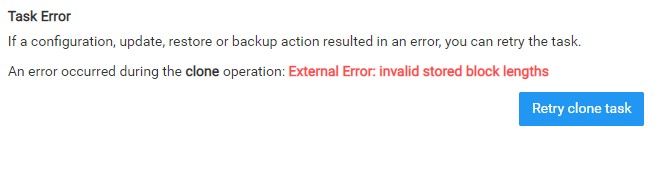
    Has anyone got this message while trying to import a backup?

    Seams to be only affecting one app in my system but nonetheless not sure what may have caused this error, I have since backed up to a version 2 weeks ago but after that point the backups seem to fail. I need the data that was created inside since then but cant get a working restore after that point. Any thoughts?

    Wordpress v2.25.0
    v7.3.6 (Ubuntu 20.04.3 LTS)
    Cloudron-wrror.jpg

    girishG 1 Reply Last reply
    0
    • affinityA affinity

      Has anyone got this message while trying to import a backup?

      Seams to be only affecting one app in my system but nonetheless not sure what may have caused this error, I have since backed up to a version 2 weeks ago but after that point the backups seem to fail. I need the data that was created inside since then but cant get a working restore after that point. Any thoughts?

      Wordpress v2.25.0
      v7.3.6 (Ubuntu 20.04.3 LTS)

      Cloudron-wrror.jpg

      girishG Do not disturb
      girishG Do not disturb
      girish
      Staff
      wrote on last edited by
      #2

      @affinity which backup provider are you using? This is an error from the service.

      affinityA 1 Reply Last reply
      0
      • girishG girish marked this topic as a question on
      • girishG girish

        @affinity which backup provider are you using? This is an error from the service.

        affinityA Offline
        affinityA Offline
        affinity
        wrote on last edited by
        #3

        @girish It's a CIFS mount from another local Linx server.

        girishG 1 Reply Last reply
        0
        • affinityA affinity

          @girish It's a CIFS mount from another local Linx server.

          girishG Do not disturb
          girishG Do not disturb
          girish
          Staff
          wrote on last edited by
          #4

          @affinity it seems to me that the backup file is corrupt (the error comes from gzip, I think). Not sure where the CIFS target is but I would check if the disk of that server is doing ok . Do you have any other (older or newer) backups to work with?

          affinityA 1 Reply Last reply
          0
          • girishG girish

            @affinity it seems to me that the backup file is corrupt (the error comes from gzip, I think). Not sure where the CIFS target is but I would check if the disk of that server is doing ok . Do you have any other (older or newer) backups to work with?

            affinityA Offline
            affinityA Offline
            affinity
            wrote on last edited by
            #5

            @girish I think this could be the case, I tried to extract the Gzip and tar file inside but had an extraction failure, So I think the file may have been corrupted due to a faulty sector of the drive. Going to replace it shortly.

            No, I didn't have any other redundancy. But hey, it happens.

            girishG 1 Reply Last reply
            1
            • girishG girish has marked this topic as solved on
            • affinityA affinity

              @girish I think this could be the case, I tried to extract the Gzip and tar file inside but had an extraction failure, So I think the file may have been corrupted due to a faulty sector of the drive. Going to replace it shortly.

              No, I didn't have any other redundancy. But hey, it happens.

              girishG Do not disturb
              girishG Do not disturb
              girish
              Staff
              wrote on last edited by
              #6

              @affinity yes, so in coming releases, we will have a checksum to verify backups. Hopefully, this is caught sooner and not just when trying to restore.

              1 Reply Last reply
              0

              Hello! It looks like you're interested in this conversation, but you don't have an account yet.

              Getting fed up of having to scroll through the same posts each visit? When you register for an account, you'll always come back to exactly where you were before, and choose to be notified of new replies (either via email, or push notification). You'll also be able to save bookmarks and upvote posts to show your appreciation to other community members.

              With your input, this post could be even better 💗

              Register Login
              Reply
              • Reply as topic
              Log in to reply
              • Oldest to Newest
              • Newest to Oldest
              • Most Votes


              • Login

              • Don't have an account? Register

              • Login or register to search.
              • First post
                Last post
              0
              • Categories
              • Recent
              • Tags
              • Popular
              • Bookmarks
              • Search
