
not 100% sure what I am look at sent the remote access to support it after 6pm here
give you some to so see why it may have not worked too
Michael
not 100% sure what I am look at sent the remote access to support it after 6pm here
give you some to so see why it may have not worked too
Michael
Hi All
Just went to login not the server was down run the test got this error and run the loudron-support --apply-db-migrations and then got the next error
═══ Cloudron Platform ═══
[OK]    MySQL is running
[OK]    nginx is running
[OK]    Dashboard cert is valid (46 days remaining, expires Oct 24 03:06:06 2026 GMT)
[OK]    dashboard is reachable via loopback
[FAIL]  Database migrations are pending. Last migration in DB: /20260521193000-mailsettings-create-table.js. Last migration file: /20260902155100-apiTokens-add-role.js.
[INFO]  Please run 'cloudron-support --apply-db-migrations' to apply the migrations.

2026-09-08T02:16:18 ==> start: Migrating data
[ERROR] AssertionError [ERR_ASSERTION]: ifError got unwanted exception: Duplicate column name 'skipFromValidation'
    at /home/yellowtent/box/node_modules/db-migrate/lib/commands/on-complete.js:15:14
    at tryCatcher (/home/yellowtent/box/node_modules/bluebird/js/release/util.js:16:23)
    at Promise.successAdapter (/home/yellowtent/box/node_modules/bluebird/js/release/nodeify.js:22:30)
    at Promise._settlePromise (/home/yellowtent/box/node_modules/bluebird/js/release/promise.js:601:21)
    at Promise._settlePromiseCtx (/home/yellowtent/box/node_modules/bluebird/js/release/promise.js:641:10)
    at _drainQueueStep (/home/yellowtent/box/node_modules/bluebird/js/release/async.js:97:12)
    at _drainQueue (/home/yellowtent/box/node_modules/bluebird/js/release/async.js:86:9)
    at Async._drainQueues (/home/yellowtent/box/node_modules/bluebird/js/release/async.js:102:5)
    at Async.drainQueues [as _onImmediate] (/home/yellowtent/box/node_modules/bluebird/js/release/async.js:15:14)
    at process.processImmediate (node:internal/timers:534:21)
    at Packet.asError (/home/yellowtent/box/node_modules/mysql2/lib/packets/packet.js:833:17)
    at Query.execute (/home/yellowtent/box/node_modules/mysql2/lib/commands/command.js:29:26)
    at Connection.handlePacket (/home/yellowtent/box/node_modules/mysql2/lib/base/connection.js:555:34)
    at PacketParser.onPacket (/home/yellowtent/box/node_modules/mysql2/lib/base/connection.js:104:12)
    at PacketParser.executeStart (/home/yellowtent/box/node_modules/mysql2/lib/packet_parser.js:75:16)
    at Socket.<anonymous> (/home/yellowtent/box/node_modules/mysql2/lib/base/connection.js:112:25)
    at Socket.emit (node:events:509:28)
    at addChunk (node:internal/streams/readable:563:12)
    at readableAddChunkPushByteMode (node:internal/streams/readable:514:3)
    at Readable.push (node:internal/streams/readable:394:5)
    at TCP.onStreamRead (node:internal/stream_base_commons:189:23)
2026-09-08T02:16:19 ==> start: DB migration failed
[FAIL]  Database migrations faile
Hi Giys
It looks like I'm going to need to move the server. I know the bill is due in about 2 days
I think I need to reinstall the OS and start over using the backup for the apps to go back.
How easy will it be to restore from the backup from that gourd up ? and if I was to get support how long would it take to move ?
Will the license work after the move?
Michael
She back on line .....
remove DB and now she up
this line got me 2nd time what the sic ? it just password not sic that was the old password if I recall
Change the root password to password (sic) -
and I had to rerun the cloudron-support --troubleshoot but she back
think it was not low space but may be time to add ( sure I can scrip or even take box offline by doing a stop )
at 5% space take the system offline or pause ( sure docker can pause )
hyper v does it if see low pause ( or email @ 10 % then pause at 5% )
think it time to re billed time let see how easy it is to move to a new VM under promox
look at the space had backup from 2022 in /var/backup remove that drop back down for 87% to 63%
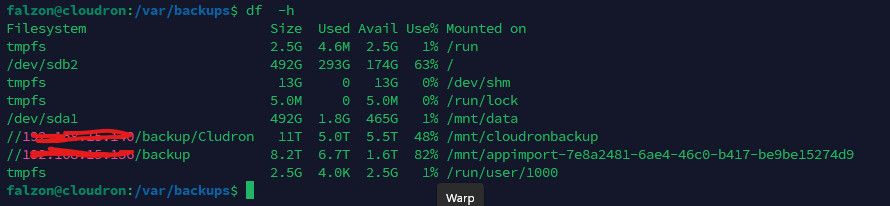
88 % still had over 62GB to go before it run out and I have a scrip that will email me drop under 10%
will be need to fix this after that down I expend the disk size too
Do you need assistance to restore the box.mysqldump? yes thanks not sure what DB name or password
feel we need to dump the full sql and start new readd in
Also, what did you update? The Ubuntu system or Cloudron ? say it was system if I recall cloudron was up 2 date
db dead need to restore for the backup
this one the last db dump and it before the reboot at 1:30am

it long
2026-06-23T05:54:36.025322Z 0 [System] [MY-010116] [Server] /usr/sbin/mysqld (mysqld 8.0.46-0ubuntu0.22.04.2) starting as process 504248
2026-06-23T05:54:36.045219Z 1 [System] [MY-013576] [InnoDB] InnoDB initialization has started.
2026-06-23T05:54:37.814461Z 1 [System] [MY-013577] [InnoDB] InnoDB initialization has ended.
2026-06-23T05:54:38.136979Z 1 [Warning] [MY-011018] [InnoDB] Skip updating information_schema metadata in InnoDB read-only mode.
2026-06-23T05:54:38.137040Z 1 [Warning] [MY-010005] [Server] Skip re-populating collations and character sets tables in InnoDB read-only mode.
2026-06-23T05:54:38.150232Z 2 [Warning] [MY-011018] [Server] Skip updating information_schema metadata in InnoDB read-only mode.
2026-06-23T05:54:38.151775Z 0 [Warning] [MY-010970] [Server] Skipped updating resource group metadata in InnoDB read only mode.
2026-06-23T05:54:38.151837Z 0 [Warning] [MY-010970] [Server] Skipped updating resource group metadata in InnoDB read only mode.
2026-06-23T05:54:38.188539Z 0 [ERROR] [MY-013183] [InnoDB] Assertion failure: trx0types.h:579:m_rsegs_n < 2 thread 140637663901248
InnoDB: We intentionally generate a memory trap.
InnoDB: Submit a detailed bug report to http://bugs.mysql.com.
InnoDB: If you get repeated assertion failures or crashes, even
InnoDB: immediately after the mysqld startup, there may be
InnoDB: corruption in the InnoDB tablespace. Please refer to
InnoDB: http://dev.mysql.com/doc/refman/8.0/en/forcing-innodb-recovery.html
InnoDB: about forcing recovery.
2026-06-23T05:54:38Z UTC - mysqld got signal 6 ;
Most likely, you have hit a bug, but this error can also be caused by malfunctioning hardware.
BuildID[sha1]=ba01e867b96f6e53f8e983aeb60c3b50366607a0
Thread pointer: 0x7fe8ac000b70
Attempting backtrace. You can use the following information to find out
where mysqld died. If you see no messages after this, something went
terribly wrong...
stack_bottom = 7fe8c1ffabb0 thread_stack 0x100000
 #0 0x55e185451afd _Z8my_abortv
 #1 0x55e18560fd72 _Z23ut_dbg_assertion_failedPKcS0_m
 #2 0x55e1855e0387 _ZN20TrxUndoRsegsIterator8set_nextEv
 #3 0x55e1855f9923 <unknown>
 #4 0x55e1855fa034 _Z9trx_purgemmb
 #5 0x55e1855b60e8 _Z28srv_purge_coordinator_threadv
 #6 0x55e185530914 <unknown>
 #7 0x7fe90aad4252 <unknown>
 #8 0x7fe90a728ac2 <unknown>
 #9 0x7fe90a7ba8cf <unknown>
 #10 0xffffffffffffffff <unknown>

Trying to get some variables.
Some pointers may be invalid and cause the dump to abort.
Query (0): is an invalid pointer
Connection ID (thread ID): 0
Status: NOT_KILLED

The manual page at http://dev.mysql.com/doc/mysql/en/crashing.html contains
information that should help you find out what is causing the crash.
2026-06-23T05:54:38.188540Z 0 [System] [MY-013951] [Server] 2026-06-23T05:54:38Z UTC - mysqld got signal 6 ;
2026-06-23T05:54:38.188541Z 0 [System] [MY-013951] [Server] Most likely, you have hit a bug, but this error can also be caused by malfunctioning hardware.
2026-06-23T05:54:38.188542Z 0 [System] [MY-013951] [Server] BuildID[sha1]=ba01e867b96f6e53f8e983aeb60c3b50366607a0
2026-06-23T05:54:38.188543Z 0 [System] [MY-013951] [Server] Thread pointer: 0x7fe8ac000b70
2026-06-23T05:54:38.188544Z 0 [System] [MY-013951] [Server] Attempting backtrace. You can use the following information to find out
2026-06-23T05:54:38.188545Z 0 [System] [MY-013951] [Server] where mysqld died. If you see no messages after this, something went
2026-06-23T05:54:38.188546Z 0 [System] [MY-013951] [Server] terribly wrong...
2026-06-23T05:54:38.188547Z 0 [System] [MY-013951] [Server] stack_bottom = 7fe8c1ffabb0 thread_stack 0x100000
2026-06-23T05:54:38.188548Z 0 [System] [MY-013951] [Server]  #0 0x55e185451afd _Z8my_abortv
2026-06-23T05:54:38.188549Z 0 [System] [MY-013951] [Server]  #1 0x55e18560fd72 _Z23ut_dbg_assertion_failedPKcS0_m
2026-06-23T05:54:38.188550Z 0 [System] [MY-013951] [Server]  #2 0x55e1855e0387 _ZN20TrxUndoRsegsIterator8set_nextEv
2026-06-23T05:54:38.188551Z 0 [System] [MY-013951] [Server]  #3 0x55e1855f9923 <unknown>
2026-06-23T05:54:38.188552Z 0 [System] [MY-013951] [Server]  #4 0x55e1855fa034 _Z9trx_purgemmb
2026-06-23T05:54:38.188553Z 0 [System] [MY-013951] [Server]  #5 0x55e1855b60e8 _Z28srv_purge_coordinator_threadv
2026-06-23T05:54:38.188554Z 0 [System] [MY-013951] [Server]  #6 0x55e185530914 <unknown>
2026-06-23T05:54:38.188555Z 0 [System] [MY-013951] [Server]  #7 0x7fe90aad4252 <unknown>
2026-06-23T05:54:38.188556Z 0 [System] [MY-013951] [Server]  #8 0x7fe90a728ac2 <unknown>
2026-06-23T05:54:38.188557Z 0 [System] [MY-013951] [Server]  #9 0x7fe90a7ba8cf <unknown>
2026-06-23T05:54:38.188558Z 0 [System] [MY-013951] [Server]  #10 0xffffffffffffffff <unknown>
2026-06-23T05:54:38.188559Z 0 [System] [MY-013951] [Server] Trying to get some variables.
2026-06-23T05:54:38.188560Z 0 [System] [MY-013951] [Server] Some pointers may be invalid and cause the dump to abort.
2026-06-23T05:54:38.188561Z 0 [System] [MY-013951] [Server] Query (0): is an invalid pointer
2026-06-23T05:54:38.188562Z 0 [System] [MY-013951] [Server] Connection ID (thread ID): 0
2026-06-23T05:54:38.188563Z 0 [System] [MY-013951] [Server] Status: NOT_KILLED
2026-06-23T05:54:38.188564Z 0 [System] [MY-013951] [Server] The manual page at http://dev.mysql.com/doc/mysql/en/crashing.html contains
2026-06-23T05:54:38.188565Z 0 [System] [MY-013951] [Server] information that should help you find out what is causing the crash.
2026-06-23T05:54:38.645326Z 0 [System] [MY-010116] [Server] /usr/sbin/mysqld (mysqld 8.0.46-0ubuntu0.22.04.2) starting as process 504332
2026-06-23T05:54:38.649439Z 0 [System] [MY-013951] [Server] A backtrace was processed and added to the main error-log in the appropriate format.
2026-06-23T05:54:38.654227Z 1 [System] [MY-013576] [InnoDB] InnoDB initialization has started.
2026-06-23T05:54:39.350571Z 1 [System] [MY-013577] [InnoDB] InnoDB initialization has ended.
2026-06-23T05:54:39.553956Z 1 [Warning] [MY-011018] [InnoDB] Skip updating information_schema metadata in InnoDB read-only mode.
2026-06-23T05:54:39.554200Z 1 [Warning] [MY-010005] [Server] Skip re-populating collations and character sets tables in InnoDB read-only mode.
2026-06-23T05:54:39.560512Z 2 [Warning] [MY-011018] [Server] Skip updating information_schema metadata in InnoDB read-only mode.
2026-06-23T05:54:39.561445Z 0 [Warning] [MY-010970] [Server] Skipped updating resource group metadata in InnoDB read only mode.
2026-06-23T05:54:39.561472Z 0 [Warning] [MY-010970] [Server] Skipped updating resource group metadata in InnoDB read only mode.
2026-06-23T05:54:39.589648Z 0 [ERROR] [MY-013183] [InnoDB] Assertion failure: trx0types.h:579:m_rsegs_n < 2 thread 140586535339584
InnoDB: We intentionally generate a memory trap.
InnoDB: Submit a detailed bug report to http://bugs.mysql.com.
InnoDB: If you get repeated assertion failures or crashes, even
InnoDB: immediately after the mysqld startup, there may be
InnoDB: corruption in the InnoDB tablespace. Please refer to
InnoDB: http://dev.mysql.com/doc/refman/8.0/en/forcing-innodb-recovery.html
InnoDB: about forcing recovery.
2026-06-23T05:54:39Z UTC - mysqld got signal 6 ;
Most likely, you have hit a bug, but this error can also be caused by malfunctioning hardware.
BuildID[sha1]=ba01e867b96f6e53f8e983aeb60c3b50366607a0
Thread pointer: 0x7fdcc4000b70
Attempting backtrace. You can use the following information to find out
where mysqld died. If you see no messages after this, something went
terribly wrong...
stack_bottom = 7fdcda7fbbb0 thread_stack 0x100000
 #0 0x560a42f69afd _Z8my_abortv
 #1 0x560a43127d72 _Z23ut_dbg_assertion_failedPKcS0_m
 #2 0x560a430f8387 _ZN20TrxUndoRsegsIterator8set_nextEv
 #3 0x560a43111923 <unknown>
 #4 0x560a43112034 _Z9trx_purgemmb
 #5 0x560a430ce0e8 _Z28srv_purge_coordinator_threadv
 #6 0x560a43048914 <unknown>
 #7 0x7fdd22f48252 <unknown>
 #8 0x7fdd22b9cac2 <unknown>
 #9 0x7fdd22c2e8cf <unknown>
 #10 0xffffffffffffffff <unknown>

Trying to get some variables.
Some pointers may be invalid and cause the dump to abort.
Query (0): is an invalid pointer
Connection ID (thread ID): 0
Status: NOT_KILLED

The manual page at http://dev.mysql.com/doc/mysql/en/crashing.html contains
information that should help you find out what is causing the crash.
2026-06-23T05:54:39.589649Z 0 [System] [MY-013951] [Server] 2026-06-23T05:54:39Z UTC - mysqld got signal 6 ;
2026-06-23T05:54:39.589650Z 0 [System] [MY-013951] [Server] Most likely, you have hit a bug, but this error can also be caused by malfunctioning hardware.
2026-06-23T05:54:39.589651Z 0 [System] [MY-013951] [Server] BuildID[sha1]=ba01e867b96f6e53f8e983aeb60c3b50366607a0
2026-06-23T05:54:39.589652Z 0 [System] [MY-013951] [Server] Thread pointer: 0x7fdcc4000b70
2026-06-23T05:54:39.589653Z 0 [System] [MY-013951] [Server] Attempting backtrace. You can use the following information to find out
2026-06-23T05:54:39.589654Z 0 [System] [MY-013951] [Server] where mysqld died. If you see no messages after this, something went
2026-06-23T05:54:39.589655Z 0 [System] [MY-013951] [Server] terribly wrong...
2026-06-23T05:54:39.589656Z 0 [System] [MY-013951] [Server] stack_bottom = 7fdcda7fbbb0 thread_stack 0x100000
2026-06-23T05:54:39.589657Z 0 [System] [MY-013951] [Server]  #0 0x560a42f69afd _Z8my_abortv
2026-06-23T05:54:39.589658Z 0 [System] [MY-013951] [Server]  #1 0x560a43127d72 _Z23ut_dbg_assertion_failedPKcS0_m
2026-06-23T05:54:39.589659Z 0 [System] [MY-013951] [Server]  #2 0x560a430f8387 _ZN20TrxUndoRsegsIterator8set_nextEv
2026-06-23T05:54:39.589660Z 0 [System] [MY-013951] [Server]  #3 0x560a43111923 <unknown>
2026-06-23T05:54:39.589661Z 0 [System] [MY-013951] [Server]  #4 0x560a43112034 _Z9trx_purgemmb
2026-06-23T05:54:39.589662Z 0 [System] [MY-013951] [Server]  #5 0x560a430ce0e8 _Z28srv_purge_coordinator_threadv
2026-06-23T05:54:39.589663Z 0 [System] [MY-013951] [Server]  #6 0x560a43048914 <unknown>
2026-06-23T05:54:39.589664Z 0 [System] [MY-013951] [Server]  #7 0x7fdd22f48252 <unknown>
2026-06-23T05:54:39.589665Z 0 [System] [MY-013951] [Server]  #8 0x7fdd22b9cac2 <unknown>
2026-06-23T05:54:39.589666Z 0 [System] [MY-013951] [Server]  #9 0x7fdd22c2e8cf <unknown>
2026-06-23T05:54:39.589667Z 0 [System] [MY-013951] [Server]  #10 0xffffffffffffffff <unknown>
2026-06-23T05:54:39.589668Z 0 [System] [MY-013951] [Server] Trying to get some variables.
2026-06-23T05:54:39.589669Z 0 [System] [MY-013951] [Server] Some pointers may be invalid and cause the dump to abort.
2026-06-23T05:54:39.589670Z 0 [System] [MY-013951] [Server] Query (0): is an invalid pointer
2026-06-23T05:54:39.589671Z 0 [System] [MY-013951] [Server] Connection ID (thread ID): 0
2026-06-23T05:54:39.589672Z 0 [System] [MY-013951] [Server] Status: NOT_KILLED
2026-06-23T05:54:39.589673Z 0 [System] [MY-013951] [Server] The manual page at http://dev.mysql.com/doc/mysql/en/crashing.html contains
2026-06-23T05:54:39.589674Z 0 [System] [MY-013951] [Server] information that should help you find out what is causing the crash.
2026-06-23T05:54:40.437410Z 0 [System] [MY-010116] [Server] /usr/sbin/mysqld (mysqld 8.0.46-0ubuntu0.22.04.2) starting as process 504383
2026-06-23T05:54:40.441982Z 0 [System] [MY-013951] [Server] A backtrace was processed and added to the main error-log in the appropriate format.
2026-06-23T05:54:40.447065Z 1 [System] [MY-013576] [InnoDB] InnoDB initialization has started.
2026-06-23T05:54:41.101394Z 1 [System] [MY-013577] [InnoDB] InnoDB initialization has ended.
2026-06-23T05:54:41.246616Z 1 [Warning] [MY-011018] [InnoDB] Skip updating information_schema metadata in InnoDB read-only mode.
2026-06-23T05:54:41.246686Z 1 [Warning] [MY-010005] [Server] Skip re-populating collations and character sets tables in InnoDB read-only mode.
2026-06-23T05:54:41.256528Z 2 [Warning] [MY-011018] [Server] Skip updating information_schema metadata in InnoDB read-only mode.
2026-06-23T05:54:41.257567Z 0 [Warning] [MY-010970] [Server] Skipped updating resource group metadata in InnoDB read only mode.
2026-06-23T05:54:41.257595Z 0 [Warning] [MY-010970] [Server] Skipped updating resource group metadata in InnoDB read only mode.
2026-06-23T05:54:41.292243Z 0 [ERROR] [MY-013183] [InnoDB] Assertion failure: trx0types.h:579:m_rsegs_n < 2 thread 140391777023552
InnoDB: We intentionally generate a memory trap.
InnoDB: Submit a detailed bug report to http://bugs.mysql.com.
InnoDB: If you get repeated assertion failures or crashes, even
InnoDB: immediately after the mysqld startup, there may be
InnoDB: corruption in the InnoDB tablespace. Please refer to
InnoDB: http://dev.mysql.com/doc/refman/8.0/en/forcing-innodb-recovery.html
InnoDB: about forcing recovery.
2026-06-23T05:54:41Z UTC - mysqld got signal 6 ;
Most likely, you have hit a bug, but this error can also be caused by malfunctioning hardware.
BuildID[sha1]=ba01e867b96f6e53f8e983aeb60c3b50366607a0
Thread pointer: 0x7faf6c000b70
Attempting backtrace. You can use the following information to find out
where mysqld died. If you see no messages after this, something went
terribly wrong...
stack_bottom = 7faf81ffabb0 thread_stack 0x100000
 #0 0x56467b4dbafd _Z8my_abortv
 #1 0x56467b699d72 _Z23ut_dbg_assertion_failedPKcS0_m
 #2 0x56467b66a387 _ZN20TrxUndoRsegsIterator8set_nextEv
 #3 0x56467b683923 <unknown>
 #4 0x56467b684034 _Z9trx_purgemmb
 #5 0x56467b6400e8 _Z28srv_purge_coordinator_threadv
 #6 0x56467b5ba914 <unknown>
 #7 0x7fafcaacc252 <unknown>
 #8 0x7fafca720ac2 <unknown>
 #9 0x7fafca7b28cf <unknown>
 #10 0xffffffffffffffff <unknown>

Trying to get some variables.
Some pointers may be invalid and cause the dump to abort.
Query (0): is an invalid pointer
Connection ID (thread ID): 0
Status: NOT_KILLED

The manual page at http://dev.mysql.com/doc/mysql/en/crashing.html contains
information that should help you find out what is causing the crash.
2026-06-23T05:54:41.292244Z 0 [System] [MY-013951] [Server] 2026-06-23T05:54:41Z UTC - mysqld got signal 6 ;
2026-06-23T05:54:41.292245Z 0 [System] [MY-013951] [Server] Most likely, you have hit a bug, but this error can also be caused by malfunctioning hardware.
2026-06-23T05:54:41.292246Z 0 [System] [MY-013951] [Server] BuildID[sha1]=ba01e867b96f6e53f8e983aeb60c3b50366607a0
2026-06-23T05:54:41.292247Z 0 [System] [MY-013951] [Server] Thread pointer: 0x7faf6c000b70
2026-06-23T05:54:41.292248Z 0 [System] [MY-013951] [Server] Attempting backtrace. You can use the following information to find out
2026-06-23T05:54:41.292249Z 0 [System] [MY-013951] [Server] where mysqld died. If you see no messages after this, something went
2026-06-23T05:54:41.292250Z 0 [System] [MY-013951] [Server] terribly wrong...
2026-06-23T05:54:41.292251Z 0 [System] [MY-013951] [Server] stack_bottom = 7faf81ffabb0 thread_stack 0x100000
2026-06-23T05:54:41.292252Z 0 [System] [MY-013951] [Server]  #0 0x56467b4dbafd _Z8my_abortv
2026-06-23T05:54:41.292253Z 0 [System] [MY-013951] [Server]  #1 0x56467b699d72 _Z23ut_dbg_assertion_failedPKcS0_m
2026-06-23T05:54:41.292254Z 0 [System] [MY-013951] [Server]  #2 0x56467b66a387 _ZN20TrxUndoRsegsIterator8set_nextEv
2026-06-23T05:54:41.292255Z 0 [System] [MY-013951] [Server]  #3 0x56467b683923 <unknown>
2026-06-23T05:54:41.292256Z 0 [System] [MY-013951] [Server]  #4 0x56467b684034 _Z9trx_purgemmb
2026-06-23T05:54:41.292257Z 0 [System] [MY-013951] [Server]  #5 0x56467b6400e8 _Z28srv_purge_coordinator_threadv
2026-06-23T05:54:41.292258Z 0 [System] [MY-013951] [Server]  #6 0x56467b5ba914 <unknown>
2026-06-23T05:54:41.292259Z 0 [System] [MY-013951] [Server]  #7 0x7fafcaacc252 <unknown>
2026-06-23T05:54:41.292260Z 0 [System] [MY-013951] [Server]  #8 0x7fafca720ac2 <unknown>
2026-06-23T05:54:41.292261Z 0 [System] [MY-013951] [Server]  #9 0x7fafca7b28cf <unknown>
2026-06-23T05:54:41.292262Z 0 [System] [MY-013951] [Server]  #10 0xffffffffffffffff <unknown>
2026-06-23T05:54:41.292263Z 0 [System] [MY-013951] [Server] Trying to get some variables.
2026-06-23T05:54:41.292264Z 0 [System] [MY-013951] [Server] Some pointers may be invalid and cause the dump to abort.
2026-06-23T05:54:41.292265Z 0 [System] [MY-013951] [Server] Query (0): is an invalid pointer
2026-06-23T05:54:41.292266Z 0 [System] [MY-013951] [Server] Connection ID (thread ID): 0
2026-06-23T05:54:41.292267Z 0 [System] [MY-013951] [Server] Status: NOT_KILLED
2026-06-23T05:54:41.292268Z 0 [System] [MY-013951] [Server] The manual page at http://dev.mysql.com/doc/mysql/en/crashing.html contains
2026-06-23T05:54:41.292269Z 0 [System] [MY-013951] [Server] information that should help you find out what is causing the crash.
2026-06-23T05:54:41.957279Z 0 [System] [MY-010116] [Server] /usr/sbin/mysqld (mysqld 8.0.46-0ubuntu0.22.04.2) starting as process 504435
2026-06-23T05:54:41.961328Z 0 [System] [MY-013951] [Server] A backtrace was processed and added to the main error-log in the appropriate format.
2026-06-23T05:54:41.966204Z 1 [System] [MY-013576] [InnoDB] InnoDB initialization has started.
2026-06-23T05:54:42.538323Z 1 [System] [MY-013577] [InnoDB] InnoDB initialization has ended.
2026-06-23T05:54:42.752253Z 1 [Warning] [MY-011018] [InnoDB] Skip updating information_schema metadata in InnoDB read-only mode.
2026-06-23T05:54:42.752311Z 1 [Warning] [MY-010005] [Server] Skip re-populating collations and character sets tables in InnoDB read-only mode.
2026-06-23T05:54:42.758409Z 2 [Warning] [MY-011018] [Server] Skip updating information_schema metadata in InnoDB read-only mode.
2026-06-23T05:54:42.759336Z 0 [Warning] [MY-010970] [Server] Skipped updating resource group metadata in InnoDB read only mode.
2026-06-23T05:54:42.759363Z 0 [Warning] [MY-010970] [Server] Skipped updating resource group metadata in InnoDB read only mode.
2026-06-23T05:54:42.795621Z 0 [ERROR] [MY-013183] [InnoDB] Assertion failure: trx0types.h:579:m_rsegs_n < 2 thread 139644939261504
InnoDB: We intentionally generate a memory trap.
InnoDB: Submit a detailed bug report to http://bugs.mysql.com.
InnoDB: If you get repeated assertion failures or crashes, even
InnoDB: immediately after the mysqld startup, there may be
InnoDB: corruption in the InnoDB tablespace. Please refer to
InnoDB: http://dev.mysql.com/doc/refman/8.0/en/forcing-innodb-recovery.html
InnoDB: about forcing recovery.
2026-06-23T05:54:42Z UTC - mysqld got signal 6 ;
Most likely, you have hit a bug, but this error can also be caused by malfunctioning hardware.
BuildID[sha1]=ba01e867b96f6e53f8e983aeb60c3b50366607a0
Thread pointer: 0x7f0178000b70
Attempting backtrace. You can use the following information to find out
where mysqld died. If you see no messages after this, something went
terribly wrong...
stack_bottom = 7f019effcbb0 thread_stack 0x100000
 #0 0x562c1ca58afd _Z8my_abortv
 #1 0x562c1cc16d72 _Z23ut_dbg_assertion_failedPKcS0_m
 #2 0x562c1cbe7387 _ZN20TrxUndoRsegsIterator8set_nextEv
 #3 0x562c1cc00923 <unknown>
 #4 0x562c1cc01034 _Z9trx_purgemmb
 #5 0x562c1cbbd0e8 _Z28srv_purge_coordinator_threadv
 #6 0x562c1cb37914 <unknown>
 #7 0x7f01e795f252 <unknown>
 #8 0x7f01e75b3ac2 <unknown>
 #9 0x7f01e76458cf <unknown>
 #10 0xffffffffffffffff <unknown>

Trying to get some variables.
Some pointers may be invalid and cause the dump to abort.
Query (0): is an invalid pointer
Connection ID (thread ID): 0
Status: NOT_KILLED

The manual page at http://dev.mysql.com/doc/mysql/en/crashing.html contains
information that should help you find out what is causing the crash.
2026-06-23T05:54:42.795622Z 0 [System] [MY-013951] [Server] 2026-06-23T05:54:42Z UTC - mysqld got signal 6 ;
2026-06-23T05:54:42.795623Z 0 [System] [MY-013951] [Server] Most likely, you have hit a bug, but this error can also be caused by malfunctioning hardware.
2026-06-23T05:54:42.795624Z 0 [System] [MY-013951] [Server] BuildID[sha1]=ba01e867b96f6e53f8e983aeb60c3b50366607a0
2026-06-23T05:54:42.795625Z 0 [System] [MY-013951] [Server] Thread pointer: 0x7f0178000b70
2026-06-23T05:54:42.795626Z 0 [System] [MY-013951] [Server] Attempting backtrace. You can use the following information to find out
2026-06-23T05:54:42.795627Z 0 [System] [MY-013951] [Server] where mysqld died. If you see no messages after this, something went
2026-06-23T05:54:42.795628Z 0 [System] [MY-013951] [Server] terribly wrong...
2026-06-23T05:54:42.795629Z 0 [System] [MY-013951] [Server] stack_bottom = 7f019effcbb0 thread_stack 0x100000
2026-06-23T05:54:42.795630Z 0 [System] [MY-013951] [Server]  #0 0x562c1ca58afd _Z8my_abortv
2026-06-23T05:54:42.795631Z 0 [System] [MY-013951] [Server]  #1 0x562c1cc16d72 _Z23ut_dbg_assertion_failedPKcS0_m
2026-06-23T05:54:42.795632Z 0 [System] [MY-013951] [Server]  #2 0x562c1cbe7387 _ZN20TrxUndoRsegsIterator8set_nextEv
2026-06-23T05:54:42.795633Z 0 [System] [MY-013951] [Server]  #3 0x562c1cc00923 <unknown>
2026-06-23T05:54:42.795634Z 0 [System] [MY-013951] [Server]  #4 0x562c1cc01034 _Z9trx_purgemmb
2026-06-23T05:54:42.795635Z 0 [System] [MY-013951] [Server]  #5 0x562c1cbbd0e8 _Z28srv_purge_coordinator_threadv
2026-06-23T05:54:42.795636Z 0 [System] [MY-013951] [Server]  #6 0x562c1cb37914 <unknown>
2026-06-23T05:54:42.795637Z 0 [System] [MY-013951] [Server]  #7 0x7f01e795f252 <unknown>
2026-06-23T05:54:42.795638Z 0 [System] [MY-013951] [Server]  #8 0x7f01e75b3ac2 <unknown>
2026-06-23T05:54:42.795639Z 0 [System] [MY-013951] [Server]  #9 0x7f01e76458cf <unknown>
2026-06-23T05:54:42.795640Z 0 [System] [MY-013951] [Server]  #10 0xffffffffffffffff <unknown>
2026-06-23T05:54:42.795641Z 0 [System] [MY-013951] [Server] Trying to get some variables.
2026-06-23T05:54:42.795642Z 0 [System] [MY-013951] [Server] Some pointers may be invalid and cause the dump to abort.
2026-06-23T05:54:42.795643Z 0 [System] [MY-013951] [Server] Query (0): is an invalid pointer
2026-06-23T05:54:42.795644Z 0 [System] [MY-013951] [Server] Connection ID (thread ID): 0
2026-06-23T05:54:42.795645Z 0 [System] [MY-013951] [Server] Status: NOT_KILLED
2026-06-23T05:54:42.795646Z 0 [System] [MY-013951] [Server] The manual page at http://dev.mysql.com/doc/mysql/en/crashing.html contains
2026-06-23T05:54:42.795647Z 0 [System] [MY-013951] [Server] information that should help you find out what is causing the crash.
2026-06-23T05:54:43.597271Z 0 [System] [MY-010116] [Server] /usr/sbin/mysqld (mysqld 8.0.46-0ubuntu0.22.04.2) starting as process 504486
2026-06-23T05:54:43.602803Z 0 [System] [MY-013951] [Server] A backtrace was processed and added to the main error-log in the appropriate format.
2026-06-23T05:54:43.607702Z 1 [System] [MY-013576] [InnoDB] InnoDB initialization has started.
2026-06-23T05:54:44.313839Z 1 [System] [MY-013577] [InnoDB] InnoDB initialization has ended.
2026-06-23T05:54:44.491022Z 1 [Warning] [MY-011018] [InnoDB] Skip updating information_schema metadata in InnoDB read-only mode.
2026-06-23T05:54:44.491080Z 1 [Warning] [MY-010005] [Server] Skip re-populating collations and character sets tables in InnoDB read-only mode.
2026-06-23T05:54:44.511607Z 2 [Warning] [MY-011018] [Server] Skip updating information_schema metadata in InnoDB read-only mode.
2026-06-23T05:54:44.512794Z 0 [Warning] [MY-010970] [Server] Skipped updating resource group metadata in InnoDB read only mode.
2026-06-23T05:54:44.512823Z 0 [Warning] [MY-010970] [Server] Skipped updating resource group metadata in InnoDB read only mode.
2026-06-23T05:54:44.541721Z 0 [ERROR] [MY-013183] [InnoDB] Assertion failure: trx0types.h:579:m_rsegs_n < 2 thread 140031922509376
InnoDB: We intentionally generate a memory trap.
InnoDB: Submit a detailed bug report to http://bugs.mysql.com.
InnoDB: If you get repeated assertion failures or crashes, even
InnoDB: immediately after the mysqld startup, there may be
InnoDB: corruption in the InnoDB tablespace. Please refer to
InnoDB: http://dev.mysql.com/doc/refman/8.0/en/forcing-innodb-recovery.html
InnoDB: about forcing recovery.
2026-06-23T05:54:44Z UTC - mysqld got signal 6 ;
Most likely, you have hit a bug, but this error can also be caused by malfunctioning hardware.
BuildID[sha1]=ba01e867b96f6e53f8e983aeb60c3b50366607a0
Thread pointer: 0x7f5b94000b70
Attempting backtrace. You can use the following information to find out
where mysqld died. If you see no messages after this, something went
terribly wrong...
stack_bottom = 7f5bb8ff8bb0 thread_stack 0x100000
 #0 0x55bc96a30afd _Z8my_abortv
 #1 0x55bc96beed72 _Z23ut_dbg_assertion_failedPKcS0_m
 #2 0x55bc96bbf387 _ZN20TrxUndoRsegsIterator8set_nextEv
 #3 0x55bc96bd8923 <unknown>
 #4 0x55bc96bd9034 _Z9trx_purgemmb
 #5 0x55bc96b950e8 _Z28srv_purge_coordinator_threadv
 #6 0x55bc96b0f914 <unknown>
 #7 0x7f5bf129f252 <unknown>
 #8 0x7f5bf0ef3ac2 <unknown>
 #9 0x7f5bf0f858cf <unknown>
 #10 0xffffffffffffffff <unknown>

Trying to get some variables.
Some pointers may be invalid and cause the dump to abort.
Query (0): is an invalid pointer
Connection ID (thread ID): 0
Status: NOT_KILLED

The manual page at http://dev.mysql.com/doc/mysql/en/crashing.html contains
information that should help you find out what is causing the crash.
same error as before I am sure just need to restore the DB for what I can see
I need to work out why that server do this on reboot make be time to move it to a new server
Hi Guy,
Update and reboot now I have a error on mysql
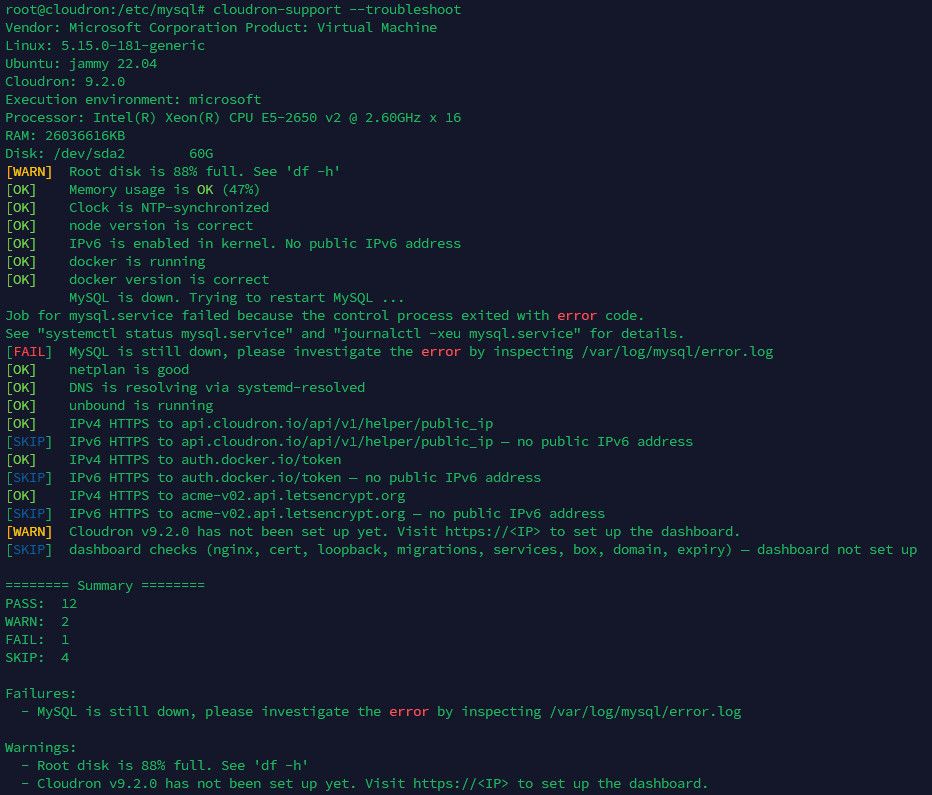
try to do a been on that for a bit

access to the backup

server under bbs.mozysswamp.org port 3131

Thanks 
sure I am missing something can see much about it how do I stop a app ?
just restart but I wish to stop stop it .
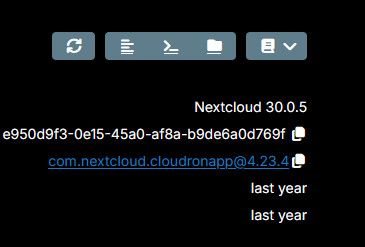
If I can't change it or remove them

.... guess have to do a file system mount with FSTAB
can I update the config on the each to the right one ? ( can't remove the old one locked ) can't change the app or restore from a backup and still wishing to put it back
thanks... I back it up 1st then remove and re add it
Nozy
hang on think I can see why /dev/sda2 on / type ext4 (rw,relatime) is the OS dik
/dev/sdb1 has the be the 2nd disk sure missing something I can access the file system and the OS does have it mounted ?
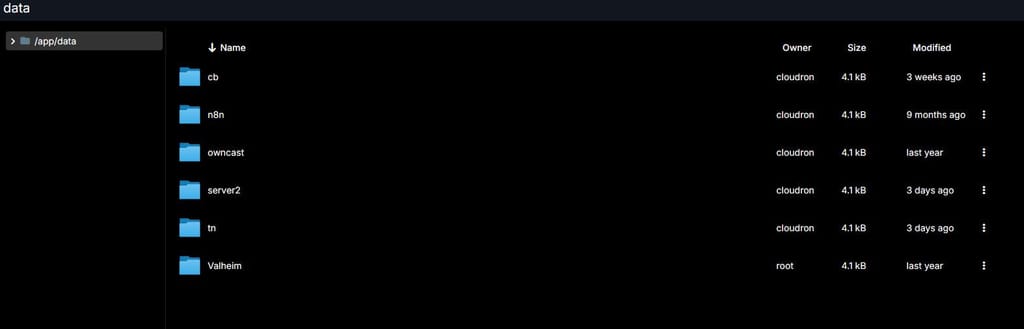
I try a remount does not help all good but this one that does not come on line.....
disk is ext4 and is on the same server disk ( hyperv )
can see the disk OS does not have it mounted but I guess the dooker has it mount
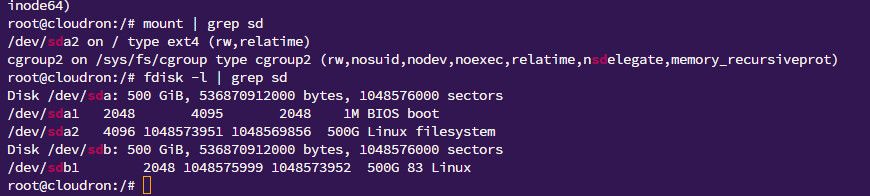
Hi All
OK think this has been happen for some timle
have 2 disk and as you can see I can see the files on the 2nd disk from the UI
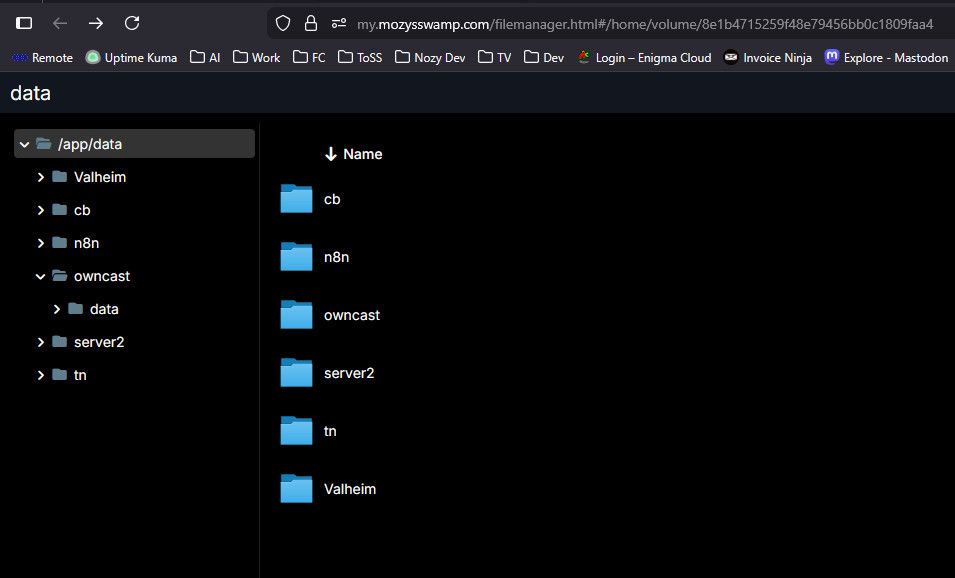
same disk and is ok

but my TriliumNext server will not start ( see error )
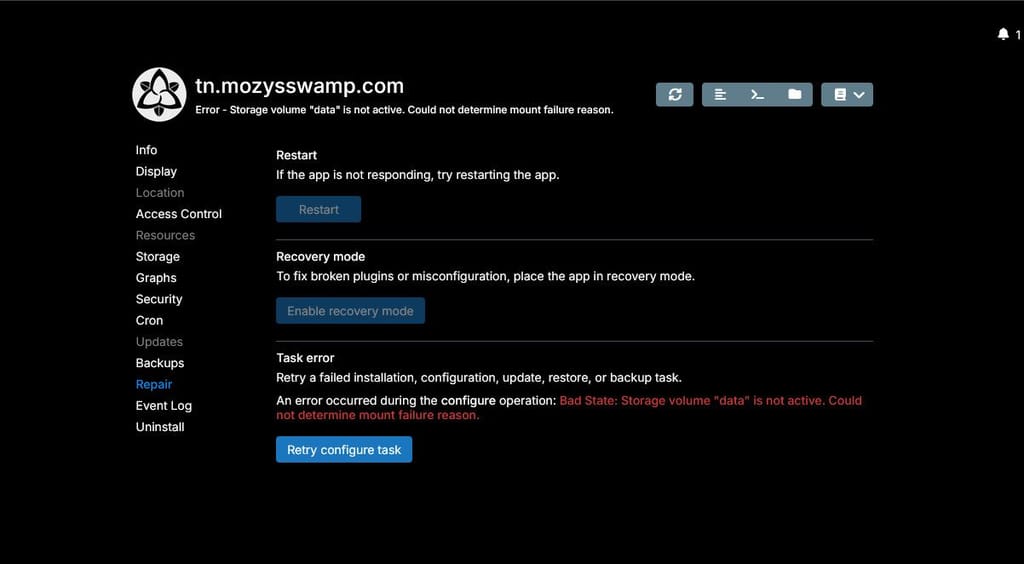
disk say it not mount but I can see the folder and a remount does not help
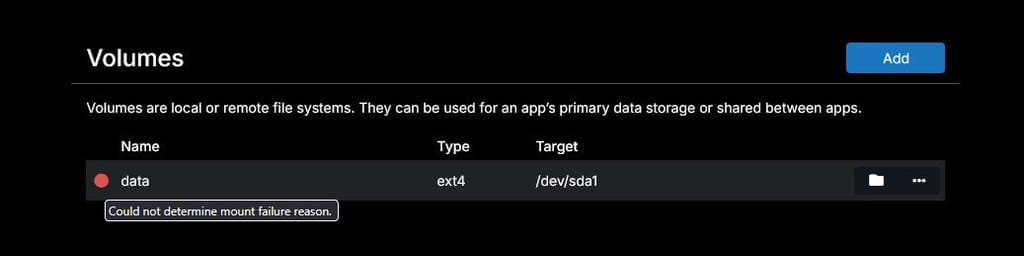
this is the same as the error was going some time back look like it not start think the disk is offline...

OK upgrade wow that looks like it work with me crying
do I try to do the domain move now take a snap be for I start just to make sure or do I upgrade to Ubuntu 24.04 1st
Nozy
