Cloudron makes it easy to run web apps like WordPress, Nextcloud, GitLab on your server. Find out more or install now.


Skip to content

Nextcloud

402 Topics 3.2k Posts
  • Nextcloud - Package Updates

    Pinned
    122
    1 Votes
    122 Posts
    82k Views
    Package UpdatesP
    [5.8.0] memcache.local set to APCu as recommened for single node setups
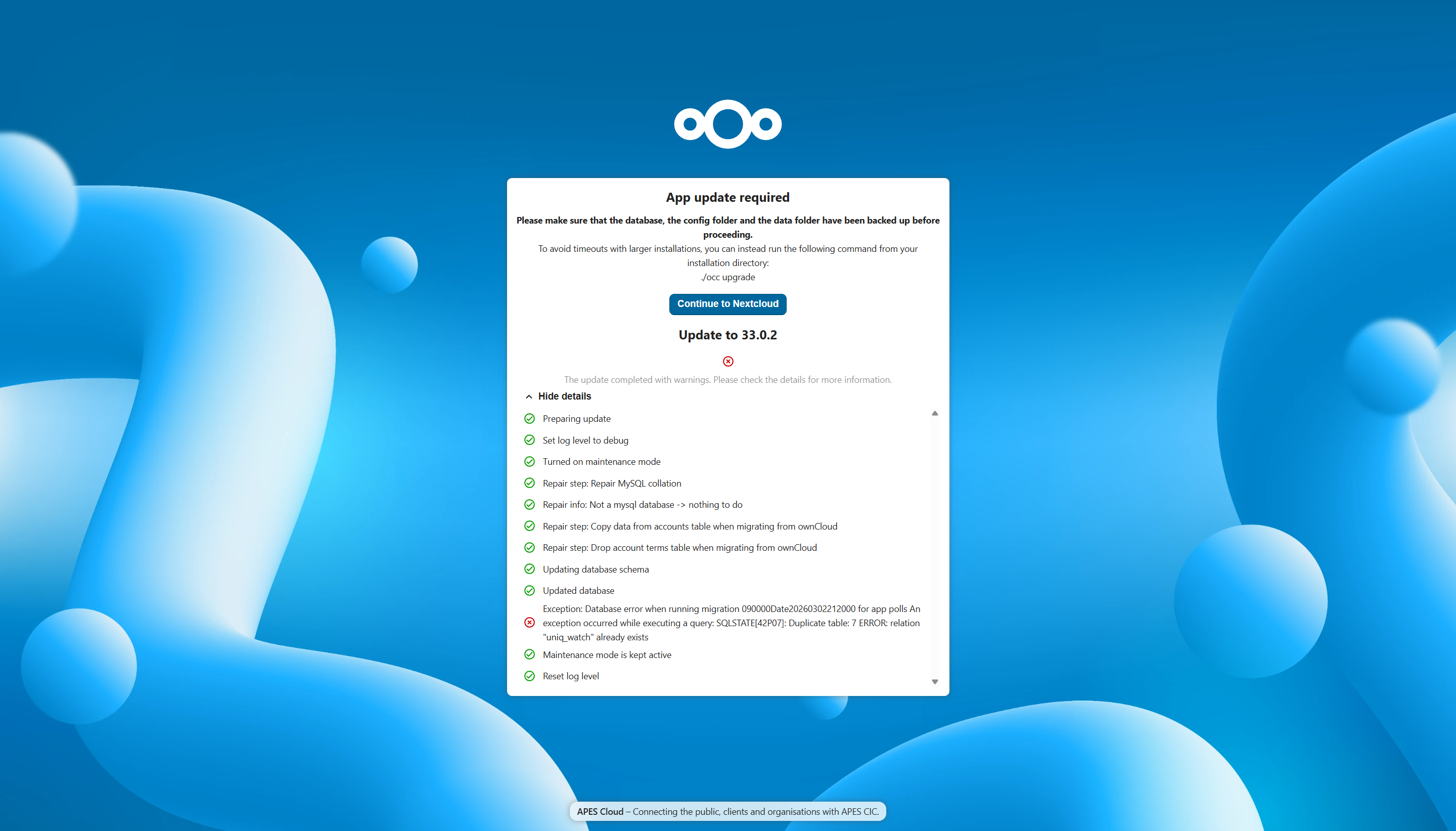
  • Polls app update causing error

    4
    1
    0 Votes
    4 Posts
    95 Views
    sponchS
    Be careful with the Polls app. I’ve stopped using it because it bricked several Nextcloud instances for me multiple times.
  • Is it possible/safe to install Client Push App ?

    8
    0 Votes
    8 Posts
    1k Views
    WiseMetalheadW
    @andreasb said: it looks like notify_push is up and running I honestly don’t understand how you managed to get this working. I spent about 5 hours today trying to set it up and still didn’t get the result I expected. @reboot cron job simply doesn’t work. It’s mentioned in the docs but I’ve never seen it run in the logs. @service does run but only once. Аfter subsequent Nextcloud restarts the job never triggers again. My version of the script works fine if I run it manually from the terminal like this /app/data/notify_push.sh. The service starts and all checks pass. root@71780ea5-011c-4c09-886e-5f7e17e0b670:/app/code# /app/data/notify_push.sh ; sleep 1 ; ps aux | grep notify_push ; ss -tlnp | grep 7867 ✓ redis is configured ✓ push server is receiving redis messages ✓ push server can load mount info from database ✓ push server can connect to the Nextcloud server ✓ push server is a trusted proxy ✓ push server is running the same version as the app configuration saved => notify_push started on port 7867 root 265 0.3 0.0 25676 8796 ? Ssl 15:57 0:00 /app/code/apps/notify_push/bin/x86_64/notify_push --allow-self-signed --nextcloud-url http://172.18.20.152 --port 7867 /app/code/config/config.php root 286 0.0 0.0 4104 2100 pts/1 S+ 15:57 0:00 grep --color=auto notify_push LISTEN 0 128 0.0.0.0:7867 0.0.0.0:* users:(("notify_push",pid=265,fd=10)) If I set up a cron job to run every 5 minutes. */5 * * * * echo "=> Enabling notify_push" && /app/data/notify_push.sh I can see in the logs that everything looks fine: Apr 16 18:30:41 ✓ redis is configured Apr 16 18:30:41 ✓ push server is receiving redis messages Apr 16 18:30:41 ✓ push server can load mount info from database Apr 16 18:30:41 ✓ push server can connect to the Nextcloud server Apr 16 18:30:41 ✓ push server is a trusted proxy Apr 16 18:30:41 ✓ push server is running the same version as the app Apr 16 18:30:41 configuration saved Apr 16 18:30:41 => notify_push started on port 7867 But in reality the process doesn’t survive after the script finishes. If I check manually with ps aux | grep notify_push ; ss -tlnp | grep 7867 there’s nothing in the terminal. Claude suggested this might be a cgroup-related issue in containers. The process started from cron gets attached to its cgroup and when the cron job exits, the process is killed along with it. I’m not sure how accurate that is. Maybe most people who claimed to have notify_push working probably didn’t verify it properly, since the warning disappears from the Nextcloud admin panel. It looks like it’s working, even when it actually isn’t.
  • Drag and Drop not working

    3
    1 Votes
    3 Posts
    60 Views
    E
    Hi @james Thank you for your feedback. I searched a bit and i found this bug report here in GitHub, it's exactly my problem. Seems to be a bug. When i pres F12 in Firefox, i can see it. First, thought about if i have a wrong configuration, but i guess that Cloudron supports the optimal configuration for Nextcloud, so there's no need to to anything, just wait for the bugfix. https://github.com/nextcloud/server/issues/59468 Has anyone else the same issue? Thanks, Eixen
  • Social App well-known error.

    2
    1
    0 Votes
    2 Posts
    86 Views
    nebulonN
    The well-known is usually served up by the main domain (example.com) so for a start if your nextcloud is installed on a subdomain, the well-known needs to be configured outside this nextcloud instance. So make sure to have an app installed at example.com so it gets routed to Cloudron. Then you can configure this via https://docs.cloudron.io/domains#well-known-locations Though not exactly sure if this nextcloud app would expect the same things as mastodon, but you can try to set the well-known mastodon accordingly, maybe that works. Otherwise we may have to add support for whatever this needs.
  • Upgrade to 33.0.1 Fail

    4
    1 Votes
    4 Posts
    235 Views
    jamesJ
    Hello @firmansi Thanks for the report. Then I have to assume that it is some Nextcloud third party app issue with the latest update.
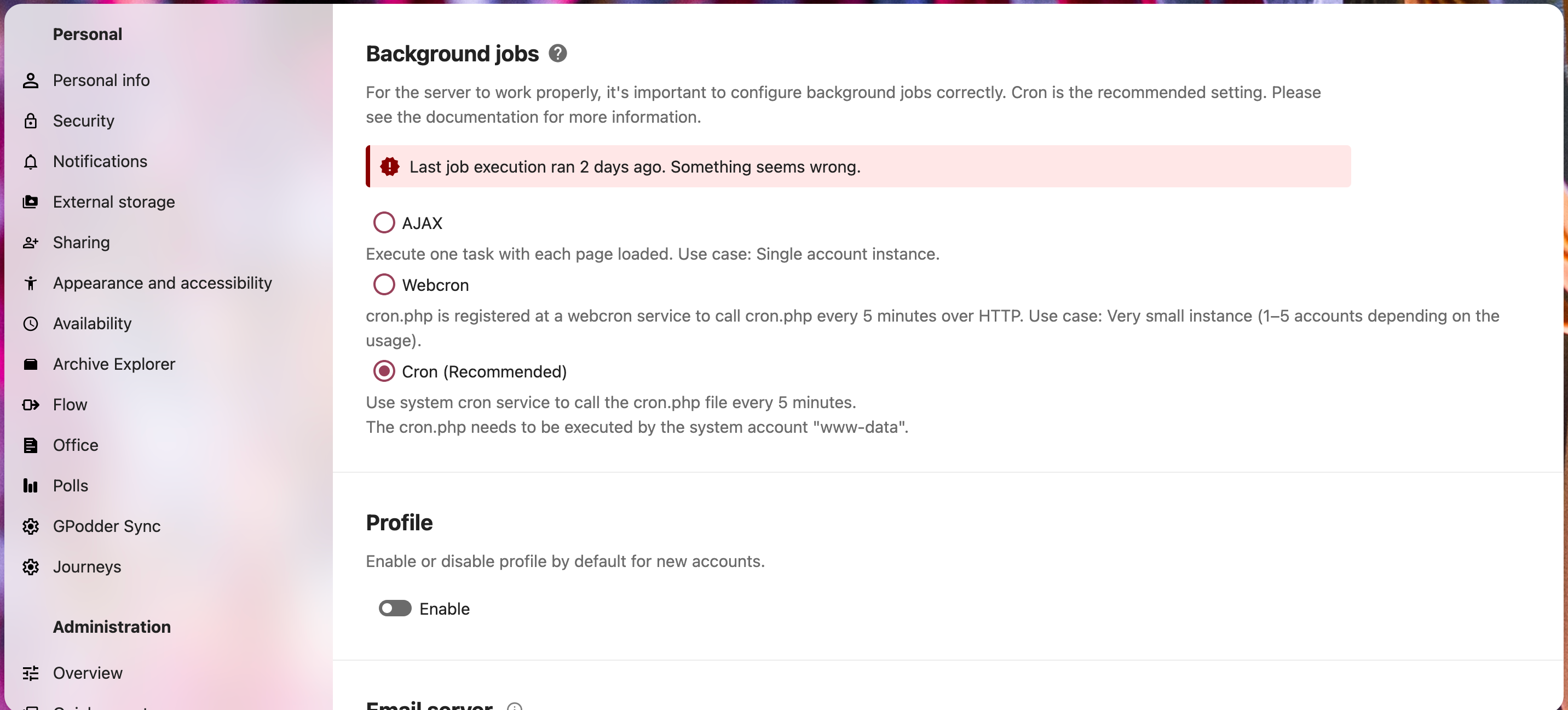
  • "Last job execution ran X days ago. Something seems wrong." with cron.

    Unsolved
    9
    2
    0 Votes
    9 Posts
    383 Views
    J
    There should be a periodic => Run cron job in your app logs . Do you see it? If not immediately, just keep the log window open for 20 mins, it will print every 5 mins.
  • Transfer OIDC user to local user

    3
    1 Votes
    3 Posts
    239 Views
    David 0D
    Thanks for your reply! I guess we'll just keep the existing users on oidc then. Or maybe, if they're willing to, they can migrate manually. Most shares and other tools (collectives, calendars) are shared via groups, not link.
  • Nextcloud 33 Appears on Git but Not Released - Any News?

    13
    1 Votes
    13 Posts
    650 Views
    jdaviescoatesJ
    @sponch thanks for the reminder
  • 2 Votes
    1 Posts
    120 Views
    No one has replied
  • nextcloud talk - end-to-end-encryption

    nextcloud nextcloud talk encryption
    1
    3 Votes
    1 Posts
    283 Views
    No one has replied
  • Android Client Sync failing - Unknown Error

    4
    0 Votes
    4 Posts
    253 Views
    D
    Here's how I've temporarily worked around the situation: Manually synced all auto upload folders to ensure I'm not missing any files Cleared the cache on the Nextcloud app Told it to ignore all pending uploads I think there is some sort of rate limit causing issues - once you get too many items pending re-upload, it just keeps hitting the server and Cloudron starts rejecting / ignoring requests from the client, which puts it into a weird state.
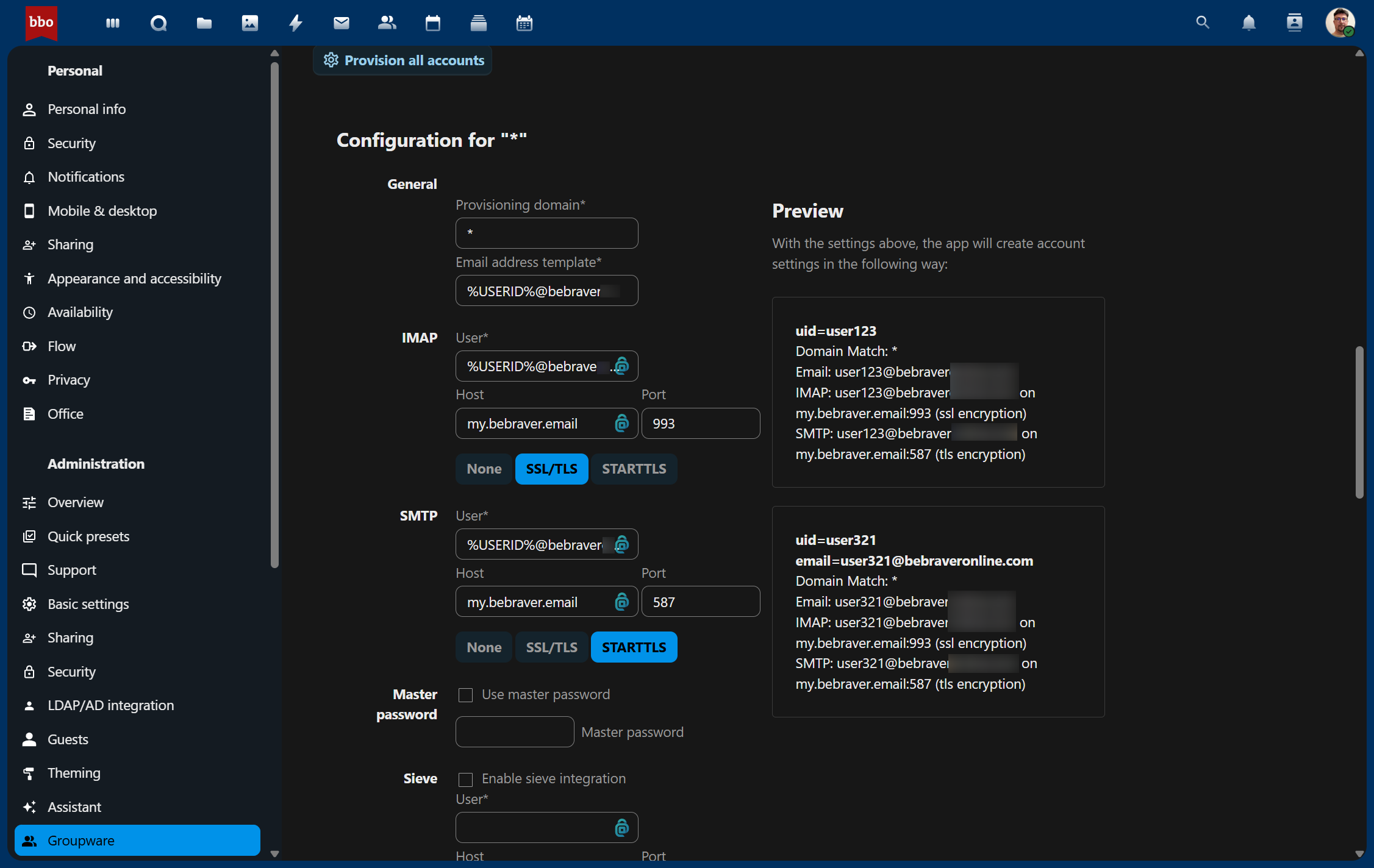
  • Nextcloud Email Automatic Provisioning

    Moved nextcloud email
    5
    1
    0 Votes
    5 Posts
    432 Views
    J
    From cloudron side, you can get an app password with mail access for the user. This is easy with REST API. On nextcloud side, you have to figure how to automate a mailbox set up for a user with that password .
  • Nextcloud Not Starting - Please help

    Solved redis
    4
    0 Votes
    4 Posts
    296 Views
    C
    That did the trick! Thank you! We can close this topic now.
  • 33 GB of usage, 177 GB system space occupied - how to find ghost files?

    16
    0 Votes
    16 Posts
    4k Views
    humptyH
    @jdaviescoates Pure gold! I just cleaned up 30ish GB I hope setting the max/min age to 30/7 should prevent this from building up anytime soon.
  • This topic is deleted!

    0
    0 Votes
    0 Posts
    9 Views
    No one has replied
  • OpenID Connect user backend 8.2.2 update issue

    oidc
    3
    1 Votes
    3 Posts
    315 Views
    osoboO
    Thank you for your reply. I have disabled the Nextcloud standard login a while ago so for now users can only login via their Cloudron’s account (including me ). I will try to figure out how to revert that
  • 1 Votes
    3 Posts
    311 Views
    T
    Thank for the reply! I was able to resolve the issue. The external SSHFS volume was still registered in Cloudron, but the remote server was offline, causing the container to fail during startup. Since the mount point was stuck and not removable at first, I proceeded as follows: sudo rmdir /mnt/volumes/... mkdir /mnt/volumes/... cd /mnt/volumes/... By recreating an empty local folder at the exact path Cloudron expected, the app was finally able to start again. Once the app was running, I could remove the external volume cleanly from the Storage configuration in the Cloudron dashboard.
  • Nextcloud Upgrade Channel

    5
    0 Votes
    5 Posts
    428 Views
    jdaviescoatesJ
    @SolarSimon I'd never even spotted those settings before but see e.g. here https://github.com/nextcloud/server/issues/53705#issuecomment-3012715584 In short, open the web terminal and run: occ config:system:set updatechecker --value=true --type=boolean It should then reappear for you: [image: 1764933999185-img_20251205_112552.jpg]
  • Nextcloud Talk API

    7
    0 Votes
    7 Posts
    3k Views
    andreasduerenA
    @vitalymp You can simply create a new user with some bot name and then make a POST call to your nextcloud instance using that users basic auth credentials after recieving data with a webhook. Something like this: { "nodes": [ { "parameters": { "method": "POST", "url": "https://cloud.tld.com/ocs/v2.php/apps/spreed/api/v4/chat/CHAT-ID", "authentication": "genericCredentialType", "genericAuthType": "httpBasicAuth", "sendQuery": true, "queryParameters": { "parameters": [ { "name": "message", "value": "=Message content" } ] }, "sendHeaders": true, "headerParameters": { "parameters": [ { "name": "OCS-APIRequest", "value": "true" }, { "name": "Content-Type", "value": "application/json" }, { "name": "Accept", "value": "application/json" } ] }, "options": {} }, "id": "3efc34ee-e77a-477f-9cbd-9e039f64e143", "name": "Post Message to NC Talk room", "type": "n8n-nodes-base.httpRequest", "typeVersion": 4.2, "position": [ 1872, 160 ], "credentials": { "nextCloudApi": { "id": "RQ8xpIKWFMblRfYZ", "name": "cloud.tld.com – bot" }, "httpHeaderAuth": { "id": "v09VrkQtu9eIAUEl", "name": "Header Auth account" }, "httpBasicAuth": { "id": "6ASiFBk1BEcktXcq", "name": "cloud.tld.com bot" } } }, { "parameters": { "path": "a907934a-19a1-4ced-b919-f1db35a4fa93", "options": {} }, "id": "f11e1143-0a6b-4867-abb2-f03a235e0ed0", "name": "Webhook", "type": "n8n-nodes-base.webhook", "typeVersion": 2, "position": [ 1424, 160 ], "webhookId": "a907934a-19a1-4ced-b919-f1db35a4fa93" } ], "connections": { "Webhook": { "main": [ [ { "node": "Post Message to NC Talk room", "type": "main", "index": 0 } ] ] } }, "pinData": {}, "meta": { "templateCredsSetupCompleted": true, "instanceId": "a382289a228a66b7e622210301ab5b6d8d06d93edb07378019866ea75d7e5793" } }