Cloudron makes it easy to run web apps like WordPress, Nextcloud, GitLab on your server. Find out more or install now.


Skip to content
  • Categories
  • Recent
  • Tags
  • Popular
  • Bookmarks
  • Search
Skins
  • Light
  • Brite
  • Cerulean
  • Cosmo
  • Flatly
  • Journal
  • Litera
  • Lumen
  • Lux
  • Materia
  • Minty
  • Morph
  • Pulse
  • Sandstone
  • Simplex
  • Sketchy
  • Spacelab
  • United
  • Yeti
  • Zephyr
  • Dark
  • Cyborg
  • Darkly
  • Quartz
  • Slate
  • Solar
  • Superhero
  • Vapor

  • Default (No Skin)
  • No Skin
Collapse
Brand Logo

Cloudron Forum

Apps - Status | Demo | Docs | Install
  1. Cloudron Forum
  2. FreeScout
  3. Critical Error After Upgrading to FreeScout 1.8.178 — "Please check your internet connection"

Critical Error After Upgrading to FreeScout 1.8.178 — "Please check your internet connection"

Scheduled Pinned Locked Moved Solved FreeScout
9 Posts 4 Posters 2.1k Views 4 Watching
  • Oldest to Newest
  • Newest to Oldest
  • Most Votes
Reply
  • Reply as topic
Log in to reply
This topic has been deleted. Only users with topic management privileges can see it.
  • vadimV Offline
    vadimV Offline
    vadim
    wrote on last edited by
    #1

    After upgrading to the latest version FreeScout 1.8.178, I started encountering a persistent issue. Whenever I perform any action on a ticket (changing status, adding a note, replying, etc.), I get the following error message:

    ❗ Error occurred. Please check your internet connection and try again.

    Screenshot:
    Screenshot at May 17 10-57-23.png

    This issue only started after updating to version 1.8.178. When I rollback to the previous version, everything works perfectly.

    Thanks in advance!

    1 Reply Last reply
    1
    • BrutalBirdieB Offline
      BrutalBirdieB Offline
      BrutalBirdie
      Partner
      wrote on last edited by
      #2

      Thanks for reporting, will have to look into that.

      Like my work? Consider donating a drink. Cheers!

      1 Reply Last reply
      0
      • BrutalBirdieB Offline
        BrutalBirdieB Offline
        BrutalBirdie
        Partner
        wrote on last edited by BrutalBirdie
        #3

        This error is also already report upstream:
        https://github.com/freescout-help-desk/freescout/issues/4768

        //edit oh that is you @vadim 😄

        Might not be related to Cloudron then at all.
        @staff might roll back the release 😬 if it is confirmed it really is an upstream issue.

        @luckow @tobiasb // ping for you since I know you use freescout very actively.

        Like my work? Consider donating a drink. Cheers!

        1 Reply Last reply
        1
        • vadimV Offline
          vadimV Offline
          vadim
          wrote on last edited by
          #4

          I'm using FreeScout very actively and have two installations. One is small — no issues after the update. The other has over 50,000 tickets and very active daily use.

          After updating to 1.8.178, every time I change something in a ticket (status, reply, etc.), I get this error:

          Error occurred. Please check your internet connection and try again.

          But the change still goes through.

          There are no errors in the system or logs. If I roll back to the previous version — everything works perfectly again.

          Tried reinstalling, cloning, using a different domain — same result. This issue only happens after the update.

          1 Reply Last reply
          0
          • girishG Offline
            girishG Offline
            girish
            Staff
            wrote on last edited by
            #5

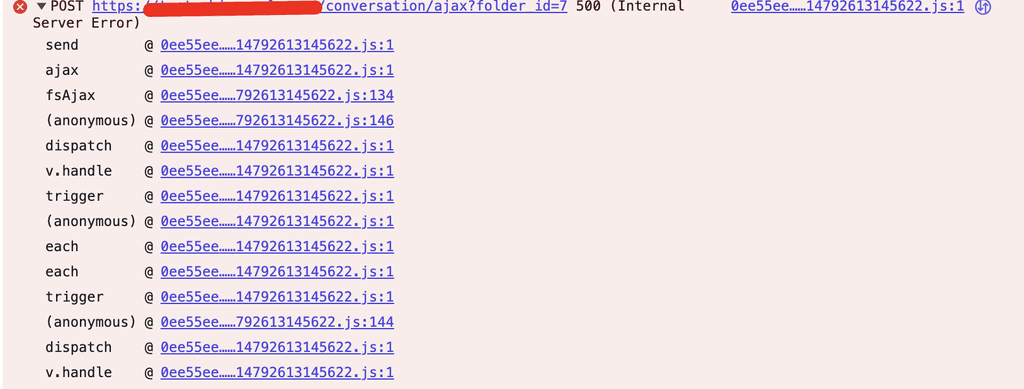
            Our support/FreeScout instance works fine. Are there any errors in browser console?

            vadimV 1 Reply Last reply
            0
            • girishG girish

              Our support/FreeScout instance works fine. Are there any errors in browser console?

              vadimV Offline
              vadimV Offline
              vadim
              wrote on last edited by
              #6

              @girish Screenshot at May 17 12-08-20.png

              1 Reply Last reply
              0
              • BrutalBirdieB Offline
                BrutalBirdieB Offline
                BrutalBirdie
                Partner
                wrote on last edited by
                #7

                I always feel silly when asking such questions.
                But, can you try to clear your browser cache? 😬
                And also maybe clear the Freescout cache => https://github.com/freescout-help-desk/freescout/wiki/Clearing-the-Cache

                Like my work? Consider donating a drink. Cheers!

                1 Reply Last reply
                0
                • vadimV Offline
                  vadimV Offline
                  vadim
                  wrote on last edited by vadim
                  #8

                  Found the issue: after updating to 1.8.178, the Faster Search module causes a fatal error in line 731 of its provider. It's passing a string to count(), which expects array|Countable. Disabling the module resolves the error.

                  1 Reply Last reply
                  1
                  • nebulonN Offline
                    nebulonN Offline
                    nebulon
                    Staff
                    wrote on last edited by
                    #9

                    The 500 status code from your screenshot also hints at a server side exception or crash, maybe worth looking into the app server side logs while that happens. Maybe the crash can then be reported upstream for that faster search module

                    1 Reply Last reply
                    0
                    • J joseph marked this topic as a question on
                    • J joseph has marked this topic as solved on

                    Hello! It looks like you're interested in this conversation, but you don't have an account yet.

                    Getting fed up of having to scroll through the same posts each visit? When you register for an account, you'll always come back to exactly where you were before, and choose to be notified of new replies (either via email, or push notification). You'll also be able to save bookmarks and upvote posts to show your appreciation to other community members.

                    With your input, this post could be even better 💗

                    Register Login
                    Reply
                    • Reply as topic
                    Log in to reply
                    • Oldest to Newest
                    • Newest to Oldest
                    • Most Votes


                    • Login

                    • Don't have an account? Register

                    • Login or register to search.
                    • First post
                      Last post
                    0
                    • Categories
                    • Recent
                    • Tags
                    • Popular
                    • Bookmarks
                    • Search