
Unusable application
-
In the registry configuration in Cloudron settings, the error Invalid serverAddress: socket hang up appears whenever I attempt to save the private registry settings.
OK, I missed this one. Can you try
docker loginon the server itself and see if that works ? -
In the registry configuration in Cloudron settings, the error Invalid serverAddress: socket hang up appears whenever I attempt to save the private registry settings.
OK, I missed this one. Can you try
docker loginon the server itself and see if that works ? -
In the registry configuration in Cloudron settings, the error Invalid serverAddress: socket hang up appears whenever I attempt to save the private registry settings.
OK, I missed this one. Can you try
docker loginon the server itself and see if that works ? -
@lanhild We have to debug this step by step.
- Does
host registry.cloudron.localresolve to public IP? - Check if nginx can reach the container..
docker ps | grep com.docker.registryto get container ID.docker inspect bea487bec441 | grep IPAddressto get local IP.curl http://172.18.20.34:5000/asdf -vshould get some response for the registry. It will haveDocker-Distribution-Api-Versionheader. - Then
curl https://registry.cloudron.local? This should give some UI page or login page of the registry
Depending on where it fails, we have to proceed. FWIW, docker login to same cloudron registry works fine on my servers.
- Does
-
@lanhild We have to debug this step by step.
- Does
host registry.cloudron.localresolve to public IP? - Check if nginx can reach the container..
docker ps | grep com.docker.registryto get container ID.docker inspect bea487bec441 | grep IPAddressto get local IP.curl http://172.18.20.34:5000/asdf -vshould get some response for the registry. It will haveDocker-Distribution-Api-Versionheader. - Then
curl https://registry.cloudron.local? This should give some UI page or login page of the registry
Depending on where it fails, we have to proceed. FWIW, docker login to same cloudron registry works fine on my servers.
@joseph My answers, step-by-step as you formatted it in your message:
- Yes.
- Reachable,
Docker-Distribution-Api-Version: registry/2.0
<html>
<head><title>302 Found</title></head>
<body>
<center><h1>302 Found</h1></center>
<hr><center>nginx</center>
</body>
</html>
docker loginfrom the Cloudron server results in the followingError response from daemon: Get "https:/registry.cloudron.local/v2/": net/http: request canceled while waiting for connection (Client.Timeout exceeded while awaiting headers)docker loginfrom any other remote works perfectly fine. - Does
-
@joseph My answers, step-by-step as you formatted it in your message:
- Yes.
- Reachable,
Docker-Distribution-Api-Version: registry/2.0
<html>
<head><title>302 Found</title></head>
<body>
<center><h1>302 Found</h1></center>
<hr><center>nginx</center>
</body>
</html>
docker loginfrom the Cloudron server results in the followingError response from daemon: Get "https:/registry.cloudron.local/v2/": net/http: request canceled while waiting for connection (Client.Timeout exceeded while awaiting headers)docker loginfrom any other remote works perfectly fine. -
Out of ideas, since I can't reproduce this anywhere. You can contact me on support@ if you want me to debug on the server.
@joseph I've now also noticed problems with the docker registry. In my case I'm also running a builderbot on the same cloudron instance. Seems like it can't connect to the docker registry, my logs on the builderbot are simply saying:
Mar 28 08:42:05 build-1774683724218 Build stream finished
Mar 28 08:42:05 build-1774683724218 Pushing...
Mar 28 08:42:20 build-1774683724218 Push stream finished
Mar 28 08:42:20 build-1774683724218 Get "https://docker.apehost.de/v2/": net/http: request canceled while waiting for connection (Client.Timeout exceeded while awaiting headers)
Mar 28 08:42:20 build-1774683724218 Push failed
Probably not related I've also noticed that the logs on the docker registry container get spammed with this error:
Mar 28 08:46:32 time="2026-03-28T07:46:32.467979729Z" level=error msg="traces export: Post \"https://localhost:4318/v1/traces\": dial tcp [::1]:4318: connect: connection refused" go.version=go1.23.7 instance.id=401bc88b-1bfe-4713-ae09-1cffdf628884 service=registry version=3.0.0 Mar 28 08:46:35 2026/03/28 07:46:35 [info] 71#71: *109 client 172.18.0.1 closed keepalive connection -
@joseph I've now also noticed problems with the docker registry. In my case I'm also running a builderbot on the same cloudron instance. Seems like it can't connect to the docker registry, my logs on the builderbot are simply saying:
Mar 28 08:42:05 build-1774683724218 Build stream finished
Mar 28 08:42:05 build-1774683724218 Pushing...
Mar 28 08:42:20 build-1774683724218 Push stream finished
Mar 28 08:42:20 build-1774683724218 Get "https://docker.apehost.de/v2/": net/http: request canceled while waiting for connection (Client.Timeout exceeded while awaiting headers)
Mar 28 08:42:20 build-1774683724218 Push failed
Probably not related I've also noticed that the logs on the docker registry container get spammed with this error:
Mar 28 08:46:32 time="2026-03-28T07:46:32.467979729Z" level=error msg="traces export: Post \"https://localhost:4318/v1/traces\": dial tcp [::1]:4318: connect: connection refused" go.version=go1.23.7 instance.id=401bc88b-1bfe-4713-ae09-1cffdf628884 service=registry version=3.0.0 Mar 28 08:46:35 2026/03/28 07:46:35 [info] 71#71: *109 client 172.18.0.1 closed keepalive connection@klawitterb said:
Probably not related I've also noticed that the logs on the docker registry container get spammed with this error:Mar 28 08:46:32 time="2026-03-28T07:46:32.467979729Z" level=error msg="traces export: Post \"https://localhost:4318/v1/traces\": dial tcp [::1]:4318: connect: connection refused" go.version=go1.23.7 instance.id=401bc88b-1bfe-4713-ae09-1cffdf628884 service=registry version=3.0.0I'm also encountering these.
-
@klawitterb said:
Probably not related I've also noticed that the logs on the docker registry container get spammed with this error:Mar 28 08:46:32 time="2026-03-28T07:46:32.467979729Z" level=error msg="traces export: Post \"https://localhost:4318/v1/traces\": dial tcp [::1]:4318: connect: connection refused" go.version=go1.23.7 instance.id=401bc88b-1bfe-4713-ae09-1cffdf628884 service=registry version=3.0.0I'm also encountering these.
@Lanhild https://git.cloudron.io/packages/docker-registry-app/-/merge_requests/15 . I think that probably fixes it per upstream reports - https://github.com/distribution/distribution/issues/4270 , https://github.com/distribution/distribution-library-image/issues/187 . I don't think this related to your original DNS issue though. This traces export is just some log spam .
-
Log spam seems to be gone now, still having trouble with the actual connection to the registry on my cloudron:
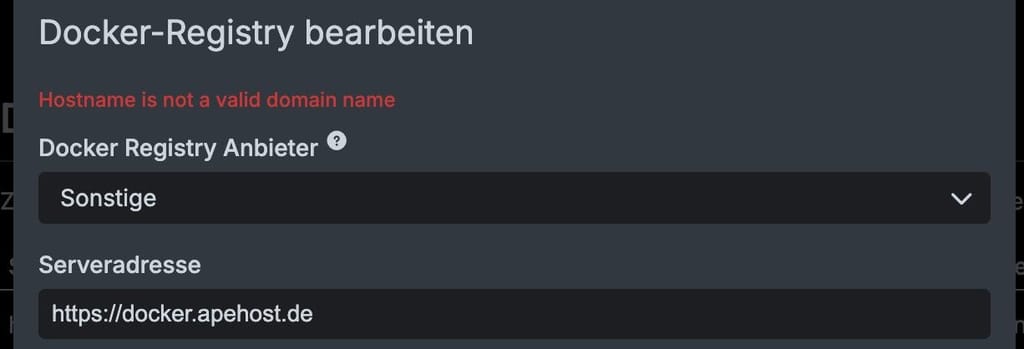
Docker registry resides on the same cloudron
-
Log spam seems to be gone now, still having trouble with the actual connection to the registry on my cloudron:
Docker registry resides on the same cloudron
-
Without https:// I'm getting: Invalid serverAddress: socket hang up
-
Just tried, that just gives me a telnet: Unable to connect to remote host: Connection refused
-
From the server:
ping -n docker.apehost.de -> works
telnet idontexist.apehost.de -> Name or service not known
telnet docker.apehost.de -> connection refused
docker pull docker.apehost.de/path-to-exisiting-image -> Error response from daemon: Get "https://docker.apehost.de/v2/": context deadline exceeded (Client.Timeout exceeded while awaiting headers)From my local machine:
docker pull docker.apehost.de/path-to-exisiting-image -> works just fine





Hello! It looks like you're interested in this conversation, but you don't have an account yet.
Getting fed up of having to scroll through the same posts each visit? When you register for an account, you'll always come back to exactly where you were before, and choose to be notified of new replies (either via email, or push notification). You'll also be able to save bookmarks and upvote posts to show your appreciation to other community members.
With your input, this post could be even better 💗
Register Login