Cloudron makes it easy to run web apps like WordPress, Nextcloud, GitLab on your server. Find out more or install now.


Skip to content
  • Categories
  • Recent
  • Tags
  • Popular
  • Bookmarks
  • Search
Skins
  • Light
  • Brite
  • Cerulean
  • Cosmo
  • Flatly
  • Journal
  • Litera
  • Lumen
  • Lux
  • Materia
  • Minty
  • Morph
  • Pulse
  • Sandstone
  • Simplex
  • Sketchy
  • Spacelab
  • United
  • Yeti
  • Zephyr
  • Dark
  • Cyborg
  • Darkly
  • Quartz
  • Slate
  • Solar
  • Superhero
  • Vapor

  • Default (No Skin)
  • No Skin
Collapse
Brand Logo

Cloudron Forum

Apps - Status | Demo | Docs | Install
  1. Cloudron Forum
  2. Docker Registry
  3. Unusable application

Unusable application

Scheduled Pinned Locked Moved Docker Registry
27 Posts 7 Posters 411 Views 8 Watching
  • Oldest to Newest
  • Newest to Oldest
  • Most Votes
Reply
  • Reply as topic
Log in to reply
This topic has been deleted. Only users with topic management privileges can see it.
  • J Offline
    J Offline
    joseph
    Staff
    wrote last edited by
    #14

    Out of ideas, since I can't reproduce this anywhere. You can contact me on support@ if you want me to debug on the server.

    klawitterbK 1 Reply Last reply
    0
    • J joseph

      Out of ideas, since I can't reproduce this anywhere. You can contact me on support@ if you want me to debug on the server.

      klawitterbK Online
      klawitterbK Online
      klawitterb
      wrote last edited by
      #15

      @joseph I've now also noticed problems with the docker registry. In my case I'm also running a builderbot on the same cloudron instance. Seems like it can't connect to the docker registry, my logs on the builderbot are simply saying:

      Mar 28 08:42:05 build-1774683724218 Build stream finished
      Mar 28 08:42:05 build-1774683724218 Pushing...
      Mar 28 08:42:20 build-1774683724218 Push stream finished
      Mar 28 08:42:20 build-1774683724218 Get "https://docker.apehost.de/v2/": net/http: request canceled while waiting for connection (Client.Timeout exceeded while awaiting headers)
      Mar 28 08:42:20 build-1774683724218 Push failed
      

      Probably not related I've also noticed that the logs on the docker registry container get spammed with this error:

      Mar 28 08:46:32 time="2026-03-28T07:46:32.467979729Z" level=error msg="traces export: Post \"https://localhost:4318/v1/traces\": dial tcp [::1]:4318: connect: connection refused" go.version=go1.23.7 instance.id=401bc88b-1bfe-4713-ae09-1cffdf628884 service=registry version=3.0.0
      Mar 28 08:46:35 2026/03/28 07:46:35 [info] 71#71: *109 client 172.18.0.1 closed keepalive connection
      
      LanhildL 1 Reply Last reply
      0
      • klawitterbK klawitterb

        @joseph I've now also noticed problems with the docker registry. In my case I'm also running a builderbot on the same cloudron instance. Seems like it can't connect to the docker registry, my logs on the builderbot are simply saying:

        Mar 28 08:42:05 build-1774683724218 Build stream finished
        Mar 28 08:42:05 build-1774683724218 Pushing...
        Mar 28 08:42:20 build-1774683724218 Push stream finished
        Mar 28 08:42:20 build-1774683724218 Get "https://docker.apehost.de/v2/": net/http: request canceled while waiting for connection (Client.Timeout exceeded while awaiting headers)
        Mar 28 08:42:20 build-1774683724218 Push failed
        

        Probably not related I've also noticed that the logs on the docker registry container get spammed with this error:

        Mar 28 08:46:32 time="2026-03-28T07:46:32.467979729Z" level=error msg="traces export: Post \"https://localhost:4318/v1/traces\": dial tcp [::1]:4318: connect: connection refused" go.version=go1.23.7 instance.id=401bc88b-1bfe-4713-ae09-1cffdf628884 service=registry version=3.0.0
        Mar 28 08:46:35 2026/03/28 07:46:35 [info] 71#71: *109 client 172.18.0.1 closed keepalive connection
        
        LanhildL Offline
        LanhildL Offline
        Lanhild
        App Dev
        wrote last edited by
        #16

        @klawitterb said:
        Probably not related I've also noticed that the logs on the docker registry container get spammed with this error:

        Mar 28 08:46:32 time="2026-03-28T07:46:32.467979729Z" level=error msg="traces export: Post \"https://localhost:4318/v1/traces\": dial tcp [::1]:4318: connect: connection refused" go.version=go1.23.7 instance.id=401bc88b-1bfe-4713-ae09-1cffdf628884 service=registry version=3.0.0
        

        I'm also encountering these.

        girishG 1 Reply Last reply
        0
        • robiR Offline
          robiR Offline
          robi
          wrote last edited by
          #17

          Assuming it is listening on port 4318, you can't do https with localhost.

          Dropping the 's' should work if the API route is available.

          Conscious tech

          1 Reply Last reply
          0
          • LanhildL Lanhild

            @klawitterb said:
            Probably not related I've also noticed that the logs on the docker registry container get spammed with this error:

            Mar 28 08:46:32 time="2026-03-28T07:46:32.467979729Z" level=error msg="traces export: Post \"https://localhost:4318/v1/traces\": dial tcp [::1]:4318: connect: connection refused" go.version=go1.23.7 instance.id=401bc88b-1bfe-4713-ae09-1cffdf628884 service=registry version=3.0.0
            

            I'm also encountering these.

            girishG Offline
            girishG Offline
            girish
            Staff
            wrote last edited by
            #18

            @Lanhild https://git.cloudron.io/packages/docker-registry-app/-/merge_requests/15 . I think that probably fixes it per upstream reports - https://github.com/distribution/distribution/issues/4270 , https://github.com/distribution/distribution-library-image/issues/187 . I don't think this related to your original DNS issue though. This traces export is just some log spam .

            1 Reply Last reply
            0
            • girishG Offline
              girishG Offline
              girish
              Staff
              wrote last edited by
              #19

              OK, with the update that log message is gone (in our registry)

              1 Reply Last reply
              0
              • klawitterbK Online
                klawitterbK Online
                klawitterb
                wrote last edited by
                #20

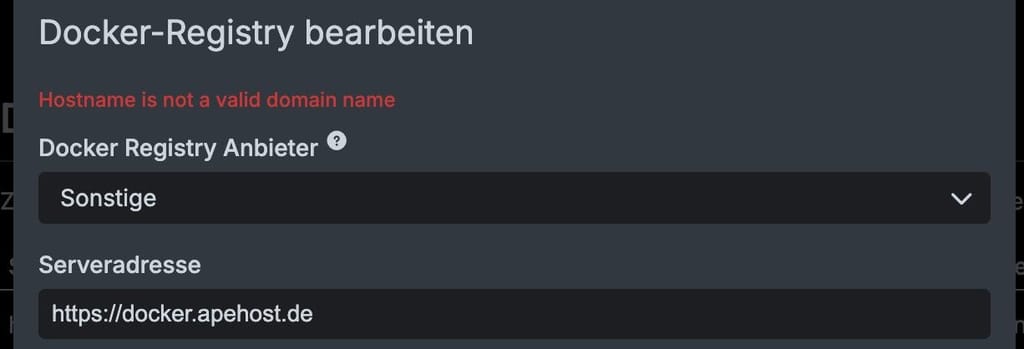
                Log spam seems to be gone now, still having trouble with the actual connection to the registry on my cloudron:
                7fa1485f-516f-4695-a564-1250df9fd355-image.jpeg

                Docker registry resides on the same cloudron

                M 1 Reply Last reply
                0
                • klawitterbK klawitterb

                  Log spam seems to be gone now, still having trouble with the actual connection to the registry on my cloudron:

                  7fa1485f-516f-4695-a564-1250df9fd355-image.jpeg

                  Docker registry resides on the same cloudron

                  M Offline
                  M Offline
                  msbt
                  App Dev
                  wrote last edited by
                  #21

                  @klawitterb try without https://

                  Happy Hosting & Web Development

                  1 Reply Last reply
                  0
                  • klawitterbK Online
                    klawitterbK Online
                    klawitterb
                    wrote last edited by
                    #22

                    Without https:// I'm getting: Invalid serverAddress: socket hang up

                    1 Reply Last reply
                    0
                    • M Offline
                      M Offline
                      msbt
                      App Dev
                      wrote last edited by
                      #23

                      You got a typo in there maybe, or a firewall?

                      Happy Hosting & Web Development

                      1 Reply Last reply
                      0
                      • nebulonN Away
                        nebulonN Away
                        nebulon
                        Staff
                        wrote last edited by
                        #24

                        So it should work without https:// there so the socket hang up is the issue somehow. Can you telnet via ssh to the registry from that server?

                        1 Reply Last reply
                        0
                        • klawitterbK Online
                          klawitterbK Online
                          klawitterb
                          wrote last edited by
                          #25

                          Just tried, that just gives me a telnet: Unable to connect to remote host: Connection refused

                          1 Reply Last reply
                          0
                          • nebulonN Away
                            nebulonN Away
                            nebulon
                            Staff
                            wrote last edited by
                            #26

                            If docker.apehost.de is the actual server, then I am able to contact that app from here at least. Does it correctly resolve on the system where it fails?

                            1 Reply Last reply
                            0
                            • klawitterbK Online
                              klawitterbK Online
                              klawitterb
                              wrote last edited by
                              #27

                              From the server:
                              ping -n docker.apehost.de -> works
                              telnet idontexist.apehost.de -> Name or service not known
                              telnet docker.apehost.de -> connection refused
                              docker pull docker.apehost.de/path-to-exisiting-image -> Error response from daemon: Get "https://docker.apehost.de/v2/": context deadline exceeded (Client.Timeout exceeded while awaiting headers)

                              From my local machine:
                              docker pull docker.apehost.de/path-to-exisiting-image -> works just fine

                              1 Reply Last reply
                              0

                              Hello! It looks like you're interested in this conversation, but you don't have an account yet.

                              Getting fed up of having to scroll through the same posts each visit? When you register for an account, you'll always come back to exactly where you were before, and choose to be notified of new replies (either via email, or push notification). You'll also be able to save bookmarks and upvote posts to show your appreciation to other community members.

                              With your input, this post could be even better 💗

                              Register Login
                              Reply
                              • Reply as topic
                              Log in to reply
                              • Oldest to Newest
                              • Newest to Oldest
                              • Most Votes


                              • Login

                              • Don't have an account? Register

                              • Login or register to search.
                              • First post
                                Last post
                              0
                              • Categories
                              • Recent
                              • Tags
                              • Popular
                              • Bookmarks
                              • Search