
Cloudron makes it easy to run web apps like WordPress, Nextcloud, GitLab on your server. Find out more or install now.


Skip to content
  • Categories
  • Recent
  • Tags
  • Popular
  • Bookmarks
  • Search
Skins
  • Light
  • Brite
  • Cerulean
  • Cosmo
  • Flatly
  • Journal
  • Litera
  • Lumen
  • Lux
  • Materia
  • Minty
  • Morph
  • Pulse
  • Sandstone
  • Simplex
  • Sketchy
  • Spacelab
  • United
  • Yeti
  • Zephyr
  • Dark
  • Cyborg
  • Darkly
  • Quartz
  • Slate
  • Solar
  • Superhero
  • Vapor

  • Default (No Skin)
  • No Skin
Collapse
Brand Logo

Cloudron Forum

Offical apps | Community apps | Demo | Docs | Install
  1. Cloudron Forum
  2. Surfer
  3. Surfer v7 - new CLI, deploys, app passwords

Surfer v7 - new CLI, deploys, app passwords

Scheduled Pinned Locked Moved Surfer
14 Posts 4 Posters 437 Views 4 Watching
  • Oldest to Newest
  • Newest to Oldest
  • Most Votes
Reply
  • Reply as topic
Log in to reply
This topic has been deleted. Only users with topic management privileges can see it.
  • girishG
    girishG
    girish
    Staff
    wrote last edited by
    #3

    @robi

    1. API keys/tokens - use these tokens to make API calls to Cloudron REST API. What changed is that they used to be per user but now they are server level. This changed because only admins can make practically any of those API calls and we thought it's better to have all admins see all the api keys created/used as a security measure

    2. App password . Use these to log in to apps. Also, for SFTP/WebDAV/CLI tools of apps.

    1 Reply Last reply
    2
    • robiR
      robiR
      robi
      wrote last edited by
      #4

      Thanks for the detail. @jdaviescoates is going to ask for this to be in the docs. 🙂

      Conscious tech

      1 Reply Last reply
      2
      • girishG
        girishG
        girish
        Staff
        wrote last edited by
        #5

        As a follow up, you can also have multiple sites now.
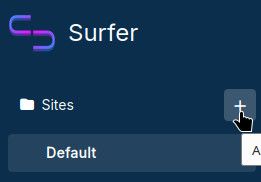
        image.jpeg

        image.jpeg

        If an alias has no "site" mapping, it falls back to Default site

        timconsidineT 2 Replies Last reply
        3
        • girishG girish referenced this topic
        • girishG girish

          As a follow up, you can also have multiple sites now.
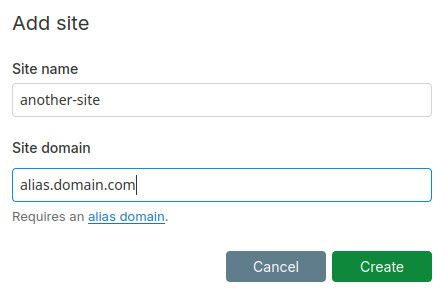
          image.jpeg

          image.jpeg

          If an alias has no "site" mapping, it falls back to Default site

          timconsidineT
          timconsidineT
          timconsidine
          App Dev
          wrote last edited by
          #6

          @girish cool, look forward to trying it out

          Indie app dev, scratching my itches : communityapps.appx.uk, portfolio at myca.appx.uk

          1 Reply Last reply
          0
          • girishG girish

            As a follow up, you can also have multiple sites now.

            image.jpeg

            image.jpeg

            If an alias has no "site" mapping, it falls back to Default site

            timconsidineT
            timconsidineT
            timconsidine
            App Dev
            wrote last edited by timconsidine
            #7

            @girish works nicely, thank you.
            I have 28 separate surfer apps, but it's mental clutter.
            I think I can consolidate ~25 simple 1-page sites under one Surfer installation.

            Indie app dev, scratching my itches : communityapps.appx.uk, portfolio at myca.appx.uk

            jdaviescoatesJ 1 Reply Last reply
            1
            • timconsidineT timconsidine

              @girish works nicely, thank you.
              I have 28 separate surfer apps, but it's mental clutter.
              I think I can consolidate ~25 simple 1-page sites under one Surfer installation.

              jdaviescoatesJ
              jdaviescoatesJ
              jdaviescoates
              wrote last edited by
              #8

              @timconsidine said:

              I think I can consolidate ~25 simple 1-page sites under one Surfer installation.

              Documenting how you go about doing that into a how to guide for the docs would be a nice touch 🙂

              I use Cloudron with Gandi & Hetzner

              1 Reply Last reply
              2
              • girishG
                girishG
                girish
                Staff
                wrote last edited by
                #9

                Hopefully it's obvious to use. You just click '+', add a site. nothing else really 😉

                But also, one "catch" is that the settings are global and not per site. I would like to keep it this way to not complicate the app too much. So you might need multiple instances for each style of setting.

                1 Reply Last reply
                1
                • robiR
                  robiR
                  robi
                  wrote last edited by
                  #10

                  I think @jdaviescoates means how to do it with existing sites, not how to click for new ones.

                  Conscious tech

                  jdaviescoatesJ 1 Reply Last reply
                  1
                  • robiR robi

                    I think @jdaviescoates means how to do it with existing sites, not how to click for new ones.

                    jdaviescoatesJ
                    jdaviescoatesJ
                    jdaviescoates
                    wrote last edited by jdaviescoates
                    #11

                    @robi said:

                    I think @jdaviescoates means how to do it with existing sites, not how to click for new ones.

                    Exactly. The process of migrating lots of different instances of Surfer into one with lots of Sites instead.

                    I use Cloudron with Gandi & Hetzner

                    1 Reply Last reply
                    0
                    • timconsidineT
                      timconsidineT
                      timconsidine
                      App Dev
                      wrote last edited by timconsidine
                      #12

                      Manual way to migrate a website from a standalone Surfer app deployment into a Site in a single Surfer deployment servicing multiple Sites as aliases :

                      • for the purposes of this summary, the standalone Surfer deployment is dolphin.domain.tld
                      • for the purposes of this summary, the 'destination' Surfer deployment hosting multiple aliased sites is whale.domain.tld
                      • go to File Manager for dolphin.domain.tld (opens /app/data)
                      • click ... on public folder and Download (to your local device Downloads folder)
                      • close File Manager and go to app dashboard for dolphin.domain.tld
                      • uninstall dolphin.domain.tld surfer app (scary but you have the public folder on your local device)
                      • go to app dashboard for whale.domain.tld, click Location then add an alias for dolphin.domain.tld, click Save, wait for whale app to reload
                      • go to https://whale.domain.tld/_admin and log in
                      • click + next to Sites
                      • add site name ('dolphin') and site domain ('dolphin.domain.tld'), click Create
                      • screen goes to empty folder for site 'dolphin'
                      • use New to upload files and folders from the original dolphin public folder downloaded to your device
                      • N.B. do NOT upload the public folder itself, upload the contents of the public folder
                      • click View Site to check it shows as the original dolphin site.
                      • optionally delete the downloaded folder from local device (or choose to keep it as backup)

                      This is a manual process but it's not difficult, just repetitive.
                      I don't think it worth scripting unless you have 50+ sites to be migrated from standalone Surfer deployments to a single Surfer deployment with aliased folder. [I have not made a script, I use the manual process to review and curate, maybe even ditch an old Surfer deployment that is no longer needed.]

                      Indie app dev, scratching my itches : communityapps.appx.uk, portfolio at myca.appx.uk

                      robiR 1 Reply Last reply
                      3
                      • timconsidineT timconsidine

                        Manual way to migrate a website from a standalone Surfer app deployment into a Site in a single Surfer deployment servicing multiple Sites as aliases :

                        • for the purposes of this summary, the standalone Surfer deployment is dolphin.domain.tld
                        • for the purposes of this summary, the 'destination' Surfer deployment hosting multiple aliased sites is whale.domain.tld
                        • go to File Manager for dolphin.domain.tld (opens /app/data)
                        • click ... on public folder and Download (to your local device Downloads folder)
                        • close File Manager and go to app dashboard for dolphin.domain.tld
                        • uninstall dolphin.domain.tld surfer app (scary but you have the public folder on your local device)
                        • go to app dashboard for whale.domain.tld, click Location then add an alias for dolphin.domain.tld, click Save, wait for whale app to reload
                        • go to https://whale.domain.tld/_admin and log in
                        • click + next to Sites
                        • add site name ('dolphin') and site domain ('dolphin.domain.tld'), click Create
                        • screen goes to empty folder for site 'dolphin'
                        • use New to upload files and folders from the original dolphin public folder downloaded to your device
                        • N.B. do NOT upload the public folder itself, upload the contents of the public folder
                        • click View Site to check it shows as the original dolphin site.
                        • optionally delete the downloaded folder from local device (or choose to keep it as backup)

                        This is a manual process but it's not difficult, just repetitive.
                        I don't think it worth scripting unless you have 50+ sites to be migrated from standalone Surfer deployments to a single Surfer deployment with aliased folder. [I have not made a script, I use the manual process to review and curate, maybe even ditch an old Surfer deployment that is no longer needed.]

                        robiR
                        robiR
                        robi
                        wrote last edited by robi
                        #13

                        @timconsidine Nice Tim, thanks for that.

                        Where do the files end up?

                        Since you're going through Surfer admin, what does the File Manager dir tree look like?

                        Editable in FM after or have to keep using /_admin?

                        Conscious tech

                        timconsidineT 1 Reply Last reply
                        0
                        • robiR robi

                          @timconsidine Nice Tim, thanks for that.

                          Where do the files end up?

                          Since you're going through Surfer admin, what does the File Manager dir tree look like?

                          Editable in FM after or have to keep using /_admin?

                          timconsidineT
                          timconsidineT
                          timconsidine
                          App Dev
                          wrote last edited by
                          #14

                          @robi kinda similar to regular surfer
                          /app/data/public : files for main (default) site
                          /app/data/publi-<sitename2> : files for 2nd site
                          /app/data/publi-<sitename3> : files for 3rd site

                          Yes, editable in File Manager in the normal way.

                          Indie app dev, scratching my itches : communityapps.appx.uk, portfolio at myca.appx.uk

                          1 Reply Last reply
                          1

                          Hello! It looks like you're interested in this conversation, but you don't have an account yet.

                          Getting fed up of having to scroll through the same posts each visit? When you register for an account, you'll always come back to exactly where you were before, and choose to be notified of new replies (either via email, or push notification). You'll also be able to save bookmarks and upvote posts to show your appreciation to other community members.

                          With your input, this post could be even better 💗

                          Register Login
                          Reply
                          • Reply as topic
                          Log in to reply
                          • Oldest to Newest
                          • Newest to Oldest
                          • Most Votes


                          • Login

                          • Don't have an account? Register

                          • Login or register to search.
                          • First post
                            Last post
                          0
                          • Categories
                          • Recent
                          • Tags
                          • Popular
                          • Bookmarks
                          • Search
