
Cloudron makes it easy to run web apps like WordPress, Nextcloud, GitLab on your server. Find out more or install now.


Skip to content
  • Categories
  • Recent
  • Tags
  • Popular
  • Bookmarks
  • Search
Skins
  • Light
  • Brite
  • Cerulean
  • Cosmo
  • Flatly
  • Journal
  • Litera
  • Lumen
  • Lux
  • Materia
  • Minty
  • Morph
  • Pulse
  • Sandstone
  • Simplex
  • Sketchy
  • Spacelab
  • United
  • Yeti
  • Zephyr
  • Dark
  • Cyborg
  • Darkly
  • Quartz
  • Slate
  • Solar
  • Superhero
  • Vapor

  • Default (No Skin)
  • No Skin
Collapse
Brand Logo

Cloudron Forum

Offical apps | Community apps | Demo | Docs | Install
  1. Cloudron Forum
  2. Mail
  3. Mail app Feature Requests : UI enhance

Mail app Feature Requests : UI enhance

Scheduled Pinned Locked Moved Solved Mail
19 Posts 5 Posters 605 Views 5 Watching
  • Oldest to Newest
  • Newest to Oldest
  • Most Votes
Reply
  • Reply as topic
Log in to reply
This topic has been deleted. Only users with topic management privileges can see it.
  • nebulonN nebulon

    Ok so I think I have fixed all of the original issues:
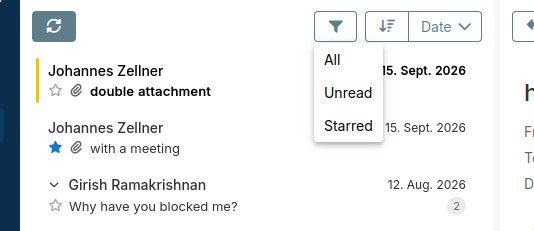
    image.jpeg

    new package requires new cloudron version, so that is a bit delayed for testing

    jdaviescoatesJ
    jdaviescoatesJ
    jdaviescoates
    wrote last edited by
    #10

    @nebulon said:

    Ok so I think I have fixed all of the original issues:

    Looking forward to testing. BTW, but "the original issues" I presume that's just these ones?

    @timconsidine said:

    ability to star certain messages
    show read mail in different colour, not simply a non-bold same colour as unread mail
    sort options include Date up/down and From up/down but To up/down would also be helpful (mail in an inbox is not always to mailbox address)
    filter for unread would also be useful

    And therefore any other UI or additional suggestions shared in this now solved thread ought to get their own new thread to make it easier for you to track?

    I use Cloudron with Gandi & Hetzner

    1 Reply Last reply
    0
    • nebulonN
      nebulonN
      nebulon
      Staff
      wrote last edited by
      #11

      ah yes please create a new one for the non-split view to keep track.

      from the above issues the toplevel folder creation and the spam mail direct deletion is also fixed

      jdaviescoatesJ 1 Reply Last reply
      2
      • nebulonN nebulon

        ah yes please create a new one for the non-split view to keep track.

        from the above issues the toplevel folder creation and the spam mail direct deletion is also fixed

        jdaviescoatesJ
        jdaviescoatesJ
        jdaviescoates
        wrote last edited by
        #12

        @nebulon I've added three new feature request posts:

        https://forum.cloudron.io/topic/16082/mail-app-feature-request-add-no-split-screen-option-and-horizontal-vertical-options-for-those-that-like-splits

        https://forum.cloudron.io/topic/16083/mail-app-feature-request-larger-compose-window-or-just-remember-last-re-sized-size

        https://forum.cloudron.io/topic/16084/mail-app-feature-request-improve-minimized-compose-ux

        Thanks!

        I use Cloudron with Gandi & Hetzner

        1 Reply Last reply
        0
        • sponchS
          sponchS
          sponch
          wrote last edited by sponch
          #13

          mh...my mail app does not update since 1.1.1 although there seem to be 2 package updates. Any hidden dependencies?

          1 Reply Last reply
          0
          • nebulonN
            nebulonN
            nebulon
            Staff
            wrote last edited by nebulon
            #14

            yes, it relies on new cloudron platform changes, so the update will show when Cloudron is updated to at least 10.1.1

            1 Reply Last reply
            3
            • sponchS
              sponchS
              sponch
              wrote last edited by
              #15

              thanks for the explanation 🙂

              1 Reply Last reply
              2
              • timconsidineT timconsidine

                @humpty installed Firefox Stylus plugin.
                Works a treat.
                Thanks for the recommendation.

                humptyH
                humptyH
                humpty
                wrote last edited by humpty
                #16

                @timconsidine the latest mail updates changed the code and the circle got wonky so here's an updated version. I went with gold, similar to the app's native yellow for the unread bar and still matches with the blue nicely.

                .mail-item.unread {
                    color: #ffbf00 !important;
                    animation: pulseUnread 2.3s ease-in-out infinite;
                }
                
                @keyframes pulseUnread {
                0%, 100% { opacity: 0.50; }
                50%      { opacity: 1; }
                }
                
                .mail-item.unread::after {
                    width: 4px !important;
                    background-color: #ffbf00 !important;
                }


                Edit: This version modifies the starred icon as well (drop in replacement code for the above).

                .mail-item.unread {
                    color: #ffbf00 !important;
                    animation: pulseUnread 2.3s ease-in-out infinite;
                }
                
                @keyframes pulseUnread {
                0%, 100% { opacity: 0.50; }
                50%      { opacity: 1; }
                }
                
                .mail-item.unread::after {
                    width: 4px !important;
                    background-color: #ffbf00 !important;
                }
                
                .col-star.starred {
                    color: #ffbf00 !important;
                    animation: glowUnread 1.8s ease-in-out infinite;
                }
                
                @keyframes glowUnread {
                    0%, 100% {
                        opacity: 0.6;
                        filter: drop-shadow(0 0 1px #f50);
                    }
                    50% {
                        opacity: 1;
                        filter: drop-shadow(0 0 5px #f50);
                    }
                }

                
                timconsidineT 1 Reply Last reply
                2
                • humptyH humpty

                  @timconsidine the latest mail updates changed the code and the circle got wonky so here's an updated version. I went with gold, similar to the app's native yellow for the unread bar and still matches with the blue nicely.

                  .mail-item.unread {
                      color: #ffbf00 !important;
                      animation: pulseUnread 2.3s ease-in-out infinite;
                  }
                  
                  @keyframes pulseUnread {
                  0%, 100% { opacity: 0.50; }
                  50%      { opacity: 1; }
                  }
                  
                  .mail-item.unread::after {
                      width: 4px !important;
                      background-color: #ffbf00 !important;
                  }


                  Edit: This version modifies the starred icon as well (drop in replacement code for the above).

                  .mail-item.unread {
                      color: #ffbf00 !important;
                      animation: pulseUnread 2.3s ease-in-out infinite;
                  }
                  
                  @keyframes pulseUnread {
                  0%, 100% { opacity: 0.50; }
                  50%      { opacity: 1; }
                  }
                  
                  .mail-item.unread::after {
                      width: 4px !important;
                      background-color: #ffbf00 !important;
                  }
                  
                  .col-star.starred {
                      color: #ffbf00 !important;
                      animation: glowUnread 1.8s ease-in-out infinite;
                  }
                  
                  @keyframes glowUnread {
                      0%, 100% {
                          opacity: 0.6;
                          filter: drop-shadow(0 0 1px #f50);
                      }
                      50% {
                          opacity: 1;
                          filter: drop-shadow(0 0 5px #f50);
                      }
                  }
                  
                  timconsidineT
                  timconsidineT
                  timconsidine
                  App Dev
                  wrote last edited by
                  #17

                  @humpty thank you !

                  Indie app dev, scratching my itches : communityapps.appx.uk, portfolio at myca.appx.uk

                  1 Reply Last reply
                  2
                  • humptyH
                    humptyH
                    humpty
                    wrote last edited by
                    #18

                    My bad! I did that code when my system was in dark mode and now the yellow isn't visible on the white. I added a dark blue background to make the text pop.

                    .mail-item.unread {
                        color: #ffbf00 !important;
                        background: #124978;
                        animation: pulseUnread 2.3s ease-in-out infinite;
                    }
                    
                    @keyframes pulseUnread {
                    0%, 100% { opacity: 0.50; }
                    50%      { opacity: 1; }
                    }
                    
                    .mail-item.unread::after {
                        width: 4px !important;
                        background-color: #ffbf00 !important;
                    }
                    
                    .col-star.starred {
                        color: #ffbf00 !important;
                        animation: glowUnread 1.8s ease-in-out infinite;
                    }
                    
                    @keyframes glowUnread {
                        0%, 100% {
                            opacity: 0.6;
                            filter: drop-shadow(0 0 1px #f50);
                        }
                        50% {
                            opacity: 1;
                            filter: drop-shadow(0 0 5px #f50);
                        }
                    }

                    
                    timconsidineT 1 Reply Last reply
                    2
                    • humptyH humpty

                      My bad! I did that code when my system was in dark mode and now the yellow isn't visible on the white. I added a dark blue background to make the text pop.

                      .mail-item.unread {
                          color: #ffbf00 !important;
                          background: #124978;
                          animation: pulseUnread 2.3s ease-in-out infinite;
                      }
                      
                      @keyframes pulseUnread {
                      0%, 100% { opacity: 0.50; }
                      50%      { opacity: 1; }
                      }
                      
                      .mail-item.unread::after {
                          width: 4px !important;
                          background-color: #ffbf00 !important;
                      }
                      
                      .col-star.starred {
                          color: #ffbf00 !important;
                          animation: glowUnread 1.8s ease-in-out infinite;
                      }
                      
                      @keyframes glowUnread {
                          0%, 100% {
                              opacity: 0.6;
                              filter: drop-shadow(0 0 1px #f50);
                          }
                          50% {
                              opacity: 1;
                              filter: drop-shadow(0 0 5px #f50);
                          }
                      }
                      
                      timconsidineT
                      timconsidineT
                      timconsidine
                      App Dev
                      wrote last edited by
                      #19

                      @humpty I only use dark mode, but goo to have the option 👍

                      Indie app dev, scratching my itches : communityapps.appx.uk, portfolio at myca.appx.uk

                      1 Reply Last reply
                      3

                      Hello! It looks like you're interested in this conversation, but you don't have an account yet.

                      Getting fed up of having to scroll through the same posts each visit? When you register for an account, you'll always come back to exactly where you were before, and choose to be notified of new replies (either via email, or push notification). You'll also be able to save bookmarks and upvote posts to show your appreciation to other community members.

                      With your input, this post could be even better 💗

                      Register Login
                      Reply
                      • Reply as topic
                      Log in to reply
                      • Oldest to Newest
                      • Newest to Oldest
                      • Most Votes


                      • Login

                      • Don't have an account? Register

                      • Login or register to search.
                      • First post
                        Last post
                      0
                      • Categories
                      • Recent
                      • Tags
                      • Popular
                      • Bookmarks
                      • Search

