
Cloudron makes it easy to run web apps like WordPress, Nextcloud, GitLab on your server. Find out more or install now.


Skip to content
  • Categories
  • Recent
  • Tags
  • Popular
  • Bookmarks
  • Search
Skins
  • Light
  • Brite
  • Cerulean
  • Cosmo
  • Flatly
  • Journal
  • Litera
  • Lumen
  • Lux
  • Materia
  • Minty
  • Morph
  • Pulse
  • Sandstone
  • Simplex
  • Sketchy
  • Spacelab
  • United
  • Yeti
  • Zephyr
  • Dark
  • Cyborg
  • Darkly
  • Quartz
  • Slate
  • Solar
  • Superhero
  • Vapor

  • Default (No Skin)
  • No Skin
Collapse
Brand Logo

Cloudron Forum

Offical apps | Community apps | Demo | Docs | Install
  1. Cloudron Forum
  2. Mail
  3. Mail app Feature Requests : UI enhance

Mail app Feature Requests : UI enhance

Scheduled Pinned Locked Moved Solved Mail
19 Posts 5 Posters 1.1k Views 5 Watching
  • Oldest to Newest
  • Newest to Oldest
  • Most Votes
Reply
  • Reply as topic
Log in to reply
This topic has been deleted. Only users with topic management privileges can see it.
  • humptyH humpty

    @timconsidine said:

    show read mail in different colour, not simply a non-bold same colour as unread mail

    I've been using this code with the Stylus plugin locally in Firefox to fix this same issue on Roundcube (class name is different though). This one is using the proper class for the CR mail app. It adds a pulsating green dot (customizable) for all unread mail.

     .mail-item.unread::before {
        content: "●"; 
        color:#0dff00;
        font-size: 16px;
        animation: pulseUnread 1s infinite;
    }
    
    @keyframes pulseUnread {
        0%   { opacity: 0.2; }
        50%  { opacity: 1; }
        100% { opacity: 0.2; }
    }
    

    Preview

    image.jpeg

    timconsidineT
    timconsidineT
    timconsidine
    App Dev CA Maintainer Super Fan
    wrote on last edited by
    #4

    @humpty cool, didn’t know about that

    Indie app dev, scratching my itches : communityapps.appx.uk, portfolio at myca.appx.uk

    1 Reply Last reply
    1
    • jdaviescoatesJ
      jdaviescoatesJ
      jdaviescoates
      Super Fan
      wrote on last edited by
      #5

      This should perhaps be a new thread, but I also have some UI requests:

      Mostly, I've never liked split-screen UIs and would much prefer a Gmail-like interface, like in SnappyMail:
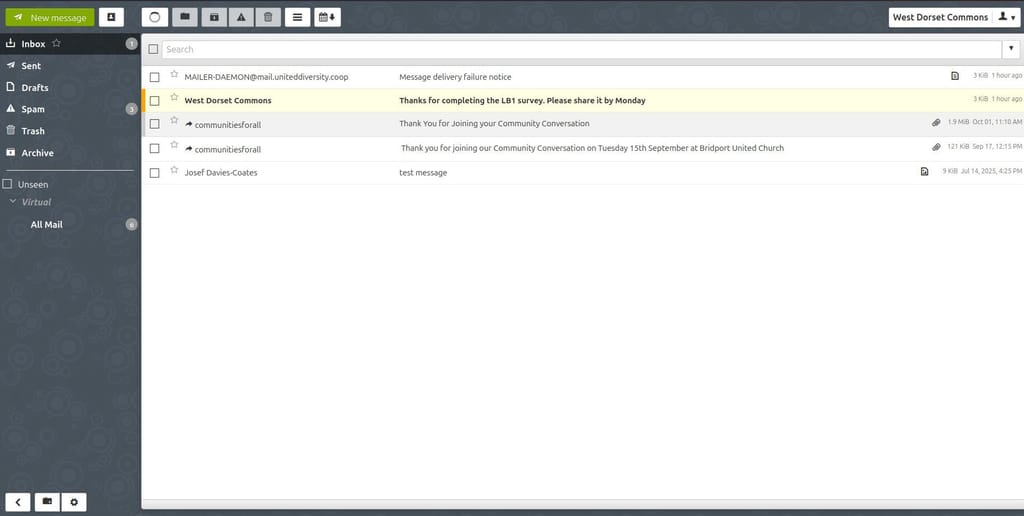
      image.jpeg

      Similarly, I've never understood why Nextcloud Mail (and also now Cloudron Mail) default to having such a tiny compose pop-up:
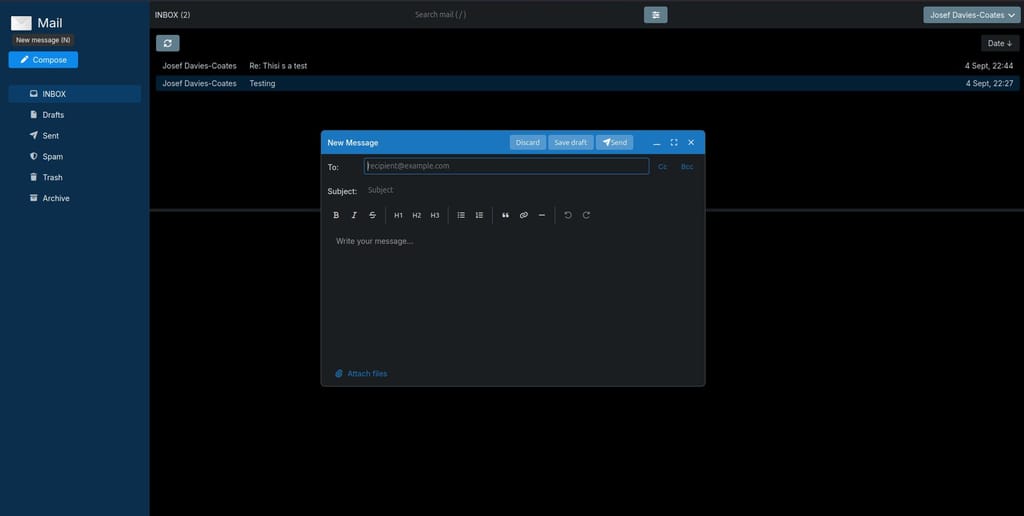
      image.jpeg

      Again, I much prefer being able to use all of my screens real estate, again, like in SnappyMail:
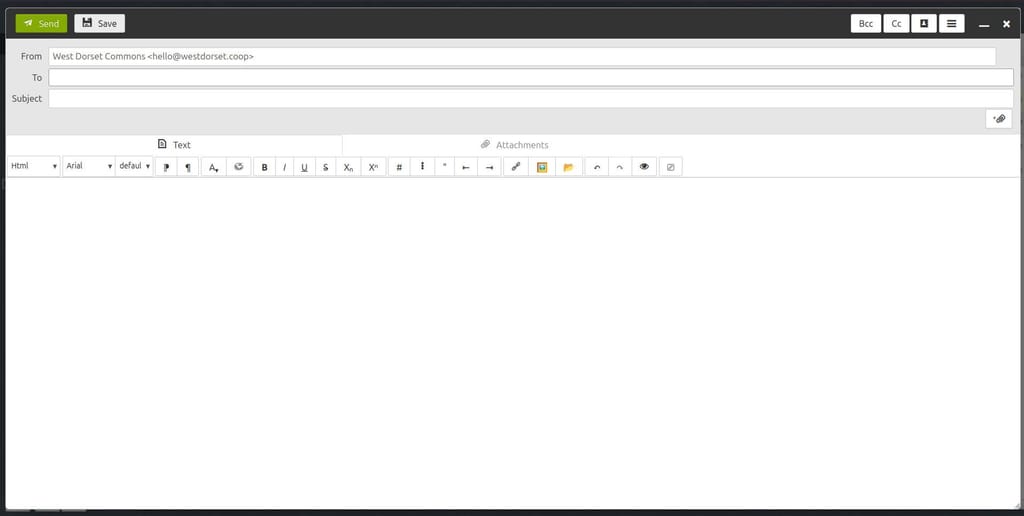
      image.jpeg

      Perhaps one way to achieve this would be to remember that last size it was resized to? then I could just resize it to e.g. something like this and it'd remember that's how I like it?
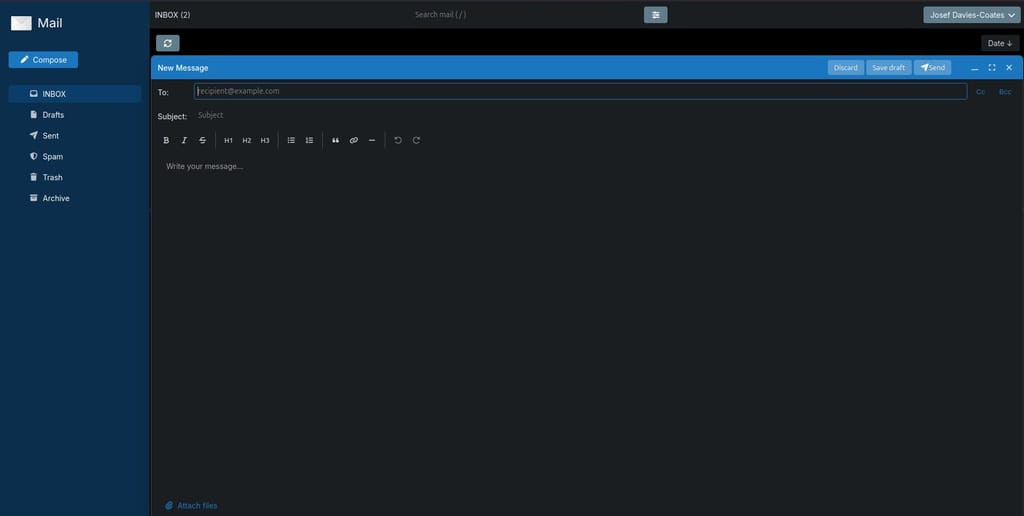
      image.jpeg

      Also, it's a strange UX that when minimising the compose window it just become as random little floating bar, rather than e.g. being docked down the bottom of the screen as in Gmail:
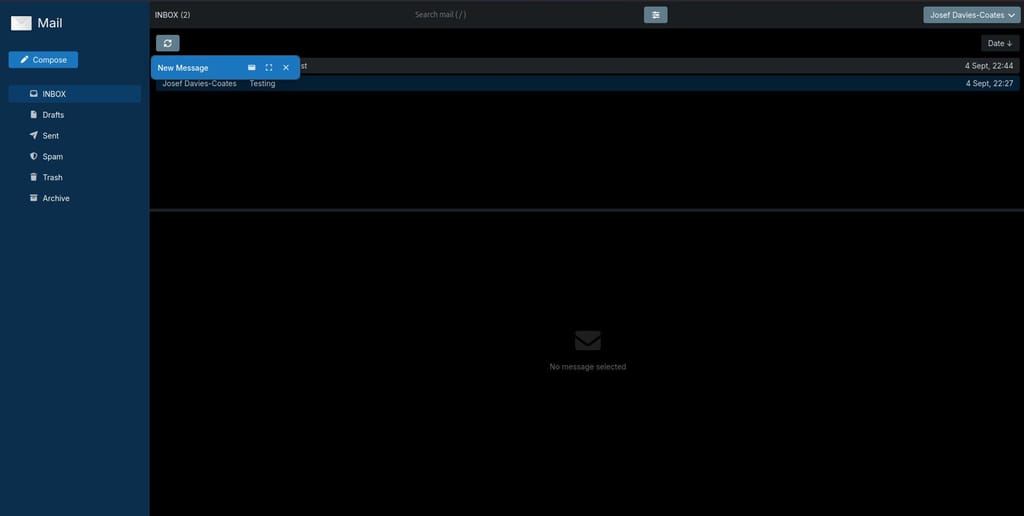
      image.jpeg

      I use Cloudron with Gandi & Hetzner

      1 Reply Last reply
      1
      • timconsidineT
        timconsidineT
        timconsidine
        App Dev CA Maintainer Super Fan
        wrote on last edited by
        #6

        UI is always difficult because firm preferences on either side of any option.
        Only real solution is to support both ways of a particular option and let user choose in settings.
        Cloudron Mail Settings are sparse compared to some clients, so while I would not advocate for a forest of options, there is scope for a few more UI options there.

        Indie app dev, scratching my itches : communityapps.appx.uk, portfolio at myca.appx.uk

        1 Reply Last reply
        2
        • humptyH humpty

          @timconsidine said:

          show read mail in different colour, not simply a non-bold same colour as unread mail

          I've been using this code with the Stylus plugin locally in Firefox to fix this same issue on Roundcube (class name is different though). This one is using the proper class for the CR mail app. It adds a pulsating green dot (customizable) for all unread mail.

           .mail-item.unread::before {
              content: "●"; 
              color:#0dff00;
              font-size: 16px;
              animation: pulseUnread 1s infinite;
          }
          
          @keyframes pulseUnread {
              0%   { opacity: 0.2; }
              50%  { opacity: 1; }
              100% { opacity: 0.2; }
          }
          

          Preview
          image.jpeg

          timconsidineT
          timconsidineT
          timconsidine
          App Dev CA Maintainer Super Fan
          wrote on last edited by
          #7

          @humpty installed Firefox Stylus plugin.
          Works a treat.
          Thanks for the recommendation.

          Indie app dev, scratching my itches : communityapps.appx.uk, portfolio at myca.appx.uk

          humptyH 2 Replies Last reply
          1
          • timconsidineT timconsidine

            @humpty installed Firefox Stylus plugin.
            Works a treat.
            Thanks for the recommendation.

            humptyH
            humptyH
            humpty
            wrote on last edited by humpty
            #8

            @timconsidine I also use with Youtube & Facebook to "declutter" the UI a bit 🙂 There's a section that redirects you to a site that has user codes that you can browse/add.
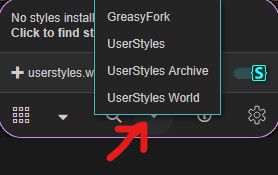
            image.jpeg

            1 Reply Last reply
            2
            • nebulonN
              nebulonN
              nebulon
              Staff
              wrote on last edited by
              #9

              Ok so I think I have fixed all of the original issues:
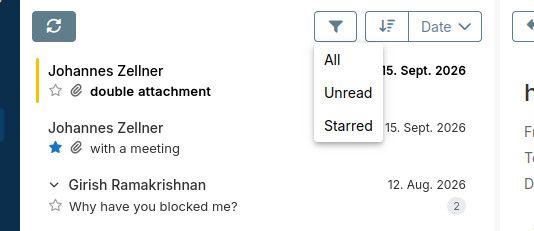
              image.jpeg

              new package requires new cloudron version, so that is a bit delayed for testing

              jdaviescoatesJ 1 Reply Last reply
              3
              • nebulonN nebulon marked this topic as a question on
              • nebulonN nebulon has marked this topic as solved on
              • nebulonN nebulon

                Ok so I think I have fixed all of the original issues:

                image.jpeg

                new package requires new cloudron version, so that is a bit delayed for testing

                jdaviescoatesJ
                jdaviescoatesJ
                jdaviescoates
                Super Fan
                wrote on last edited by
                #10

                @nebulon said:

                Ok so I think I have fixed all of the original issues:

                Looking forward to testing. BTW, but "the original issues" I presume that's just these ones?

                @timconsidine said:

                ability to star certain messages
                show read mail in different colour, not simply a non-bold same colour as unread mail
                sort options include Date up/down and From up/down but To up/down would also be helpful (mail in an inbox is not always to mailbox address)
                filter for unread would also be useful

                And therefore any other UI or additional suggestions shared in this now solved thread ought to get their own new thread to make it easier for you to track?

                I use Cloudron with Gandi & Hetzner

                1 Reply Last reply
                0
                • nebulonN
                  nebulonN
                  nebulon
                  Staff
                  wrote on last edited by
                  #11

                  ah yes please create a new one for the non-split view to keep track.

                  from the above issues the toplevel folder creation and the spam mail direct deletion is also fixed

                  jdaviescoatesJ 1 Reply Last reply
                  2
                  • nebulonN nebulon

                    ah yes please create a new one for the non-split view to keep track.

                    from the above issues the toplevel folder creation and the spam mail direct deletion is also fixed

                    jdaviescoatesJ
                    jdaviescoatesJ
                    jdaviescoates
                    Super Fan
                    wrote on last edited by
                    #12

                    @nebulon I've added three new feature request posts:

                    https://forum.cloudron.io/topic/16082/mail-app-feature-request-add-no-split-screen-option-and-horizontal-vertical-options-for-those-that-like-splits

                    https://forum.cloudron.io/topic/16083/mail-app-feature-request-larger-compose-window-or-just-remember-last-re-sized-size

                    https://forum.cloudron.io/topic/16084/mail-app-feature-request-improve-minimized-compose-ux

                    Thanks!

                    I use Cloudron with Gandi & Hetzner

                    1 Reply Last reply
                    0
                    • sponchS
                      sponchS
                      sponch
                      wrote on last edited by sponch
                      #13

                      mh...my mail app does not update since 1.1.1 although there seem to be 2 package updates. Any hidden dependencies?

                      1 Reply Last reply
                      0
                      • nebulonN
                        nebulonN
                        nebulon
                        Staff
                        wrote on last edited by nebulon
                        #14

                        yes, it relies on new cloudron platform changes, so the update will show when Cloudron is updated to at least 10.1.1

                        1 Reply Last reply
                        3
                        • sponchS
                          sponchS
                          sponch
                          wrote on last edited by
                          #15

                          thanks for the explanation 🙂

                          1 Reply Last reply
                          2
                          • timconsidineT timconsidine

                            @humpty installed Firefox Stylus plugin.
                            Works a treat.
                            Thanks for the recommendation.

                            humptyH
                            humptyH
                            humpty
                            wrote on last edited by humpty
                            #16

                            @timconsidine the latest mail updates changed the code and the circle got wonky so here's an updated version. I went with gold, similar to the app's native yellow for the unread bar and still matches with the blue nicely.

                            .mail-item.unread {
                                color: #ffbf00 !important;
                                animation: pulseUnread 2.3s ease-in-out infinite;
                            }
                            
                            @keyframes pulseUnread {
                            0%, 100% { opacity: 0.50; }
                            50%      { opacity: 1; }
                            }
                            
                            .mail-item.unread::after {
                                width: 4px !important;
                                background-color: #ffbf00 !important;
                            }


                            Edit: This version modifies the starred icon as well (drop in replacement code for the above).

                            .mail-item.unread {
                                color: #ffbf00 !important;
                                animation: pulseUnread 2.3s ease-in-out infinite;
                            }
                            
                            @keyframes pulseUnread {
                            0%, 100% { opacity: 0.50; }
                            50%      { opacity: 1; }
                            }
                            
                            .mail-item.unread::after {
                                width: 4px !important;
                                background-color: #ffbf00 !important;
                            }
                            
                            .col-star.starred {
                                color: #ffbf00 !important;
                                animation: glowUnread 1.8s ease-in-out infinite;
                            }
                            
                            @keyframes glowUnread {
                                0%, 100% {
                                    opacity: 0.6;
                                    filter: drop-shadow(0 0 1px #f50);
                                }
                                50% {
                                    opacity: 1;
                                    filter: drop-shadow(0 0 5px #f50);
                                }
                            }
                            
                            timconsidineT 1 Reply Last reply
                            2
                            • humptyH humpty

                              @timconsidine the latest mail updates changed the code and the circle got wonky so here's an updated version. I went with gold, similar to the app's native yellow for the unread bar and still matches with the blue nicely.

                              .mail-item.unread {
                                  color: #ffbf00 !important;
                                  animation: pulseUnread 2.3s ease-in-out infinite;
                              }
                              
                              @keyframes pulseUnread {
                              0%, 100% { opacity: 0.50; }
                              50%      { opacity: 1; }
                              }
                              
                              .mail-item.unread::after {
                                  width: 4px !important;
                                  background-color: #ffbf00 !important;
                              }


                              Edit: This version modifies the starred icon as well (drop in replacement code for the above).

                              .mail-item.unread {
                                  color: #ffbf00 !important;
                                  animation: pulseUnread 2.3s ease-in-out infinite;
                              }
                              
                              @keyframes pulseUnread {
                              0%, 100% { opacity: 0.50; }
                              50%      { opacity: 1; }
                              }
                              
                              .mail-item.unread::after {
                                  width: 4px !important;
                                  background-color: #ffbf00 !important;
                              }
                              
                              .col-star.starred {
                                  color: #ffbf00 !important;
                                  animation: glowUnread 1.8s ease-in-out infinite;
                              }
                              
                              @keyframes glowUnread {
                                  0%, 100% {
                                      opacity: 0.6;
                                      filter: drop-shadow(0 0 1px #f50);
                                  }
                                  50% {
                                      opacity: 1;
                                      filter: drop-shadow(0 0 5px #f50);
                                  }
                              }
                              
                              timconsidineT
                              timconsidineT
                              timconsidine
                              App Dev CA Maintainer Super Fan
                              wrote on last edited by
                              #17

                              @humpty thank you !

                              Indie app dev, scratching my itches : communityapps.appx.uk, portfolio at myca.appx.uk

                              1 Reply Last reply
                              2
                              • humptyH
                                humptyH
                                humpty
                                wrote on last edited by
                                #18

                                My bad! I did that code when my system was in dark mode and now the yellow isn't visible on the white. I added a dark blue background to make the text pop.

                                .mail-item.unread {
                                    color: #ffbf00 !important;
                                    background: #124978;
                                    animation: pulseUnread 2.3s ease-in-out infinite;
                                }
                                
                                @keyframes pulseUnread {
                                0%, 100% { opacity: 0.50; }
                                50%      { opacity: 1; }
                                }
                                
                                .mail-item.unread::after {
                                    width: 4px !important;
                                    background-color: #ffbf00 !important;
                                }
                                
                                .col-star.starred {
                                    color: #ffbf00 !important;
                                    animation: glowUnread 1.8s ease-in-out infinite;
                                }
                                
                                @keyframes glowUnread {
                                    0%, 100% {
                                        opacity: 0.6;
                                        filter: drop-shadow(0 0 1px #f50);
                                    }
                                    50% {
                                        opacity: 1;
                                        filter: drop-shadow(0 0 5px #f50);
                                    }
                                }
                                
                                timconsidineT 1 Reply Last reply
                                2
                                • humptyH humpty

                                  My bad! I did that code when my system was in dark mode and now the yellow isn't visible on the white. I added a dark blue background to make the text pop.

                                  .mail-item.unread {
                                      color: #ffbf00 !important;
                                      background: #124978;
                                      animation: pulseUnread 2.3s ease-in-out infinite;
                                  }
                                  
                                  @keyframes pulseUnread {
                                  0%, 100% { opacity: 0.50; }
                                  50%      { opacity: 1; }
                                  }
                                  
                                  .mail-item.unread::after {
                                      width: 4px !important;
                                      background-color: #ffbf00 !important;
                                  }
                                  
                                  .col-star.starred {
                                      color: #ffbf00 !important;
                                      animation: glowUnread 1.8s ease-in-out infinite;
                                  }
                                  
                                  @keyframes glowUnread {
                                      0%, 100% {
                                          opacity: 0.6;
                                          filter: drop-shadow(0 0 1px #f50);
                                      }
                                      50% {
                                          opacity: 1;
                                          filter: drop-shadow(0 0 5px #f50);
                                      }
                                  }
                                  
                                  timconsidineT
                                  timconsidineT
                                  timconsidine
                                  App Dev CA Maintainer Super Fan
                                  wrote on last edited by
                                  #19

                                  @humpty I only use dark mode, but goo to have the option 👍

                                  Indie app dev, scratching my itches : communityapps.appx.uk, portfolio at myca.appx.uk

                                  1 Reply Last reply
                                  3

                                  Hello! It looks like you're interested in this conversation, but you don't have an account yet.

                                  Getting fed up of having to scroll through the same posts each visit? When you register for an account, you'll always come back to exactly where you were before, and choose to be notified of new replies (either via email, or push notification). You'll also be able to save bookmarks and upvote posts to show your appreciation to other community members.

                                  With your input, this post could be even better 💗

                                  Register Login
                                  Reply
                                  • Reply as topic
                                  Log in to reply
                                  • Oldest to Newest
                                  • Newest to Oldest
                                  • Most Votes


                                  • Login

                                  • Don't have an account? Register

                                  • Login or register to search.
                                  • First post
                                    Last post
                                  0
                                  • Categories
                                  • Recent
                                  • Tags
                                  • Popular
                                  • Bookmarks
                                  • Search