Cloudron makes it easy to run web apps like WordPress, Nextcloud, GitLab on your server. Find out more or install now.


Skip to content
  • Categories
  • Recent
  • Tags
  • Popular
  • Bookmarks
  • Search
Skins
  • Light
  • Brite
  • Cerulean
  • Cosmo
  • Flatly
  • Journal
  • Litera
  • Lumen
  • Lux
  • Materia
  • Minty
  • Morph
  • Pulse
  • Sandstone
  • Simplex
  • Sketchy
  • Spacelab
  • United
  • Yeti
  • Zephyr
  • Dark
  • Cyborg
  • Darkly
  • Quartz
  • Slate
  • Solar
  • Superhero
  • Vapor

  • Default (No Skin)
  • No Skin
Collapse
Brand Logo

Cloudron Forum

Offical apps | Community apps | Demo | Docs | Install
  1. Cloudron Forum
  2. Ghost
  3. Ghost issue with subscriber email and mail configuration

Ghost issue with subscriber email and mail configuration

Scheduled Pinned Locked Moved Ghost
mailrelaymailgun
31 Posts 7 Posters 18.9k Views 6 Watching
  • Oldest to Newest
  • Newest to Oldest
  • Most Votes
Reply
  • Reply as topic
Log in to reply
This topic has been deleted. Only users with topic management privileges can see it.
  • girishG
    girishG
    girish
    Staff
    wrote on last edited by
    #4

    As @nebulon said, put the mailgun credentials in cloudrons mail server instead of inside ghost. This setting is in email -> outbound.

    iamdinakarI 1 Reply Last reply
    1
    • girishG girish

      As @nebulon said, put the mailgun credentials in cloudrons mail server instead of inside ghost. This setting is in email -> outbound.

      iamdinakarI
      iamdinakarI
      iamdinakar
      wrote on last edited by
      #5

      @girish yup did this too! Email -> Outbound -> input my Mailgun settings -> Saved.

      Still not working. I'm able to send test email but the actual signup form emails are unsent.

      girishG 1 Reply Last reply
      0
      • iamdinakarI iamdinakar

        @girish yup did this too! Email -> Outbound -> input my Mailgun settings -> Saved.

        Still not working. I'm able to send test email but the actual signup form emails are unsent.

        girishG
        girishG
        girish
        Staff
        wrote on last edited by
        #6

        @iamdinakar let me try this in my local cloudron now.

        1 Reply Last reply
        0
        • girishG
          girishG
          girish
          Staff
          wrote on last edited by girish
          #7

          @iamdinakar OK, I go this working (cc @atrilahiji as well)

          The "tricky" part is that Ghost seems to want to send emails as noreply@domain.com. It also wants send newsletter by default as noreply@ghost.domain.com (i.e the app's domain).

          I will show how to setup Ghost to setup an email address newsletter@domain.com instead.

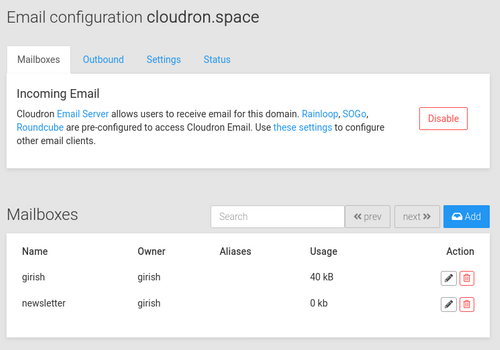
          1. We have to create a mailbox in your domain dedicated for this newsletter. If your domain is hosted on Cloudron, you go to mailboxes and create one. I created newsletter@cloudron.space. You can skip this if your email is hosted elsewhere (and you have to create the mailbox in your mail provider instead).
            47b8b193-0cac-4554-a500-c400869b85a8-image.png

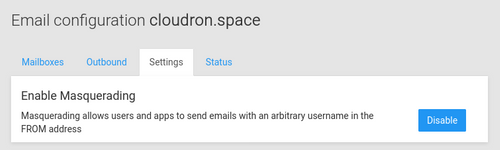
          2. Recall that I said that Ghost wants to send emails with multiple email addresses noreply and newsletter. For this to work, we have to enable Masquerading in Cloudron's mail server.
            48b8a532-b5de-427c-a950-03ff28390b2a-image.png

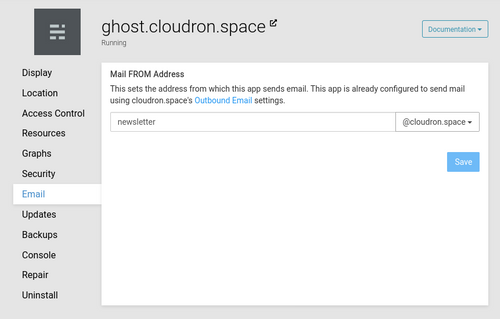
          3. Next, we configure the email address for the Ghost app to be newsletter@domain.com.
            7e6008f5-2fee-4cb6-a64d-dfa7642a9dae-image.png

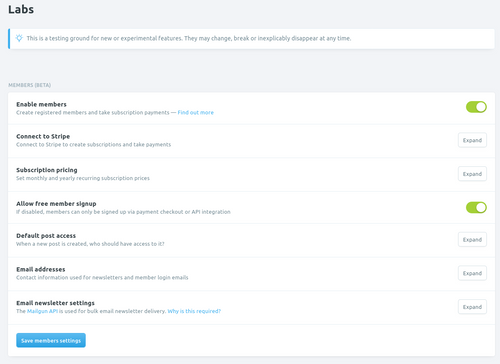
          4. Next, go to Ghost and enable members (under Labs)
            f23ba54d-fbbd-4398-9b82-ab4be909e632-image.png

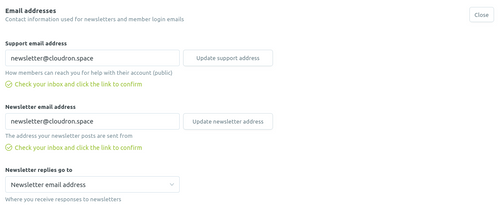
          5. Change the Support and Newsletter email addresses in the members UI to the newsletter@domain.com.
            e2c1dbd7-1568-45ec-a468-74aef218065e-image.png

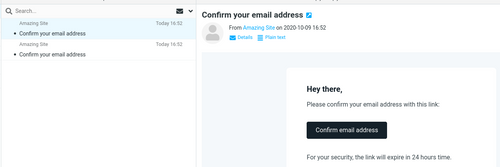
          6. You have to confirm the email Ghost sent to newsletter@domain.com
            95ff4fa0-40cb-4ecf-a971-96c70b818ca5-image.png

          Testing

          • Go the blog and click Subscribe button in the top nav bar. It pops up a dialog.

            028b1833-0477-4273-a35b-7f1daaf6c346-image.png

          • Click subscribe
            69928829-34ff-41ab-ac84-66785b09886a-image.png

          • Check inbox

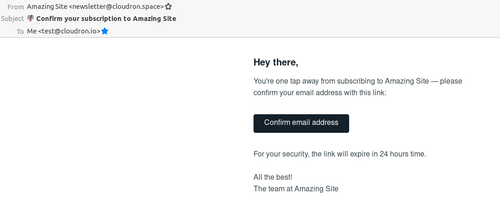
            08fe84fe-ae74-41ca-8e32-1720e08f9298-image.png

          ? 1 Reply Last reply
          3
          • girishG girish

            @iamdinakar OK, I go this working (cc @atrilahiji as well)

            The "tricky" part is that Ghost seems to want to send emails as noreply@domain.com. It also wants send newsletter by default as noreply@ghost.domain.com (i.e the app's domain).

            I will show how to setup Ghost to setup an email address newsletter@domain.com instead.

            1. We have to create a mailbox in your domain dedicated for this newsletter. If your domain is hosted on Cloudron, you go to mailboxes and create one. I created newsletter@cloudron.space. You can skip this if your email is hosted elsewhere (and you have to create the mailbox in your mail provider instead).

              47b8b193-0cac-4554-a500-c400869b85a8-image.png

            2. Recall that I said that Ghost wants to send emails with multiple email addresses noreply and newsletter. For this to work, we have to enable Masquerading in Cloudron's mail server.

              48b8a532-b5de-427c-a950-03ff28390b2a-image.png

            3. Next, we configure the email address for the Ghost app to be newsletter@domain.com.

              7e6008f5-2fee-4cb6-a64d-dfa7642a9dae-image.png

            4. Next, go to Ghost and enable members (under Labs)

              f23ba54d-fbbd-4398-9b82-ab4be909e632-image.png

            5. Change the Support and Newsletter email addresses in the members UI to the newsletter@domain.com.

              e2c1dbd7-1568-45ec-a468-74aef218065e-image.png

            6. You have to confirm the email Ghost sent to newsletter@domain.com

              95ff4fa0-40cb-4ecf-a971-96c70b818ca5-image.png

            Testing

            • Go the blog and click Subscribe button in the top nav bar. It pops up a dialog.

              028b1833-0477-4273-a35b-7f1daaf6c346-image.png

            • Click subscribe
              69928829-34ff-41ab-ac84-66785b09886a-image.png

            • Check inbox

              08fe84fe-ae74-41ca-8e32-1720e08f9298-image.png

            ?
            ?
            A Former User
            wrote on last edited by [[global:former-user]]
            #8

            @girish I haven't noticed issues with login emails or newsletter emails without any additional setup. I'll double check everything.

            1 Reply Last reply
            1
            • marcusquinnM
              marcusquinnM
              marcusquinn
              CA Maintainer Super Fan
              wrote on last edited by
              #9

              Thought I'd test again too after seeing this post.

              I've also not had an issue, just standard Ghost + Casper theme + Mailgun API entered in the Lab settings.

              marcusquinn.com if anyone wanted to subscribe. Won't be posting for a while though, time is limited with family care needs for a while.

              Web Design & Development: https://www.evergreen.je
              Technology & Apps: https://www.marcusquinn.com

              jdaviescoatesJ 1 Reply Last reply
              0
              • jdaviescoatesJ
                jdaviescoatesJ
                jdaviescoates
                Super Fan
                wrote on last edited by
                #10

                I've got this issue too, and can't (yet) do the proposed solution @girish has posted because I've only got outgoing mail set-up for the domain I wanted Ghost to be on 😕

                I've got Mailgun API in Ghost Labs section, and Outgoing Mail for the Domain the Ghost app is installed on on Cloudron has Mailgun SMTP details added too.

                But no emails arrive...

                I use Cloudron with Gandi & Hetzner

                1 Reply Last reply
                1
                • marcusquinnM marcusquinn

                  Thought I'd test again too after seeing this post.

                  I've also not had an issue, just standard Ghost + Casper theme + Mailgun API entered in the Lab settings.

                  marcusquinn.com if anyone wanted to subscribe. Won't be posting for a while though, time is limited with family care needs for a while.

                  jdaviescoatesJ
                  jdaviescoatesJ
                  jdaviescoates
                  Super Fan
                  wrote on last edited by jdaviescoates
                  #11

                  @marcusquinn said in Ghost issue with subscriber email and mail configuration:

                  I've also not had an issue, just standard Ghost + Casper theme + Mailgun API entered in the Lab settings.

                  I assume Ghost installed on Cloudron?

                  Have you got outgoing emails set to Mailgun on Cloudron?

                  And do you have incoming emails set-up for marcusquinn.com set-up on Cloudron too?

                  I assume you've got all the DNS records from Mailgun set-up?

                  @marcusquinn said in Ghost issue with subscriber email and mail configuration:

                  marcusquinn.com if anyone wanted to subscribe. Won't be posting for a while though, time is limited with family care needs for a while.

                  Can confirm that your emails arrive.

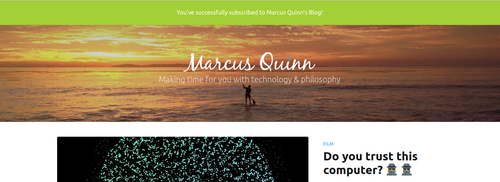
                  Although annoyingly can't close the confirmation banner at the top once I confirmed:
                  confirmation_banner.png

                  I use Cloudron with Gandi & Hetzner

                  marcusquinnM 1 Reply Last reply
                  1
                  • jdaviescoatesJ jdaviescoates

                    @marcusquinn said in Ghost issue with subscriber email and mail configuration:

                    I've also not had an issue, just standard Ghost + Casper theme + Mailgun API entered in the Lab settings.

                    I assume Ghost installed on Cloudron?

                    Have you got outgoing emails set to Mailgun on Cloudron?

                    And do you have incoming emails set-up for marcusquinn.com set-up on Cloudron too?

                    I assume you've got all the DNS records from Mailgun set-up?

                    @marcusquinn said in Ghost issue with subscriber email and mail configuration:

                    marcusquinn.com if anyone wanted to subscribe. Won't be posting for a while though, time is limited with family care needs for a while.

                    Can confirm that your emails arrive.

                    Although annoyingly can't close the confirmation banner at the top once I confirmed:

                    confirmation_banner.png

                    marcusquinnM
                    marcusquinnM
                    marcusquinn
                    CA Maintainer Super Fan
                    wrote on last edited by marcusquinn
                    #12

                    @jdaviescoates Think that's a bug with the theme, a refresh of click should clear, but yeah, all on Cloudron and standard setup in Ghost and standard Cloudron SMTP setup, not using Mailgun for that.

                    Web Design & Development: https://www.evergreen.je
                    Technology & Apps: https://www.marcusquinn.com

                    jdaviescoatesJ 1 Reply Last reply
                    0
                    • marcusquinnM marcusquinn

                      @jdaviescoates Think that's a bug with the theme, a refresh of click should clear, but yeah, all on Cloudron and standard setup in Ghost and standard Cloudron SMTP setup, not using Mailgun for that.

                      jdaviescoatesJ
                      jdaviescoatesJ
                      jdaviescoates
                      Super Fan
                      wrote on last edited by
                      #13

                      @marcusquinn ok thanks.

                      Hmz, so I wonder why it's not working for myself and @iamdinakar 😕

                      I use Cloudron with Gandi & Hetzner

                      1 Reply Last reply
                      0
                      • girishG
                        girishG
                        girish
                        Staff
                        wrote on last edited by
                        #14

                        @jdaviescoates So, the issue is you do not get emails? Where is your incoming mail server?

                        jdaviescoatesJ 1 Reply Last reply
                        0
                        • girishG girish

                          @jdaviescoates So, the issue is you do not get emails? Where is your incoming mail server?

                          jdaviescoatesJ
                          jdaviescoatesJ
                          jdaviescoates
                          Super Fan
                          wrote on last edited by
                          #15

                          @girish I think the issue is the the mails are not sent.

                          The incoming mail sever for the domain is Google Apps/ G Suite/ whatever the hell it is called these days

                          I use Cloudron with Gandi & Hetzner

                          1 Reply Last reply
                          0
                          • girishG
                            girishG
                            girish
                            Staff
                            wrote on last edited by
                            #16

                            To check things on order:

                            • Ghost is configured to send mail via Cloudron. Cloudron is configured to send mail via Mailgun.

                            • Now, check is Cloudron can send mail. There is a test mail button in the Email view for each domain.

                            • Then, send a test mail from Ghost. You can check in Cloudron Mail Server logs, if Ghost even tries to send mail via Cloudron.

                            • Finally, if all works, it probably ended up in Spam. If it's not even in Spam, it's probably because google blackholed it. I have seen this happen sometimes when email gets accepted by Google but it just "disappears"/ not seen by user at all.

                            jdaviescoatesJ 3 Replies Last reply
                            0
                            • girishG girish

                              To check things on order:

                              • Ghost is configured to send mail via Cloudron. Cloudron is configured to send mail via Mailgun.

                              • Now, check is Cloudron can send mail. There is a test mail button in the Email view for each domain.

                              • Then, send a test mail from Ghost. You can check in Cloudron Mail Server logs, if Ghost even tries to send mail via Cloudron.

                              • Finally, if all works, it probably ended up in Spam. If it's not even in Spam, it's probably because google blackholed it. I have seen this happen sometimes when email gets accepted by Google but it just "disappears"/ not seen by user at all.

                              jdaviescoatesJ
                              jdaviescoatesJ
                              jdaviescoates
                              Super Fan
                              wrote on last edited by
                              #17

                              @girish said in Ghost issue with subscriber email and mail configuration:

                              Ghost is configured to send mail via Cloudron.

                              I'm unclear about this. Ghost requires that you use Mailgun to use it's Membership features. And @marcusquinn says he has it working be putting his Mailgun API into his Cloudron-hosted Ghost

                              I use Cloudron with Gandi & Hetzner

                              1 Reply Last reply
                              0
                              • girishG girish

                                To check things on order:

                                • Ghost is configured to send mail via Cloudron. Cloudron is configured to send mail via Mailgun.

                                • Now, check is Cloudron can send mail. There is a test mail button in the Email view for each domain.

                                • Then, send a test mail from Ghost. You can check in Cloudron Mail Server logs, if Ghost even tries to send mail via Cloudron.

                                • Finally, if all works, it probably ended up in Spam. If it's not even in Spam, it's probably because google blackholed it. I have seen this happen sometimes when email gets accepted by Google but it just "disappears"/ not seen by user at all.

                                jdaviescoatesJ
                                jdaviescoatesJ
                                jdaviescoates
                                Super Fan
                                wrote on last edited by
                                #18

                                @girish said in Ghost issue with subscriber email and mail configuration:

                                Now, check is Cloudron can send mail. There is a test mail button in the Email view for each domain.

                                Test mail arrives fine.

                                I use Cloudron with Gandi & Hetzner

                                1 Reply Last reply
                                0
                                • girishG girish

                                  To check things on order:

                                  • Ghost is configured to send mail via Cloudron. Cloudron is configured to send mail via Mailgun.

                                  • Now, check is Cloudron can send mail. There is a test mail button in the Email view for each domain.

                                  • Then, send a test mail from Ghost. You can check in Cloudron Mail Server logs, if Ghost even tries to send mail via Cloudron.

                                  • Finally, if all works, it probably ended up in Spam. If it's not even in Spam, it's probably because google blackholed it. I have seen this happen sometimes when email gets accepted by Google but it just "disappears"/ not seen by user at all.

                                  jdaviescoatesJ
                                  jdaviescoatesJ
                                  jdaviescoates
                                  Super Fan
                                  wrote on last edited by
                                  #19

                                  @girish said in Ghost issue with subscriber email and mail configuration:

                                  Then, send a test mail from Ghost. You can check in Cloudron Mail Server logs, if Ghost even tries to send mail via Cloudron.

                                  Can't see anything in the logs. But then I've got my Mailgun API in the Ghost Members setting in the Lab section of settings, because that is what you have to use.

                                  /me goes to Mailgun to see what what I can see there...

                                  I use Cloudron with Gandi & Hetzner

                                  1 Reply Last reply
                                  0
                                  • girishG
                                    girishG
                                    girish
                                    Staff
                                    wrote on last edited by
                                    #20

                                    @jdaviescoates I now realize maybe we are talking of different things. One is membership setup for which I posted the instructions in https://forum.cloudron.io/post/15371 . This did not require any mailgun related things. I guess you are talking about the newsletter which is maybe configured somewhere else (https://ghost.org/faq/mailgun-newsletters/)

                                    jdaviescoatesJ 1 Reply Last reply
                                    0
                                    • girishG
                                      girishG
                                      girish
                                      Staff
                                      wrote on last edited by
                                      #21

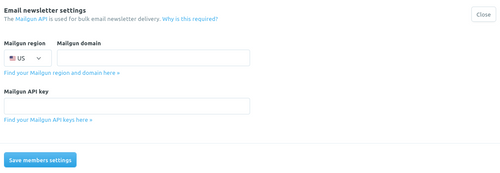
                                      Found it. This is indeed required for newsletter delivery (and not for the members to sign up afaict). Are members able to sign up on your site?

                                      dc74e7c3-1db4-4699-ae9c-57f8bde887d8-image.png

                                      jdaviescoatesJ 1 Reply Last reply
                                      0
                                      • girishG girish

                                        @jdaviescoates I now realize maybe we are talking of different things. One is membership setup for which I posted the instructions in https://forum.cloudron.io/post/15371 . This did not require any mailgun related things. I guess you are talking about the newsletter which is maybe configured somewhere else (https://ghost.org/faq/mailgun-newsletters/)

                                        jdaviescoatesJ
                                        jdaviescoatesJ
                                        jdaviescoates
                                        Super Fan
                                        wrote on last edited by
                                        #22

                                        @girish now I'm doubly confused! 😆

                                        The Email newsletter settings are within the Members (Beta) section of Lab in Ghost settings:
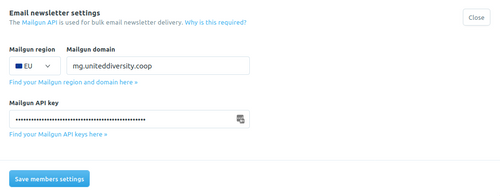
                                        email_newsletter_setting_is_part_of_member_settings.png

                                        If you look here:

                                        https://ghost.org/faq/mailgun-newsletters/

                                        It seems you can use SMTP to sign people up, but not to them actually email them:

                                        https://ghost.org/faq/mailgun-newsletters/

                                        I use Cloudron with Gandi & Hetzner

                                        girishG 1 Reply Last reply
                                        1
                                        • girishG girish

                                          Found it. This is indeed required for newsletter delivery (and not for the members to sign up afaict). Are members able to sign up on your site?
                                          dc74e7c3-1db4-4699-ae9c-57f8bde887d8-image.png

                                          jdaviescoatesJ
                                          jdaviescoatesJ
                                          jdaviescoates
                                          Super Fan
                                          wrote on last edited by
                                          #23

                                          @girish said in Ghost issue with subscriber email and mail configuration:

                                          Are members able to sign up on your site?

                                          No. Probably because I've entered Mailgun API into the field shown in my screenshot above but it doesn't work.

                                          Perhaps I've pasted in the wrong thing or something!

                                          I use Cloudron with Gandi & Hetzner

                                          jdaviescoatesJ 1 Reply Last reply
                                          0

                                          Hello! It looks like you're interested in this conversation, but you don't have an account yet.

                                          Getting fed up of having to scroll through the same posts each visit? When you register for an account, you'll always come back to exactly where you were before, and choose to be notified of new replies (either via email, or push notification). You'll also be able to save bookmarks and upvote posts to show your appreciation to other community members.

                                          With your input, this post could be even better 💗

                                          Register Login
                                          Reply
                                          • Reply as topic
                                          Log in to reply
                                          • Oldest to Newest
                                          • Newest to Oldest
                                          • Most Votes


                                          • Login

                                          • Don't have an account? Register

                                          • Login or register to search.
                                          • First post
                                            Last post
                                          0
                                          • Categories
                                          • Recent
                                          • Tags
                                          • Popular
                                          • Bookmarks
                                          • Search